This thread has been locked.

If you have a related question, please click the "Ask a related question" button in the top right corner. The newly created question will be automatically linked to this question.

David Hackenbracht1 's motor

Other Parts Discussed in Thread: MOTORWARE

Chris,

You were totally right. I checked my directory, checked my screenshot, (keeping a log) and I just in error most certainly

picked the wrong script. Drank to much coffee yesterday afternoon, couldn't sleep last night.

Anyhow it looks GREAT I'm up to lab 5f now. Thanks for the help.

David

  • Chris,

    Things were going so well.......I am doing MotorWare  Lab 6b.

    Attached is the user.h file.

    I am in the correct directory, Ran the correct script 6b, set the bit for run and the motor never goes counter clockwise.

    Then it says "done".

    Would you mind giving me a tip here? Thanks

    David

    8765.USER.rar

  • Found 3 values in My Motor that were incorrect from my Gold user.h file

    #define USER_SYSTEM_INERTIA               (0.0190846324)

    #define USER_SYSTEM_FRICTION                    (0.7974877954)

    #define USER_SYSTEM_BANDWIDTH_SCALE             (1.0)

    I changed those and it still doesn't rotate CCW. Didn't think those values would make a difference, but I checked all

    the values and those were the only ones different.

    David

  • David,

    The motor doesn't rotate CCW?  Does it rotate CW?

    I have seen an issue where if you are on compiler version 6.2.0 the motor will only rotate in a single direction.  To check this right click on your project and select "Properties".  In the project properties window select general and look for the compiler version (see below for example).

    You need to make sure you are on compiler 6.2.3 or greater.

  • Thanks for the help.

    I am using Compiler v6.2.3

    I don't know I keep looking at the direction in the lab 6b. I believe I have the right user.h file, and checked the defines for correct values.

    It will run cw fine, I can even change the speed. How do you check to see if the FAST est. is online? When I put the lab in start it slowly runs clockwise then says it is done with the motion sequence “gMotorVars.SpinTAC.VelPlanDone”  set to True. Like it really never runs. So I don't know what the problem is.

    Here are two screen debug shots. Maybe they will help.

    1018.ATTACH.rar

    Thanks for the reply,

    David

  • David,

    Are you referring to running the motion sequence in lab 06b?  If so you need to start the motion sequence by setting gMotorVars.SpinTAC.VelPlanRun to ST_PLAN_RUN.  The motion sequence will not run automatically, it needs to be triggered.

    If you want to run the motor ccw without running the motion sequence, you need to set a negative value in gMotorVars.SpeedRef_krpm.

  • Thank you for your reply.

    Yes, I am doing lab 6b.

    Thanks for the information. What you say is clearly in the instructions, Thanks.(see below)

    "Use SpinTAC™ Velocity Plan to design a motion sequence.

    "To run the motor a couple of steps are required:


     To start the project, set the variable “gMotorVars.Flag_enableSys” equal to 1.
     To start the current loop controller, set the variable “gMotorVars.Flag_Run_Identify” equal to 1.
    To start the motion sequence, the SpinTAC™ Velocity Plan button needs to be set to start once the FAST estimator is online." Here it is not clear on how to know when the "FAST estimator" is on line. After waiting about 15 min. I presumed it might be and went on. Status indicators showed no errors.


     Set “gMotorVars.SpinTAC.VelPlanRun” to ST_PLAN_START to begin the motion sequence.
    The motor will run through a very simple motion sequence where the motor spins anti-clockwise and then spins clockwise.

    Here it states that "motor spins anti-clockwise and then spins clockwise" and it never spins anti-clockwise.

    Then “gMotorVars.SpinTAC.VelPlanDone” will be set to True. This is done to indicate to the user program that the motion sequence has completed." Which happens also. I have checked my user.h file, Checked to see if I missed adding any defines. I havn't found any.

    David

  • David,

    The FAST estimator being online is indicted by gMotorVars.EstState.  When this variable indicates that the estimator is OnLine it is fine to proceed with the lab.

    Did you follow this step in the instructions? Set “gMotorVars.SpinTAC.VelPlanRun” to ST_PLAN_START to begin the motion sequence.

    After this variable is set correctly it will being the motion sequence and will spin cw & ccw.  

  • Ok, this is so tiring. Here's what just happened....I turned the laptop on this morning. Left it at work last night.

    No one touched it. started CCS, it loaded the lab 6b. I plugged in the USB for the TI kit 8301 which I have been using.

    Turn on the power supply. Watched the LED's come on. Started Build in CCS, went to download the program to the ,microprocessor and it said there was an error. AN ERROR !!!! Nothing changed since yesterday. I did exactly as I described. When I shut it down, I closed it normally. That error wasn't there yesterday. I have a screen shot of the error if you like.

    I rather think that this software has issues. My error is #169 argument of type "uint_leas8_t*" is incompatible with parameter of type "const uint_least8_t"."

    David

  • David,

    When you built the project are you sure that you build Lab 06b?  Did you by chance build a different project in your workspace?  Often CCS can change the "working" project unexpectedly.  

    It also might be worth trying to clean and then build.  That should help clear up any old symbols that might exist in your project.

  • Yes.

    I printed the pages from the lab "Lab Projects Overview" to help keep track of everything including when switching from FOC to MOTION.

    I also have be careful to check at the top of CCS main page for the project number "proj.lab06c.c" in this case. I am also just as careful to load the right script when loading "expressions".

    I loaded CCS again using -clean between these replies, probably the second thing I thought of, since in the past that has actually cleared some problems. What I will do next is close the projects, go to motorware..... and reload the project again. Don't think this will help but I will try. I have actually had to load CCS fresh on another laptop to get it to work from some problems.

    Please email again, if you think of anything else.

    David

  •  Ok, nothing helped.

    Since we are adding nothing to the user.h file I'll try and go on to lab 6c.

    It loaded with out error. So following the lab manual, using a known good user.h file, I followed these instructions.

    To run the motor a couple of steps are required:
     To start the project, set the variable “gMotorVars.Flag_enableSys” equal to 1.
     To start the current loop controller, set the variable “gMotorVars.Flag_Run_Identify” equal to 1.
    To start the motion sequence, the SpinTAC™ Velocity Plan button needs to be set to start.
     Set “gMotorVars.SpinTAC.VelPlanRun” to ST_PLAN_START to begin the motion sequence once the FAST Estimator is online.
    The motor will run through a procedure that is designed to emulate a washing machine. It will open the WASHER_FillValve. Water will fill the drum until “gWaterLevel” reaches 1000. Once “gWaterLevel” reaches the maximum, the WASHER_FillSensor is tripped. Then the motor will then spin clockwise and counter-clockwise 20 times.

    The motor NEVER moves clock wise or CCwise. It does however spin in the rinse cycle.

    I'll have to get a cable (from Home) but I also took a video of the screen, it shows where it should be going in CW and CCW direction and shows the motor.

    David

  • David,

    What is the value for bandwidth that you are using for this lab?  What is the value in gMotorVars.SpinTAC.VelCtlBwScale?

    I've seen when using a low value for bandwdith, than the motor will not respond very well and won't spin during agitation in lab 06c.  This is equivalent to having a very low set of PI gains.  

  • gMotorVars.SpinTAC.VelCtlBwScale = 1

    With out enabling ST_PLAN changing from STOP to START the motor just starts to spin slowly CC, it that is any help.

    David

  • David,

    I would recommend that you increase the bandwidth.  This is equivalent to setting more aggressive PI gains for a speed controller.  For the Telco/Anaheim motor I would recommend setting gMotorVars.SpinTAC.VelCtlBwScale to 4.0

    Most motors/applications don't work well with the default bandwidth of 1.  It needs to be tuned for your system.

    For all of the sensorless labs, it is expected that the motor will slowly rotate in one direction at startup.  This helps confirm that the system is functional.  The speed the motor is spinning at is available in: gMotorVars.SpeedRef_krpm.

  • Adam,

    I just noticed something. The dog gone user.h file appears to be the wrong one. Please give me a little while to sort this out.

    See I marked the correct header with comments, and I don't see them on this one. Nuts.....

    David

  • Adam,

    I do have a question, are the two user.h files the same? The one in MOTION and the one in FOC?

    I know you add 4 extra lines to the one in the lab and I have been guilty for forgetting to save it, but is there a way to tell the difference? I think I noticed on one of them a commented path line, I'll look for that.

    David

  • Yes, Line 39. commented out, shows the path. Wish I had know this a week ago. Oh, well that's how we learn.

    Are their other differences?

    David

  • David,

    Those four lines in the motor definition and the USER_SYSTEM_BANDWIDTH_SCALE are the key differences between the two files.  Everything else should be the same.  

    One way to tell the difference is to look at the path that is included in the header portion of the user.h file.  When you are in a user.h file it should display the entire path on the title bar of the CCS window or if your mouse over the file.  

  • I compared them side by side and these are the only changes I can find. They are all in the MOTION user.h  file.

    //! \file   solutions/instaspin_motion/boards/drv8301kit_revD/f28x/f2806xM/src/user.h
     

    #else
    #define USER_IQ_FULL_SCALE_FREQ_Hz        (USER_MOTOR_NUM_POLE_PAIRS/0.008)   // (4/0.008) = 500 Example with buffer for 8-pole 6 KRPM motor to be run to 6 KRPM; Hz = (RPM * Poles) / 120
    #endif

    I did find that my brief ADC current offsets for A, B, and C phases and ADC voltage offsets for A, B, and C phases were different, but I will correct that after I post this.


    //! \brief Defines the default bandwidth for SpinTAC Control
    //! \brief This value should be determined by putting SpinTAC Control through a tuning process
    #define USER_SYSTEM_BANDWIDTH_SCALE    (1.0)
     

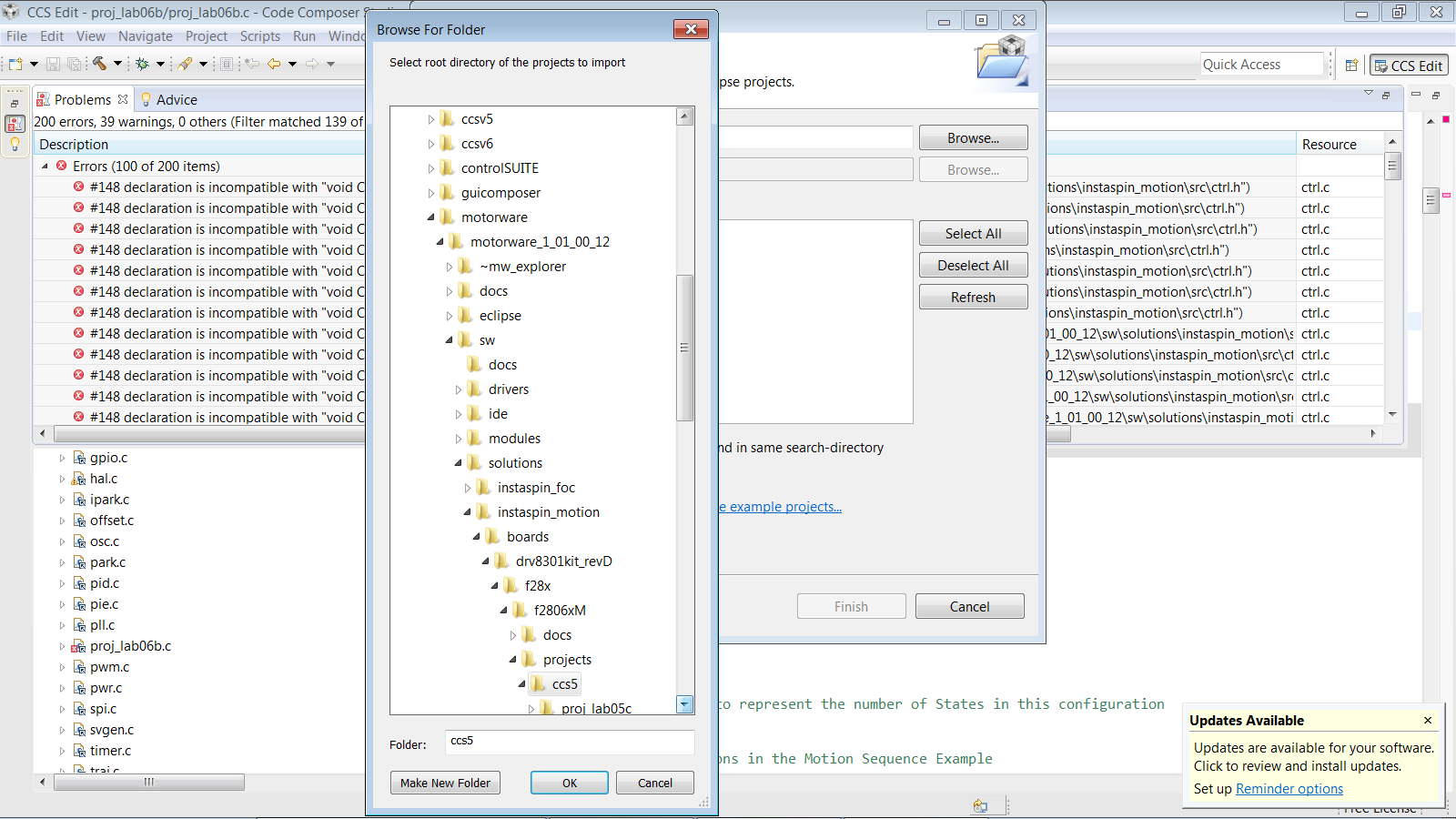
    I removed, MotorWare, control SUITE, and CCS. Re-installed them and I still have these errors. 200 of them.

     The attached screen shows I got them from the right directory.

    What could be wrong?

    David

  • David,

    When you imported the projects into your workspace did you have either of these checkboxes selected?

    Those checkboxes need to remain unchecked in order to use the symbolic linking that is required for MotorWare.

  • No.

    Thank you for your thoughts, good catch, but I havn't done that one yet.

    I did find the problem or solution if you will.my nemesis the user.h file. After cross checking the line in MSW I then check the user file in CCS against my good MSW user.h (doc) file. The numbers were correct but I had gotten the dog gone FOC file again. So I went into the directory after closing CCS and deleted the one in FOC, so for now it won't happen again.

    I have the best luck, the fire alarms are just now going off.

    It compiled fine, I will now try to download it and see what happens, Thanks for you interest  and kindness in helping me.

    David

  • Yahoo !!!!!!!

    Master.........it's alive !!!!!

    6b works like it should. Thank God, I'm going in reverse now.

    Thanks Adam for your interest.

    David

  • I'm glad we were able to get it spinning.  Getting everything just so is by far the hardest part.