This thread has been locked.

If you have a related question, please click the "Ask a related question" button in the top right corner. The newly created question will be automatically linked to this question.

basic guide to start a sensorless motor

Other Parts Discussed in Thread: DRV8301, INSTASPIN-BLDC, CONTROLSUITE, MOTORWARE, DRV8302

I'm a new user of the C2000. The control board is CC2803X ISO DIMM REV 1.3 and the power board DRV8301 - HC - EVM Rev D. I want to use it to make a simple sensorless motor to spin. I check the user manual available, the don't provide basic and step by step process. So, I keep getting error all the time. I just need to know what to know or if there is a good user guide that explains everything step by step, or maybe where to start. Because, the user guides online make no sense.

  • InstaSPIN-BLDC is as simple as it gets. 

    For most motors simply click the check box and the motor will commutate and spin.

    Quick Start Guide:

    C:\ti\controlSUITE\development_kits\DRV830x-HC-C2-KIT_v105\~GUI

    Project Documentation:

    C:\ti\controlSUITE\development_kits\DRV830x-HC-C2-KIT_v105\InstaSPIN_BLDC\~Doc

    Videos:

    http://focus.ti.com/general/docs/video/Search.tsp?term=instaspin-bldc

    if you want to control the torque or the speed of the motor, you can do it to some level with InstaSPIN-BLDC, but it takes a bit of tuning expertise, and you have the limitations of BLDC type control.  InstaSPIN-FOC and InstaSPIN-MOTION make things even easier, essentially automating the entire control loop.

    You can try this with your DRV8301 board by using TMDSCNCD28069MISO and a GUI or embedded project by installing MotorWare and after install running MotorWare.exe to view the docs, GUI install, etc.


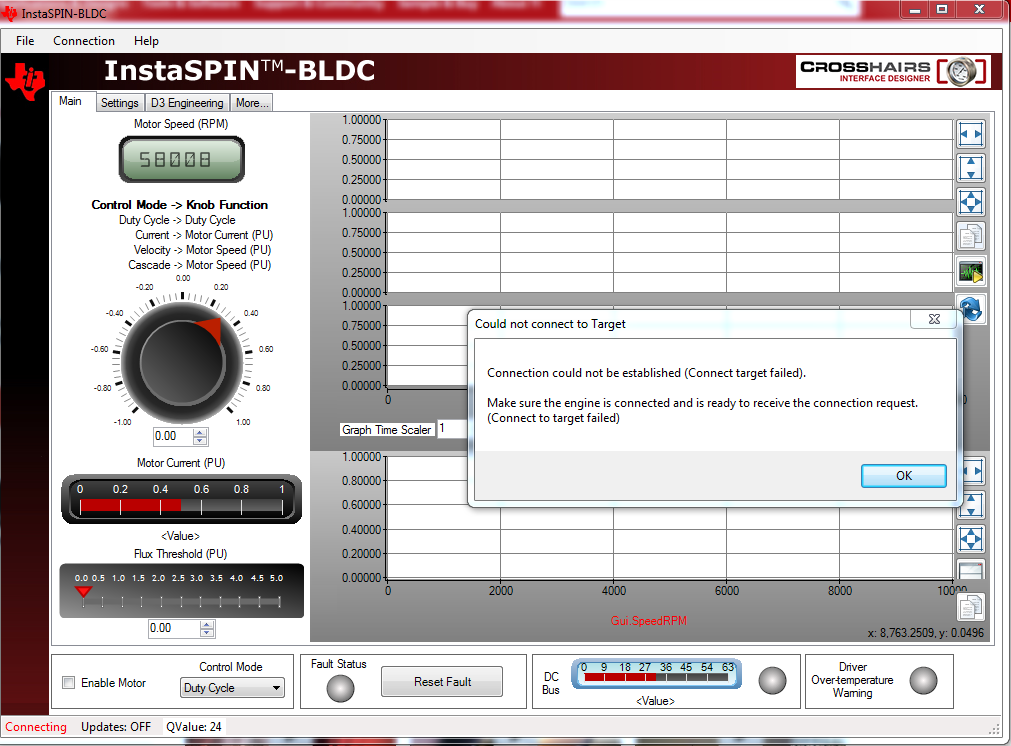
  • I just got this as error

    what do I have to do to make that work? I tried it manually, I still got the same error.

  • Once again, your PC is not able to connect through USB - FTID Chipset - JTAG - MCU.

    There is something wrong with one of the following:

    - power

    - switches on the controlCARD

    - PC installing the driver / connecting (check Device Manager)

    - FTDI chip not being properly programmed from the manufacturer

    - AND beyond the root cause of target failure, to connect the GUI you need to have the proper .out programmed onto the MCU on the controlCARD


  • The strange thing is, first, there is no problem with the power connection. Second, the switches on the control board are setting up the right way: both SW2 are up and SW3 down. Third, there is no problem with driver connecting on the device manager. Now, I don't know for the FTDI chip not being properly programmed from the manufacturer, my question is how do I know that? Fourth, I tried various to program the control board with PM sensorless code I got the error, with InstaSPIN-BLDC I still got the error, and I used GUI Project I still have the error. Another question is, how do I know which proper .out programmed to have onto the MCU on the controlCARD?

  • Amos Nortilien said:
    both SW2 are up and SW3 down.

    better re-check that user's guide you hate

    Make sure that the following switches are set as described below on the F28035 controlCARD to enable boot from flash and connection to the SCI

    a. SW3: OFF (UP) position

    b. SW2: Position 1 = ON (UP), Position 2 = ON (UP)


    Amos Nortilien said:
    Another question is, how do I know which proper .out programmed to have onto the MCU on the controlCARD?

    If you want to run InstaSPIN-BLDC_GUI_DRV83xx_v104.exe

    you need to make sure InstaSPIN-BLDC_GUI_DRV8301_v104.out is programmed onto the mcu (if you have the DRV8301, there is a different .out for DRV8302).


    If you need to check your FTDI chip or re-program see this post

    http://e2e.ti.com/support/microcontrollers/c2000/f/171/t/21086.aspx


  • With SW3 on the OFF position(up), I still got the same error.