This thread has been locked.

If you have a related question, please click the "Ask a related question" button in the top right corner. The newly created question will be automatically linked to this question.

Brand new F28069 experimenter kit not working...

Hi, 

I recently bought two experimenter kits F28069. One works fine but I cannot manage to connect to the second one. There seems to be some sort of driver problem. I am using the same computer, same program and the same target configuration file. The two devices should be identical.

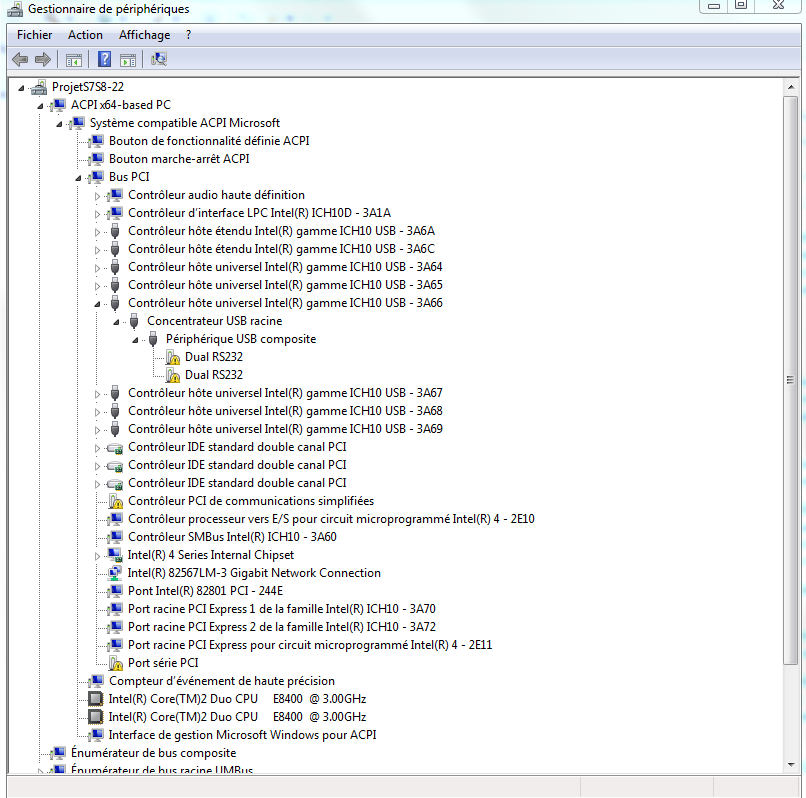
I have noticed that when I connect the first device (the one that works fine) I have these two peripherals: TI XDS100 channel A and TI XDS100 channel B. However, when I disconnect this experimenter kit and I connect the second one, the TI XDS100 peripherals disapear and are replaced by two USB composite peripherals.

I have tried this procedure: http://e2e.ti.com/support/microcontrollers/c2000/f/171/t/21086.aspx, but the program cannot find my device so that I can reprogram it. 

What can I do to make this work? I am a little disapointed that my new device is not working...

Thank you,

Myriam

  • Hi Myriam,

    I am a little disapointed that my new device is not working.

    Very sorry for the inconvinience caused.

    when I disconnect this experimenter kit and I connect the second one, the TI XDS100 peripherals disapear and are replaced by two USB composite peripherals.

    Can you paste the screenshot of the device manager with composite peripherals? (For reference purpose)

    Regards,

    Gautam

  • Hi Myriam,

    So when you "Scan for Available Devices" in MProg its output shows that there are

    0 blank devices
    and
    0 programmed devices

    when the Experimenter Kit Docking Station's USB is plugged in and powered?  This is NOT what should happen.

    The only thing that might cause this is if J8 on the Docking Station is populated.  Can you make sure that it is NOT populated?

    ===

    In general, it sounds like you're doing the right things and that the board is not functioning properly.

    If you purchased this kit through the eSTORE, you can contact customer support to get a replacement (https://estore.ti.com/faq.aspx#q5.1).  If you received it from a sales representative, FAE, or via the university program you will need to contact them.

    I am truly sorry for the issues that you have run into.  Hopefully this will get you moving forward again.


    Thank you,
    Brett

  • Hi Brett,

    Yes, that is it. I scan and it does not find any devices when the kit is USB plugged and powered. J8 is not populated.

    Here is the sreenshot for the drivers when I plug the kit that is not functionnal

    Thanks,

    Myriam

  • Hi Myriam,

    I would suggest working to get a replacement kit via the method I described above.


    Thank you,
    Brett