This thread has been locked.

If you have a related question, please click the "Ask a related question" button in the top right corner. The newly created question will be automatically linked to this question.

C2000 8bit spi cycle

I am working on 8bit SPI cycle on 28069.

I create a 4 cycle 0x00 0x00 0x00 0x01 4 8bit cycle on SPI master to drive MOSI to one at the last cycle LSB.

I saw the SPITXBUF set to 0x01 on the last  8bit cycle.. However, I didn't see a bit set to one on MOSI.

Please advise.

  • Hello,

    ken ho1 said:
    However, I didn't see a bit set to one on MOSI.

    Do you mean the MOSI pin didn't change to one? How do you observe this MOSI?

    Did you already set the GPIOs pins related to SPI?

    Best regards,

    Maria

  • Hi Maria,

    Yes. I did. Unless I made any mistake.

    Have you tried the spi 8bit mode before?

    Ken

  • Ken,

    After a transmission the SPI will go back to the bus' default state (I'm not sure exactly what this is without pulling out a board and testing this).

    If you want to enforce a level on the bus when you're not transmitting I would recommend changing the pin back to a GPIO and driving the state manually.

    BR,

  • Trey,

    Thanks for the suggestion. Do you mean the SPI MOSI pin go back to default state?

    But I am probing the SPI cycle when the SCLK is still there. Am I correct?

    I could try the GPIO setting later.

    Ken

  • Ken,

    I apologize, I didn't originally understand your question.

    I modified the SPI_FFDLB test case to send out 0x00, 0x00, 0x00, 0x01 and verified that it transmited the correct data with an oscilloscope.  The device clock out a 1 as the last bit as expected.  I've attached the code below:

    //###########################################################################
    //
    //!  \addtogroup f2806x_example_list
    //!  <h1>SPI Digital Loop Back(spi_loopback)</h1>
    //!
    //!  This program uses the internal loop back test mode of the peripheral. 
    //!  Other then boot mode pin configuration, no other hardware configuration
    //!  is required. Interrupts are not used.
    //!
    //!  A stream of data is sent and then compared to the received stream.
    //!  The sent data looks like this: \n
    //!  0000 0001 0002 0003 0004 0005 0006 0007 .... FFFE FFFF \n
    //!  This pattern is repeated forever.
    //!  
    //!  \b Watch \b Variables \n     
    //!  - \b sdata , sent data
    //!  - \b rdata , received data
    //		
    ////###########################################################################		
    // $TI Release:  $
    // $Release Date:  $
    //#############################################################################
    
    #include "DSP28x_Project.h"     // Device Headerfile and Examples Include File
    
    // Prototype statements for functions found within this file.
    void spi_xmit(Uint16 a);
    void spi_fifo_init(void);
    void spi_init(void);
    void error(void);
    
    void main(void)
    {
       Uint16 sdata;  // send data
       Uint16 rdata;  // received data
       
    // Step 1. Initialize System Control:
    // PLL, WatchDog, enable Peripheral Clocks
    // This example function is found in the F2806x_SysCtrl.c file.
       InitSysCtrl();
    
    // Step 2. Initalize GPIO: 
    // This example function is found in the F2806x_Gpio.c file and
    // illustrates how to set the GPIO to it's default state.
    // InitGpio();  // Skipped for this example  
    // Setup only the GP I/O only for SPI-A functionality
    // This function is found in F2806x_Spi.c
       InitSpiaGpio();
    
    // Step 3. Clear all interrupts and initialize PIE vector table:
    // Disable CPU interrupts 
       DINT;
    
    // Initialize PIE control registers to their default state.
    // The default state is all PIE interrupts disabled and flags
    // are cleared.  
    // This function is found in the F2806x_PieCtrl.c file.
       InitPieCtrl();
    
    // Disable CPU interrupts and clear all CPU interrupt flags:
       IER = 0x0000;
       IFR = 0x0000;
       
    // Initialize the PIE vector table with pointers to the shell Interrupt 
    // Service Routines (ISR).  
    // This will populate the entire table, even if the interrupt
    // is not used in this example.  This is useful for debug purposes.
    // The shell ISR routines are found in F2806x_DefaultIsr.c.
    // This function is found in F2806x_PieVect.c.
       InitPieVectTable();
    	
    // Step 4. Initialize all the Device Peripherals:
    // This function is found in F2806x_InitPeripherals.c
    // InitPeripherals(); // Not required for this example
       spi_fifo_init();	  // Initialize the Spi FIFO
       spi_init();		  // init SPI
    
    // Step 5. User specific code:
    // Interrupts are not used in this example. 
       sdata = 0x0000;							
       for(;;)
       {    
         // Transmit data
    	     spi_xmit(0);
    	     spi_xmit(0);
    	     spi_xmit(0);
    	     spi_xmit(1);
         // Wait until data is received
         while(SpiaRegs.SPIFFRX.bit.RXFFST !=1) { } 			
         // Check against sent data
         rdata = SpiaRegs.SPIRXBUF;				
         if(rdata != sdata) error();
         sdata++;
       }
    } 	
    
    // Step 7. Insert all local Interrupt Service Routines (ISRs) and functions here:	
    
    void error(void)
    {
       __asm("     ESTOP0");						// Test failed!! Stop!
        for (;;);
    }
    
    void spi_init()
    {    
    	SpiaRegs.SPICCR.all =0x0007;	             // Reset on, rising edge, 16-bit char bits
    	SpiaRegs.SPICTL.all =0x0006;    		     // Enable master mode, normal phase,
                                                     // enable talk, and SPI int disabled.
    	SpiaRegs.SPIBRR =0x007F;									
        SpiaRegs.SPICCR.all =0x009F;		         // Relinquish SPI from Reset   
        SpiaRegs.SPIPRI.bit.FREE = 1;                // Set so breakpoints don't disturb xmission
    }
    
    void spi_xmit(Uint16 a)
    {
        SpiaRegs.SPITXBUF=a;
    }    
    
    void spi_fifo_init()										
    {
    // Initialize SPI FIFO registers
        SpiaRegs.SPIFFTX.all=0xE040;
        SpiaRegs.SPIFFRX.all=0x2044;
        SpiaRegs.SPIFFCT.all=0x0;
    }  
    
    //===========================================================================
    // No more.
    //===========================================================================


    BR,

  • Trey,

    Are you using 8bit or 16bit cycle?

    Your SPICCR set to 16bit  0x009F. Should it be 0x0097 instead?

    SpiaRegs.SPICCR.all =0x009F; //

    Ken

  • Ooops, good catch.  I changed the initial initialization, but not the line where it brings it out of reset.  Just tested and now I see what you're seeing.  Let me investigate further.

    BR,

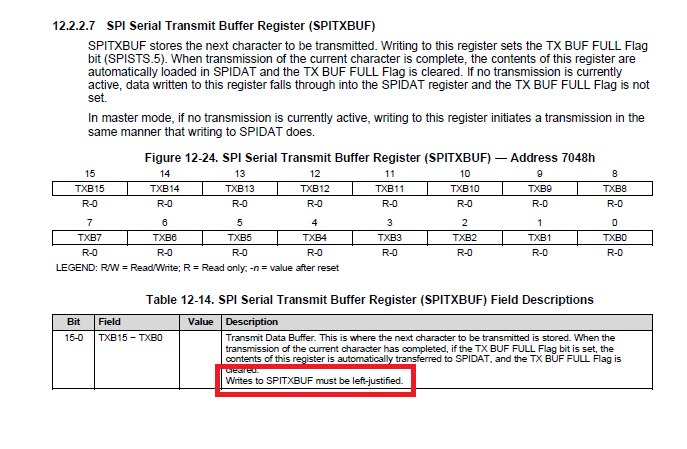
  • If you look at the user guide for this peripheral you'll find that writes to this register need to be left justified.

    BR,

  • Could you give an example ?

  • Trey,

    I think that I got it.

    Thanks.

    Ken

  • Hello Ken,

    That's good you made it.

    ken ho1 said:
    Have you tried the spi 8bit mode before?

    Yes, I have made Piccolo to communicate with PIC (microchip) using SPI 8-bit before.

    Cheers!

    Best regards,

    Maria

  • Maria,

    Thanks.

    Ken