This thread has been locked.

If you have a related question, please click the "Ask a related question" button in the top right corner. The newly created question will be automatically linked to this question.

Running From Flash, where initialized global variable are located

Other Parts Discussed in Thread: TMS320F28335

Hi all,

I am using the TMS320F28335 Delfino Experimental kit.

My code is running from flash. Due to large array size I have combined the RAM sections.

RAML4L6 : origin = 0x00C000, length = 0x003000 

From the .map file in the Debug section I found that all the functions and ISR are located in the FLASH, but all the global variable, which I have initialized to zero are placed in the RAM section. Are all variables and array
kept in RAM while running the code from Flash?

From the TI wiki page it states that initialized global and static variables are in .cinit section and located in Flash. As a result I couldn't understand how all the variables and arrays are located RAM.

I have referred the SPRA958L for running my code from Flash. I haven't added the DSP2833x_Headers_nonBIOS.cmd as the address for RAM and Flash were overlapping the one I have in F28335.cmd file.
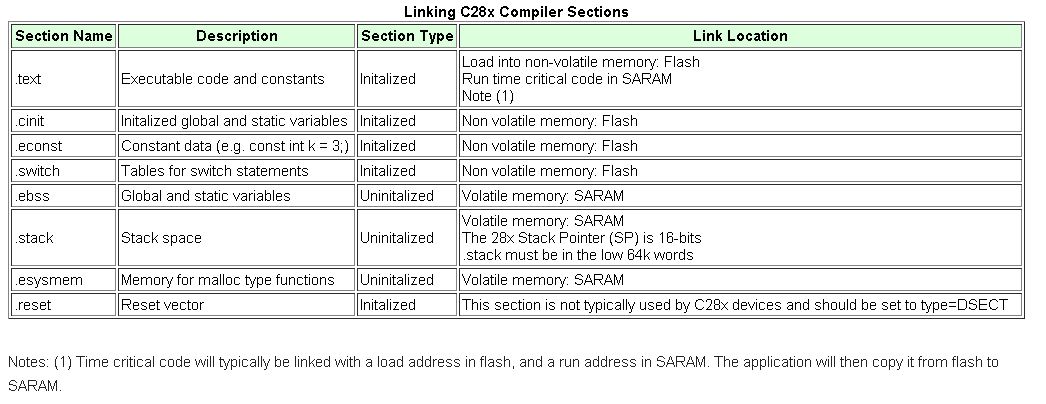
  • Hi Pankaj, 

    Are all variables and array 
    kept in RAM while running the code from Flash?


    True, while running the code from flash the variables are transferred to Ram for quick computations. 

    Regards, 

    Gautam

  • Hi Gautam,

    I have initialized the variables and arrays to zero, according to the TI wiki page they will be in .cint section, and placed in Flash, right? 

    Only "Executable code and constants" (in the note its mentions only for "Critical code") which are located in .text will be moved from Flash to RAM . Does it also include all the variables Global, arrays, initialized and uninitialized?

    Is there a way to only transfer the currently required variables to flash and then move them back to RAM? Its just that I am trying to accommodate more array in my code. 


    Best Regards,

    Pankaj 

  • Hi,

    In the last para I meant to move variable from Flash to RAM when they are operated upon and when they are not currently being used send them back to Flash.

    Regards,

    Pankaj

  • Pankaj,

    if you create global arrays then those get counted into the DATA section which goes into RAM, the .cinit section contains the initialization values that go into the initialized global data.

    If you want to create the array only when you need it in a function, try using local arrays (arrays declared inside a scope of function, these go into stack), you could also create a single global array and initialize it with data from flash in your function before using it and move the data back to flash after you are done with it, so some other function can use this.

    compiler or tools won't automatically do this for you, you will have to do something like above in your application as it fits your needs.


    Hope this helps

    Best Regards

    Santosh


  • Dear Santosh,

    Thank you for your quick reply. 

    I created local arrays in the function as you mentioned. There was no error during code compilation but when I ran the code it went to the ILLEGAL_ISR section. As you mentioned local variables go into the stack, I increased the stack size but still the same error. I also tried booting only from RAM to see if there is some mistake while copying things from Flash to RAM. But it gave an error "Code will not fit into available memory". 

    After that, I went back to boot from Flash and kept the Stack size as before and tried step wise execution, but the control goes till the end of the main function closing brace and then in red color fonts a message says "Can't find a source file at "/tmp/TI_MKLIBr6S4KF/SRC/args_main.c"  then when I view the Disassembly and continue step wise execution, it goes through few instructions and then stops at 33eb89 SB. Please find attached screen short.

    Best regards,

    Pankaj


  • Pankaj,

    looks like you are running into memory corruption issues. Try to step through the code and see which line of code causes the illegal_isr, maybe the stack is crossing into another RAM section used for some other code or data.


    Best Regard

    Santosh

  • Dear Santosh,

    Please find below the .map screen shot. The stack is assigned RAMM1.

    As we can see there is still some memory available.  Due to my arrays size, it is possible that the stack is not sufficient but there are no other RAM section available to merge.

    Next, I made few arrays global and few local, but now ILLEGAL_ISR is entered, when the control comes out of function that are doing float32 calculation. If I comment that function out it goes through other lines of code and again goes into ILLEGAL_ISR after  float32 calculation.

    Best Regards,

    Pankaj

  • Pankaj,

    can you check if you have floating point options turned ON in the project compiler options? I'm not sure these two problems are related. Try using float in a simple blinky example and see the difference.


    Best Regards

    Santosh


  • Dear Santosh,

    Can you tell me where exactly is the floating point option are as I didn't find the setting. When I run the code from FLASH  with few arrays, it works fine. So the setting should be fine. In short

    Code running from RAM, less array, work fine.

    Code running from Flash, less arrays, works fine

    Code running from RAM, more arrays, "Program will not fit into memory" 

    Code running from Flash, more arrays, ILLEGAL ISR.

    I am trying to move the code to Flash to free more RAM for other things.

    I have increased the stack size to 0x800 from the previous 0x380. In case the stack was overflowing during calculation but still I am getting the same results. (ILLEGAL ISR encountered when the code is in float32 calculation). I am not able to see any overlap of address in the .map file as the variables in stack are created and destroyed during run time. I also checked for infinite loop in my code but nothing of that sort. Is there a way to exactly find what cause the Illegal ISR ? As the step wise execution is not pointing me to the right place in my case.

    Is there a special ALU where the float calculation are done? Does it use other resources other than stack. As Stack seems to be enough.

    I ran the sample LED flashing example from flash with the same float function and did a step wise execution and it worked fine.

    Regards,

    Pankaj

  • Pankaj,

    if you have floating point options turned ON (in compiler options, right click on the project shows a window where you can browse for these options) then make sure what you are passing on to the Float instruction ( the memory this instruction is acting on) obviously something must be wrong with it that is causing the error. Also by ILLEGAL_ISR do you know which interrupt is occurring (ITRAP or some other PIE interrupt).


    Best Regards

    santosh

  • Dear Santosh,

    Apologies for the delayed reply. 

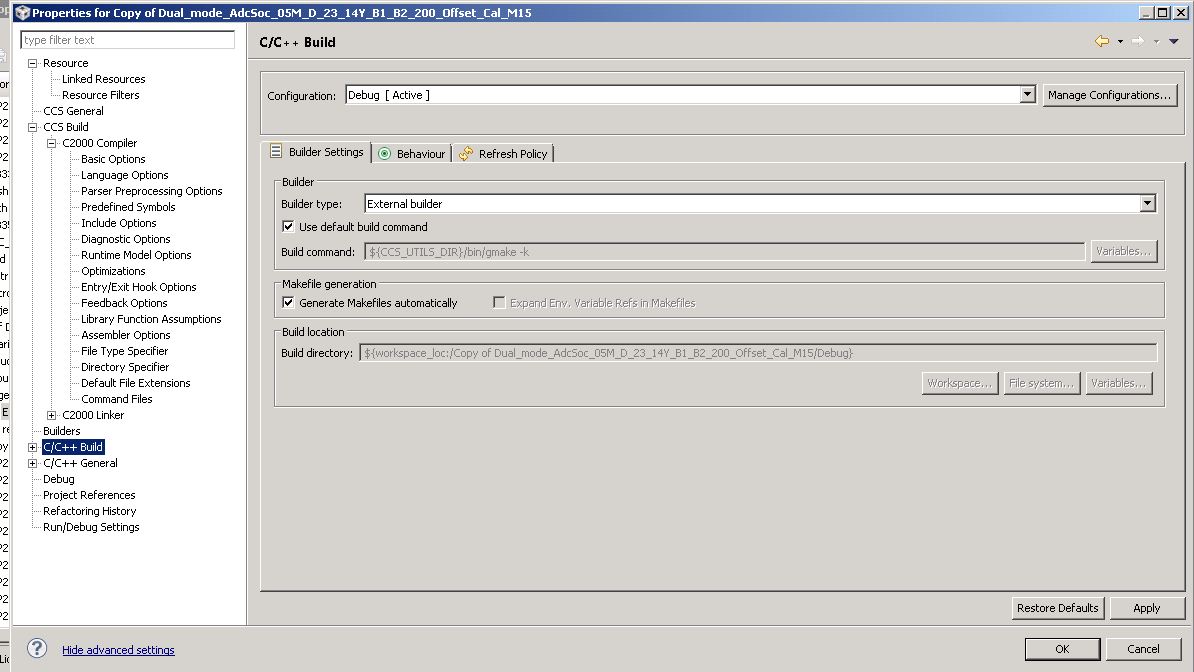
    I am using a CCS 5.5 and didn't find the floating point option. Can you be a bit more specific. I get the following option in the properties tab.

    During step wise execution, the control goes into ITRAP0 before going into ILLEGAL ISR.

    Best Regards,

    Pankaj Kadam

  • Hi Pankaj,

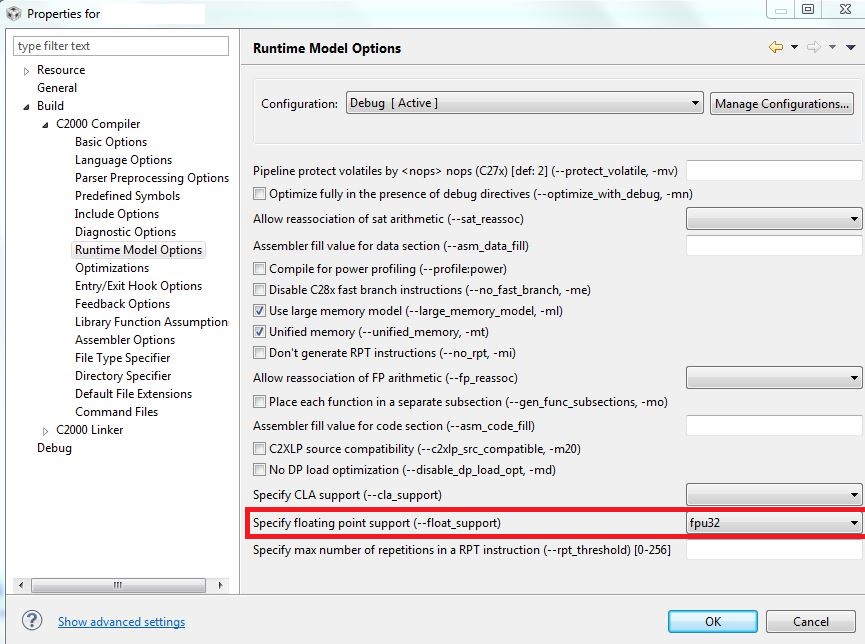
    I guess, Santosh is talking about this window:

    Regards,

    Gautam

  • Dear Gautam,

    Thanks for the screen shot. My current setting is the same as mentioned fpu32.

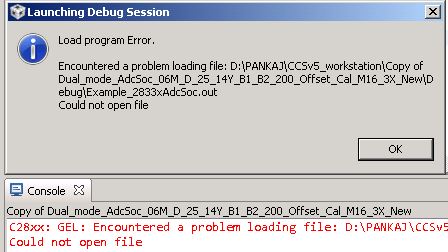
    I am using few float64 to store the multiplication of float32, so I changed it to fpu64. I got a Load Program error. The .out file could not be opened. I tried changing the work space but I still get the same error. 

    I don't know about much about GEL file that needs to be added.

    Best Regards,

    Pankaj Kadam

  • Hi Pankaj,

    The 28335 supports native 32-bit (single precision) floating point instructions.  Any long double calculations are done via software in the RTS library.    The float_support flag tells the compiler what type of instructions the CPU supports. fpu32 tells it that 32-bit float instructions are available.  The switch fpu64 would be for 64-bit floating-point instructions which C2000 does not currently have.

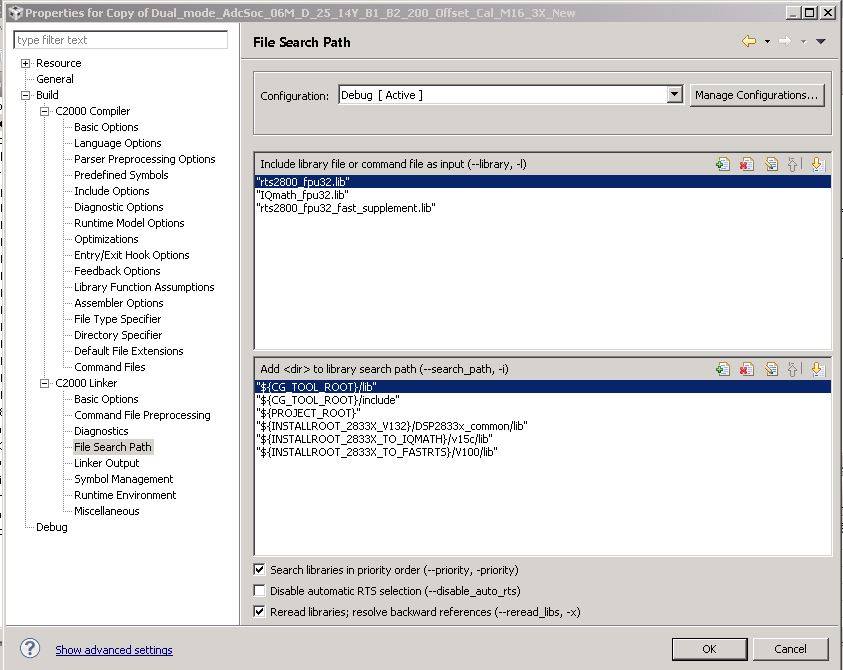
    If you set fpu32 then use rts2800_fpu32.lib - this enables native 32-bit floating point calculations and any long double calculations will be done via software.

    Regards,

    Gautam

  • Dear Gautam,

    Thanks for the explanation. The lib file was already included, the setting was on fpu32 and I am still having issue withthe Illegal ISR,  ITRAP0.

    Can you have a look at the .cmd file (I have change the extension to .txt) I am using to assign the memory. If there is a overlap or corruption.

    /*
    // TI File $Revision: /main/10 $
    // Checkin $Date: July 9, 2008   13:43:56 $
    //###########################################################################
    //
    // FILE:	F28335.cmd
    //
    // TITLE:	Linker Command File For F28335 Device
    //
    //###########################################################################
    // $TI Release: 2833x/2823x Header Files V1.32 $
    // $Release Date: June 28, 2010 $
    //###########################################################################
    */
    
    /* ======================================================
    // For Code Composer Studio V2.2 and later
    // ---------------------------------------
    // In addition to this memory linker command file, 
    // add the header linker command file directly to the project. 
    // The header linker command file is required to link the
    // peripheral structures to the proper locations within 
    // the memory map.
    //
    // The header linker files are found in <base>\DSP2833x_Headers\cmd
    //   
    // For BIOS applications add:      DSP2833x_Headers_BIOS.cmd
    // For nonBIOS applications add:   DSP2833x_Headers_nonBIOS.cmd    
    ========================================================= */
    
    /* ======================================================
    // For Code Composer Studio prior to V2.2
    // --------------------------------------
    // 1) Use one of the following -l statements to include the 
    // header linker command file in the project. The header linker
    // file is required to link the peripheral structures to the proper 
    // locations within the memory map                                    */
    
    /* Uncomment this line to include file only for non-BIOS applications */
    /* -l DSP2833x_Headers_nonBIOS.cmd */
    
    /* Uncomment this line to include file only for BIOS applications */
    /* -l DSP2833x_Headers_BIOS.cmd */
    
    /* 2) In your project add the path to <base>\DSP2833x_headers\cmd to the
       library search path under project->build options, linker tab, 
       library search path (-i).
    /*========================================================= */
    
    /* Define the memory block start/length for the F28335  
       PAGE 0 will be used to organize program sections
       PAGE 1 will be used to organize data sections
    
        Notes: 
              Memory blocks on F28335 are uniform (ie same
              physical memory) in both PAGE 0 and PAGE 1.  
              That is the same memory region should not be
              defined for both PAGE 0 and PAGE 1.
              Doing so will result in corruption of program 
              and/or data. 
              
              L0/L1/L2 and L3 memory blocks are mirrored - that is
              they can be accessed in high memory or low memory.
              For simplicity only one instance is used in this
              linker file. 
              
              Contiguous SARAM memory blocks can be combined 
              if required to create a larger memory block. 
     */
    
    
    MEMORY
    {
    PAGE 0:    /* Program Memory */
               /* Memory (RAM/FLASH/OTP) blocks can be moved to PAGE1 for data allocation */
    
       ZONE0       : origin = 0x004000, length = 0x001000     /* XINTF zone 0 */
       RAML0L3     : origin = 0x008000, length = 0x004000     /* on-chip RAM block L0 */
      // RAML1       : origin = 0x009000, length = 0x001000     /* on-chip RAM block L1 */
      // RAML2       : origin = 0x00A000, length = 0x001000     /* on-chip RAM block L2 */
      // RAML3       : origin = 0x00B000, length = 0x001000     /* on-chip RAM block L3 */
       ZONE6       : origin = 0x0100000, length = 0x100000    /* XINTF zone 6 */ 
       ZONE7A      : origin = 0x0200000, length = 0x00FC00    /* XINTF zone 7 - program space */ 
       FLASHH      : origin = 0x300000, length = 0x008000     /* on-chip FLASH */
       FLASHG      : origin = 0x308000, length = 0x008000     /* on-chip FLASH */
       FLASHF      : origin = 0x310000, length = 0x008000     /* on-chip FLASH */
       FLASHE      : origin = 0x318000, length = 0x008000     /* on-chip FLASH */
       FLASHD      : origin = 0x320000, length = 0x008000     /* on-chip FLASH */
       FLASHC      : origin = 0x328000, length = 0x008000     /* on-chip FLASH */
       FLASHA      : origin = 0x338000, length = 0x007F80     /* on-chip FLASH */
       CSM_RSVD    : origin = 0x33FF80, length = 0x000076     /* Part of FLASHA.  Program with all 0x0000 when CSM is in use. */
       BEGIN       : origin = 0x33FFF6, length = 0x000002     /* Part of FLASHA.  Used for "boot to Flash" bootloader mode. */
       CSM_PWL     : origin = 0x33FFF8, length = 0x000008     /* Part of FLASHA.  CSM password locations in FLASHA */
       OTP         : origin = 0x380400, length = 0x000400     /* on-chip OTP */
       ADC_CAL     : origin = 0x380080, length = 0x000009     /* ADC_cal function in Reserved memory */
       
       IQTABLES    : origin = 0x3FE000, length = 0x000b50     /* IQ Math Tables in Boot ROM */
       IQTABLES2   : origin = 0x3FEB50, length = 0x00008c     /* IQ Math Tables in Boot ROM */  
       FPUTABLES   : origin = 0x3FEBDC, length = 0x0006A0     /* FPU Tables in Boot ROM */
       ROM         : origin = 0x3FF27C, length = 0x000D44     /* Boot ROM */        
       RESET       : origin = 0x3FFFC0, length = 0x000002     /* part of boot ROM  */
       VECTORS     : origin = 0x3FFFC2, length = 0x00003E     /* part of boot ROM  */
    
    PAGE 1 :   /* Data Memory */
               /* Memory (RAM/FLASH/OTP) blocks can be moved to PAGE0 for program allocation */
               /* Registers remain on PAGE1                                                  */
       
       BOOT_RSVD   : origin = 0x000000, length = 0x000050     /* Part of M0, BOOT rom will use this for stack */
    
      // RAMM0L1      : origin = 0x000050, length = 0x0007B0
       RAMM0      : origin = 0x000050, length = 0x0003B0     /* on-chip RAM block M0 */
       RAMM1       : origin = 0x000400, length = 0x000400     /* on-chip RAM block M1 */
       RAML4L6     : origin = 0x00C000, length = 0x003000     /* on-chip RAM block L1 */
      //RAML5       : origin = 0x00D000, length = 0x001000     /* on-chip RAM block L1 */
      // RAML6       : origin = 0x00E000, length = 0x001000     /* on-chip RAM block L1 */
      //
    
       RAML7      : origin = 0x00F000, length = 0x001000     /* on-chip RAM block L1 */
       ZONE7B      : origin = 0x20FC00, length = 0x000400     /* XINTF zone 7 - data space */
       FLASHB      : origin = 0x330000, length = 0x008000     /* on-chip FLASH */
    }
    
    /* Allocate sections to memory blocks.
       Note:
             codestart user defined section in DSP28_CodeStartBranch.asm used to redirect code 
                       execution when booting to flash
             ramfuncs  user defined section to store functions that will be copied from Flash into RAM
    */ 
     
    SECTIONS
    {
     
       /* Allocate program areas: */
       .cinit              : > FLASHA      PAGE = 0
       .pinit              : > FLASHA,     PAGE = 0
       .text               : > FLASHA      PAGE = 0
       codestart           : > BEGIN       PAGE = 0
       ramfuncs            : LOAD = FLASHD, 
                             RUN = RAML0L3,
                             LOAD_START(_RamfuncsLoadStart),
                             LOAD_END(_RamfuncsLoadEnd),
                             RUN_START(_RamfuncsRunStart),
                             PAGE = 0
    
       csmpasswds          : > CSM_PWL     PAGE = 0
       csm_rsvd            : > CSM_RSVD    PAGE = 0
       
       /* Allocate uninitalized data sections: */
        .stack              : > RAML7       PAGE = 1
      // .stack              : > RAMM1       PAGE = 1
       .ebss               : > RAML4L6     PAGE = 1
       .esysmem            : > RAMM1       PAGE = 1
    
       /* Initalized sections go in Flash */
       /* For SDFlash to program these, they must be allocated to page 0 */
       .econst             : > FLASHA      PAGE = 0
       .switch             : > FLASHA      PAGE = 0      
    
       /* Allocate IQ math areas: */
       IQmath              : > FLASHC      PAGE = 0                  /* Math Code */
       IQmathTables     : > IQTABLES,  PAGE = 0, TYPE = NOLOAD 
       
       /* Uncomment the section below if calling the IQNexp() or IQexp()
          functions from the IQMath.lib library in order to utilize the 
          relevant IQ Math table in Boot ROM (This saves space and Boot ROM 
          is 1 wait-state). If this section is not uncommented, IQmathTables2
          will be loaded into other memory (SARAM, Flash, etc.) and will take
          up space, but 0 wait-state is possible.
       */
       /*
       IQmathTables2    : > IQTABLES2, PAGE = 0, TYPE = NOLOAD 
       {
       
                  IQmath.lib<IQNexpTable.obj> (IQmathTablesRam)
       
       }
       */
       
       FPUmathTables    : > FPUTABLES, PAGE = 0, TYPE = NOLOAD 
             
       /* Allocate DMA-accessible RAM sections: */
       DMARAML4         : > RAML4L6,     PAGE = 1
       DMARAML5         : > RAML4L6,     PAGE = 1
       DMARAML6         : > RAML4L6,     PAGE = 1
       //DMARAML7         : > RAML4L6,     PAGE = 1
      // DMARAML5         : > RAML5,     PAGE = 1
      // DMARAML6         : > RAML6,     PAGE = 1
        DMARAML7         : > RAML7,     PAGE = 1
       
       /* Allocate 0x400 of XINTF Zone 7 to storing data */
       ZONE7DATA        : > ZONE7B,    PAGE = 1
    
       /* .reset is a standard section used by the compiler.  It contains the */ 
       /* the address of the start of _c_int00 for C Code.   /*
       /* When using the boot ROM this section and the CPU vector */
       /* table is not needed.  Thus the default type is set here to  */
       /* DSECT  */ 
       .reset              : > RESET,      PAGE = 0, TYPE = DSECT
       vectors             : > VECTORS     PAGE = 0, TYPE = DSECT
       
       /* Allocate ADC_cal function (pre-programmed by factory into TI reserved memory) */
       .adc_cal     : load = ADC_CAL,   PAGE = 0, TYPE = NOLOAD
    
    }
    
    /*
    //===========================================================================
    // End of file.
    //===========================================================================
    */


    Best Regards,

    Pankaj

  • Hello,

    I copied my code into the example flash program and added all necessary files. I enabled the optimization to level 1 and the code was able to run past the function that contained the float32 calculation and other parts of the code.

    After enabling the optimization, I observed an odd behavior during step wise execution, the control  jumps and repeat previous instruction and then come back to current instruction, this continues throughout the program. I ignored it initially, but after applying the input, the ADC is not capturing any values. Have you come across any similar issue?

    I tried applying the on-board 3.3V, still the value captured was zero. 

    Best Regards,

    Pankaj Kadam