This thread has been locked.

If you have a related question, please click the "Ask a related question" button in the top right corner. The newly created question will be automatically linked to this question.

getting started with motorware

Genius 5910 points

Other Parts Discussed in Thread: MOTORWARE, DRV8312

Hi,


I'm trying to compile a example of the motorware package but I got the error #10099-D program will not fit into.  I have CCS6.  In CCS6 There isn't an option to select the F28069M.  Do I have to go back to CCS5?

Somebody any suggestions how to fix this problem.


  • Dear Ernst van Spronsen,


    I recommend you to check link command files (*.cmd) in your project.

    You should use correct cmd files. Also, you should adjust the length of error section if you added more codes.


    Correct Link Command files:

    F2806x_Headers_nonBIOS.cmd

    F28069M.cmd or f28069M_ram_lnk.cmd


    I can easily hep you if you provide me your cmd file, error messages, and map file (project name.map) if it exists in the debug folder of your project.


    Best Regards,

    Richard Park

  • If I don't copy the project to my own the workspace it compiles correctly.  What I have to do to copy everything to my own workspace so I can begin playing with the code. 

     Thanks,

  • Ernst,

    I don't recommend you to copy lab project from motorware folder to your work space.

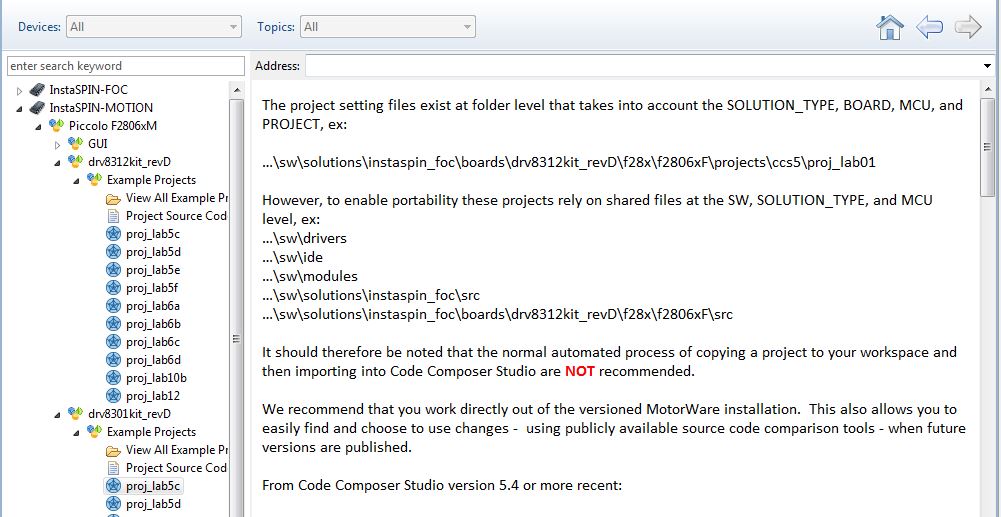
    Here is the comment in motorware.

    It should therefore be noted that the normal automated process of copying a project to your workspace and then importing into Code Composer Studio are NOT recommended.

    We recommend that you work directly out of the versioned MotorWare installation. This also allows you to easily find and choose to use changes - using publicly available source code comparison tools - when future versions are published.

    Best Regards,

    Richard Park

  • If you want to start your own project based on a MotorWare example, a method for doing so that allows portability as we release new revisions (~2-4 times per year planned) is outlined in this post

    but we still recommend working inside a MotorWare directory. You CAN bring this out to another folder, and update links (or pull files into a single location) but I personally wouldn't do this unless it was absolutely necessary.

  • So the only option I have is install the complete motorware installation in my workspace and remove the thinks I don't need.  (Supplying a custom project three is not an option?)

     Do I understand correctly that this is still under heavy development?


  • how do you know what you don't need?

    we created the MotorWare folder structure mostly to help ourselves in portability with 3 different MCUs (02x, 05x, 06x) and multiple inverters (drv8312, 8301, boost, hvkit)...but it also helps you in that we can actually release all these different projects working on so many different platforms. If we didn't do it this way you wouldn't have so many examples that work.

    ernst van spronsen said:
    Do I understand correctly that this is still under heavy development?

    No. There is continuous development because we continue to invest in improvements and new solution technology.  The MotorWare method is critical to us doing so.  The code base is stable.