This thread has been locked.

If you have a related question, please click the "Ask a related question" button in the top right corner. The newly created question will be automatically linked to this question.

Can't get LED to blink from Motorware Lab1

Other Parts Discussed in Thread: MOTORWARE, TMS320F28027F, BOOSTXL-DRV8301, DRV8301

Hi everyone,

I have the C2000 Launchpad XL, with the TMS320F28027F. I am trying to just run the first Motorware lab to get LED2 to blink. 

The program is running, and enters the ISR routinely, but for some reason the LED does not toggle.

I even tried commenting out that line in the ISR, and adding this line before the infinite while loop:

HAL_turnLedOff(halHandle,(GPIO_Number_e)HAL_Gpio_LED2);

However, the LED still does not turn off.

Does anyone have any idea as to what the problem may be?

Thanks,

Aleksandar Zivkovic

  • To be honest I haven't run proj_lab01 since we released InstaSPIN 1.5 yrs ago!

    Just tried it and it worked fine.

    When proj_lab01.out is loaded GPIO 0-3 turn on.  Once you select Run GPIO 0 will blink. Pause will cause it to pause in a random on/off state. Run will again blink.

    I used MotorWare 13, CCSv6

    I assume you have power/jumpers correct and you are actually able to connect to the target and load (flash) the Launchpad?  You have the 27F version with the InstaSPIN-FOC  logo?

  • Yes, InstaSPIN FOC circle logo with C2000 LaunchPad XL with the rocket ship.


    I have the board plugged in via USB, all switches are turned up (on), and all jumpers are on. Are those the only necessary connections needed?

    I put a breakpoint inside the ISR and it was enterring it, but the hardware is not showing a blinking led, it's just constantly on

    interrupt void mainISR(void)
    {
      // toggle status LED
      if(gLEDcnt++ > (uint_least32_t)(USER_ISR_FREQ_Hz / LED_BLINK_FREQ_Hz))
      {
        HAL_toggleLed(halHandle,(GPIO_Number_e)HAL_Gpio_LED2);
        gLEDcnt = 0;
      }

  • Chris, are you able to "Open Declaration" for the following function?

    #ifdef LAUNCHPAD
    // Setup GPIOs 0 and 1 as outputs for use in project lab1 only.
    // This is specific to the launchpad because its LEDs are also used by the PWM channels.
    HAL_setupLaunchPadGpio0and1(halHandle);
    #endif

    It doesn't take me anywhere when I attempt to, and I'm guessing that for some reason I am missing that function definition in the hal.h header file?

    I

  • Aleksandar Zivkovic1 said:
    I have the board plugged in via USB, all switches are turned up (on), and all jumpers are on. Are those the only necessary connections needed?

    Yes, if NOT using the BOOSTXL-DRV8301 then you have it set-up correctly. All jumpers connected and switches up.

    Maybe you messed up another file by accident. Why don't you try a fresh install of MotorWare since you aren't that far along yet?

  • I tried and no success. Only when I initialized another GPIO and changed it in the interrupt did I get the blinking LED. This is what I added:

    GPIO_Handle GPIO_test;
    GPIO_test = GPIO_init((void *)GPIO_BASE_ADDR, sizeof(GPIO_Obj));
    GPIO_setMode(GPIO_test, GPIO_Number_0, GPIO_0_Mode_GeneralPurpose);
    GPIO_setDirection(GPIO_test, GPIO_Number_0, GPIO_Direction_Output);

    Then in the ISR:

    if(gLEDcnt++ > (uint_least32_t)(USER_ISR_FREQ_Hz / LED_BLINK_FREQ_Hz))
    {
    //HAL_toggleLed(halHandle,(GPIO_Number_e)HAL_Gpio_LED2);
    HAL_toggleLed(halHandle,(GPIO_Number_e)GPIO_Number_0);
    gLEDcnt = 0;
    }

  • And a new issue occured for lab 2...perhaps this deserves a thread of its own.

    So, I am trying to simply get my motor to spin as the lab indicates, it is a BLDC motor. 

    However, the motor isnt spinning, and i get the following error: "No source available for "0x3fdd38"", or No source available for "0x3fc973" . This occurs when I pause the program after I set both gMotorVars.Flag_enableSys and gMotorVars.Flag_Run_Identify to a 1. The motor characteristic values in gMotorVars are changing, but I am thinking because I am not using a motor given in the user.h file (I am using a Park 180 Brushless Outrunner Motor), the program never recognizes it. 

    Should I just keep changing the values in user.h until the motor shows some signs of life?

    Regards,

    Aleksandar Zivkovic

  • Aleksandar Zivkovic1 said:
    However, the motor isnt spinning, and i get the following error: "No source available for "0x3fdd38"", or No source available for "0x3fc973" .

    this makes it seem like you don't even have a binary programmed onto the chip. Are you sure you have built a valid .out and actually flashed it to the chip?  It takes several seconds to flash, so you will actually see a message as it updates the flash.  Then you should see this

    well, for one thing it looks like you have a low inductance high speed motor, so you need to do motor ID using proj_lab02c

    Aleksandar Zivkovic1 said:
    Should I just keep changing the values in user.h until the motor shows some signs of life?

    You should set the values correctly per the documentation. Are you following the spreadsheet in MotorWare to set your user.h values?

    but stepping back, it looks like you have some other issue with the LaunchPad or CCS.

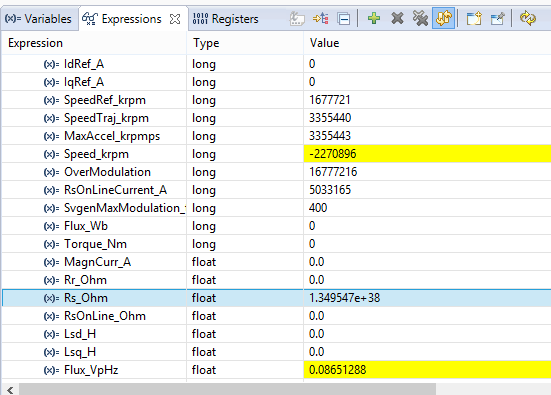
  • Chris, this is what I see:

    Yes, I set them as the pdf stated, but I have not tried lab2_partc yet, so perhaps it will work there. Thanks once more for trying to help me, I'll do my best to make my questions as clear as possible, but I was not expecting to have such issues with what should be quite simple tasks.

    Regards,

    Aleksandar Zivkovic

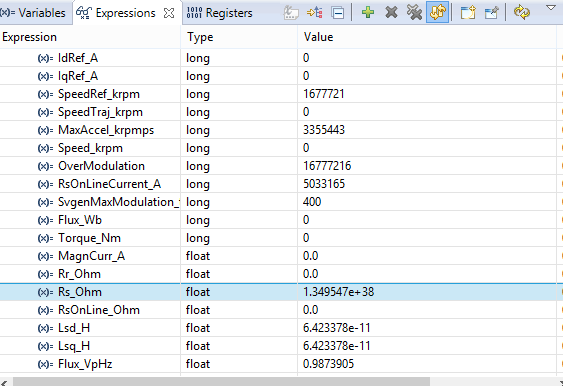
  • And here is what Im getting while running Lab2_c: (motor is still not running, in fact when I probe each 3 ports from the drv8301 BOOST-XL pack, there is no current or voltage on the oscilloscope).

  • infinite resistance is showing that the motor signals are not connected.

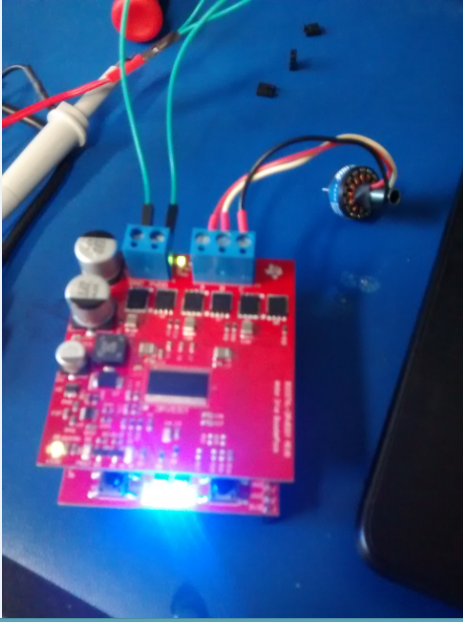
    can you take a picture of your hardware set-up please and confirm you have voltage at PVDD-GND and  gMotorVars.VdcBus_kV

  • Here is the setup:

    I measured 11 V across PVDD, and as for gMotorVars.VdcBus_kV, it is some very high value, fluctating around 428929.

    Perhaps this section of the code is not working?

    #ifdef DRV8301_SPI
      // turn on the DRV8301 if present
      HAL_enableDrv(halHandle);
      // initialize the DRV8301 interface
      HAL_setupDrvSpi(halHandle,&gDrvSpi8301Vars);
    #endif


    It is grayed out in CCS, just as for project 1,  this part was grayed out:

    #ifdef LAUNCHPAD
      // Setup GPIOs 0 and 1 as outputs for use in project lab1 only.
      // This is specific to the launchpad because its LEDs are also used by the PWM channels.
      HAL_setupLaunchPadGpio0and1(halHandle);
    #endif

    If this function didn't execute, that would explain why the LED wasnt toggling in the ISR, and for Lab2 it would explain that the DRV8301 is not initialized, right?

  • Aleksandar Zivkovic1 said:
    I measured 11 V across PVDD, and as for gMotorVars.VdcBus_kV, it is some very high value, fluctating around 428929.

    make sure you set the variable to Q value 24. This is what it looks like for ~24V. You should see ~0.011

    Please remove the BOOST and attach a picture of just the Launchpad. It still is behaving like it doesn't have the right chip (although lab 1 should have still worked).

  • I tried something else which I think got it to work Chris:

    Apparantly, I was supposed to import the projects from the boostxldrv8301_revB folder of MotorWare, and not the drv8301kit_revD folder.

    When I did this, I no longer have the gray box, and the LED blinks in Lab 1 like it is supposed to.

    I will test Lab2 now and let you know what happens.

  • ha! yes, helps to use the correct SW. It can be confusing I know.

    Just go straight to proj_lab02c, a/b won't work for that motor.

    You'll also need to make some changes to user.h 

    #define USER_IQ_FULL_SCALE_VOLTAGE_V (11.0)


    post these settings you are using

    #elif (USER_MOTOR == My_Motor)

    #define USER_MOTOR_TYPE MOTOR_Type_Pm

    #define USER_MOTOR_NUM_POLE_PAIRS (2)

    #define USER_MOTOR_Rr (NULL)

    #define USER_MOTOR_Rs (0.3918252)

    #define USER_MOTOR_Ls_d (0.00023495)

    #define USER_MOTOR_Ls_q (0.00023495)

    #define USER_MOTOR_RATED_FLUX (0.03955824)

    #define USER_MOTOR_MAGNETIZING_CURRENT (NULL)

    #define USER_MOTOR_RES_EST_CURRENT (3.0)

    #define USER_MOTOR_IND_EST_CURRENT (-0.5)

    #define USER_MOTOR_MAX_CURRENT (20.0)

    #define USER_MOTOR_FLUX_EST_FREQ_Hz (20.0)


  • Well the motor begin spinning after all, I left most of the #defines as (NULL) like the lab manual suggested though, and also Rs was read as a value < 1.

    Thanks for your help Chris hopefully it will be smoother sailing from here.

  • glad you have progressed.

    again, I have experience with these little hobby motors. You need to use proj_lab02c to ID the parameters. Set IQ_VOLTAGE = bus voltage

    and look at some of the hobby motor USER_MOTOR settings for some examples

    #elif (USER_MOTOR == eflite_helicopter_420)
    #define USER_MOTOR_TYPE                 MOTOR_Type_Pm
    #define USER_MOTOR_NUM_POLE_PAIRS       (3)
    #define USER_MOTOR_Rr                   (NULL)
    #define USER_MOTOR_Rs                   (0.01953091)
    #define USER_MOTOR_Ls_d                 (2.998549e-06)
    #define USER_MOTOR_Ls_q                 (2.998549e-06)
    #define USER_MOTOR_RATED_FLUX           (0.003449948)
    #define USER_MOTOR_MAGNETIZING_CURRENT  (NULL)
    #define USER_MOTOR_RES_EST_CURRENT      (3.0)
    #define USER_MOTOR_IND_EST_CURRENT      (-3.0)
    #define USER_MOTOR_MAX_CURRENT          (15.0)
    #define USER_MOTOR_FLUX_EST_FREQ_Hz     (80.0)

  • Yes, this would be for the next lab (3a) which utilizes the CTRL_setFlag_enableUserMotorParams function?


    I had add the ! in order to get the motor to spin, how precise do the parameters have to be in order for the motor to be recognized?

    CTRL_setFlag_enableUserMotorParams(ctrlHandle,!gMotorVars.Flag_enableUserParams);

    Interestingly though, when I put the Rs value obtained from Lab2 in the #define statement, as soon as I turn the gMotorVars.Flag_enableSys to a 1, it instantly turns to a 0, and the program terminates at the end of the for(;;) loop. However, leaving Rs as (NULL) allows the program to continue, and the motor spins as expected.

    I put the Ls_q, Ls_d, and rated flux values as you suggested, but changing Rs gives me an issue.

  • please follow the lab document and run proj_lab02c.

    do not move on until we have verified the results.

    attach the user.h you are using for proj_lab02c.

    During ID the EST_State will go through

    RoverL

    Rs: when this state finishes record the Rs value from gMotorVars

    RampUp: insure the motor starts up, spins, and keeps spinning until RampDown

    RatedFlux: when this state finishes record the Flux_VpHz value from gMotorVars

    Ls:  insure the motor keeps spinning; when this state finished record the Ls_d value from gMotorVars

    RampDown

  • yes i obtained those values, they are the following:

    USER_MOTOR_Rs (0.4606804)
    USER_MOTOR_Ls_d (2.130021e-05)
    USER_MOTOR_Ls_q (2.130021e-05)
    USER_MOTOR_RATED_FLUX (0.002340067)

  • ok, these values are reasonable Rs/Ls and Isc = Flux / 2*Pi / Ls for this type of motor.

    You can move on to the next labs.

    BTW - in proj_lab02c after you ID this motor you should be able to set and run to some speeds.  Your speed Kp and Ki values are likely too stiff for higher speeds though and you can't change those until you get to 05b.