This thread has been locked.

If you have a related question, please click the "Ask a related question" button in the top right corner. The newly created question will be automatically linked to this question.

some questions about InstaSPIN-motion

Other Parts Discussed in Thread: MOTORWARE

now I finish all the labs, but some questions confused me .

1)  How to download the program into flash memory ? T I write :#define flash , but CCS compile failed . 

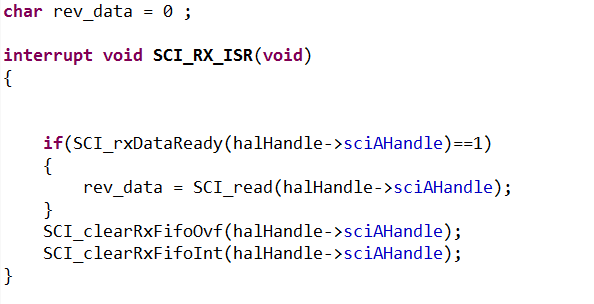
2) I add SCI receive interttupt function in proj_lab13e.c , and when I send a character to MCU , The CCS will report errors .

3) About question 2 , how CCS compiler communicate with MCU ?  by SCI ? no.  by what ?

4) lab13e say gMotorVars.MaxJerk_krpmps2 can reach 400.0 , but  I can reach 120.0 only , why ?

so can anyone  give me a hand ?
  • 1. To download the projects into the FLASH you need to change the build configuration of the project.  Right click on the project select Build COnfigurations -> Set Active and select Flash.  In addition to the preprocessor define FLASH, there are some additional files that are included and a new linker file.

    2. I'll have to let the TI experts comment about this one.

    3. CCS compiler communicates with the MCU over JTAG.

    4. Are you configuring gMotorVars.MaxJerk_krpmps2 to be an IQ20 variable?  

  • Hi Adam,

      Thanks for the reply.

      1. I selected Flash, should I define FLASH?  Can you tell me more informations about the additional files that need to be included and the new linker file.   

     2.I modifed my code , and the CCS compiler  shows normal , but  the program can not step into sci receive interrupt  fuction, I will check my code again.

    3.when I cut the JTAG , the program is stoped , so I need to download the program into FLASH memory .

  • Stefan Du said:
    2) I add SCI receive interttupt function in proj_lab13e.c , and when I send a character to MCU , The CCS will report errors .

    there are several posts on the front page about SCI and SPI communication. Note that most of these peripherals are NOT set-up / enabled in the example projects. We only set-up what is required for that specific example.

    You need to follow the examples of peripherals that are enabled and the HAL tutorial

    C:\ti\motorware\motorware_1_01_00_13\docs\tutorials

  • Stefan,

    When you have selected the Flash target, it should already have defined FLASH for you.

    It pulls in these files:

    CodeStartBranch.asm - This branches into the c_init00 function

    memCopy.c - This will copy select functions from FLASH into the RAM

    F28069M.cmd - This is a new linker file that will load code into the FLASH instead of RAM