This thread has been locked.

If you have a related question, please click the "Ask a related question" button in the top right corner. The newly created question will be automatically linked to this question.

f28377d boot mode pins

Other Parts Discussed in Thread: CONTROLSUITE

Hi folks,

Could anyone give me information about changing the "boot mode pins" which are GPIO 74 and 82 by default.

There is not enough info in technical reference manual and datasheet. 

We are adding below lines to our usual code and then upload it to flash of device by using CCS. 

EALLOW

DcmsZ1Regs.Z1_BOOTCTRL.bit.KEY=0x5A

DcmsZ1Regs.Z1_BOOTCTRL.bit.BMODE=0xFF

DcmsZ1Regs.Z1_BOOTCTRL.bit.BOOTPIN0=0x58(which means gpio 88)

DcmsZ1Regs.Z1_BOOTCTRL.bit.BOOTPIN1=0x56(which means gpio 86)

EDIS

but we are unable to change the pins what procedure we should follow could you please explain little more.

  • That seems correct. are you programming all the bits in user OTP at once? did you program the data with ECC? 

    we have ROM source code released in ControlSuite "C:\ti\controlSUITE\libs\utilities\boot_rom" you can load symbols, do a source level debug, put break points and see what is going on.

    Best Regards

    Santosh

  • Hi,


    We are adding below lines to our usual code and then upload it to flash of device by using CCS. 

    EALLOW

    DcmsZ1Regs.Z1_BOOTCTRL.bit.KEY=0x5A

    DcmsZ1Regs.Z1_BOOTCTRL.bit.BMODE=0xFF

    DcmsZ1Regs.Z1_BOOTCTRL.bit.BOOTPIN0=0x58(which means gpio 88)

    DcmsZ1Regs.Z1_BOOTCTRL.bit.BOOTPIN1=0x56(which means gpio 86)

    EDIS


    From this, look like you are trying to change the value in Z1_BOOTCTRL register by writting into this register using CPU. That'll not work becasue this register is READ ONLY and value in this register get loaded from USER OTP (location 0x7801E). You need to program this location using Flash plug-in GUI. When you open the flash plug-in GUI, you can find there Z1-BOOTCTRL field where you can provide the data and then program it. 

    Regards,

    Vivek Singh


  • Hi  vivek,

    Thank you for your reply again.

    I am doing exactly what you said. I write the value 0x5658FF5A then click the program OTPBOOTCTRL but the pins doesn't change. 

    Are we doing it wrong?

    By the way, the chip we are using is tmx (experimental version) is this a problem?

    Thank you

  • Hi,

     I am doing exactly what you said. I write the value 0x5658FF5A then click the program OTPBOOTCTRL but the pins doesn't change. 

    Was the programming successful ? You can check the value in status register "DcmsZ1Regs.Z1_BOOTCTRL" and see if it's matching with value programmed using flash plug-in GUI.

    Also how are you checking that new BOOT PINS are taking effect or not?

    By the way, the chip we are using is tmx (experimental version) is this a problem?

    This should be ok.

    Regards,

    Vivek Singh

  • Hi vivek,

    I check the register value from memory browser and it matches with the value i want.

    And my check is below;

    When i ground the gpio72(default pin) the flash program doesnt start despite the gpio 85 and 87 (which are my new pins) are high. And the flash starts immediately after i connect the 72 to high. My comment is that, i write to the register succesfully(because i read the value correct) but the pins somehow stay default value. 

    I am stuck at this point.

    Thank you again for all your help.

    Here is my register value

  • Suleyman

    we have ROM source code released in ControlSuite "C:\ti\controlSUITE\libs\utilities\boot_rom" you can load symbols, do a source level debug, put break points and see what is going on?


    Best Regards

    Santosh

  • Hi,

    Here is quick thing to check -

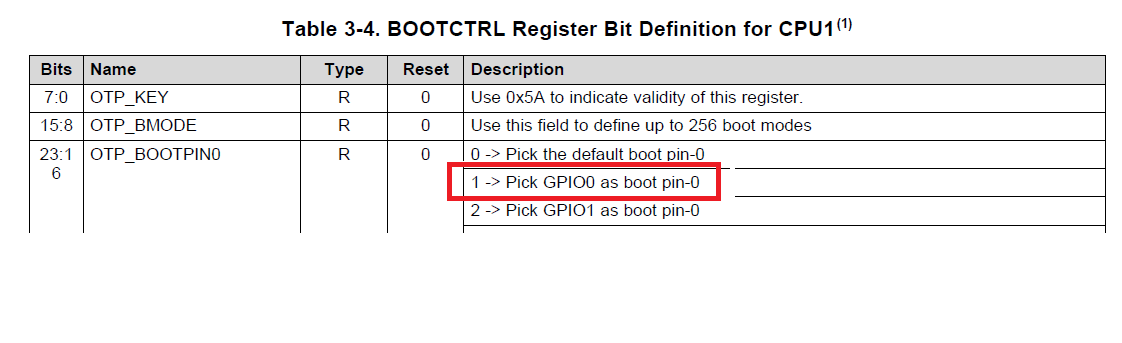
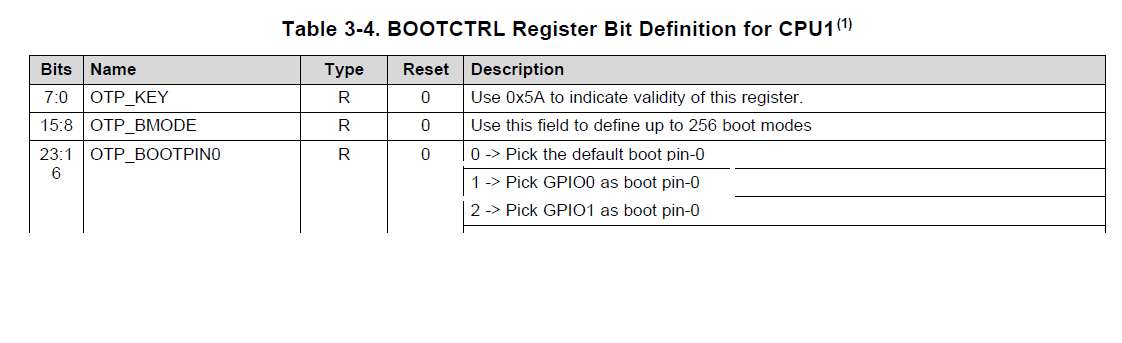
    Please note that the decoding of the pin number. What mentioned in the TRM is decimal value and what you program in BOOTCTRL location is in hex. So you need to convert the value written into register to decimal for pin number. E.g. in this case you have written 0x56580B5A which means you are choosing GPIO pin number 85 (0x56 -1) and 87 (0x58 -1). If you expecting it to be 55/56 (or 56/57, in case you didn't notice that value "1" select GPIO-0 pin not GPIO-1) then that will be an issue.

    Following is what we have in TRM -

    Please check the same. I hope this resolve the issue. If not then as Santosh mention, use the boot ROM source code from controlSUITE to debug it further.

    Regards,

    Vivek Singh