This thread has been locked.

If you have a related question, please click the "Ask a related question" button in the top right corner. The newly created question will be automatically linked to this question.

how to access individual bits register epwm 28069

Other Parts Discussed in Thread: CONTROLSUITE, MOTORWARE, DRV8301

Hi all I have a very short question,

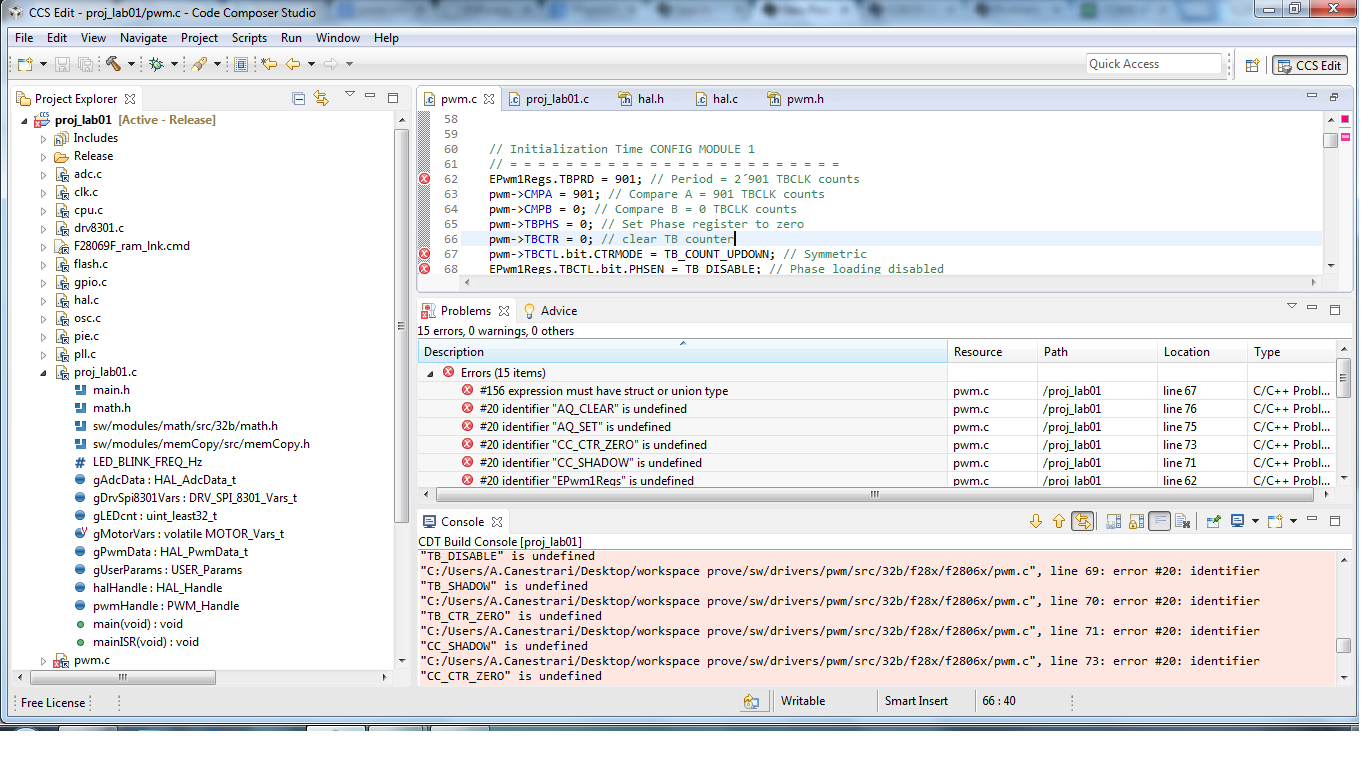
how do I access the individual bits in the registers with the point and with EPwm1Regs.

I will return error saying EPwm1Regs undefined
  • Hi Andrea,

    Did you refer the example codes present in controlSuite? Check this one out:
    C:\ti\controlSUITE\device_support\f2806x\v141\F2806x_examples_ccsv5\epwm_up_aq

    Regards,
    Gautam
  • and the answer to the question where to find it, is not that you have been much help I still have the same problems as before.
    I looked inside the file c you suggested but I know as before

  • Hello Andrea,
    This is Motorware template that you use, right?
    As Gautam said, please check the PWM example from ControlSuite and follow the way the header files needed and linked by the main c file, and include these header files to this motorware template.
    And I believe, there will be some errors because of overlapping or missing something. You should check what you can reduce one by one, for example: to link the missing headers and put it in Motorware project, and so on.
    So actually, your short question has long answer (long steps) because some modification on some files are needed to not be overlapped with the one that already pointed in Motorware.
    I have done the same for I2C, so I believe you can do it too, but I cannot give you the steps because it will be too complicated to write.
    If you want, please mention the things that you have done, and let see what we can help to reduce the error.
    Good luck!

    Best regards,
    Maria
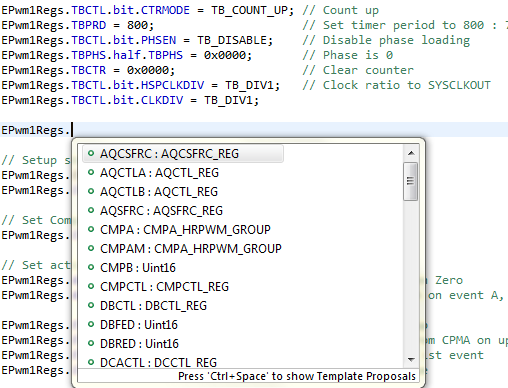
  • As you might also know that CCS supports auto-complete feature wherein when you can access/configure registers under ePWM or other peripherals... This is how its done:

    If you're unable to use this feature then... you're project headers are incorrect and hence as mentioned in my previous post, "Please import the project mentioned above to CCS and try"

    Also, the way you're configuring the peripheral is different and hence refer & follow the structure available in example codes.


    Regards,

    Gautam

  • good morning,

    I explain my situation so I get the best tips.


    I have a starter kit with drv8301 f28069 card.

    Now I'm starting to use the mirco texas before I used the competition, I would like to create a project of my own, but I can not to set the various parameters and to include header link to etc.

    there is a step by step guide that explains how to do well explained by one starting from scratch?

    at this time to the problem described above chart using the project I'm one of motorware instant foc, to be clear what it does simply flashing the led on this and I wanted to put my code for PWM.
    I looked into the project in control suite
    I went to look at the files in the folder, but there are too many I would like to insert only those absolutely necessary and not all.

    the second question how do i recognize the header files to my seasons I have to put them in the project folder of the LED blinking (this I did), but then in ccs tells me that there are not, where can I find a procedure described in step step, because I do not want you to spend time with my little problems, but I would love to learn how to use this micro which to me is quite new.

    thanks to all

  • Hello Andrea,

    andrea canestrari said:
    I have a starter kit with drv8301 f28069 card.

    First of all, please confirm that you have F28069F/M, not F28069 (without F or M).

    andrea canestrari said:
    there is a step by step guide that explains how to do well explained by one starting from scratch?

    If you want to modify Motorware code, I recommend you to read the document mentioned in this thread

    instead of learning to put your own code from scratch without knowing what Motorware code structure is.

    andrea canestrari said:
    on this and I wanted to put my code for PWM.
    I looked into the project in control suite

    Please see and follow chapter 6.2 of the document in that thread above.

    I hope after read and follow this chapter you will get insight how to put PWM code in Motorware instead of following ControlSuite PWM example code that has different structure.

    andrea canestrari said:
    but I would love to learn how to use this micro which to me is quite new.

    This is different problem.

    Motorware template is not for first learning, at least for me. FYI, my very first TI's MCU was F28069M, with its controlcard, also for Motor project.

    Please use examples in ControlSuite to learn about this MCU. Try to understand how to program the peripheral that you need (for example: PWM) and after you understand it, you can jump to Motorware and search its APIs (\motorware\motorware_1_01_00_14\sw\drivers) and compare them with registers that used by ControlSuite examples.

    If you don't really understand about APIs, learn the existing PWM setting in Motorware so you can know where and how to put and call the PWM APIs in Motorware.

    Hope you will have not much difficulties to learn this MCU.

    And your question is welcomed in this forum.

    Good luck!

    Best regards,

    Maria

  • Also, if you want to learn about Motorware code structure, please see the documents provided in \motorware\motorware_1_01_00_14\docs (motorware_coding_standards.pdf and motorware_software_architecture.pdf)