This thread has been locked.

If you have a related question, please click the "Ask a related question" button in the top right corner. The newly created question will be automatically linked to this question.

F28069 control stick: GUI Composer Runtime - project Export problem

Other Parts Discussed in Thread: TMS320F28069

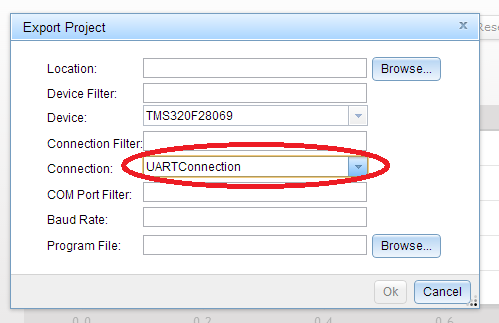
I have the TI C28_uart_monitor example project (unmodified) running on the F28069 Control Stick under CCSv6 (updated today). Both the target program and GUI Composer seem to work ok with either the JTAG or the UART connection selected in Debug view. My next step is to create a GUI Composer Runtime app so that I can use the serial communication link independent of JTAG/CCS. However when I try to Export the GUI Composer project, the “Export Project” dialogue which appears does not contain boxes for “COM Port Filter” and “Baud Rate” (as suggested in the "GUI Composer and UART support with standard monitor" wiki.) The “Export Project” dialogue that appears is the same as when I have created a GUIC Runtime app for use with a JTAG link. Any help would be appreciated.

  • Hi David,

    I hope you followed this step correctly: processors.wiki.ti.com/.../ProgramModelUart_GuiComposer

    Regards,
    Gautam
  • Dear Gautam,

    Thanks for your rapid response. As you advise I have revisited the “Exporting Application for use with GUI Composer Runtime” section of the “ProgramModelUart GuiComposer” wiki.

    In the first paragraph of this section, it says “The main difference is that export dialog needs to have UART connection selected during export”. Just below this text there is a picture of the Export dialog which shows 8 fields. The second field “Connection:” shows “UARTConnection” has been selected. I assume this is what is being referred to in the text.

    My problem is that I don’t know how to get this “Export” dialog to appear which has these 8 fields present. When I click on the “Export Project” button within the GUIComposer Projects Palette, I get an “Export” dialog with only 6 fields visible. The fields are Location:, Device Filter:, Device:, Connection Filter:, Connection:, and Program File:. In the Device: field I select TMS320F28069.When I then try to select an option in the Connection: field the “UARTConnection” option is not present. There are only a range of XDS type options in the drop-down menu.

    The fact that I don’t get the 8 field “Export” dialog (shown in the wiki) when I click on the “Export Project” button within the GUIComposer Projects Palette is what is throwing me.

    So I don’t know how to ensure that the “UART connection is selected during export”.


    Dave

  • Dave which version of GUI composer are you using?
  • Hi Gautam,

    When I click on the "Source" button at top RHS of GUIC window I get a script with the line

    <head data-gc-version="1.5.201501051800"

    I presume this is a valid way to determine the version of guic.

    Dave
  • Hi Gautam,

    The older version of GUIC (i.e.1.5.201501051800) I mentioned was installed some time ago as a "plug-in" to CCS. This was installed from the CCS App Centre. I didn't mention earlier that when I decided last week to use GUIC Runtime, I installed GUIC version 6 (from the website you mention). This installation went into folder \ti\guicomposer and I believe this is used to create the Runtime app.

    In view of this, am I correct in assuming that I need to ensure that two instances of GUIC need to be installed and up to date? i.e. the CCS plug-in and an instance "external" to CCS?

    If (as it appears) my GUIC CCS plug-in is out of date, then does this need to be installed via the App Centre from "within" CCS?

    Thanks for your help.

    Dave
  • Dave, I guess the offline installer might've replaced the plug-in as both get installed at \ti\guicomposer
    Let me know if you get the option now.
  • Hi Gautam,

    If the offline installer has replaced the plug-in then this situation has applied since last week and therefore nothing has changed. Also if this has occurred then it raises the question as to what the version number (1.5.201501051800) found in the GUIC Source script means i.e. why is it not now showing version 6.0.

    It is only a few weeks ago that I installed the GUIC CCS plug-in so I would have thought that it would be at least version 5.???. Do you know if there is another way to verify the version of the GUIC plug-in rather than looking at this Source script?

    Thanks for your help

    Dave
  • Hi Gautam,

    Further to my last message, I was having problems accessing the App Centre earlier from work. I have now accessed it from home and it states that GUI Composer is up to date. The export problem still remains.

    Thanks

    Dave

  • Let me pull in the GUI Composer expert here to help you out.

    Just be patient.

    Regards,

    Gautam

  • Thanks Gautam, I really appreciate you help.
    Dave
  • This is a known bug, but the fix has not yet been released.  Luckily, the fix is easy to apply. 

    Back up the existing file, then replace ccsv6/ccs_base/common/targetdb/drivers/gti_uart_driver.xml with the attached file.

    <?xml version="1.0"?>
    <drivers id="MSP430">
    	<isa Type="MSP430" ProcID="0x6b800000">
    		<driver file="../../../DebugServer/drivers/JavaToGtiAdapter.dvr">			
    			<property Type="stringfield" Value="COM65" id="COM Port" />
    			<property Type="stringfield" Value="9600" id="Baud Rate" />
    			<property Type="hiddenfield" Value="Little Endian" id="Endianness" />
    			<property Type="hiddenfield" Value="16" id="Word Size Page 0" />
    			<property Type="hiddenfield" Value="8" id="Minimum Addressable Size Page 0" />
    			<property Type="hiddenfield" Value="com.ti.transport.target.impl.JavaToGTIUartMonitor" id="Java Class" />
    			<property Type="hiddenfield" Value="NewInstance" id="Instance Function" />
    			<property Type="filepathfield" Value="../../DebugServer/packages/ti/dss/java/com.ti.uart.monitor_1.0.0.jar" id="Jar File" />
    			<connectionType Type="UARTConnection"/>
    		</driver>
    	</isa>
    	
    	<isa Type="TMS320C28XX" ProcID="0x5000A3F8">
    		<driver file="../../../DebugServer/drivers/JavaToGtiAdapter.dvr">			
    			<property Type="stringfield" Value="COM65" id="COM Port" />
    			<property Type="stringfield" Value="9600" id="Baud Rate" />
    			<property Type="hiddenfield" Value="Little Endian" id="Endianness" />
    			<property Type="hiddenfield" Value="16" id="Word Size Page 0" />
    			<property Type="hiddenfield" Value="16" id="Minimum Addressable Size Page 0" />
    			<property Type="hiddenfield" Value="16" id="Word Size Page 1" />
    			<property Type="hiddenfield" Value="16" id="Minimum Addressable Size Page 1" />
    			<property Type="hiddenfield" Value="16" id="Word Size Page 2" />
    			<property Type="hiddenfield" Value="16" id="Minimum Addressable Size Page 2" />
    			<property Type="hiddenfield" Value="com.ti.transport.target.impl.JavaToGTIUartMonitor" id="Java Class" />
    			<property Type="hiddenfield" Value="NewInstance" id="Instance Function" />
    			<property Type="filepathfield" Value="../../DebugServer/packages/ti/dss/java/com.ti.uart.monitor_1.0.0.jar" id="Jar File" />
    			<connectionType Type="UARTConnection"/>
    		</driver>
    	</isa>
    	
    	<isa Type="CORTEX_M4" ProcID="0x75803800">
    		<driver file="../../../DebugServer/drivers/JavaToGtiAdapter.dvr">			
    			<property Type="stringfield" Value="COM14" id="COM Port" />
    			<property Type="stringfield" Value="9600" id="Baud Rate" />
    			<property Type="hiddenfield" Value="Little Endian" id="Endianness" />
    			<property Type="hiddenfield" Value="32" id="Word Size Page 0" />
    			<property Type="hiddenfield" Value="8" id="Minimum Addressable Size Page 0" />
    			<property Type="hiddenfield" Value="com.ti.transport.target.impl.JavaToGTIUartMonitor" id="Java Class" />
    			<property Type="hiddenfield" Value="NewInstance" id="Instance Function" />
    			<property Type="filepathfield" Value="../../DebugServer/packages/ti/dss/java/com.ti.uart.monitor_1.0.0.jar" id="Jar File" />
    			<connectionType Type="UARTConnection"/>
    		</driver>
    	</isa>
    	
    	<isa Type="CORTEX_M3" ProcID="0x75803800">
    		<driver file="../../../DebugServer/drivers/JavaToGtiAdapter.dvr">			
    			<property Type="stringfield" Value="COM14" id="COM Port" />
    			<property Type="stringfield" Value="9600" id="Baud Rate" />
    			<property Type="hiddenfield" Value="Little Endian" id="Endianness" />
    			<property Type="hiddenfield" Value="32" id="Word Size Page 0" />
    			<property Type="hiddenfield" Value="8" id="Minimum Addressable Size Page 0" />
    			<property Type="hiddenfield" Value="com.ti.transport.target.impl.JavaToGTIUartMonitor" id="Java Class" />
    			<property Type="hiddenfield" Value="NewInstance" id="Instance Function" />
    			<property Type="filepathfield" Value="../../DebugServer/packages/ti/dss/java/com.ti.uart.monitor_1.0.0.jar" id="Jar File" />
    			<connectionType Type="UARTConnection"/>
    		</driver>
    	</isa>
    	
    	<isa Type="Cortex_R4" ProcID="0x75803400">
            <driver file="../../../DebugServer/drivers/JavaToGtiAdapter.dvr">			
    			<property Type="stringfield" Value="COM14" id="COM Port" />
    			<property Type="stringfield" Value="9600" id="Baud Rate" />
    			<property Type="hiddenfield" Value="32" id="Word Size Page 0" />
    			<property Type="hiddenfield" Value="8" id="Minimum Addressable Size Page 0" />
    			<property Type="hiddenfield" Value="com.ti.transport.target.impl.JavaToGTIUartMonitor" id="Java Class" />
    			<property Type="hiddenfield" Value="NewInstance" id="Instance Function" />
    			<property Type="filepathfield" Value="../../DebugServer/packages/ti/dss/java/com.ti.uart.monitor_1.0.0.jar" id="Jar File" />
    			<connectionType Type="UARTConnection"/>
            </driver>
        </isa>
    	
    	<isa Type="Cortex_R5" ProcID="0x75803400">
    		<driver file="../../../DebugServer/drivers/JavaToGtiAdapter.dvr">			
    			<property Type="stringfield" Value="COM14" id="COM Port" />
    			<property Type="stringfield" Value="9600" id="Baud Rate" />
    			<property Type="hiddenfield" Value="32" id="Word Size Page 0" />
    			<property Type="hiddenfield" Value="8" id="Minimum Addressable Size Page 0" />
    			<property Type="hiddenfield" Value="com.ti.transport.target.impl.JavaToGTIUartMonitor" id="Java Class" />
    			<property Type="hiddenfield" Value="NewInstance" id="Instance Function" />
    			<property Type="filepathfield" Value="../../DebugServer/packages/ti/dss/java/com.ti.uart.monitor_1.0.0.jar" id="Jar File" />
    			<connectionType Type="UARTConnection"/>
            </driver>
    	</isa>
    	
    	<isa Type="CS_DAP" ProcID="0x38000405">
    		<driver file="../../../DebugServer/bin/DummyGTIDriver.dll">			
    			<connectionType Type="UARTConnection"/>	
    		</driver>
    	</isa>
    	
    	<isa Type="ICEPICK_C" ProcID="0x3C000805">
    		<driver file="../../../DebugServer/bin/DummyGTIDriver.dll">			
    			<connectionType Type="UARTConnection"/>	
    		</driver>
    	</isa>
    	
    	<isa Type="TMS192C2006" ProcID="0x30008030">
            <driver file="NONE">			
    			<connectionType Type="UARTConnection"/>	
    		</driver>
        </isa>
    	
        <isa Type="TMS192C2007" ProcID="0x30008038">
           <driver file="NONE">					
                <connectionType Type="UARTConnection"/>
            </driver>
        </isa>
    <!--		
    	<driverProperties>
    	    <version number="1.0"/>


    		<choicelist id="Jar File" extn="Jar File (*.jar)|*.jar|All Files (*.*)|*.*||" type="FILE_PATH_EXTN" must="true">
    			<choice/>
    		</choicelist>
    		
    		<inference key="FixedEntry" value="Java Class" value2="com.ti.transport.target.impl.TestTransport"></inference>
    		<inference key="FixedEntry" value="Instance Function" value2="NewInstance"></inference>


    		<choicelist id="Endianness" must="true" type="string_list">
    			<choice value="Little Endian"/>
    		</choicelist>
    		<inference key="FixedEntry" value="Word Size Page 0" value2="16"></inference>
    		<inference key="FixedEntry" value="Minimum Addressable Size Page 0" value2="8"></inference>
    		
    		<hierarchy>
    			<hchoice depends="none" key="Jar File"/>
    			<hchoice depends="none" key="Endianness"/>
    		</hierarchy>
    		<current>
    			<cchoice key="Jar File" value="../../../../../../../../JavaToGTIAdapterTester/JavaToGTIAdapterTester.jar"/>
    			<cchoice key="Endianness" value="Little Endian"/>
    		</current>
    	</driverProperties> 
    -->
    </drivers>
    

    Darian

  • Hi Darian,

    Thank you for getting involved. I followed your instruction. I replaced the existing gti_uart_driver.xml with the new version but it hasn't made any difference. I still get the 6-field version of the dialogue when I click on the "Export" button within the GUIC Projects Palette.

    As before the project and gui seem to work ok from within ccs.

    Dave

  • Dave,

    What version of CCS/GUI Composer are you using? I am using CCS6.1 and after dropping in the xml file suggested by Darian, I was able to see the UART connection for this device.

    Patrick

  • Hi Patrick,

    The version of CCS is 6.1.0.00104. I am not sure how to determine the version of GUIC from within CCS but the setup file downloaded for the GUIC installation is

    GUI_Composer-6.0.0.0-Setup

    Also the App Center window states that GUI Composer is “Up to Date”.

    Thanks

    Dave

  • That is the right version. I assume that you drop the xml file into CCS and not GUI Composer. The UART should be the last entry in the connection list. We can do a quick webex if you still have issue.

    Patrick
  • Hi Patrick,

    I dropped the gti_uart_driver.xml file in folder ccsv6/ccs_base/common/targetdb/drivers

    When you say "connection list" do you mean the box at bottom of the "Alternate Communication" area of the Basic tab for the .ccxml file? If so then this box only has one entry present which is "ComPort".

    I will try things out on another pc first as I am not set up for webex.

    Thanks
    Dave
  • Hi Dave,

    I mean the connection in the GUI Composer export dialog. And yes, the ccxml file editor should have the UART connection for the "Alternative Communication" in the ccxml file editor.

    I have attached two images showing the UART connection on my CCS6.1 install after dropping in the xml file.

    CCXML file editor:

    This is what the Export Project:

    Regards,
    Patrick

  • Hi Patrick,
    On following your instructions I can now get a GUIC Export dialogue which has 8 fields. Below is my understanding what goes into these fields:-

    Location: Set to where the export zip file is to be stored. So presumably it can be anywhere.
    Device Filter: can be left blank
    Device: TMS320F28069
    Connection Filter: can be left blank
    Connection: UARTConnection
    COM Port Filter: (** see below)
    Baud Rate: 9600
    Program File: C28_UART_monitor.out

    ** I am not sure what to put in this field for the F28069 control stick example. The example given in the “ProgramModelUart GuiComposer” wiki is based on the MSP430 and shows MSP* in this field. On my PC, Windows has allocated COM16 to the control stick. Do I literally put COM16 in this field?

    After exporting the GUIC project, I believe I must extract the resulting zip file into the \ti\guicomposer\webapps folder and then double-click on the launcher application file to create the GUIC Runtime stand-alone GUI.
    Do the above points look correct?

    After exporting the GUIC project, presumably I have to put back the XDS100v2 settings in the .ccxml file in order to be able to continue with normal target load, debug etc.

    Thanks
    Dave
  • Hi Dave,

    The COM Port Filter is optional, this apply to all filters. If you specify a filter string, the GUI Composer runtime will show the entries that matches the filter strings in the user. I believe the strings can be a regular expression.

    Yes, you must extract the zip file into the webapp folder and use the launcher to start the application.

    You don't need to add (or modify) the CCXML file in the project, the runtime will generate the ccxml file based on your selection in the configuration page in the application. However if you want to use your own ccxml file in the application, then you can simply drop in the ccxml file into the app folder with the filename appConfig.ccxml. The runtime will not generate a ccxml file or even show the configuration page if there is an appConfig.ccxml file.

    Patrick

  • Hi Patrick,
    I followed your instructions to export the GUIC project with the Export dialogue settings as below

    Location: Uart_demo_app.zip
    Device: TMS320F28069
    Connection: UARTConnection
    Baud Rate: 9600
    Program File: C28_UART_monitor.out
    (the other 3 filter fields were left blank)

    I then extracted the resulting “Uart_demo_app.zip” file to \ti\guicomposer\webapps

    In order to load the target code into the F28069 control stick I needed to go back into .ccxml editor within CCSv6 and select the XDS100v2 USB Debug Probe. After doing this the settings in the .ccxml editor are now:-

    Connection: Texas Instruments XDS100v2 USB Debug Probe
    Board or Device: TMS320F28069
    The Alternate Communication selector is showing “UART Communication” but there is nothing showing in the box below that.

    I then load and run the target code. I can verify that the target code is running by monitoring “ErrorCount” in the Expressions view of CCS (continuous refresh).

    I then go to \ti\guicomposer\webapps and double-click on launcher

    The Runtime “Uart_demo_app” window appears. At the top of the app window there are 3 fields as below

    Devices: TMS320F28069
    Baud Rate: 9600
    COM Port: For this I then select “USB Serial Port (COM16)”

    (I select COM16 as this is what appears in Windows 7 Device Manager when I plug in the control stick)

    In the main area of the Runtime “Uart_demo_app” GUI there are the Error Count box, Reset Error Count button and the Error Count graph widgets as expected. However each widget has a small red X which I believe implies that the GUI cannot access the “ErrorCount” variable in the target program.

    In the Runtime “Uart_demo_app” GUI I have tried changing the Devices: selection to “control STICK – Piccolo F28069” but this makes no difference.

    Any further suggestions would be appreciated.

    Thanks for your help.
    Dave
  • Are you able to try to create a ccxml file with UART connection inside CCS and name it appConfig.ccxml. Drop this file into the your gui app?

  • Hi Patrick,

    In CCS I opened the ccxml editor and selected UARTConnection and left device at TMS320F28069, then pressed save button.

    Went to project explorer\targetConfigs and copied TMS320F28069.ccxml

    Pasted this file into \ti\guicomposer\webapps

    Renamed the file appConfig.ccxml

    Went back to TMS320F28069.ccxml editor in CCS and selected XSD100v2 again in order to load and run target code.

    Run and verified target code is running

    Launched app and selected USB Serial Port (COM16) but it’s still the same (i.e. red x and each widget).

    Dave
  • Hi Dave,

    Can we have a webex session to debug this issue? It is going to help us to get to the bottom of this issue quicker.

    Patrick

  • Hi Patrick,

    ok, I will get back to you when I'm set up with webex.

    Thanks

    Dave
  • Hi Patrick,

    I am now set up with webex. I am in UK (GMT). What is your time zone? Can you let me have some times when you are free for a webex?

    Dave
  • I am in Toronto, EST. We are 5 hours apart. How about next week Tuesday at 10am EST? It will be 3pm for you.

    Patrick

  • Hi Patrick,

    Yes, next Tuesday at 10am EST (3pm in UK) is ok. Is there a way to send my email to you privately via E2E?

    Thanks

    Dave


  • Yes there is, and I already sent a friend request to you so that we can continue the conversation through email.

    Patrick
  • Hi Dave,

    I have got a hold on a F28069 device and was able to reproduce the issue with the application that you sent to me. I have filed a CQ to track this issue SDSCM00052178.

    Regards,
    Patrick

  • ok, thanks Patrick

    Dave