This thread has been locked.

If you have a related question, please click the "Ask a related question" button in the top right corner. The newly created question will be automatically linked to this question.

Debugging symbols missing in CCS6.1

Other Parts Discussed in Thread: TMS320F28377S

Hi there. 

I'm programming the LaunchpadXL TMS320F28377S v1.0, under Windows 7, with CCS v6.1. 

I've successfully gotten the blinky LED to work, but every time when I've downloaded a new program (Build, click debug), the program runs as intended for 5-6 seconds, and then halts. 

Furthermore, none of the symbols for the debugging is shown. 

Did I accidentally deactivate something, or what do I do, to be able to use the debugger, and run programs on the MCU.

Kindly, Christian Buhl Soerensen.

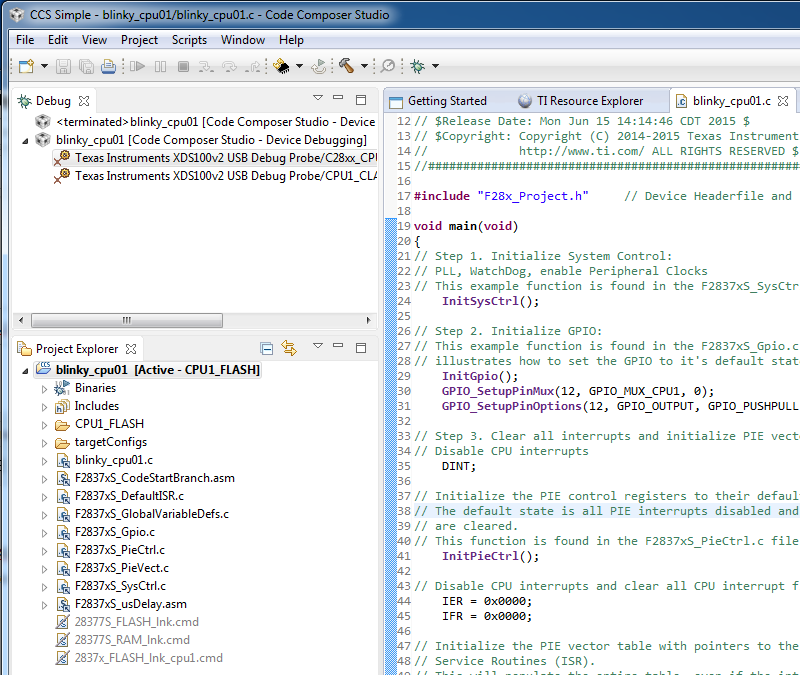
  •  Attaching a screendump of how it looks.

  • Christian,
    I think it depends on some default settings what clicking on the "debug" will do. In basic case it will simply launch the debug screen with the emulator info and CPU info from the XML, but the processors will not be connected or file downloaded. In best case it will do all :)

    To make sure can you right click on the main C28x processor in the above screenshot to make sure we are connected? Pop up with show the inverse action depending on if we are connected or not.

    Once we are connected, lets load/re-load the program and see if the symbols appear.

    One other thing I noticed is I don't see the Tools/Run dropdowns on your debug screen, make sure you are on the CCS Debug pane when running/debugging the processor.

    I'll monitor this thread for your feedback, and we'll take it from there.

    Matt
  • Hi Matthew - thank you for your reply.

    I got tired of beating around in the bush, and uninstalled everything, and reinstalled it again. And that solved the issue - however unsatisfying.

    Regarding your questions anyway; I assume I was connected - the 'Test connection' that is somewhere in the software worked fine. No errors, and seemingly positive results. I didn't try the method you suggest, though.

    Doesn't it change to the debug perspective automatically, when you push the button?
  • Christian,
    You are correct on the function of the button push, but there are a lot of sub steps that get triggered off that and I wasn't sure where we were failing. Debug perspective gets launched, target gets connected, code downloaded, GEL executed, etc. Didn't know where we were failing so my suggestion was to go step by step.

    At any rate the re-install fixed it, which is good but as you said frustrating. Keep us posted if you have anymore problems.