This thread has been locked.

If you have a related question, please click the "Ask a related question" button in the top right corner. The newly created question will be automatically linked to this question.

tmx320f28377s dcsm debugging

Other Parts Discussed in Thread: CONTROLSUITE

Hi,

i'm trying to activate the code security module on a tmx320f28377s device but i keep getting an error.

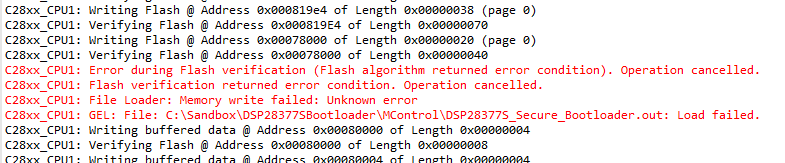
When writing the requested values to the dcsm_otp_z1 sections i get a flash verification error.

C28xx_CPU1: GEL Output: 
Memory Map Initialization Complete
C28xx_CPU1: Error during Flash verification (Flash algorithm returned error condition). Operation cancelled.
C28xx_CPU1: Flash verification returned error condition. Operation cancelled.
C28xx_CPU1: File Loader: Memory write failed: Unknown error
C28xx_CPU1: GEL: File: C:\Sandbox\DSP28377SBootloader\MControl\DSP28377S_Secure_Bootloader.out: Load failed.

after this i exclude the ZoneSecurity.asm file so the otp has no information to program and everything works as expected but ofcourse the otp has no data programmed... my link pointers are still at 0xffffffff, this happens on devices being programmed for the first time, so i don't think the ECC is corrupt...

Any ideas anyone ?

Thanks a lot

Jan

  • Hi Jan,

    Please check the value @ address location 0x1071000 (address for ECC) via CCS memory watch window. All the values should be 0xFFFFFFFF. If not then that's an issue.

    Also which CCS version you are using? Please make sure you have installed all the latest CCS updates (check for updates by clicking on "Help -> Check for Updates" in CCS).

    Regards,

    Vivek Singh

  • Hi Vivek,
    thanks for your support.
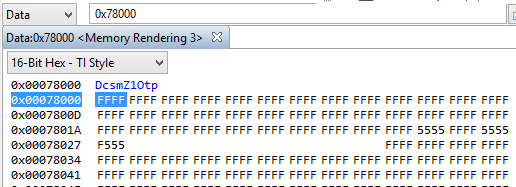
    i checked the things you asked and they all look good. So i build my foirmware and take a look at otp registers @ 0x78000 -> this shows all 0xFF's. Same for 0x1071000. If i try to program i get the failed message.
    in the mean time i was able to program the password by disabling the verify after flash option. And after this i see the zoneselect bytes are correctly programmed (0x78020) but the otp region (0x78000) still reads all 0xFF's while the last 32bits (Z1-BOOTCTRL) should have been 0x0000FF5A....
    So it seems only the dcsm_otp_z1 section fails to program...

    regards
    Jan
  • I forgot to mention: i'm running version 6.1.0.00104 with no updates available and i'm using controlsuite V170 support files so i think i'm all up to date ...

    regards

    Jan

  • Hi Jan,

    We don't see any issue with programming of linkpointers. Could you take a snapshot of  memory view, starting location 0x78000/0x78200 and post it. Also please check your map file to make sure these values are getting assigned to correct address location. If possible, attach your project file also.

    Regards,

    Vivek Singh

  • Hi Vivek,

    i've took some snapshots of the memory space:

    first, if i compile and debug without the zoneselectblock.asm i get following empty spaces at the otp and ecc:

    afterwards i include the asm security asm file but then i get the verification error (i only use zone 1 so i didn't take pictures of 0x78200)

    if i disabled verify flash i get following programmed memory space: (i erased the password)

    and the password is programmed correctly. To me it seems the dcsm_otp_z1 section doesn't get programmed, the dcsm_zsel_z1 does. the otp values remain unchanged except for the bootctrl-word. These are the values i tried to program:

         .sect "dcsm_otp_z1"
    	  
    	  .long 0xFFFFFFFF     ;Z1-LINKPOINTER1
    	  .long 0xFFFFFFFF     ;Reserved
    	  .long 0xFFFFFFFF     ;Z1-LINKPOINTER2
    	  .long 0xFFFFFFFF     ;Reserved
    	  .long 0xFFFFFFFF     ;Z1-LINKPOINTER3
    	  .long 0xFFFFFFFF     ;Reserved
    	  .long 0xFFFFFFFF     ;Reserved
    	  .long 0xFFFFFFFF     ;Reserved
    	  .long 0xFFFFFFFF     ;Z1-PSWDLOCK
    	  .long 0xFFFFFFFF     ;Reserved
    	  .long 0xFFFFFFFF     ;Z1-CRCLOCK
    	  .long 0xFFFFFFFF     ;Reserved
    	  .long 0xFFFFFFFF     ;Z1-JTAGLOCK
    	  .long 0xFFFFFFFF     ;Reserved
    	  .long 0xFFFFFFFF     ;Reserved
    	  .long 0x0000FF5A     ;Z1-BOOTCTRL			

    and the map file looks ok to me 

    MEMORY CONFIGURATION
    
             name            origin    length      used     unused   attr    fill
    ----------------------  --------  ---------  --------  --------  ----  --------
    PAGE 0:
      RAMM0                 00000122   000002de  00000000  000002de  RWIX
      RAMLS3                00008000   00002000  000007e9  00001817  RWIX
      RAMLS4                0000a000   00000800  00000000  00000800  RWIX
      RAMD0                 0000b000   00000800  00000000  00000800  RWIX
      RAMGS14               0001a000   00001000  00000000  00001000  RWIX
      RAMGS15               0001b000   00001000  00000000  00001000  RWIX
      DCSM_OTP_Z1_P0        00078000   00000020  00000020  00000000  RWIX
      DCSM_ZSEL_Z1_P0       00078020   00000010  00000010  00000000  RWIX
      DCSM_OTP_Z2_P0        00078200   00000020  00000000  00000020  RWIX
      DCSM_ZSEL_Z2_P0       00078220   00000010  00000000  00000010  RWIX
      BEGIN                 00080000   00000004  00000002  00000002  RWIX

    i can't upload the program files however, my boss wouldn't be to happy about it...

    Thanks for the help.

    Regards,

    Jan

  • Hi Jan, were you able to get this working?

    Regards,
    Vivek Singh
  • Hi Vivek,

    no i did not.. I'm currently programming the pasword with the flash verification off. And i'm using a hardware mod to put the processor in wait-boot mode when necessary...

    I have ordered and am waiting for a few TMS processor samples (untill now we are using the TMX version). And i was hoping the problem would be solved with those...

    regards,

    Jan

  • Hi Jan,

    After further debug we found issue with existing example code which prevents it from programming the BOOTCTRL values in OTP. We have updated the example code and I am attaching updated example code here for your reference. Please have a look at .cmd and .asm file and modify your code accordingly and see if that fixes the issue.

    Regards,

    Vivek Singh

    blinky_with_dcsm.zip

  • Thanks Vivek,

    this solved the issue.

    Regards

    Jan

  • Hi,

    Does the blinky example contain the fix in Support library V180?

    Thanks

  • Hi Simon,

    V180 was released in Nov and after that no update has been made to controlSUITE so you'll not find this fixed in V180. Another controlSUITE update is planned by end of this quarter and that should have this fixed.

    Regards,

    Vivek Singh