


Hello,
I'm using the F28027F to develop a program, I started to develop the program over the existing code in the example "Example_F2802xGpioToggle" so far so good. I am loading the programs to RAM and not for FLASH, and so I want to continue.
But this time my code has exceeded the size of the RAM as can be seen in the photographs below.

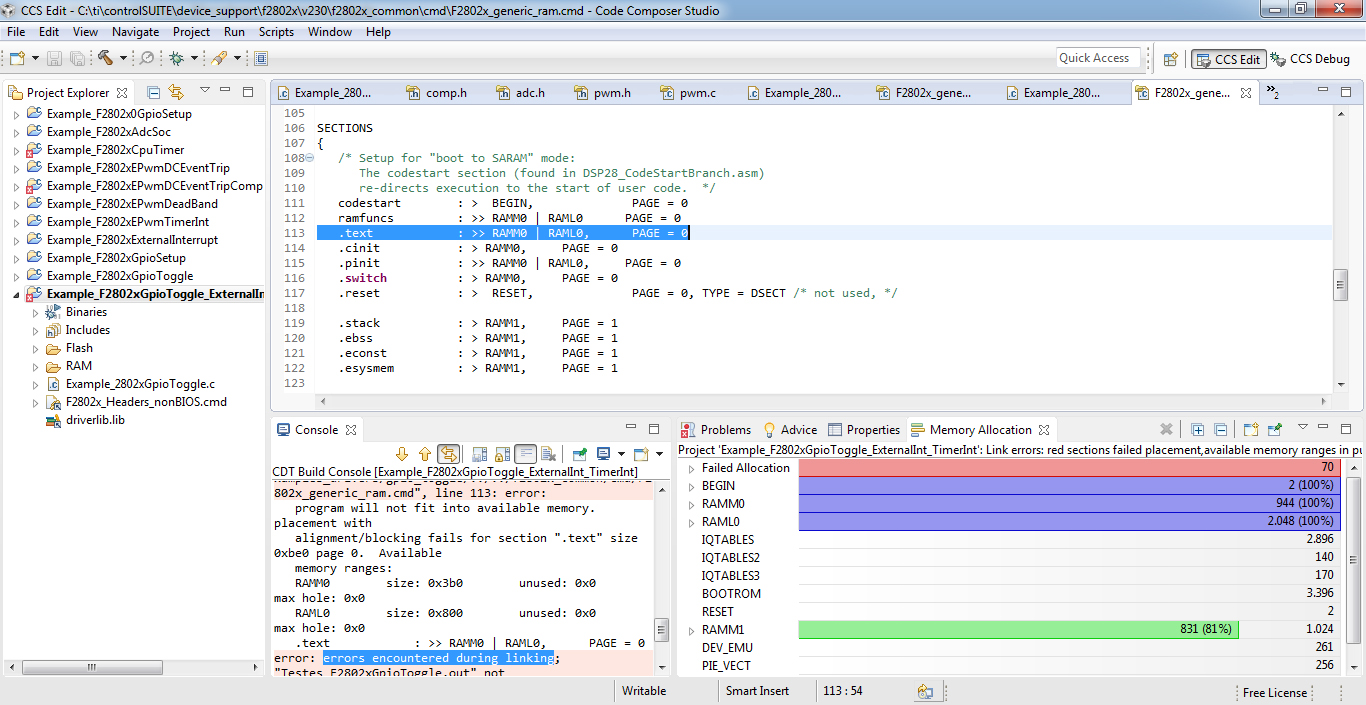
I've read in some places this forum, but still could not figure how to make more RAM available for my program. Can somebody explain this?
My RAM configuration file is attached.
/*
//###########################################################################
//
// FILE:    F2802x_generic_ram.cmd
//
// TITLE:   Linker Command File For 2802x examples that run out of RAM
//
//          This ONLY includes all SARAM blocks on the 2802x device.
//          This does not include flash or OTP.
//
//          Keep in mind that L0 is protected by the code
//          security module.
//
//          What this means is in most cases you will want to move to
//          another memory map file which has more memory defined.
//
//###########################################################################
// $TI Release: F2802x Support Library v230 $
// $Release Date: Fri May  8 07:43:05 CDT 2015 $
// $Copyright: Copyright (C) 2008-2015 Texas Instruments Incorporated -
//             http://www.ti.com/ ALL RIGHTS RESERVED $
//###########################################################################
*/

/* ======================================================
// For Code Composer Studio V2.2 and later
// ---------------------------------------
// In addition to this memory linker command file,
// add the header linker command file directly to the project.
// The header linker command file is required to link the
// peripheral structures to the proper locations within
// the memory map.
//
// The header linker files are found in <base>\F2802x_headers\cmd
//
// For BIOS applications add:      F2802x_Headers_BIOS.cmd
// For nonBIOS applications add:   F2802x_Headers_nonBIOS.cmd
========================================================= */

/* ======================================================
// For Code Composer Studio prior to V2.2
// --------------------------------------
// 1) Use one of the following -l statements to include the
// header linker command file in the project. The header linker
// file is required to link the peripheral structures to the proper
// locations within the memory map                                    */

/* Uncomment this line to include file only for non-BIOS applications */
/* -l F2802x_Headers_nonBIOS.cmd */

/* Uncomment this line to include file only for BIOS applications */
/* -l F2802x_Headers_BIOS.cmd */

/* 2) In your project add the path to <base>\F2802x_headers\cmd to the
   library search path under project->build options, linker tab,
   library search path (-i).
/*========================================================= */

/* Define the memory block start/length for the F2802x
   PAGE 0 will be used to organize program sections
   PAGE 1 will be used to organize data sections

   Notes:
         Memory blocks on F2802x are uniform (ie same
         physical memory) in both PAGE 0 and PAGE 1.
         That is the same memory region should not be
         defined for both PAGE 0 and PAGE 1.
         Doing so will result in corruption of program
         and/or data.

         The L0 memory blocks is mirrored - that is
         it can be accessed in high memory or low memory.
         For simplicity only one instance is used in this
         linker file.

         Contiguous SARAM memory blocks can be combined
         if required to create a larger memory block.
*/

MEMORY
{
PAGE 0 :
   /* For this example, L0 is split between PAGE 0 and PAGE 1 */
   /* BEGIN is used for the "boot to SARAM" bootloader mode   */

   BEGIN      : origin = 0x000000, length = 0x000002
   RAMM0      : origin = 0x000050, length = 0x0003B0
   RAML0     : origin = 0x008000, length = 0x000800
   RESET      : origin = 0x3FFFC0, length = 0x000002

   IQTABLES   : origin = 0x3FE000, length = 0x000B50     /* IQ Math Tables in Boot ROM */
   IQTABLES2  : origin = 0x3FEB50, length = 0x00008C     /* IQ Math Tables in Boot ROM */
   IQTABLES3  : origin = 0x3FEBDC, length = 0x0000AA     /* IQ Math Tables in Boot ROM */

   BOOTROM    : origin = 0x3FF27C, length = 0x000D44


PAGE 1 :

   /* For this example, L0 is split between PAGE 0 and PAGE 1 */
   BOOT_RSVD   : origin = 0x000002, length = 0x00004E     /* Part of M0, BOOT rom will use this for stack */
   RAMM1       : origin = 0x000400, length = 0x000400     /* on-chip RAM block M1 */
}


SECTIONS
{
   /* Setup for "boot to SARAM" mode:
      The codestart section (found in DSP28_CodeStartBranch.asm)
      re-directs execution to the start of user code.  */
   codestart        : >  BEGIN,              PAGE = 0
   ramfuncs         : >> RAMM0 | RAML0      PAGE = 0
   .text            : >> RAMM0 | RAML0,      PAGE = 0
   .cinit           : > RAMM0,     PAGE = 0
   .pinit           : >> RAMM0 | RAML0,     PAGE = 0
   .switch          : > RAMM0,     PAGE = 0
   .reset           : >  RESET,              PAGE = 0, TYPE = DSECT /* not used, */

   .stack           : > RAMM1,     PAGE = 1
   .ebss            : > RAMM1,     PAGE = 1
   .econst          : > RAMM1,     PAGE = 1
   .esysmem         : > RAMM1,     PAGE = 1

   IQmath           : > RAML0,     PAGE = 0
   IQmathTables     : > IQTABLES,  PAGE = 0, TYPE = NOLOAD

  /* Uncomment the section below if calling the IQNexp() or IQexp()
      functions from the IQMath.lib library in order to utilize the
      relevant IQ Math table in Boot ROM (This saves space and Boot ROM
      is 1 wait-state). If this section is not uncommented, IQmathTables2
      will be loaded into other memory (SARAM, Flash, etc.) and will take
      up space, but 0 wait-state is possible.
   */
   /*
   IQmathTables2    : > IQTABLES2, PAGE = 0, TYPE = NOLOAD
   {

              IQmath.lib<IQNexpTable.obj> (IQmathTablesRam)

   }
   */
   /* Uncomment the section below if calling the IQNasin() or IQasin()
      functions from the IQMath.lib library in order to utilize the
      relevant IQ Math table in Boot ROM (This saves space and Boot ROM
      is 1 wait-state). If this section is not uncommented, IQmathTables2
      will be loaded into other memory (SARAM, Flash, etc.) and will take
      up space, but 0 wait-state is possible.
   */
   /*
   IQmathTables3    : > IQTABLES3, PAGE = 0, TYPE = NOLOAD
   {

              IQmath.lib<IQNasinTable.obj> (IQmathTablesRam)

   }
   */

}

/*
//===========================================================================
// End of file.
//===========================================================================
*/


