This thread has been locked.

If you have a related question, please click the "Ask a related question" button in the top right corner. The newly created question will be automatically linked to this question.

F2806x Firmware Development user manual mode


Hi to all,

While following the "F2806x Firmware Development Package" user manual for implementing

an example of cpu timers I have reached the stage of choosing appropriate boot-mode for the example.

In the manual appears: "...The CPU-Timer example only requires that
the hardware be setup for Boot to SARAM mode. " (page 14 - stage 6).

I've searched all the data manual of the TMS320F2806x and more and still didn't manage to figure out

which mode to choose for this purpose -

Since the device is used with an XDS100v2 JTAG, nd connected to the MCU via a docking station
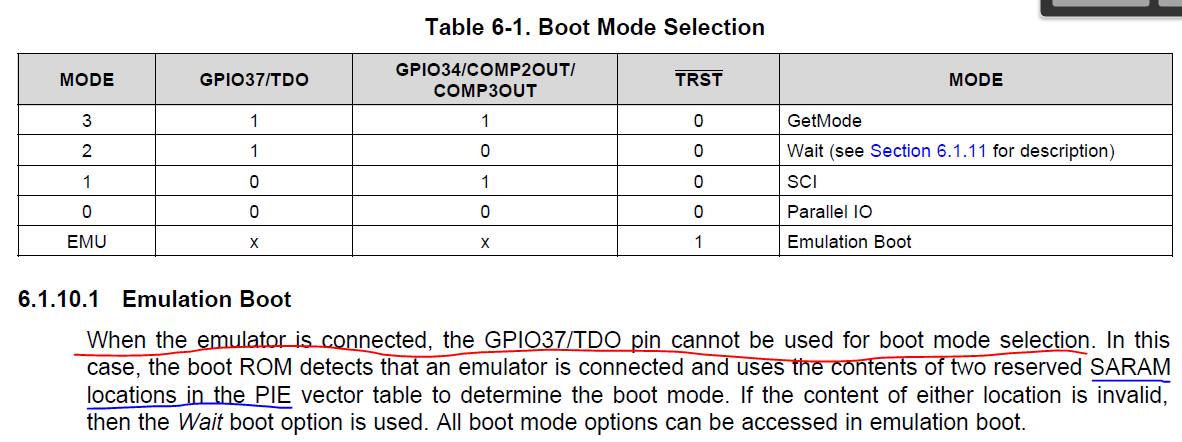
 it seems that the mode "EMU" is chosen automatically, as appears in the "6.1.10 Boot ROM" section of the data manual. (see figure)
 Therefor no other mode is available?

since no other mode refers to the SARAM - does the "boot to SARAM mode" refer to this mode?

Thanks,

Amitai
  • Amitai,

    For general debugging and running your program, the device by default when connected to the debugger will go to wait mode. From there you load your program and run it through CCS. Boot to SARAM is only if you place any code at 0x0000000 and is only available in emulation mode. More on boot modes is in the TRM: www.ti.com/.../spruh18f.pdf

    The working doesn't seem to be clear, I'll will make a note to review and clear up the dev user guide.

    Best Regards
    Chris
  • Thanks for the reply.

    After continuing reading the FW example and rereading  the TRM I found a table which mentions the

    SARAM specific mode option and the configuration needed.

    I managed successfully to fulfill all the stages of the example guide and to see the variables change,

    besides one stage which results in an error -

    What is the executable file? what does it execute? I have build the project and run the debugger, are

    there more stages needed? Trying to perform these stages results in the error -

    " No source available for "0x3ff75c" "


    From reading the help topic "Program Load and Program Reload" it seems this stage is done

    automatically in this case. So I guess this also should be fixed? or maybe there's a difference between CCS 5 and
    6?

    Thanks,

    Amitai

  • Amitai,

    I'm glad you got it up and running!

    The executable file is referring to the ".out" file that is generated from the build step. You are correct though, in pretty much most cases, when you run the debugger, this step is automatically handled. Sometimes the debugger doesn't automatically load the code and then this step would be applicable. I'll append the note to also put clarification on this step.

    Otherwise, if you have the code running, then don't worry about step 7! Happy coding!

    Best Regards
    Chris
