This thread has been locked.

If you have a related question, please click the "Ask a related question" button in the top right corner. The newly created question will be automatically linked to this question.

f2806x boot loader

Other Parts Discussed in Thread: CONTROLSUITE

Dear Sir or Madam,

I'm using the DRV8301-69M kit with f2806x ISO controlCARD and want to download my application with serial_flash_programmer.exe .

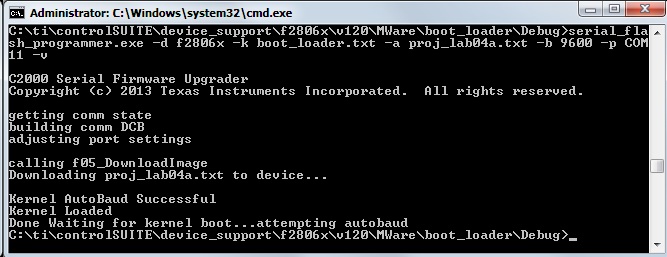
Therefore I compiled the boot_loader example from C:\ti\controlSUITE\device_support\f2806x\v120\MWare\boot_loader converted it with hex2000.exe into hex format, did the same with my application and changed the dip switches on the controller card to sw1/1 on, sw1/2 off, sw3/1off and sw3/2 on. I switched power off and on to get the controller into the SCI boot mode and connected the communication cable to J1. Then I started serial_flash_programmer.exe -d f2806x -k boot_loader.txt -a myapplication.txt - 9600 -p COM11 -v .

I get the following messages but the controller doesn't start my application.
Any help would be great.

  • Hi,

    Glad to see you are using the serial flash programmer. However, the serial flash programmer will not work with the boot_loader example. The boot_loader example is an example which uses the USB and not the SCI.

    Instead, please use the f2806x_flash_kernel example with the serial flash programmer. After loading the kernel successfully with the serial flash programmer, the kernel will execute and will perform an autobaud function with the PC still running the serial flash programmer. 

    Please see 

    sal

  • Hi Sal,

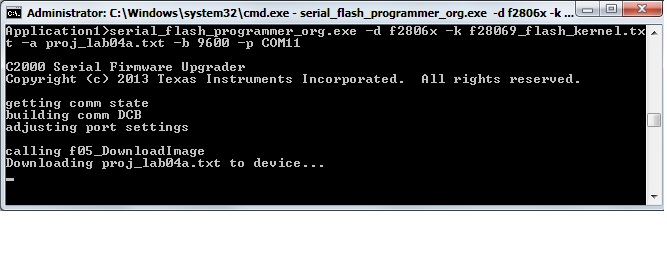
    thank you for the information. Unfortunatelly it' still not working. Your attached file and the information from TMS320x2806x Piccolo (Rev. E)  (spruh18e.pdf) is my guide line to solve this problem. I took the 'C:\ti\controlSUITE\device_support\f2806x\v140\F2806x_examples_ccsv5\f28069_flash_kernel' example and compiled it into f28069_flash_kernel.txt and tried to download it to the device. But the serial_flash_programmer.exe hang up as you can see in the picture.

    Any help would be great.

  • Hi Sal,
    I have some additional information. I used the source of serial_flash_programmer and added some outputs with MS Visual Studio. There I could see that the file f28069_flash_kernel.txt was downloaded correctly to the controller. It seams to me as if the controller doesn't make a reboot. So the serial_flash_programmer program waits endles for the second autobaud from the controler board.
  • What GPIOs are you using for SCI boot? Which GPIOs are used by the sci kernel?

    When the process hangs, you can pause the serial flash programmer and see where it is in the program. Also, you can then connect JTAG to the f2806x and see where it is hanging. If the kernel is loaded properly, you can pause the C28x, add the symbols of the kernel (.out) and see where it is hanging. This will help you debug the problem.

    sal
  • I'm using GPIO28 and GPIO29 for SCI boot and for sci kernel.

    Debugging f28069_flash_kernel I found out what happens. When then function Flash_Program is called for the first time (it's in Shared_boot.c line 147) the return code is 12. So I guess programming the flash didn't work.
  • Is there a chance that your device is locked with the CSM?

    sal
  • I guess it isn't. From address 0x3F 7FF8 to 7FFF is all set to 0xFF. The same content is at 0x00 0AE0 to 0AE7. The content of address 0x00 0AEF is 0x0070.
  • What is your flash application? The application you are downloading must be entirely in flash. This programmer has been tested and should work. Can you describe to me your step by step process.

    If you have Visual Studio, you can debug the process by stepping through the serial flash programmer on the PC, or the kernel in CCS. Do you have Visual Studio?

    sal