This thread has been locked.

If you have a related question, please click the "Ask a related question" button in the top right corner. The newly created question will be automatically linked to this question.

Instaspin Lab 5f - When Iq current limit is reached the motor control stops

Other Parts Discussed in Thread: SN74AUP1G74

I am working in Lab 5f - comparing the InstaSPIN-MOTION speed controller against the traditional PI controller. The hardware platform that I am using is the hvkit with the F28069 control card.

I am running my motor with a load. Each time that the current (Iq) reaches the limit defined in my user.h file (USER_IQ_FULL_SCALE_CURRENT_A) the controller stops the motor. I would like to modify this lab so that the controller tries to achieve the requested speed but if unable to do so due to the Iq limit, that it will continue to run the motor at the max allowed Iq limit without stopping. Where should I start?

When I was initially using the InstaSPIN-MOTION GUI to evaluate my motor, I was able to set a target speed and then when the Iq limit was reached the controller would continue to run the motor at the max Iq limit even if the target speed was not achieved. Is there a better Lab/Project that I should start with to implement this behavior?

  • it should continue to saturate the speed control output to the USER_MOTOR_MAX_CURRENT setting

    USER_IQ_FULL_SCALE_CURRENT should not be changed from the default parameters. It should be >= 0.5 * USER_ADC_FULL_SCALE_CURRENT
  • Thanks for the reply. I had changed the USER_IQ_FULL_SCALE_CURRENT to a higher value than the default.

    I changed the USER_IQ_FULL_SCALE_CURRENT back to the default (10.0) and then I also set the USER_MOTOR_MAX_CURRENT at 5.0 Amps.
    With these settings the speed control output does saturate and Iq hovers around the USER_MOTOR_MAX_CURRENT. This is the behavior that I am looking for. However if I set the USER_MOTOR_MAX_CURRENT at anything greater than ~6 Amps, then the controller stops the motor if Iq is ever reached.

    If I am understanding correctly, I should be able to set USER_MOTOR_MAX_CURRENT as high as 10 without the adverse effect of the motor control halting. Correct?
  • from the SW side that's correct.

    I don't think the controller is stopping the motor. Did you check the fuse? Or perhaps the over current setting on the HVKIT hardware/software?
  • Yes, I did check the fuse. It is OK.

    I am not familiar with any over current setting on the HVKIT hardware/software. Where do I find that? How is it changed?

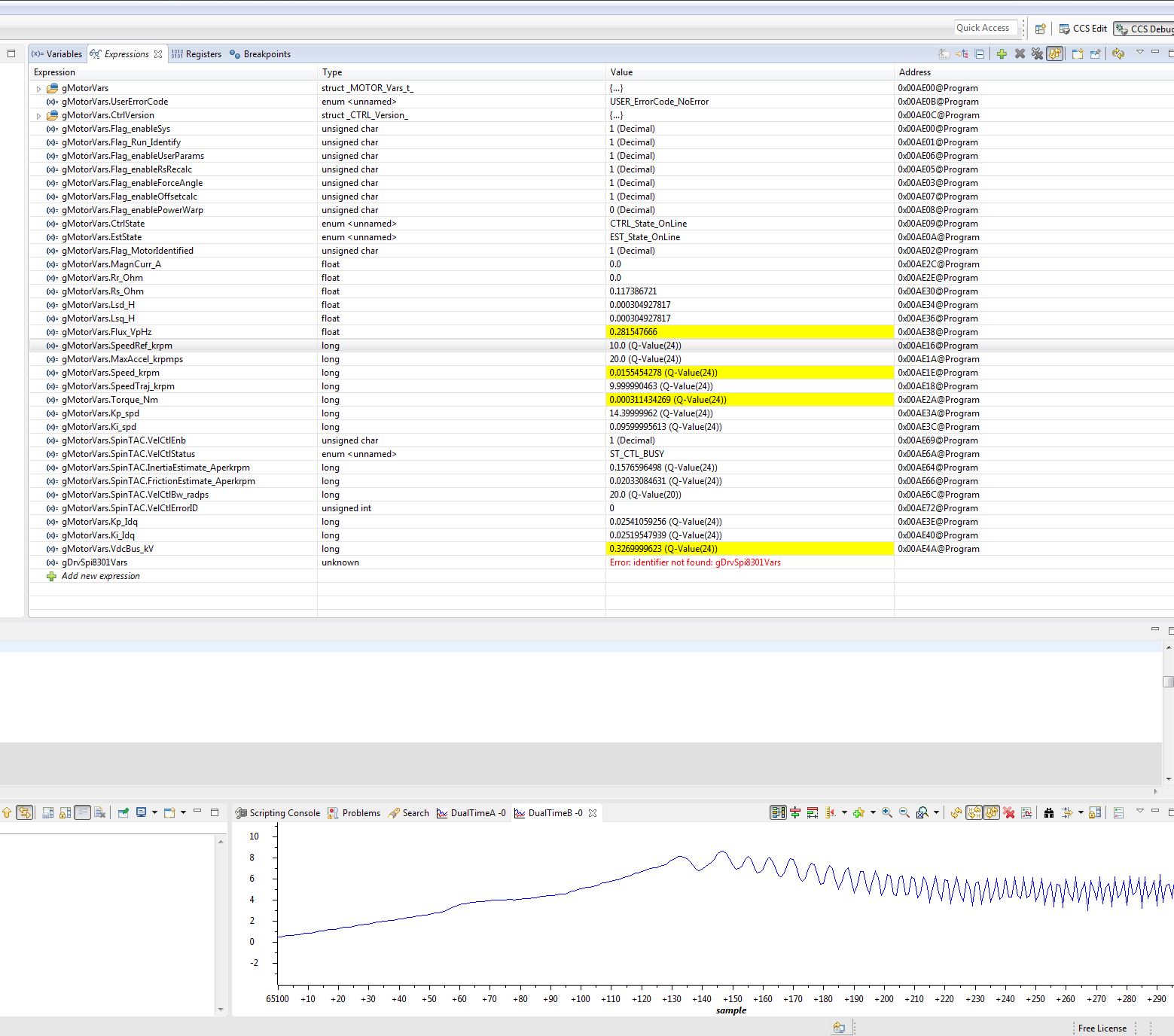
    The behavior that I am seeing is that the motor just stops without any effect to the gMotorVars structure. I have included a screen shot of the gMotorVars structure as well as a graph of Iq.  When this occurs I am unable to re-start the motor unless I exit the debug session and start over, and then the controller will run the motor again.

  • Have 3 questions as below.
    1. Can the traditional PI controller work well on the same platform?
    2. Did you set correct inertia for the SpinTAC speed controller? or use lab5c to do inertia identification?
    3. Why the gMotorVars.SpinTAC.VelCtlBw_radps is equal to 0? You need to set gMotorVars.SpinTAC.VelCtlBw_radps to _IQ(10.0) to _IQ(80.0) based on requested response. You can set "#define USER_SYSTEM_BANDWIDTH (20.0)" in user.h.
  • Have two questions as below.
    1. Can the traditional PI controller work well on the same platform?
    2. Did you set correct inertia for the SpinTAC speed controller? or use lab5c to do inertia identification?

    Change gMotorVars.SpinTAC.VelCtlBw_radps to improve response. Suchas, set "#define USER_SYSTEM_BANDWIDTH (20.0)" in user.h.
  • Can your testing work well when the load is small? If yes, maybe, the hvkit enter the current protection to stop the motor.

    Limit to the current sample circuit of hvkit, can't set USER_MOTOR_MAX_CURRENT up to 10.0A, which maybe cause the current sample saturation because the maximum sample current of ADC is limit to 19.89, the USER_MOTOR_MAX_CURRENT is less than 19.89/2.0/SQRT(2.0). So you can try two methods to improve the output current of hvkit.
    1. Decrease current shunt resistor from 20mOHM to 10mOHM, or other samll resistance.
    2. Decrease amplify gain which need to change many resistors, such as increase R14/R16, R17/R33, R34/R41, from 220(OHM ) to 470(OHM), or other large resistance.

    And need to change J7 to 2-3 and adjust VR1 to increase comparator reference for hardware current protection, or change J7 to 1-2 directly.
  • 1. The traditional PI controller acts the same way as the spintac in that the blender stops running when Iq approaches the limit.
    2. Yes, I did go through lab5c to the do the inertia identification.

    The USER_SYSTEM_BANDWIDTH is set to 20.0
  • You are correct. It was the current protection that is stopping the motor.

    I would like to increase the maximum sample current as you suggest. I am going to change the shunt resistors from 20mOHM to 10mOHM. What accompanying changes will I need to make in the software?

    Also, I noticed that there is a hardware current limit protection circuit that can shutdown the inverter as well as a software current limit protection that can also shut down the inverter. Both use the "OCP" signal to trigger the shutdown. I would like to be able to clear the fault while I am in debug mode so that I can start running the motor again without exiting debug mode and then restarting. What variables/flags do I need to clear/set in order to clear the fault?
  • 1. If change shunt resistor from 20(mOHM) to 10(mOHM), you need to change scale and maximum current in user.h as below

    #define USER_IQ_FULL_SCALE_CURRENT_A (20.0) // 20.0/10mOHM Example for hvkit_rev1p1 typical usage
    #define USER_ADC_FULL_SCALE_CURRENT_A (39.78) // 39.78/10mOHM hvkit_rev1p1 current scaling

    2. You need to add below 3 lines code to clear faults from flip flop (U3, SN74AUP1G74), and then enable the PWM.
    GPIO_setLow(obj->gpioHandle,GPIO_Number_9);
    GPIO_setLow(obj->gpioHandle,GPIO_Number_9);
    GPIO_setHigh(obj->gpioHandle,GPIO_Number_9);