This thread has been locked.

If you have a related question, please click the "Ask a related question" button in the top right corner. The newly created question will be automatically linked to this question.

C2000 launchpad with DRV8301 for 3 phase motor run

Other Parts Discussed in Thread: MOTORWARE, DRV8301, TMS320F28027, LAUNCHXL-F28027F, INSTASPINUNIVERSALGUI, BOOSTXL-DRV8301, TMS320F28027F

Hi,

I am running all new installation on windows 10 and GUI doesn't work for me

see below:
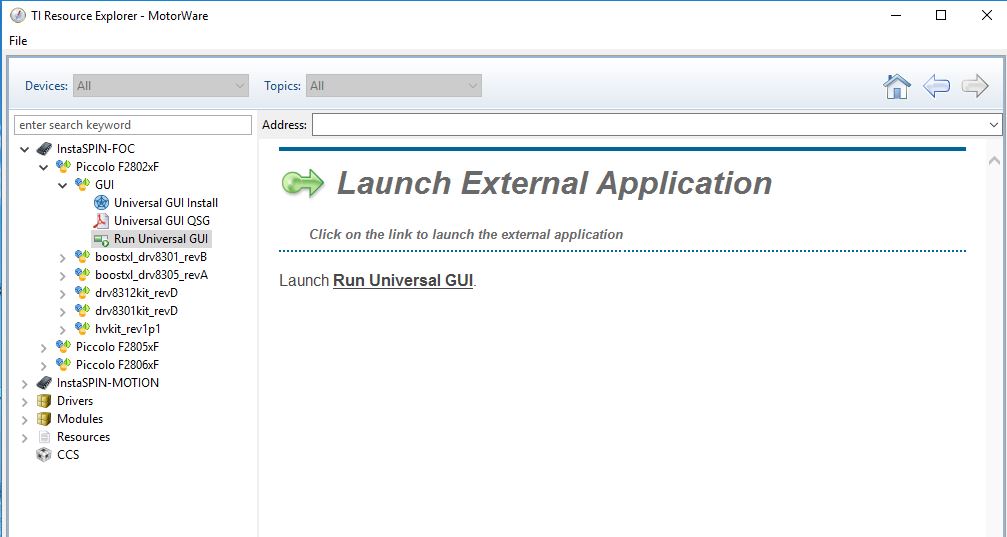
And then I get this:
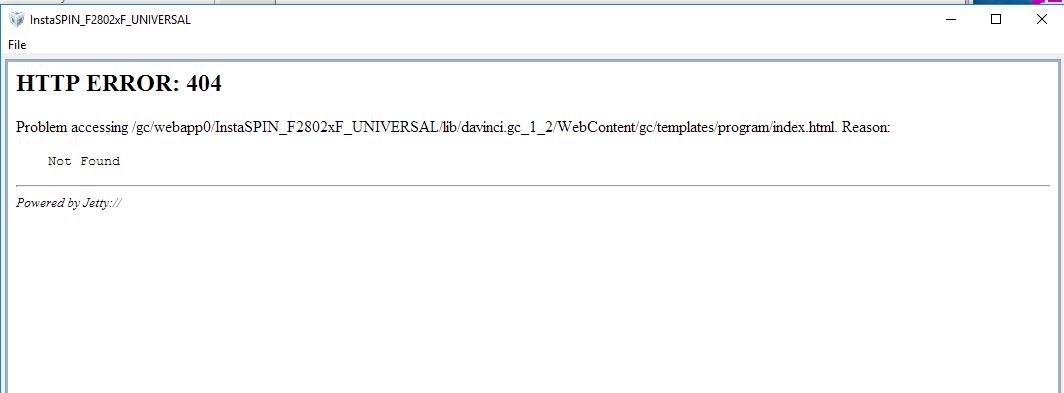
Why?

Thanks,

Roee

  • I saw a similar complaint to this recently
    let me move your thread to the GUI Composer team on the CCS forum
  • Hi,

    I did un-install to all CCS environment and TI and re-installed

    This fixed the problem

    But I can't RUN GUI because there is no .out file to the WEB application of the Motorware

    See below - I open Motorware

    And then I get this

    And GUI is BAD - since no out file -> how should I get it? I want general 3-phase motor RUN

    Thanks for any help

    If the file was OK I wouldn't have all the red marks

  • per the user guide you need to create a .out in CCS using MotorWare and the projects for your inverter and controller combination
  • now that you got the GUI to work I'll move this back over to InstaSPIN forum
  • Can you send me CCS code example that I can open with CCS ? I couldn't find how to do it
    Thanks
  • you have to build it for your combination of HW and your motor

    read through this first
    C:\ti\motorware\motorware_1_01_00_16\docs\guis\universal\qsg_gui_universal.pdf

    the lab guide you follow is at:
    C:\ti\motorware\motorware_1_01_00_16\docs\labs\instaspin_labs.pdf
  • Thanks,
    I have to admit that this is far away from straight forward
    I have spent all day trying to run it
    While I remember that year ago it runs for me just after installing the Motorware - and the example worked and spin my motor without doing anything... this is strange - probably it loaded some default .out code to chip

    Any way Still doesn't work
    I have looked over the labs - I need probably something like Lab 05b - since I need DRV8301 chip and I just want to run 3 phase motor.
    I don't want to use the hall-sensors - and I know that instantspin can overcome these sensors (by measuring with accurate ADC to actual motor place)
    so I need to import Lab 05b and Build it - in order to create the .out file correct ?
    then put the file in the here
    C:\ti\guicomposer\webapps\InstaSPIN_F2802xF_UNIVERSAL
    correct?
    Thanks,
    Roee
  • And then I get this:

    Restarting Program Model...
    Initializing target : C:\ti\guicomposer\eclipse\workspace\.metadata\.plugins\com.ti.binding.program\appConfig.ccxml
    Connecting target: Texas Instruments XDS100v2 USB Debug Probe/C28xx
    C28xx: GEL Output:
    Device Calibration not complete, check if device is unlocked and recalibrate.
    C28xx: Flash Programmer: Warning: The configured device (TMS320F28027), does not match the detected device (). Flash Programming operations could be affected. Please consider modifying your target configuration file.

    Loading program: C:\ti\guicomposer\webapps\InstaSPIN_F2802xF_UNIVERSAL\appProgram.out
    C28xx: GEL Output:
    Device Calibration not complete, check if device is unlocked and recalibrate.
    C28xx: Loader: One or more sections of your program falls into a memory region that is not writable. These regions will not actually be written to the target. Check your linker configuration and/or memory map.

    C28xx: GEL Output:
    Device Calibration not complete, check if device is unlocked and recalibrate.


    Which unlocked ??
    although I have taken all defaults in example and did not change anything
    Thanks,
    Roee
  • Can someone help on this

    Or have a working code to run 3 phase motor?

    Using DRV8301 and c2000 launch pad (F28027F)

    Thanks

    Roee

  • you have to compile a project with some information based on your motor. This is explained in the documentation (I know, it's a lot of pages).

    use proj_lab02c for motor ID.
    let's get the motor ID'd first

    at a minimum you will need to set-up the USER_MOTOR section with the POLES, FLUX_EST, RES_EST_CURRENT, IND_EST_CURRENT


    can you also verify that you have LAUNCHXL-F28027F with emphasis on the F
  • First thanks for your help

    Second what does this mean:

    Device Calibration not complete, check if device is unlocked and recalibrate.
    C28xx: Flash Programmer: Warning: The configured device (TMS320F28027), does not match the detected device (). Flash Programming operations could be affected. Please consider modifying your target configuration file.

    Loading program: C:\ti\guicomposer\webapps\InstaSPIN_F2802xF_UNIVERSAL\appProgram.out
    C28xx: GEL Output:
    Device Calibration not complete, check if device is unlocked and recalibrate.
    C28xx: Loader: One or more sections of your program falls into a memory region that is not writable. These regions will not actually be written to the target. Check your linker configuration and/or memory map.

    Also where is the file to configure the parameters you have mentioned ?

    About the lab - does it measure the actual parameters of the motor after I connect it ?

    If yes where is the output ?

    If there is a chance I can share my screen with you online - and you will show me how to start with Team viewer or something like this

    Thanks,

    Roee

  • Hi,
    Thanks for your help
    Ok found this path:
    C:\ti\motorware\motorware_1_01_00_16\sw\modules\fast\src\32b
    so I guess the
    userParams.h are my parameters
    but in the file I see that I need to put this flag:
    _USERPARAMS_H_
    in order to compile with my parameters

    Also when I put the output file and run it I get this:

    Initializing target : C:\ti\guicomposer\eclipse\workspace\.metadata\.plugins\com.ti.binding.program\appConfig.ccxml
    Connecting target: Texas Instruments XDS100v2 USB Debug Probe/C28xx
    C28xx: GEL Output:
    Device Calibration not complete, check if device is unlocked and recalibrate.
    C28xx: Flash Programmer: Warning: The configured device (TMS320F28027), does not match the detected device (). Flash Programming operations could be affected. Please consider modifying your target configuration file.

    Loading program: C:\ti\guicomposer\webapps\InstaSPIN_F2802xF_UNIVERSAL\appProgram.out
    C28xx: GEL Output:
    Device Calibration not complete, check if device is unlocked and recalibrate.
    C28xx: Loader: One or more sections of your program falls into a memory region that is not writable. These regions will not actually be written to the target. Check your linker configuration and/or memory map.

    meaning the device doesn't match
    where do I configure the C2000 board ?
    Thanks,
    Roee
  • Ok Getting to it.
    Found and declare this:

    #elif (USER_MOTOR == Roee1)
    #define USER_MOTOR_TYPE BLDC
    #define USER_MOTOR_NUM_POLE_PAIRS (6)
    #define USER_MOTOR_Rr (NULL)
    #define USER_MOTOR_Rs (0.4110007)
    #define USER_MOTOR_Ls_d (0.0007092811)
    #define USER_MOTOR_Ls_q (0.0007092811)
    #define USER_MOTOR_RATED_FLUX (0.03279636)
    #define USER_MOTOR_MAGNETIZING_CURRENT (NULL)
    #define USER_MOTOR_RES_EST_CURRENT (1.0)
    #define USER_MOTOR_IND_EST_CURRENT (-1.0)
    #define USER_MOTOR_MAX_CURRENT (5.0)
    #define USER_MOTOR_FLUX_EST_FREQ_Hz (20.0)


    I think this is enough to start.
    Now how do I compile with my flag ? (Roee1)

    Thanks
    Roee
  • Roee,
    you are making progress. Keep reading the InstaSPIN_labs.pdf document

    you need to build proj_lab02c with your changes to user.h

    you will then load to your Launchpad using CCS and change the flags/variables using the CCS Expressions View to start the ID process.

    Once you have proven that work we can look at getting the INSTASPINUNIVERSALGUI to work correctly.
  • Ok,

    Where is the Build logfile is it here:

    C:\ti\motorware\motorware_1_01_00_16\sw\solutions\instaspin_foc\boards\hvkit_rev1p1\f28x\f2806xF\projects\ccs5\proj_lab02c\Release

    the XML file: proj_lab02c_linkInfo

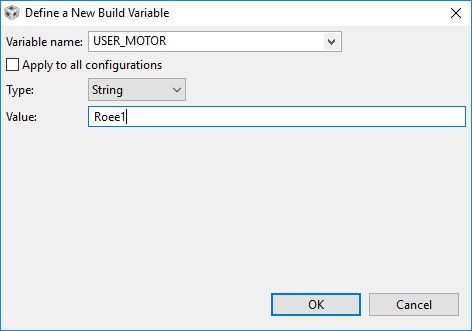
    I did put variable here:

    But in XML file I don't see my variable Roee1 why ?

    Can I try to upload this now to webapplication ?

    Also how do I know that this lab is good for F28027F chip ?

    Thanks,

    Roee

  • what in the world are you trying to do?

    have you considered following the instructions? They don't mention anything about creating a new build variable or touching an xml file.

    F28027F is InstaSPIN-FOC enabled. InstaSPIN-FOC projects are built using MotorWare. If you have a LAUNCHXL-F28027F and BOOSTXL-DRV8301 you will use the projects at:
    C:\ti\motorware\motorware_1_01_00_16\sw\solutions\instaspin_foc\boards\boostxldrv8301_revB\f28x\f2802xF\projects\ccs5
  • Ok Understood and done the appProgram.out
    Now need to upload it to my board
    I will try to do so
    Thanks,
    Roee
  • Ok,

    Almost read everything

    Now I am sure I am doing ok.

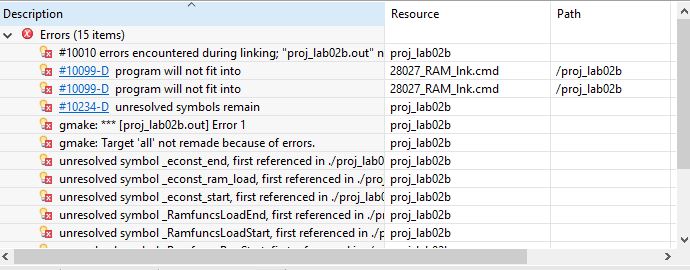
    However when I build I get errors:

    Most of them that program will not fit ??

    I did change in the build section to my device which is TMS320F28027F (that BTW is not in the list ??!)

    Any way I get errors of program will not fit ?

    Should I change this ?

    Thanks,

    Roee

  • don't change any build settings.

    just follow the instructions.

    import the project.
    update the user.h
    build the project, launch debugger, and connect to target
  • I am almost sure I am doing all correct.
    However it doesn't load it.
    I am using this path:

    C:\ti\guicomposer\webapps\InstaSPIN_F2802xF_UNIVERSAL\InstaSPIN_UNIVERSAL.exe
    And put the correct :appProgram.out file (I think)
    Can I send you my appProgram.out file -> to check that you can load it to C2000 launchpad ?

    I am not sure by now if I have HW failure
    -- Never giving up :)

    Thanks,
    Roee
  • you already have CCS open to build the project. Please follow the InstaSPIN_labs.pdf to see if you can connect to the target and load the program. if so, try to run it following proj_lab02c instructions.

    lets worry about the GUI part later. (it likely needs to be reinstalled)

    I can certainly send you a .out, though you should be able to build it yourself.