This thread has been locked.

If you have a related question, please click the "Ask a related question" button in the top right corner. The newly created question will be automatically linked to this question.

ControlSuite Setup Wizard "ended prematurely"

Other Parts Discussed in Thread: CONTROLSUITE

I tried to install the actual ControlSUITE with F28335 support unter Windows 7 32Bit-Pro. After choosing the required packages and clicking 'next' I got the following error screen with "The ControlSuite Setup Wizard ended prematurely".
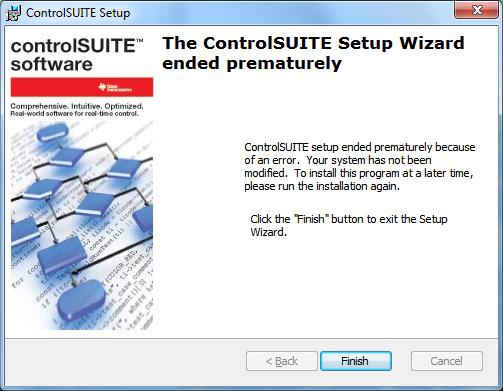
I tried to install the software under the "Windows XP" compatibility mode and Admin-priviliges but the problem still exists. Now I've got no further ideas to get it work...

Does anybody have the same problem or a solution/workaround for it?

Thanks in advance, Andreas

  • Andreas,

    What packages are you installing? If it is more than just the F28335 device support package, can you try to isolate one specific package that is causing the problem (ie. one specific library or one specific device support package)?


    -Michael

  • Dear Michael,

    thanks for your reply. I tested the installer with several different package combinations. The result is always the same... After choosing the packages and clicking on 'Next' the screen shown above appears. (No dialog with the packages and the drive space like in the "normal" behaviour e.g. under Windows XP).

    Is it possible the get the packages in a zip-file and install them manually?

    Kind Regards, Andreas

  • aspr,

    We started doing this when others had install issues. The zip file resides here

    http://www.ti.com/lit/zip/sprca85

    and you need to extract to C:\

    However, this is still the last release, and has not been updated to the new set of source that was released on Tuesday.  We expect to have this zip updated with the latest next Monday/Tuesday.  Is there something specific you are looking for we can extract and send?


  • Chris,

    thanks for the link. Unfortunately I need the release from last tuesday because I want to use a Delfino DSP with the controlSuite.

    I could installed the controlSuite on another PC some minutes ago and now I would try to copy the whole folder to another machine. Is it possible to install the CS simply by copy the folder to the same location? Or are there some other adaptations necessary?

    Another (offtopic) question: Do you plan a HVPM_Sensored_2833x-project for the HVMotorCtrl+PfcKit ?
    At the moment there are only  sensorless projects for 2833x in den path .

    Kind regards, Andreas

  • 1. The zip file is being updated with the latest image. We are hoping it replicates to the server today/tomorrow.

    2. Yes, you can simply copy over the entire ti/controlSUITE folder from one install to another

    3. We use the QEP throughout build levels 3-5, so in essence you have a working sensored example included in the sensorless projects.  Perhaps we need to call this out so it's obvious on first inspection.  Read through the documentation here C:\ti\controlSUITE\development_kits\HVMotorCtrl+PfcKit_v1.3\HVPM_Sensorless_2833x\~Docs


  • I'll give this a try as well - I had an update fail with an error message, "Downloaded file corrupt'" or something like that.  I think the PC may have gone to sleep while the file was downloading.

    When I try to do an update now - it comes back and says I have the latest version even though I don't.  I verified that by downloading Control Suite onto another machine and seeing some new directories and such.

    Thanks,
    jwest


  •  John,

    We have solved the issue and will be doing a new release on Tuesday.  This should fix all update issues for everyone. Fingers crossed.


  • Chris,

    AOK.

    You guys thought of putting this on a CVS or SVN server and just letting us update on our own so to speak?

    Thanks,
    jwest


  • Hi guys, I'm sorry, I still have the same problem with premature installation ending. Using Win 7 Home Premium 32bits SP1. Have the latest zip file (20 Dec 2011) unzipped in C:\TI_ControlSuite and the latest CCS is already installed. Could you please help me with this? Thanks in advance.