


Other Parts Discussed in Thread: CONTROLSUITE
Hello,
I am attempting to create code using Simulink for my launchpad f28027 that will determine the RMS of an incoming voltage. I've posted an image of my code:
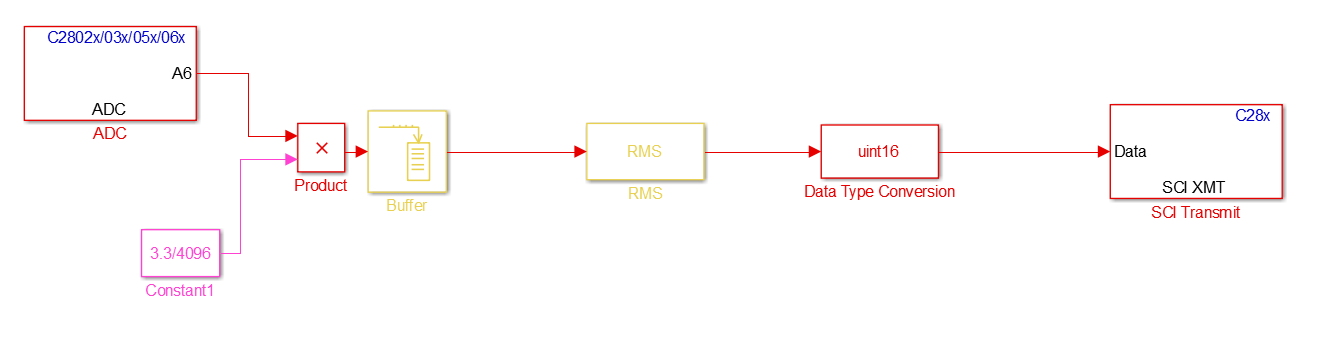
The code samples from an ADC block, stores the values in a buffer and sends the vector into the RMS block, which should return the RMS of the sampled voltage. In order to get sensible values, I need to have a large enough buffer of points to provide to the RMS block. However, I have found that I cannot set the buffer size to anything larger than 256 samples (I am hoping for at least 1000 samples). As soon as I increase the buffer size to anything greater, I get an error, which terminates the build and tells me that it "Failed to generate all binary outputs." In going back through the diagnostics, I think I have found the error that is terminating the build. It shows up as one of these two:
Error 1:
<Linking>
"C:/MATLAB/SupportPackages/R2016a/toolbox/target/supportpackages/tic2000/src/c28027.cmd", line 26: error:
   program will not fit into available memory.  run placement with
   alignment/blocking fails for section ".ebss" size 0x18bc page 1.  Available
   memory ranges:
   RAMM0M1      size: 0x7fe        unused: 0x7fe        max hole: 0x7fe
Error 2:
<Linking>
"C:/MATLAB/SupportPackages/R2016a/toolbox/target/supportpackages/tic2000/src/c28027.cmd", line 72: error:
   program will not fit into available memory.  run placement with
   alignment/blocking fails for section ".stack" size 0x200 page 1.  Available
   memory ranges:
   RAMM0M1      size: 0x7fe        unused: 0x34         max hole: 0x34
People have recommended booting from flash and updating the linker file. I have checked the "Boot from flash" option in the build parameters of the model configuration and it does not seem to make any difference. The other recommendation I got was to update the linker file. I found the linker file and read through some of the documentation online and I am finding it very difficult to understand what changes I need to make and how to make them. Could someone possibly explain how to edit the file to accommodate approximately 1000 samples? I have posted a copy of my linker file below.
Linker File:
MEMORY
{
PAGE 0:
    BEGINRAM:    origin=0x0, length=0x2
    PRAML0:  origin=0x8000, length=0x1000
    OTP:     origin=0x3d7800, length=0x400
    FLASH:   origin=0x3f0000, length=0x7ff6
    BEGINFLASH:  origin=0x3f7ff6, length=0x2
    CSM_PWL:     origin=0x3f7ff8, length=0x8
    IQTABLES:    origin=0x3fe000, length=0xb50
    IQTABLES2:   origin=0x3feb50, length=0x8c
    IQTABLES3:   origin=0x3febdc, length=0xaa
    BOOTROM:     origin=0x3ff27c, length=0xd44
    RESET:   origin=0x3fffc0, length=0x2
    VECTORS:     origin=0x3fffc2, length=0x3e
PAGE 1:
    RAMM0M1:     origin=0x2, length=0x7fe
}
#if BOOT_FROM_FLASH
SECTIONS
{
    .vectors:    load = 0x000000000
    .text:   > FLASH, PAGE = 0
    .switch:     > FLASH, PAGE = 0
    .bss:    > RAMM0M1, PAGE = 1
    .ebss:   > RAMM0M1, PAGE = 1
    .far:    > RAMM0M1, PAGE = 1
    .cinit:  > FLASH, PAGE = 0
    .pinit:  > FLASH, PAGE = 0
    .const:  > FLASH, PAGE = 0
    .econst:     > FLASH, PAGE = 0
    .reset:  > RESET, PAGE = 0, TYPE = DSECT
    .data:   > RAMM0M1, PAGE = 1
    .cio:    > RAMM0M1, PAGE = 1
    .sysmem:     > PRAML0, PAGE = 0
    .esysmem:    > RAMM0M1, PAGE = 1
    .stack:  > PRAML0, PAGE = 0
    .rtdx_text:  > FLASH, PAGE = 0
    .rtdx_data:  > RAMM0M1, PAGE = 1
    IQmath:  > FLASH, PAGE = 0
    codestart:   > BEGINFLASH, PAGE = 0
    csmpasswds:  > CSM_PWL, PAGE = 0
    csm_rsvd:    > PRAML0, PAGE = 0
    ramfuncs:    LOAD = FLASH,
        RUN = PRAML0,
        LOAD_START(_RamfuncsLoadStart),
        LOAD_END(_RamfuncsLoadEnd),
        RUN_START(_RamfuncsRunStart),
        PAGE = 0
    IQmathTables:    > IQTABLES, PAGE = 0 , TYPE = NOLOAD
    IQmathTables2:   > IQTABLES2, PAGE = 0 , TYPE = NOLOAD
    IQmathTables3:   > IQTABLES3, PAGE = 0 , TYPE = NOLOAD
}
#else
SECTIONS
{
    .vectors:    load = 0x000000000
    .text:   > PRAML0, PAGE = 0
    .switch:     > PRAML0, PAGE = 0
    .bss:    > RAMM0M1, PAGE = 1
    .ebss:   > RAMM0M1, PAGE = 1
    .far:    > RAMM0M1, PAGE = 1
    .cinit:  > PRAML0, PAGE = 0
    .pinit:  > PRAML0, PAGE = 0
    .const:  > RAMM0M1, PAGE = 1
    .econst:     > RAMM0M1, PAGE = 1
    .reset:  > RESET, PAGE = 0, TYPE = DSECT
    .data:   > RAMM0M1, PAGE = 1
    .cio:    > RAMM0M1, PAGE = 1
    .sysmem:     > RAMM0M1, PAGE = 1
    .esysmem:    > RAMM0M1, PAGE = 1
    .stack:  > RAMM0M1, PAGE = 1
    .rtdx_text:  > PRAML0, PAGE = 0
    .rtdx_data:  > RAMM0M1, PAGE = 1
    IQmath:  > PRAML0, PAGE = 0
    codestart:   > BEGINRAM, PAGE = 0
    csmpasswds:  > CSM_PWL, PAGE = 0
    csm_rsvd:    > PRAML0, PAGE = 0
    ramfuncs:    > PRAML0, PAGE = 0
    IQmathTables:    > IQTABLES, PAGE = 0 , TYPE = NOLOAD
    IQmathTables2:   > IQTABLES2, PAGE = 0 , TYPE = NOLOAD
    IQmathTables3:   > IQTABLES3, PAGE = 0 , TYPE = NOLOAD
}
#endif
Thank you very much in advance for all of your help!
All the best,
Eric
