This thread has been locked.

If you have a related question, please click the "Ask a related question" button in the top right corner. The newly created question will be automatically linked to this question.

TMS320F28377D: SCI Peripheral: How the start bit is synchronized if an external transmitter is sending continuous stream of frames

Hello Team,

I have a customer who is needing further explanation on how the the start bit is synchronized if an external transmitter is sending continuous stream of frames (assuming that both micro-controllers are setup in Asynchronous mode and NOT in multiprocessor modes)

" The main thing I am trying to understand:  How does the Receiver differentiate between Start bit and any other Data bit in a Frame when SCI is setup as regular UART and external Transmitter is sending a continuous stream of Frames without any delay between two successive message Blocks.

Case 1:

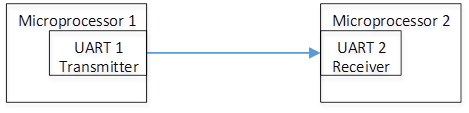
In the below attached diagram, if the UART 2 powers up first and starts listening and then the UART 1 powers up and starts transmitting, then there should not be any issue on detecting the Start bit since line was Idle and then Receiver detects four consecutive SCICLK periods of zero on the line. From this point on, the UART 2 Receiver should be able to read continuous stream of Frames without any issue.

 Case 2:

Now, if the UART 1 powers up first and starts transmitting continuous stream of frames, when the UART2 powers up, how does it differentiate a Start bit from a random Data bit since line is never Idle for any amount of time?   

Note:  I have started on a project and inherited a similar implementation.  The development team has verified that the driver works even when they break the communication link during the transmission, the Receiver somehow is able to synchronize with start of Frame.  But no one quite understands how?  In case 2, it seems that the Receiver should continuously encounter Frame Overrun errors but in reality it does not.  I will really appreciate if you can provide an explanation for this behavior. "

Thank you for your assistance with this.

Sincerely,

Kishen

  • Hello Team,

    Is there any reference you can point me to to understand how the Receiver is able to synchronize with start of Frame when in non-idle mode?

    Thank you for your time.

    Kishen
  • Kishen,

    The case2 you described could be problematic.  UART #2 will take the first low bit it sees after the SCI is enabled as the START bit.  It will likely get some error however in the frame, for example missing STOP bit or parity error if in use, etc.  So, UART #2 will know that something is wrong.  It will not sync up until there is some quiet time on the bus.  This is the UART protocol.  It is not designed for hot-plug into an active bus.  The connecting node can get out of sync, as you indicated.

    Regards,

    David

  • Hello David,

    Thank you for your response. I really appreciate it.

    As you said there should be some quite/ idle time before the sync. However from what the customer is describing they seem to sync with the start of the frame with no idle time ( Case 2). This behavior has me confused. Is this a normal scenario?

    Thank you for your time.

    Kishen
  • Kishen,

    I cannot explain why the customers test case is sync'ing.  Here is a counter example.  Suppose the transmitter was continuously transmitting 0xEF:

    Now suppose the receiver was hot-plugged such that it started monitoring the RX line at the D1 bit.  It would see the D3 bit as a start bit, and D2 as the stop bit.  In other words, it would see:

    D3 = start

    [D4, D5, D6, D7, stop, start, D0, D1] = data bits

    D2 = stop

    and it would think it was receiving 0xFB.

    There is no way for the receiver to know the data is wrong.  In this example, start and stop bits would continue to re-occur in the correct locations (D3=start, D2=stop, with data bits in the middle).

    What you need to do is insert some idle time, at some point, so the receiver can get sync'd up.

    Regards,

    David

  • Thank you very much for your help.
