


Part Number: TMDSHV1PHINVKIT
Other Parts Discussed in Thread: CONTROLSUITE, POWERSUITE
Tool/software: Code Composer Studio
Hi
I have hv solar DC -AC kit. (Part Number TMDSHV1PHINVKIT)
I have installed this card to it. H52C1 Concerto Card . ( Link : http://www.ti.com/tool/tmdscncdh52c1 ) .
System has burned due to previous engineers testing and I fixed it.
I repaired following things:
1. Replaced all MOSFETs
2. Repaired all Gate Drivers and checked separately at 20 Khz , all are working with producing +15V and -12V output signals to mosfets.
Next I wanted to install program. I choose this code from the Control Suite software. ( C:\ti\controlSUITE\development_kits\HV_SOLAR_DC_AC_v1.1\Solar_HV_DCAC_Concerto_SCI_Rev_0 )
But in this document comes with Solar kit, it shows this address ( \controlSUITE\development_kits\Solar HV Kit\DC-AC board ) ( Here is the document link : http://www.ti.com/lit/ug/tidu402/tidu402.pdf ).
Anyway I could program using above code I used, and system connects with HV Solar GUI and when I truned on system, MOSFETs burned, because Mosfets in same path get Turn ON same time and so high current flow through them. I removed two mosfets and then system have only two mosfets those are not in same line. Thus system worked producing half sine wave.
I think there is some issue with Mosfet drivers or Code. or some kind of feedback. I don't know which is.
Please help me if you can to solve below problems.
1. I want to make sure that I am using the correct code.
2. is this happen due to failure of input feedback?
3. In controller card I changed SW1, what is the correct configuration of SW1. ( Please see attached image. I don't understand which one to select )
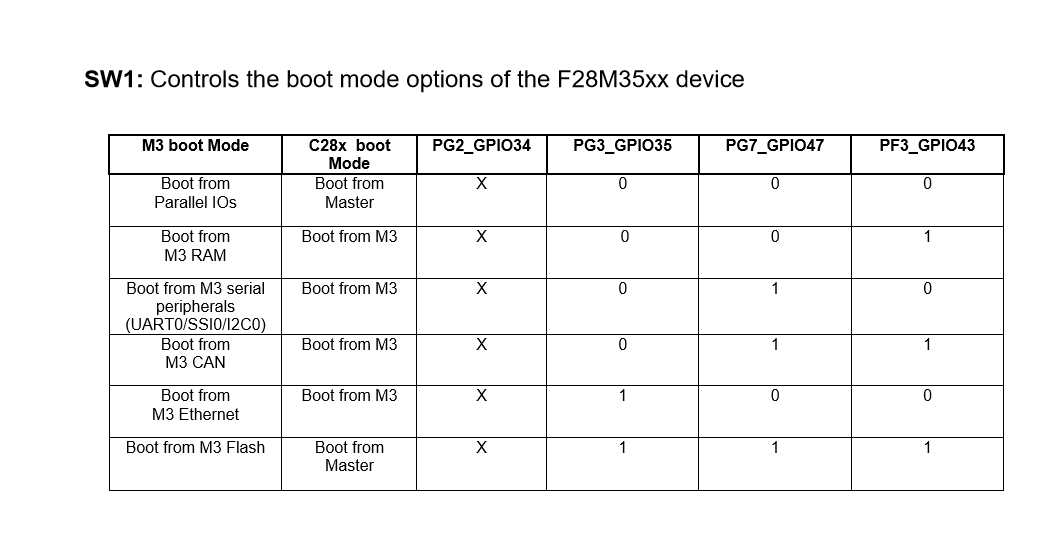
Please help me if you know any answer. I have struck here for 15 days,
Thank you very much!


