This thread has been locked.

If you have a related question, please click the "Ask a related question" button in the top right corner. The newly created question will be automatically linked to this question.

TMS320F28075: Unable to program flash

Part Number: TMS320F28075


Hi,

I am developing a product using the TMS320F28075 chip. I want to program  the flash on a brand new chip with empty flash but run into issues.
I have made a thread in the CCS section but was redirected here since it looked like a hardware issue (e2e.ti.com/.../2096625

What I did was:
1. Launch a debug session by launching the target configuration file (see attached .ccxml file)
2. Press connect
3. Open the on-chip flash view/tool
4. Press the 'erase' button
5. Observe error 'see attached image'

Used tool: Code Composer Studio Version: 7.0.0.00043
Target configuration file: /cfs-file/__key/communityserver-discussions-components-files/81/5100.xds560v2.zip
Emulator: Spectrum Digital XDS560V2 STM USB Eumulator
Error message: See attached image

I also tried the CCS UniFlash Version: 3.4.1.00012 but this resulted in the exact same error message.
Loading a program in RAM works perfectly and testing the Emulator JTAG connection does not produce any errors.
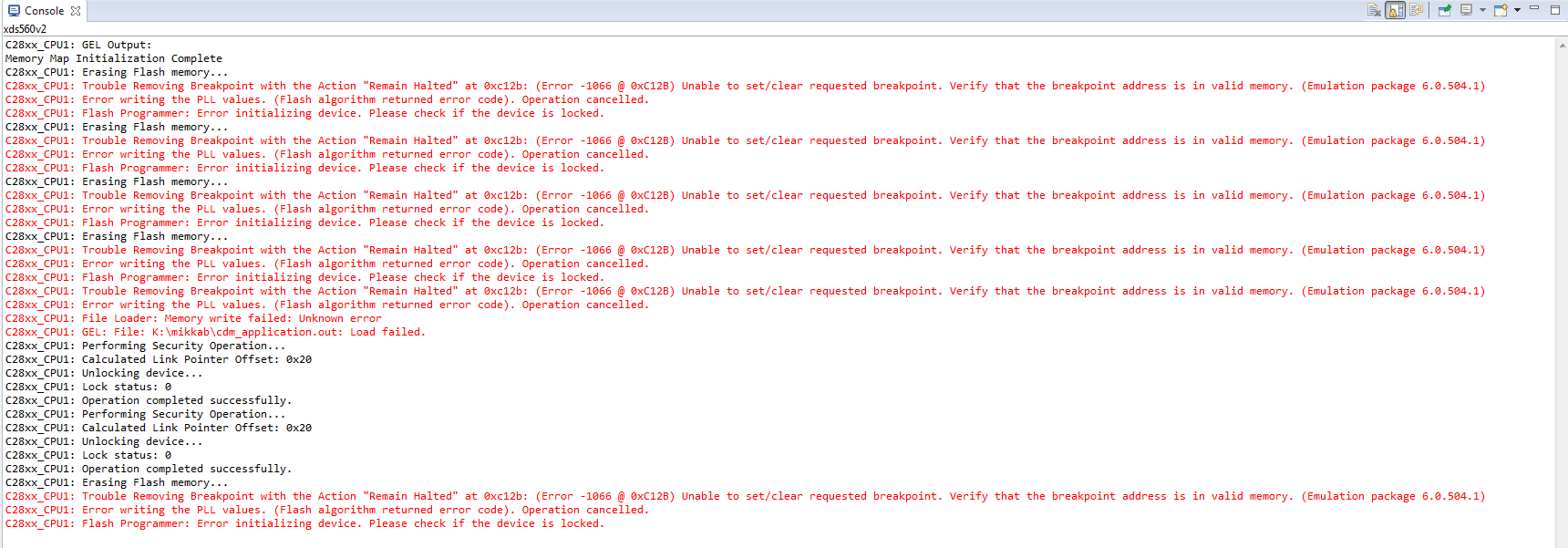
Some helpful pointers would truly be appreciated! 

R. Sonnemans

  • Sonnemans,

    Before clicking the erase button, try doing a CPU reset via CCS menu and do a free run (hit resume button) so that BootROM code gets executed.  This will make sure that the device is in a known state before using Flash Plugin. 

    Let me know if it helps.

    Thanks and regards,

    Vamsi

  • Vamsi Gudivada said:

    Sonnemans,

    Before clicking the erase button, try doing a CPU reset via CCS menu and do a free run (hit resume button) so that BootROM code gets executed.  This will make sure that the device is in a known state before using Flash Plugin. 

    Let me know if it helps.

    Thanks and regards,

    Vamsi

    Hi Vamsi,

    I have tried your suggestion but unfortunately I still get the same error. After this I tried your suggestion with the boot-pins set to 'Wait Boot Mode' this however also produced the same error.

  • For what it is worth, do you have a TI board that has the 28075 mounted? Can you connect that board to the JTAG and can you update the flash on that board? That is one way to determine if it is a problem with the tool or with the processor.
  • Also in the error message, I see it says "check if device is locked".

    To check the same, after connecting to CCS, please open the Memory browse window and check the value at address 0x78000 - 78030 and 0x78200-78230. If you see value other than 0xFFFF_FFFF on any other these locations then we need to analyze the same to check if device is indeed locked. If you see all these value 0x0 then device is locked. Let us know.

    Regards,
    Vivek Singh
  • Vivek Singh said:
    Also in the error message, I see it says "check if device is locked".

    To check the same, after connecting to CCS, please open the Memory browse window and check the value at address 0x78000 - 78030 and 0x78200-78230. If you see value other than 0xFFFF_FFFF on any other these locations then we need to analyze the same to check if device is indeed locked. If you see all these value 0x0 then device is locked. Let us know.

    Regards,
    Vivek Singh

    Hi Vivek,

    I have checked the suggested memory ranges and the all read 0xFFFF_FFFF. So the device is not locked.

  • Todd Anderson78572 said:
    For what it is worth, do you have a TI board that has the 28075 mounted? Can you connect that board to the JTAG and can you update the flash on that board? That is one way to determine if it is a problem with the tool or with the processor.

    Yes I also have the following development board:
    F2807x controlCARD R1.1 with an TMX320F28075

    On that card the erase completed successfully with the same .ccxml file and emulator!
    At least now we know it's a device/board fault. I also tried an identical board of ours and it produces the same error, so it isn't a faulty processor either.

    Now the question remains how it is possible that the RAM can be programmed on my device but the flash seems to be inaccessible.
    Any ideas?

  • Sonnemas,

    As mentioned in the device datasheet, the PowerPAD on the bottom of the package for these devices must be soldered to the ground plane of the PCB.

    Can you confirm whether it is done correctly or not?

    Thanks and regards,
    Vamsi
  • We have found the issue, it was the 1V2 supply on our board. It dips when we try to erase the flash resulting in a chip reset. When we supplied 1V2 directly with a seperate supply we were able to flash the chip without any issues.
    I will mark this thread as solved.

    Thanks for all the suggestions.