This thread has been locked.

If you have a related question, please click the "Ask a related question" button in the top right corner. The newly created question will be automatically linked to this question.

RTOS: BIOS app on CPU2 may change the PLL set on CPU1

Tool/software: TI-RTOS

First, there is a similar question refers to .

In my project, when I only run CPU1, there is no problem. The task is runing with period of 5 ms which I configured in the code. The PLL and tick are configured in the cfg file as 200 MHz and 500 us respectively.

Then when I load CPU2 program, the BIOS on CPU2 seems to change the system clock (normally CPU2 do not configure the PLL, and its system clock should be same with CPU1). Also I found that the clock in the cfg file for cpu2 remain 25000000 Hz, unless I configure the PLL in cpu2.cfg which cannot be done in CPU2! When I see the debug information from CPU2 through ccs, the variable BIOS.cpufrequency.lo allways equals 25000000. Hence, I guess maybe the boot rom of CPU1 is overwriten.  Should the two cmd files for both CPUs be same?

  • Could anybody can help me?? Thanks a lot!
  • I forgot to post the result when the CPU2 program is loaded. When the CPU2 program is loaded, the period of the task in CPU1 became larger than ten times, I forgot the concrete value. I will put the value tomorrow .
  • Hi Xiangjun,

    What version of SYS/BIOS are you using?

    Todd
  • Hi Todd, my BIOS is 6.46.5.55

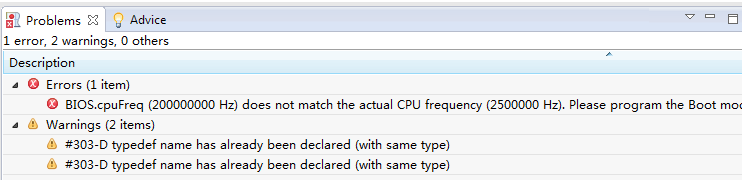
    Today the cfg error even occured  the building failure, as shown in the picture

    Even I configued the PLL in CPU2 to try making successfully compiling. It still did not work. So I had to re-estbablish a new BIOS project, then it worked.

    But still there eists the problem of the system clock. Everytime when I loaded the CPU2 program, the clock changed. I have to reset and restart the two CPUs, then the clock became normal. So in the ccs debug mode, I have to reset and restart the two CPUs everytime after loading the CPU2.

    By the way, there is a option 'initiate boot of the CPU2 processor' in cfg file. When I enable this option in CPU1 project, the ccs debuge cannot work, but in this case, the dsp works from power cycle. When disable this option in CPU1 project, the ccs debuge can work, but in this case, the CPU2 will not boot  from power cycle. Is this normal?

  • Hi Xiangjun,

    Regarding the CPU2 load:  Flash tools configure the PLL when you load code in to Flash using them.  Hence, when you load CPU2 image, PLL configuration that you do with your CPU1 application will be changed by CPU2 Flash tool.  I would suggest you to load both CPU1 and CPU2 coff files before executing them.  Also, make sure to uncheck the "Run to main symbol on a Program load or restart" field in debugger's AutoRun and Launch options.  This will halt the execution at entry point after load. This way, any settings that your application configures before reaching main() does not get overwritten when loading the other core's Flash.

    Thanks and regards,

    Vamsi  

  • Hi, Vamsi, your method works! Thank you very much!

  • Hi Xiangjun,

    Thank you for the confirmation.
    I am closing this thread.

    Thanks and regards,
    Vamsi