This thread has been locked.

If you have a related question, please click the "Ask a related question" button in the top right corner. The newly created question will be automatically linked to this question.

CCS/LAUNCHXL-F28069M: CCS Error: Incompatible declaration of PieVectTable

Part Number: LAUNCHXL-F28069M
Other Parts Discussed in Thread: CONTROLSUITE, SYSBIOS

Tool/software: Code Composer Studio

Hi, 

I am carrying out the TI_RTOS kernel workshop on CCS 6.1.0., on Launchpad F28069M. I am referring the student guide and at Lab 4 for TI_RTOS Kernel Workshop for C28x.

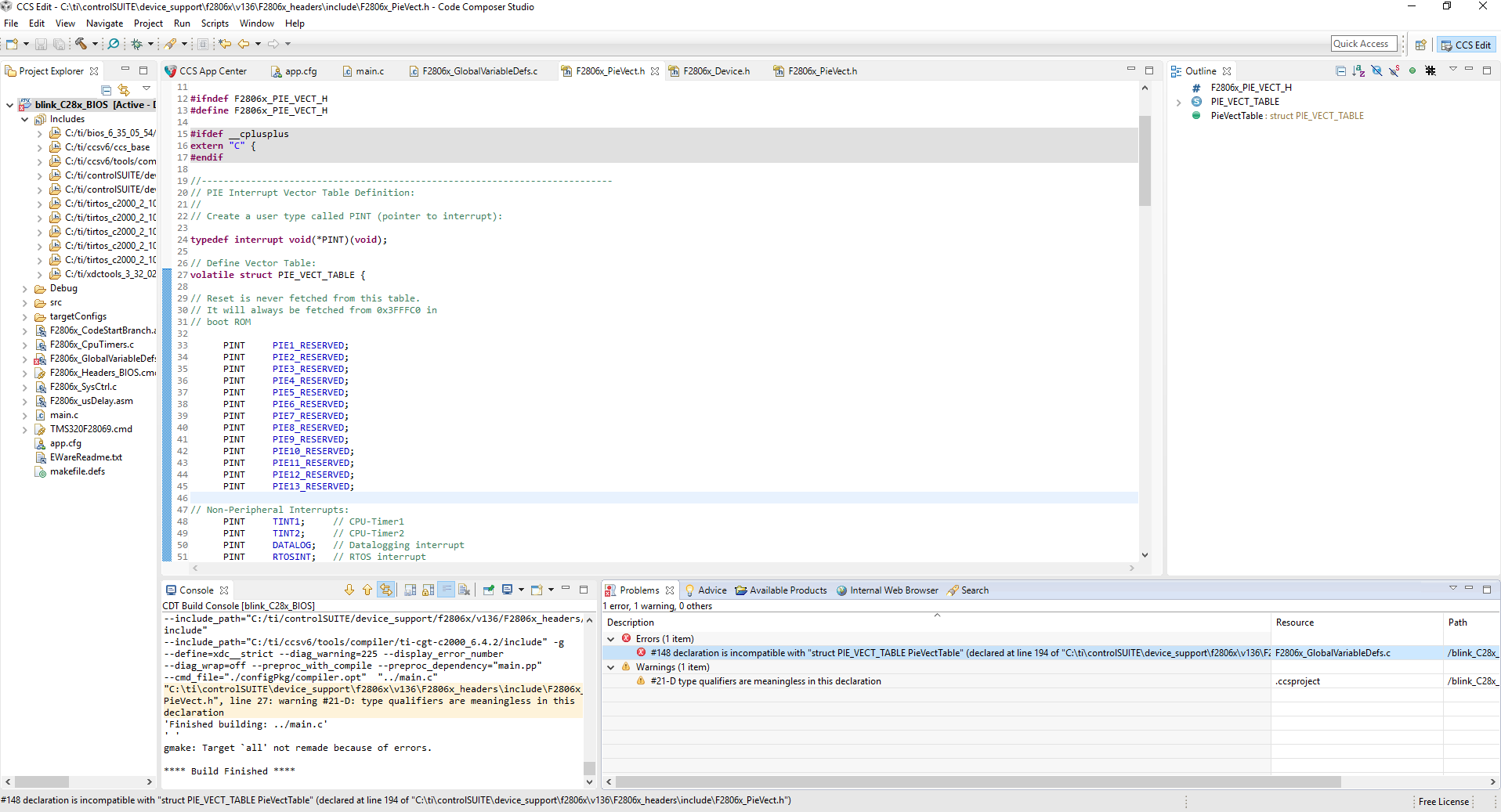
I build the project and have an error:
#148 declaration is incompatible with "struct PIE_VECT_TABLE PieVectTable" (declared at line 194 of "C:\ti\controlSUITE\device_support\f2806x\v136\F2806x_headers\include\F2806x_PieVect.h") F2806x_GlobalVariableDefs.c /blink_C28x_BIOS line 376 C/C++ Problem

The solution I tried is to change struct PIE_VECT_TABLE in F2806x_PieVect.h to volatile struct PIE_VECT_TABLE


I still get the same error. Could someone please suggest a solution. I have added the screenshot for reference. Thank you for your time and help.
  • Hello,

    Like the warning in the console in your screenshot says, the volatile doesn't belong on the struct definition, so undo that change. Instead, I believe you need to put it on the extern declaration of PieVectTable near the bottom of the .h file. Does that get rid of the error?

    Whitney
  • Hi Whitney,

    Thank you for responding. I had tried that too and that gives me more errors (44 errors).

    Best Regards,
    Anjali
  • Is PieVectTable volatile in F2806x_GlobalVariableDefs.c? I assume that's why you added "volatile", correct?

    Can you tell me what some of these 44 errors say?

    Whitney
  • Yes, the PieVectTable in F2806x_GlobalVariableDefs.c is volatile. But in F2806x_PieVect.h it is not. Since the error said incompatible, I changed it to volatile in F2806x_PieVect.h

    Below is a screenshot of the errors when I change the extern struct PieVectTable in F2806x_PieVect.h (towards the bottom of the file, like you mentioned) to volatile. Thank you.

  • I was able to reproduce similar errors if I built SYSBIOS without FPU support and configured the project with FPU support. I think you'll need to fix a similar mismatch in your project.

    I don't know what settings the workshops use, but I suspect you'll need to open up app.cfg and go to the SYS/BIOS "Basic Runtime Options" page (should be the "Runtime" link at the top) and look for the box labeled "Custom Compiler Options." You'll want to check the --float_support option and make sure it matches the float support options in your project properties' build options.

    I'm using a slightly different version of SYS/BIOS than you, but hopefully they look pretty similar.

    Whitney

  • Hi Whitney,

    I'm glad you could reproduce the error. I changed the BIOS- Basic Runtime Options and added float_support to the Custom Complier Options.

    However, when I build the project without changing the F2806x_PieVect.h, it gives 1 error- incompatible (same as the first error)

    If I add volatile to the PieVectTable towards the end of F2806x_PieVect.h, build throws 44 errors similar as before.

    Could you please suggest what I must be doing different. I did clean project and build it again and still get the same errors.

    Thank you.

    Best Regards,

    Anjali

  • Anjali,

    I think you will need to keep the volatile on PieVectTable. It's strange that changing the Custom Compiler Options didn't help get rid of the other errors though.

    Can you send me the compiler options for your project and the custom compiler options for BIOS so I can compare them and see if I can spot the issue?

    Thanks,
    Whitney
  • Compiler options for the project:
    -v28 -ml -mt --cla_support=cla0 --float_support=fpu32 --vcu_support=vcu0 --include_path="C:/ti/controlSUITE/device_support/f2806x/v136/F2806x_common/include" --include_path="C:/ti/controlSUITE/device_support/f2806x/v136/F2806x_headers/include" --include_path="C:/ti/ccsv6/tools/compiler/ti-cgt-c2000_6.4.2/include" --advice:performance=all -g --define=xdc__strict --diag_warning=225 --display_error_number --diag_wrap=off

    Custom compiler options for BIOS:
    -v28 -DLARGE_MODEL=1 -ml --float_support=fpu32 -q -mo --program_level_compile -o3 -g --optimize_with_debug

    Hope this helps. Thank you.
  • That all looks fine...

    When you do a Clean, try also deleting the whole Debug folder just in case something is being retained in there somehow.

    Whitney
  • Thank you for the suggestion. But that didn't help. I still get errors.

    Best Regards,
    Anjali
  • In your project Properties under General, can you look at the Target in the RTSC tab? Is it ti.targets.C28_large or ti.targets.C28_float? If it's _large, change it to _float.

    Whitney
  • Thank you for your time and help. Really appreciate it.

    Best Regards,
    Anjali
  • Awesome! That worked. Thank you.

    Best Regards,

    Anjali