This thread has been locked.

If you have a related question, please click the "Ask a related question" button in the top right corner. The newly created question will be automatically linked to this question.

CCS/TMS320F28379D: XDS110 Debug Probe cannot be used to debug F28379D

Part Number: TMS320F28379D
Other Parts Discussed in Thread: TMDSEMU110-U

Tool/software: Code Composer Studio

Dear All,

I have tried to use XDS110 debug probe to debug F28379D experimenter kit(www.ti.com/.../TMDSDOCK28379D), but it got an error message as follows,

C28xx_CPU1: File Loader: Verification failed: Values at address 0x00000@Program do not match Please verify target memory and memory map.
C28xx_CPU1: GEL: File: C:\ti\App\Delfino\blinky_cpu01\CPU1_RAM\blinky_cpu01.out: a data verification error occurred, file load failed.

I have changed to use XDS110 debug probe as debugger in the Target Configuration and set position 1 of A:SW1 off and set position 2 of SW1 on.

Does anyone have solutions for this problem?  Thank you.

Xview.

  • Xview,

    Are you using an external XDS110 (TMDSEMU110-U) with the board or are you trying to use the onboard XDS100? The board actually has an onboard XDS100v2.

    If you are trying to use an external XDS110 how did you connect it to the board?

    Regards,
    John
  • Actually I see you are using the DOCK and not the LaunchPad. I will see if I can find one of those to test with an XDS110. If you use the onboard XDS100v2 does that work?

    John
  • Dear John,

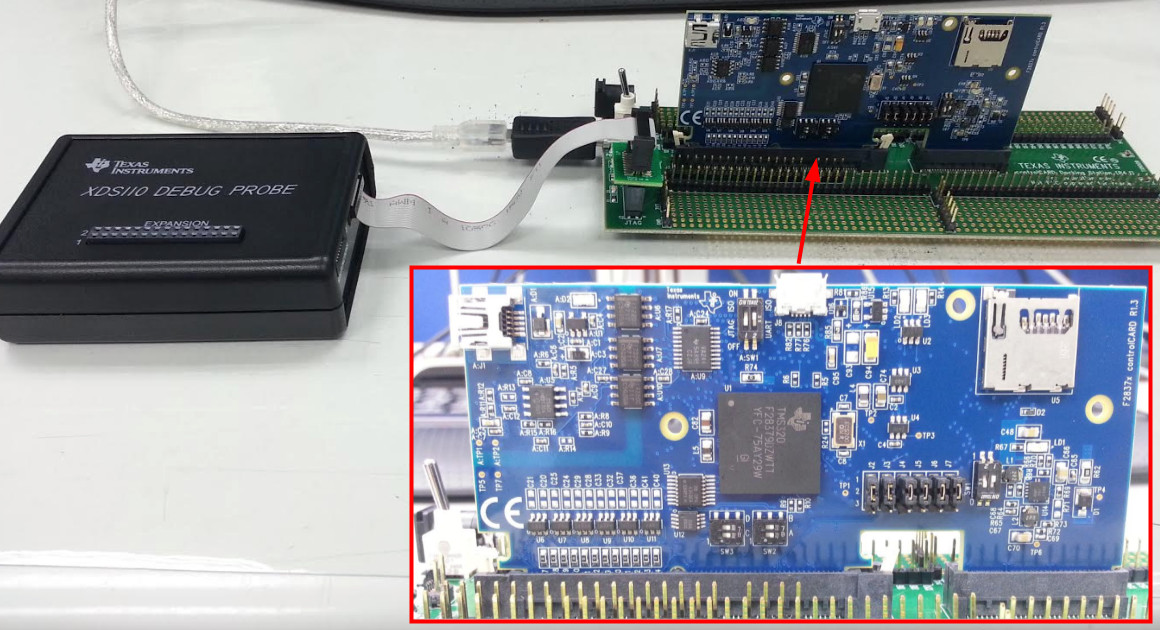
    I do use an external XDS110 Debug Probe to debug the kit.  The picture of the test setup is attached. I have completely setup both A:SW1 and SW1 according to the user's guide. But it didn't work and got error messages.

    Best regards,

    Xview.

  • Dear John,

    It works perfectly if I use onboard XDS100V2. In my project, I have to design a new control board based on F28379D, but equipped with an onboard XDS100V2 is not consideration. So I must make sure that XDS110 debug probe is workable with the experimenter kit.

    Xview.
  • I found a F28377D controlCARD and the same Dock.  I am able to connect an XDS110 fine.  In looking at your picture it looks like the switch beside the power is set to EXT-ON but there is no 5V power supply connected.  I have a 5V power supply connected.

    Do you have a 5V supply that you could try?  I tried supplying power via USB and that was ok for me but it is worth a try in your setup.

  • Dear John,

    I didn't connect a DC 5V power supply when I take the picture, but I did provide the power when I try to debug with the XDS110 debug probe. What is your CCS version?  I use CCS V6.1.3.

    Best regards,

    Xview.

  • Dear John,

    I performed the 'check for updates' and then the firmware of the XDS110 debug probe has been upgraded. Now, it can be used to debug the example project. Thank you very much.

    Best regards,

    Xview.

  • Great.  CCSv6.1.3 doesn't have support for the XDS110 standalone probe by default.  In the documentation for the probe we state that CCSv7 or later is required.  However CCSv6.1.3 can work fine if you do the update and then update the pod firmware as you have done.  Note that if you do the pod firmware update before installing the latest CCS Emulation Update you can break the pod as it will load an incompatible firmware (it will load the firmware for the version of the XDS110 that is built into some of our LaunchPad boards).

    Regards,
    John