This thread has been locked.

If you have a related question, please click the "Ask a related question" button in the top right corner. The newly created question will be automatically linked to this question.

CCS/TMS320F28377S: CCS/TMS320F28377S

Part Number: TMS320F28377S
Other Parts Discussed in Thread: CONTROLSUITE, C2000WARE

Tool/software: Code Composer Studio

Hi,

I would like to program flash, but when I select this option from drop down menu I have errors that some header files cannot be found. I do not have this problem when I program into RAM.

"../ADC_IN_PWM_40kHz_H_Bridge_up_conv.c", line 8: fatal error #1965: cannot open source file "F28x_Project.h"

"../F2837xS_Adc.c", line 46: fatal error #1965: cannot open source file "F2837xS_device.h"

Thanks vadim

  • Hi Vadim,

    From where did you import this example?

    Regards,
    Gautam
  • Hi Gautam,
    Originally it was from controlSUITE. But I normally do copy and paste of my projects (that originally were imported) to avoid links to the imported files instead of the files themselves. First time to replace the links, I manually copied all relevant files to my project directory and deleted the links.
    Thanks vadim
  • Those particular files are used by both RAM and Flash based projects. My suspicion is in the Flash project one of the include links in the project properties is not correct and / or missing and thus the file is not found.

    F2837xS_common\include is where "F28x_Project.h" is normally within device support.
    F2837xS_headers\include is where "F2837xS_device.h" is normally within device support.

    You mentioned that these came from controlSUITE. We are now providing updates to the F2837x support within C2000Ware.

    Regards
    Lori
  •   Thanks Lori,

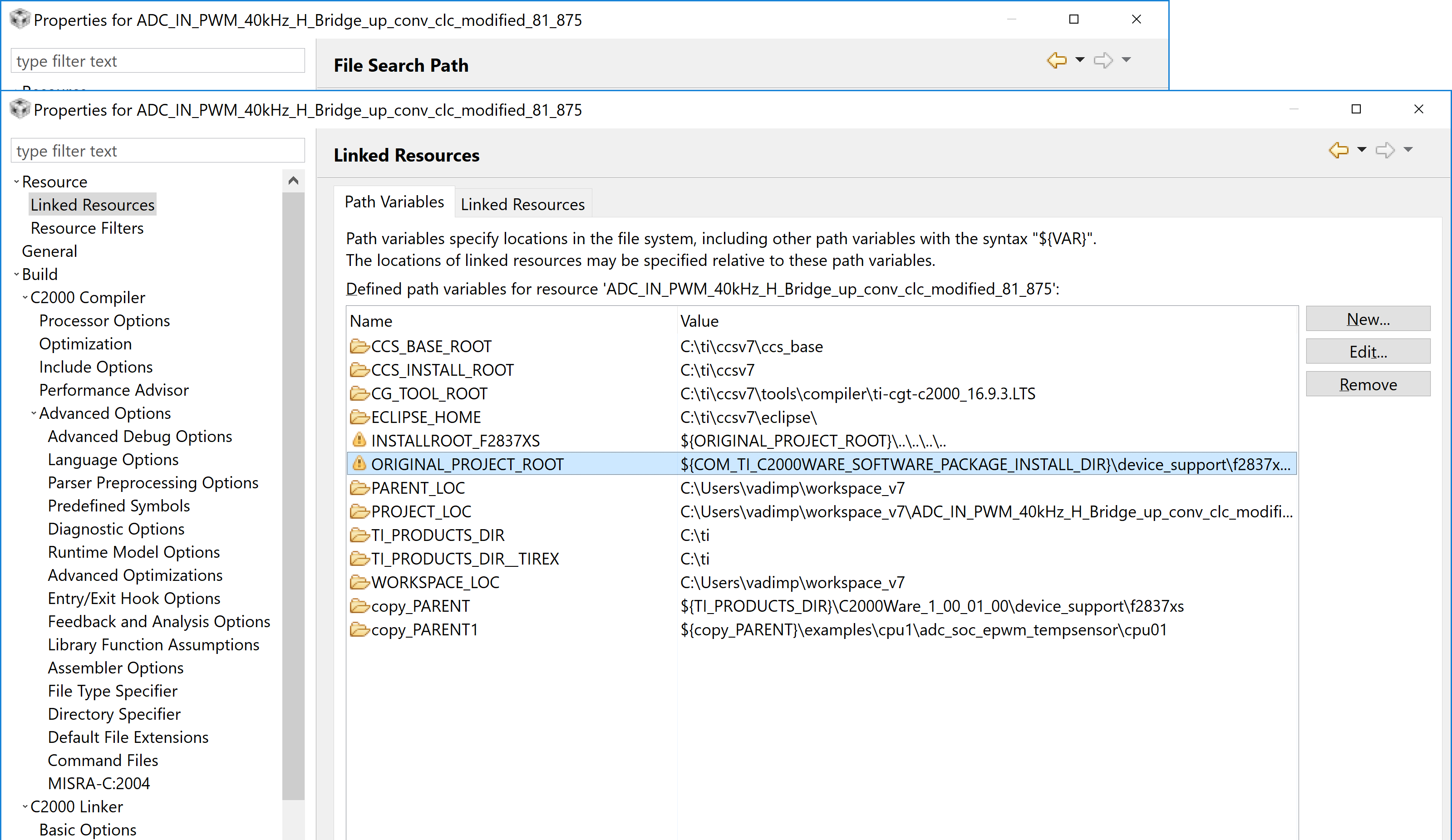
    The paths are different for flash and ram. If I put a pointer near a directory I can see the entire path and they are different. There is as well an exclamation signs in path variables. i attached all three screens. How can I select the right locations of those two directories.

    thanks vadim

  • Vadim,

    I've asked one of our SW engineers to look into this and get back with you.

    Lori
  • Hi Vadim,

    In the project properties window, you can check under Build->C2000 Compiler->Include Options to see whether the following paths are included. These paths have the files your error message indicated were missing.
    "${INSTALLROOT_F2837XS}/headers/include"
    "${INSTALLROOT_F2837XS}/common/include"

    If the INSTALLROOT_F2837XS is properly configured, these should evaluate to:
    C:\ti\c2000\C2000Ware_1_00_02_00\device_support\f2837xd\headers\include
    C:\ti\c2000\C2000Ware_1_00_02_00\device_support\f2837xd\common\include

    The C2000Ware version may be different as I see in your screenshot, it evaluates to C2000Ware_1_00_01_00, and that's fine if you have the earlier version of C2000Ware installed.

    Regards,
    Elizabeth

  • Thanks Lori,
    I created a new “main” project and imported all the files from the project in question. I set paths
    "C:\ti\C2000Ware_1_00_02_00_Software\device_support\f2837xs\headers\include"
    "C:\ti\C2000Ware_1_00_02_00_Software\device_support\f2837xs\common\include"
    I added 28377S_RAM_lnk.cmd in linker command window.
    I was able to build the project but with a lot of #10247-D warnings like
    warning #10247-D: creating output section "EmuBModeVar" without a SECTIONS specification
    warning #10247-D: creating output section "EmuBootPinsVar" without a SECTIONS specification
    warning #10247-D: creating output section "RomWaitStateRegsFile" without a SECTIONS specification
    warning #10247-D: creating output section "FlashPumpSemaphoreRegsFile" without a SECTIONS specification
    I have the same warnings when I use 28377S_FLASH_lnk.cmd file.
    In addition, when I import a project file, in General Properties window I have the following configurations: CPU1_RAM and CPU1_FLASH
    When I create a new project I have Debug and Release configurations. When I tried release configuration with 28377S_FLASH_lnk.cmd it generated errors, even though it works for debug configuration.
    fatal error #1965: cannot open source file "F2837xS_device.h"
    How do I create CPU1_RAM, CPU1_FLASH configuration? How do I address warning in debug and fix release flash configurations?
    thanks vadim
  • Hi Vadim,

    Can you verify you've added F2837xS_Headers_nonBIOS.cmd? This linker command file specifies those sections. It's found in C:\ti\c2000\C2000Ware_1_00_02_00\device_support\f2837xs\headers\cmd

    To add build configurations, go to Properties->General and select Manage Configurations. You can refer to this wiki: processors.wiki.ti.com/.../Project_Build_Configurations

    Regards,
    Elizabeth
  • Hi Elizabeth,
    I added F28377xSHeaders_nonBIOS file via project/add file. I selected into linker command window 28378S_FlASH_link.cmd file . In this case there are no warnings. In all other combinations ( one is added via "add file" another placed into linker window) of those two files there are errors. Do I have to have two cmd files? I have not noticed two cmd files in any TI example
    “To add build configurations, go to Properties->General and select Manage Configurations. You can refer to this wiki: processors.wiki.ti.com/.../Project_Build_Configurations”
    I visited this page and checked the movie as well red linker primer on wiki page. It did not answer my questions about creating configurations similar to those in all TI examples.
    1 In the video there only two configurations: release and debug that are being copied from existing cofiguration, no explanation of other options. I tried all other options but they are not enabled. For example how do I create a new configuration by default, import from project or import from predifined? Is there a document describing how to do it?
    2 all TI examples have either CPU1_RAM or CPU1_FLASH configurations and not a release or debug. Those examples have linker window empty but in C2000linker include files window those two files are being used: "2837xS_Generic_RAM_lnk.cmd" and "2837xS_Generic_FLASH_lnk.cmd". And those files are replaced automatically when the build is switched from ram to flash. Yoy do not have to input any cmd file.How is it done?
    Thanks vadim
  • Hi Elizabeth,
    I figured it out. One question though is left when should I use F2837xS_Headers_BIOS.cmd and F2837xS_Headers_nonBIOS.cmd
    Thanks vadim
  • Hi Vadim,

    F2837xS_Headers_nonBIOS.cmd should be used for projects that do not use DSP/BIOS whereas F2837xS_Headers_BIOS.cmd is for DSP/BIOS projects. DSP/BIOS (also known as SYS/BIOS) is a TI-developed RTOS available in CCS for C2000 as well as other TI devices.

    If you're curious, more info on DSP/BIOS can be found here:
    processors.wiki.ti.com/.../Category:DSPBIOS

    Regards,
    Elizabeth
  • Hi Elizabeth,
    The manual recommends "Before you read this manual, you may use the Code Composer Studio online tutorial and the DSP/BIOS
    section of the online help to get an overview of DSP/BIOS". I could not find this section in help. There is a link to "DSP knowledge base" but when I click I have this "To help protect the security of information you enter into this website, the publisher of this content does not allow it to be displayed in a frame. “I am using CCS v7. Could you please provide a link to the overview of DSP/BIOS?
    thanks vadim
  • Hi Vadim,

    It could be because DSP/BIOS is the older version and the current version is called SYS/BIOS.
    This is likely a better resource than what I shared before: processors.wiki.ti.com/.../Category:SYSBIOS

    Regards,
    Elizabeth