This thread has been locked.

If you have a related question, please click the "Ask a related question" button in the top right corner. The newly created question will be automatically linked to this question.

C2000WARE: SCI_setConfig baud rate calculated wrong

Part Number: C2000WARE


Good day,

I have uncovered a bug in the C2000WARE V1.00.3.00 release, specifically targeting the F2837xD chip.

The SCI_setConfig() function in the driverlib (line 71) calculates the divider as follows:

divider = ((lspclkHz  / (baud * 8U)) - 1U);

Which is wrong, it should be:

divider = lspclkHz / ((baud * 8U) - 1U);

Kind regards,

SR

  • Hi Stephan,

    Thank you for posting this.

    Can you describe how you confirmed this? How did you you identify the divider was wrong and identify that your fix worked?

    This information will be helpful for us.

    Regards,
    sal
  • Hi Sal,

    The process followed was as follows:

    1. First I noticed issues when going beyond 115200 baud, specifically 921600 baud where I encountered serious framing issues.
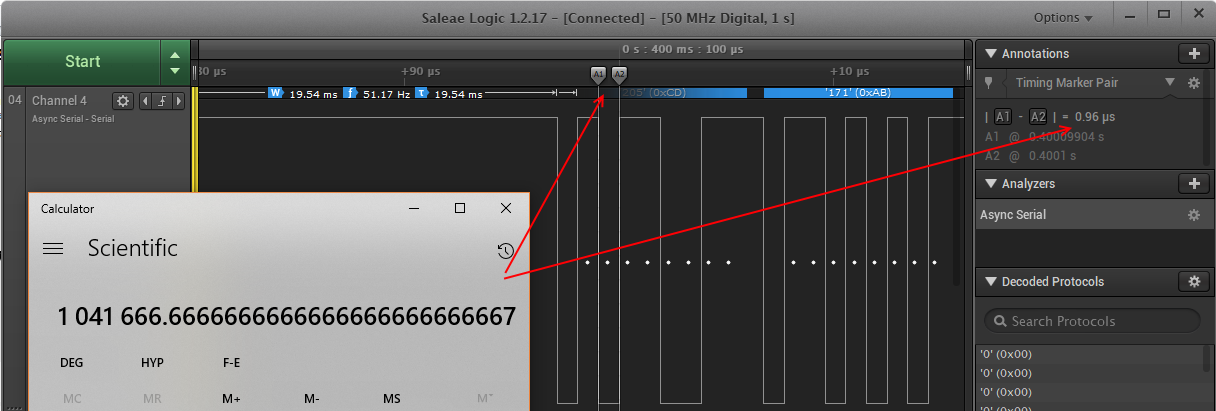
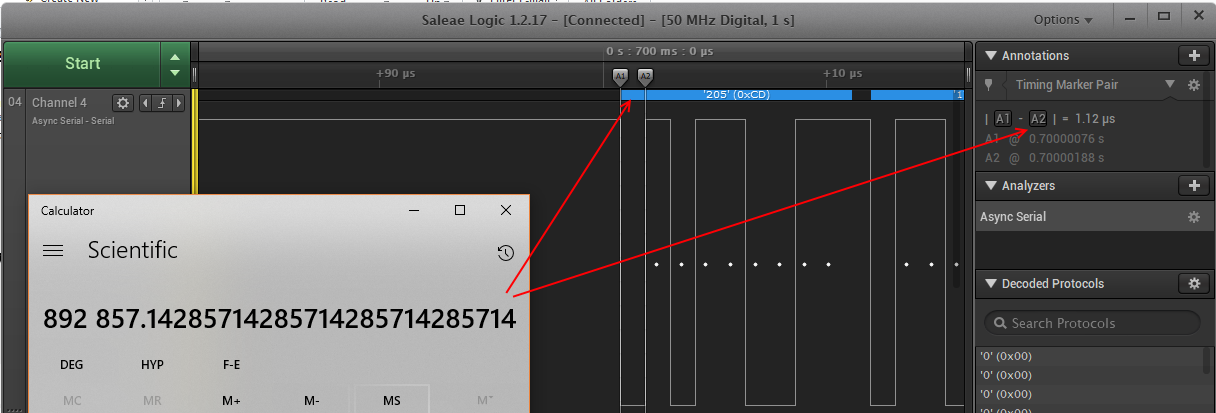
    2. When I put the SCI TX signal on a logic analyser, it was clear there was a baud rate issue. At 115200 the signal was around 115700-ish (not enough to cause issues) but at the 921600 it was creating a ~1060000 baud stream, way out of spec.
    3. Using one of me previous software sections I corrected the issue by changing the baud rate calculation to: 

    divider = lspclkHz / ((baud * 8U) - 1U); Please see my other post below, whis was only half the issue...

    I verified the signal on the logic analyser again, as well as Realterm, with framing issues now in the past.

    Other project info:

    1. CPU clocked at 200MHz with external 20MHz crystal and PLL enabled.
    2. Stock standard F2837x controlCARD R1.3 was used in a R4.1 docking station.
    3. C2000WARE V1.00.3.00
    4. CCS V7.1.0.0016

    Kind regards,

    SR

  • Stephan,

    Thank you very much for this information. We will file this bug and correct it!

    sal
  • Stephan,

    I double checked the formula in the SCI chapter of the TRM.

    The two formulas are consistent with the driverlib (sci.c) SCI_setConfig() function.

    It appears that the formula in the TRM is not correct then, if what you are saying is true.

    sal
  • Hi Sal,

    I've delved deeper into the issue, and found the root cause. The problem here is the coarse setting of the baud rate divider along with an implementation issue causing the baud rate problem. What I mean is the following:

    Using the data sheet / lib function as-is, 921600 @ 50 MHz clock gives a divider of 5, resulting in a 1041666 baud.

    Using my (old) function, 921600 @ 50 MHz clock gives a divider of 6, resulting in a 892857 baud.

    Interesting note is that the latter is only ~3% off, where the library function differs ~12%.

    What this ultimately means is that the function itself (as per the datasheet) is correct, but the integer division (and associated incorrect rounding) gives the incorrect divisor. The inner part, when done with integer arithmetic, incorrectly truncates the divider value. In my case, 50 MHz / (921600 * 8) = 6.78168..., but the implementation (using integers) will truncate it to just 6, making the (1 - 0.78168...) fault and giving a final divisor of 5.

    I have revised my calculation in the driver to the following, which matches the data sheet, but uses floating-point division and a +0.5f to correct for rounding (as +0.5f, truncated, is just like rounding if the value is positive):

    divider = (uint32_t)(((float)lspclkHz / (((float)baud) * 8.0f)) + 0.5f) - 1U;

    It provides the correct divider value of 6 for my case, and for any other value will always be within -0.5 to 0.5 of the most correct divider value.

    Kind regards,

    SR

  • Stephan,

    Thank you for clarifying and for looking into this. I think we will change the formula to this in the driver. It seems like the issues will occur with those higher baud rates, like the one you are using. So, this formula should work for low and high baud rates.

    Thank you again for your help.

    sal
  • Hi Sal,

    Always happy to help, my pleasure!

    Kind regards,

    SR

  • Happy New Year!

    sal