This thread has been locked.

If you have a related question, please click the "Ask a related question" button in the top right corner. The newly created question will be automatically linked to this question.

TMS320F28065: Programming lock issue

Part Number: TMS320F28065
Other Parts Discussed in Thread: UNIFLASH

Hi Support,

my customer is facing issues in programming TMS320F28065 with BlackHawk XDS100v2. Several devices (not all) result in fact "locked" and it is then not possible to erase or reprogram them.

This is the LOG and outcome of CCS 7.2:
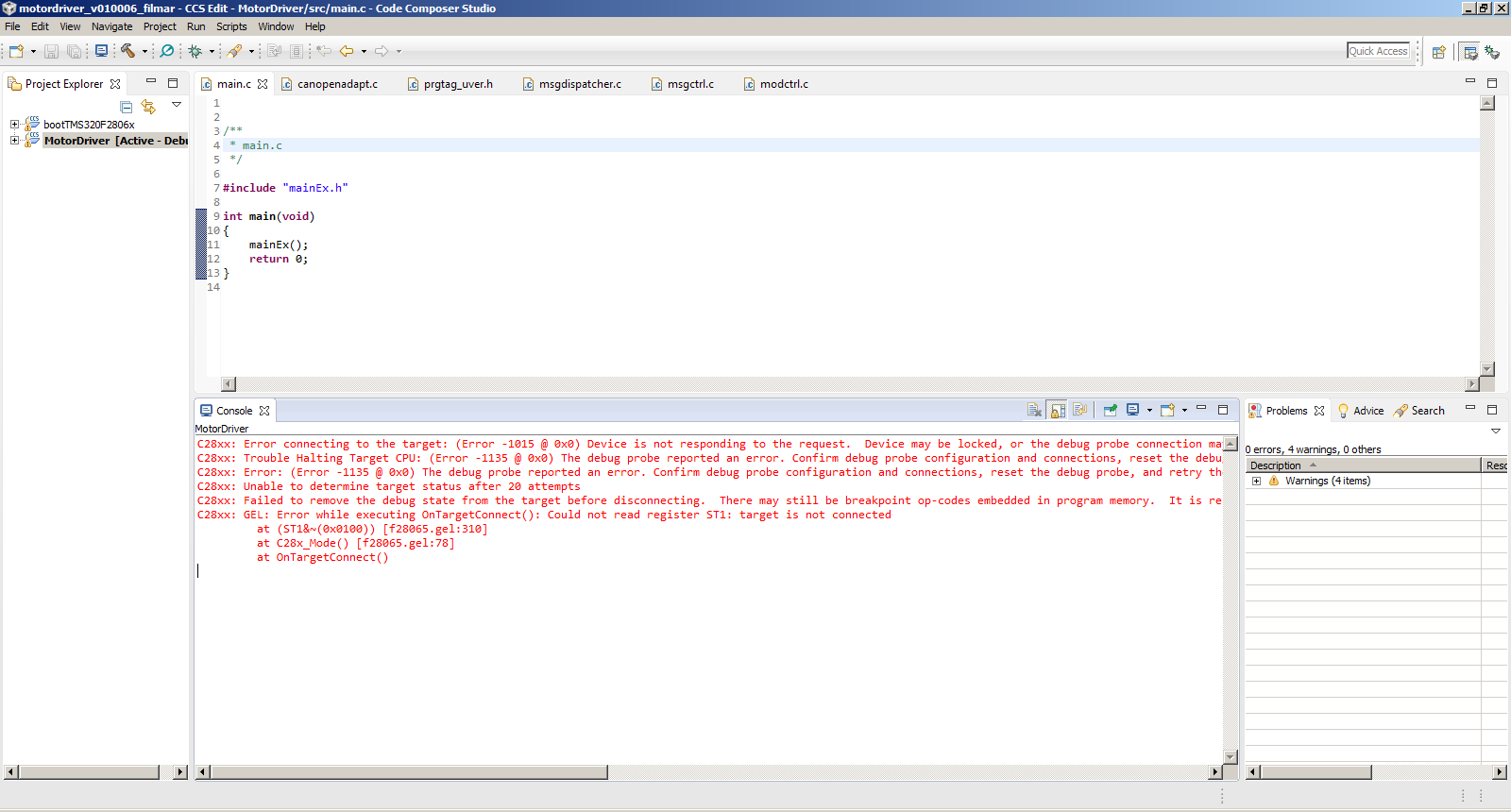
C28xx: Error connecting to the target: (Error -1015 @ 0x0) Device is not responding to the request.  Device may be locked, or the debug probe connection may be unreliable. Unlock the device if possible (e.g. use wait in reset mode, and power-cycle the board). If error persists, confirm configuration and/or try more reliable JTAG settings (e.g. lower TCLK). (Emulation package 6.0.628.3)
C28xx: Trouble Halting Target CPU: (Error -1135 @ 0x0) The debug probe reported an error. Confirm debug probe configuration and connections, reset the debug probe, and retry the operation. (Emulation package 6.0.628.3)
C28xx: Error: (Error -1135 @ 0x0) The debug probe reported an error. Confirm debug probe configuration and connections, reset the debug probe, and retry the operation. (Emulation package 6.0.628.3)
C28xx: Unable to determine target status after 20 attempts
C28xx: Failed to remove the debug state from the target before disconnecting.  There may still be breakpoint op-codes embedded in program memory.  It is recommended that you reset the emulator before you connect and reload your program before you continue debugging
C28xx: GEL: Error while executing OnTargetConnect(): Could not read register ST1: target is not connected
     at (ST1&~(0x0100)) [f28065.gel:310]
     at C28x_Mode() [f28065.gel:78]
     at OnTargetConnect()

And this is wht customer obtains from UniFlash 3.0:
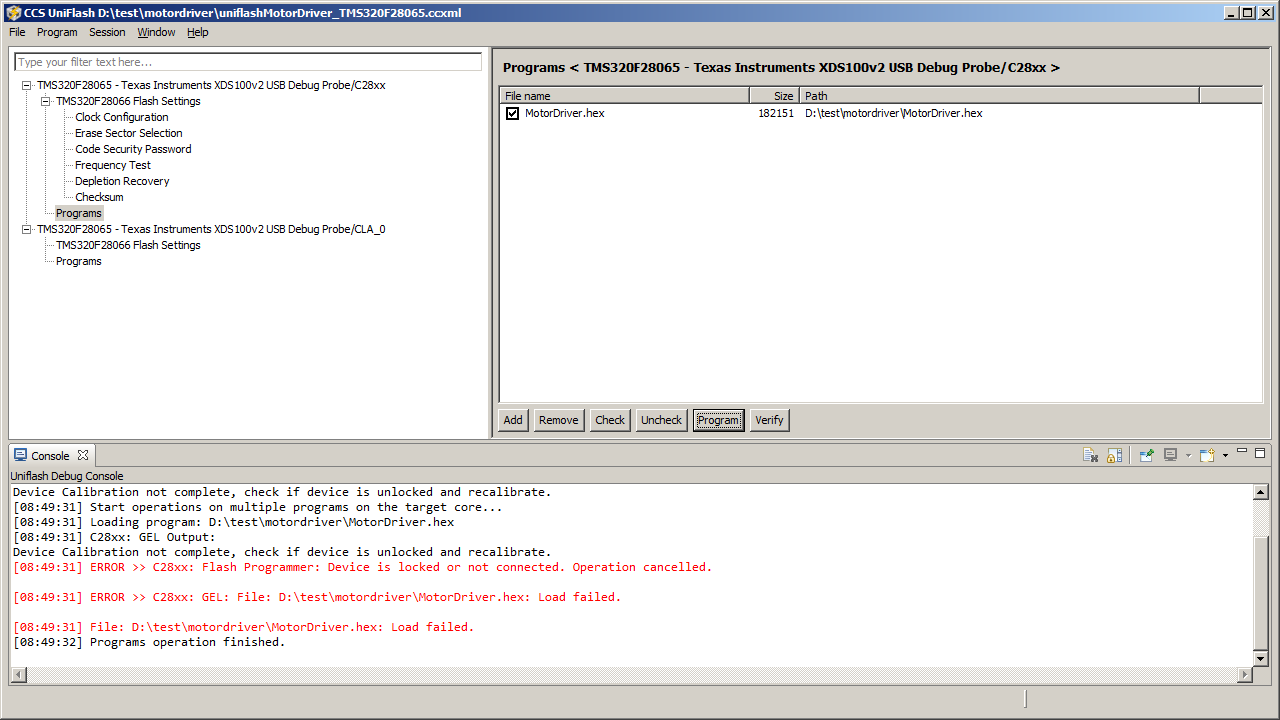
Device Calibration not complete, check if device is unlocked and recalibrate.
[08:49:31] Start operations on multiple programs on the target core...
[08:49:31] Loading program: D:\test\motordriver\MotorDriver.hex
[08:49:31] C28xx: GEL Output:
Device Calibration not complete, check if device is unlocked and recalibrate.
[08:49:31] ERROR >> C28xx: Flash Programmer: Device is locked or not connected. Operation cancelled.

[08:49:31] ERROR >> C28xx: GEL: File: D:\test\motordriver\MotorDriver.hex: Load failed.

[08:49:31] File: D:\test\motordriver\MotorDriver.hex: Load failed.
[08:49:32] Programs operation finished.

Can you kindly help me identifying the root of this issue?

Thanks and regards,

Alberto

  • Alberto,


    1. Does the customer's code have a password?
    2. How many devices got locked? Out of how many?
    3. Was there any kind of interruption to the Erase/Program process?
    4. How is the board powered? Dedicated power-supply? USB connection?
    5. Are they able to connect to these locked devices using wait-in-reset mode?


  • Hareesh,

    thanks for your feedback.
    Here below the feedback to your questions:

    1. They are not using Password
    2. 2 devices are failing on 10 boards mounted
    3. There are no interruptions of Erase or Programming phases. These are not starting at all. Please refer to CCS image for that.
    4. The Board is powered by a proper dedicated Power Supply
    5. Can you provide more details on how to interface via Wait-In-Reset mode please?

    Thanks and regards,
    Alberto
  • Alberto,
    It appears the devices have been locked inadvertently. Please see 6.1.11 of SPRS698F for details on "Wait" boot-mode. I meant this mode, not wait-in-reset mode.
  • Hareesh,

    they set the following register

    using the following setting: Hw GPIO37/TDO=1, GPIO34=0 and TRST=0 in order to enter Wait Mode.

    Also doing this the system gives back the following error: 

    C28xx: GEL Output:
    Device Calibration not complete, check if device is unlocked and recalibrate.C28xx: GEL Output:
    Device Calibration not complete, check if device is unlocked and recalibrate.C28xx: Flash Programmer: Device is locked or not connected. Operation cancelled.
    C28xx: File Loader: Memory write failed: Unknown error
    C28xx: GEL: File: D:\Progetti\TI\26-debug_lab\motordriver_v010007\MotorDriver\Debug\MotorDriver.out: Load failed.

    They also tried procedure suggested in TRM 2.2.9 example 2-4:

    To connect your emulator, but keep application code from executing before the emulator connects:
    • Configure GPIO37 and GPIO34 pins for mode 2, WAIT, and initiate a power-on-reset.
    • The boot ROM will detect TRST = 0 and will use the two pins to determine wait boot.
    • The boot ROM populates EMU_KEY with 0x55AA and EMU_BMODE with WAIT_BOOT.
    • The boot ROM sits in the wait routine.
    • Connect the debugger; TRST will go high.
    • Modify the EMU_BMODE via the debugger to boot to FLASH or other desired boot mode.
    • Perform a debugger reset and run. The boot loader will use the EMU_BMODE and boot to the desired
    loader or location.

    but they receive the following error:

    C28xx: Error connecting to the target: (Error -1015 @ 0x0) Device is not responding to the request.  Device may be locked, or the debug probe connection may be unreliable. Unlock the device if possible (e.g. use wait in reset mode, and power-cycle the board). If error persists, confirm configuration and/or try more reliable JTAG settings (e.g. lower TCLK). (Emulation package 6.0.628.3)
    C28xx: Trouble Halting Target CPU: (Error -1135 @ 0x0) The debug probe reported an error. Confirm debug probe configuration and connections, reset the debug probe, and retry the operation. (Emulation package 6.0.628.3)
    C28xx: Error: (Error -1135 @ 0x0) The debug probe reported an error. Confirm debug probe configuration and connections, reset the debug probe, and retry the operation. (Emulation package 6.0.628.3)
    C28xx: Unable to determine target status after 20 attempts
    C28xx: Failed to remove the debug state from the target before disconnecting.  There may still be breakpoint op-codes embedded in program memory.  It is recommended that you reset the emulator before you connect and reload your program before you continue debugging
    C28xx: GEL: Error while executing OnTargetConnect(): Could not read register ST1: target is not connected
         at (ST1&~(0x0100)) [f28065.gel:310]
         at C28x_Mode() [f28065.gel:78]
         at OnTargetConnect()


    Can you confirm this Wait Boot Mode is available also working with XDS100?

    Please let me know how to move on .

    Thanks and regards,

    Alberto

  • Alberto,

                I tried the wait-boot on silicon with a Spectrum Digital XDS100v2 and it works. Here is what I did:

    • Without the JTAG connected, I tried the following on a blank device:
        • Put the device in wait-boot mode. Saw the –XRS pin pulsing because the WD is enabled.
        • Put the device in SCI-boot mode. Did not see the –XRS pin pulsing because the WD is disabled.


    • Added passwords to an example code and programmed it in flash.
    • Cycled power and CCS was unable to connect, as expected.
    • Disconnected JTAG, put the device in wait-mode. Now connected JTAG and brought up CCS. I was able to connect to the device and erase the flash successfully.


    Did this happen during the very first attempt to connect to these devices? i.e. in brand new devices that have never been programmed at all?


    Also, for the devices where the flash programmed correctly, is the application working correctly?