This thread has been locked.

If you have a related question, please click the "Ask a related question" button in the top right corner. The newly created question will be automatically linked to this question.

CCS/TMS320F28377D: TMS320F28377D/DC offsset in RFFT of ADC signal

Part Number: TMS320F28377D
Other Parts Discussed in Thread: CONTROLSUITE,

Tool/software: Code Composer Studio

I am working with the example code 2837x_RFFT_ADC in controlSUITE with TMS320F28377D.  The ADC is configured to work at 25,600 sample/sec, the ADC result is put into the RFFTin1Buff to calculate the frequency spectrum in microcontroller F28377D. The RFFT_STAGES is set to 12 (that mean FFT length=4096).

I use function generator to create a sinusoid 8KHzThe result is seem to be not correct. I have some questions need  help.

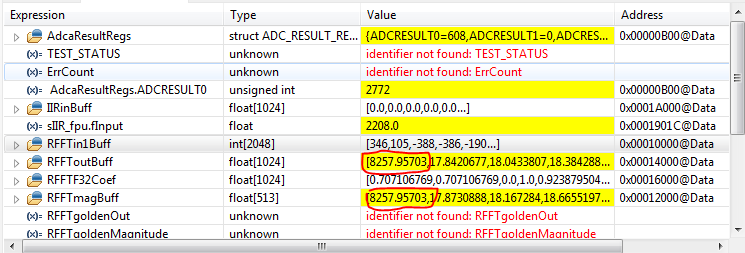
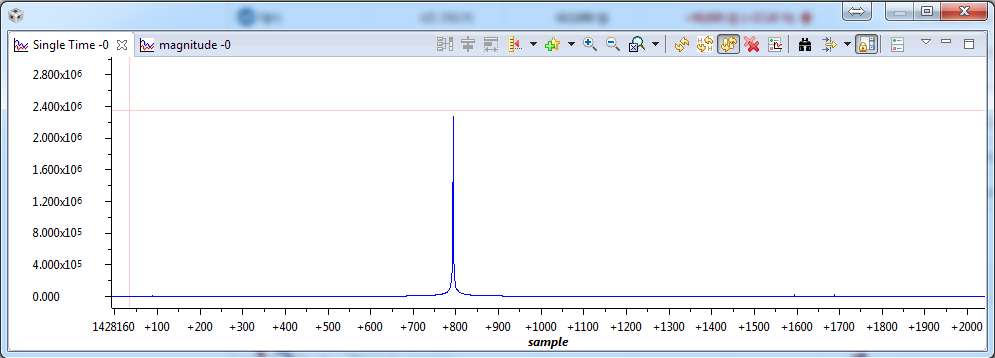
1--The first problem is the DC offset is to high as in the figure (I use Tools>Graph>Single Time to display the result of FFT calculation stored in RFFTmagBuff ). I used a IIR filter to remove the DC offset.

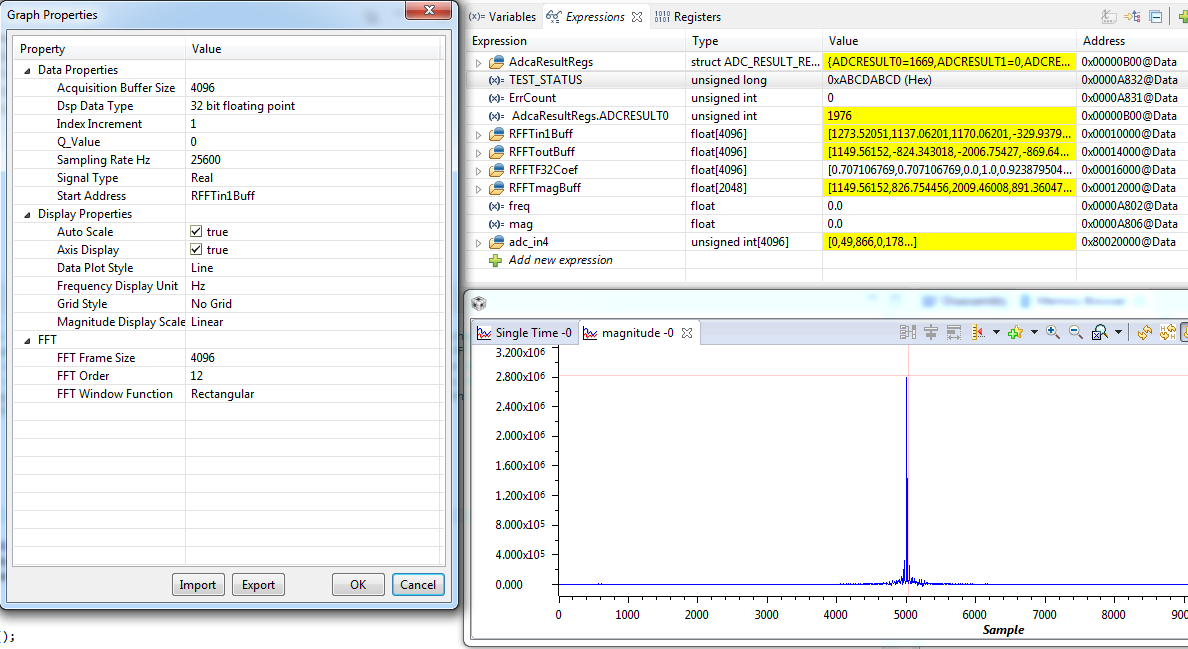
compare the result by using CCS to calculate FFT (Tools>Graph>FFT Magnitude)

2--The second problem is how to convert the unit of of result FFT magnitude, the y-axis in the graph, 
  • Hi Thanh,

    I have a few questions

    1. What version of the FPU library are you using?

    2. The RFFT table included in the library only supports up to a 1024 point real FFT. Are you generating the twiddle factor table at runtime? for 12 stages?

    3. Is the first graph displaying RFFTin1Buff? It should only have 4096 entries since you are running a 4096 point FFT.

    thanh nguyen said:
    1--The first problem is the DC offset is to high as in the figure (I use Tools>Graph>Single Time to display the result of FFT calculation stored in RFFTmagBuff ). I used a IIR filter to remove the DC offset.

    As far as the DC goes you will see a small value here because your sampling frequency is not an integer multiple of your sinusoid frequency, i.e. 25.6K/8K =  3.2. There wont be an equal number of positive and negative values to cancel each other for every 4096 samples. BUT you shouldn't see the huge spike you are seeing now - that just tells me the algorithm is not working. 

    The output of the RFFT is ordered a little differently, the RFFT only calculates half the spectrum (real input has a conjugate symmetric frequency spectrum so you only need half), i.e. from F(0) to F(N/2) arranged in the following manner

    re[0], re[1]....re[N/2-1], re[N/2], im[N/2-1], im[N/2-2].....im[1]

    The bins re[0] and re[N/2] are real only. So looking at the raw spectrum will not be useful, you would have to see the magnitude spectrum.

    thanh nguyen said:
    2--The second problem is how to convert the unit of of result FFT magnitude, the y-axis in the graph, 

    You should see a spike in the N*(f_m/f_s) bin, i.e. 4096*(8k/25.6k) = 1280th bin. Can you try the 1024 point RFFT and see whether you get the right result, should see a spike in the 1024*(8k/25.6k) = 320th bin and small DC offset

  • Hi Vishal,

    Thank you a lot for you help!

    1: I use library provided by you Vishal Coelho

    //$TI Release: C28x Floating Point Unit Library V1.50.00.00 $

    //$Release Date: Jun 2, 2015 $

    2: Actually, I didn't check the  RFFT table. But I tried the case RFFT_STAGES =10, but the FFT results still have the DC offset. the figure below is  the case RFFT_STAGES =10

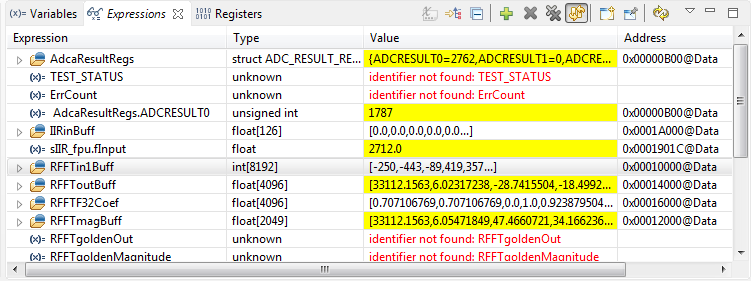
    3:  the first graph displaying RFFTin1Buff has 2049 point, here is the result of  the case RFFT_STAGES =12, 4096 points FFT, the result is stored in RFFToutBuff[4096] with first 2048 value is the REAL part and the last 2048 value is the IMAGI part 

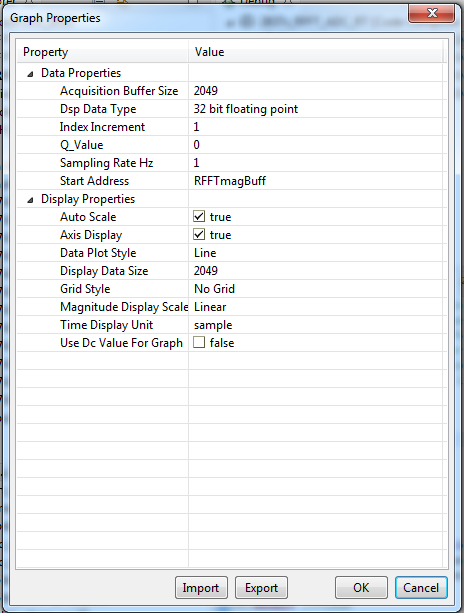
    I use Tools>Graph>Single Time to display the RFFTmagBuff with the configuration as follow

  • I'm just curious If we use the 1024 point FFT, can you try sampling at 24K instead. 24K is an integer multiple of your 8K sinusoidal input so you should see a very small (close to 0) DC offset, and a very clean spike in the magnitude specturm, at the (8/24*1024) =170.67~171st bin (some leakage into 170). We can verify that there is nothing wrong with algorithm.

    Also the DC bin is just the average of the sampled frame. So if you are running a 1024 point FFT its the average of all 1024 points. Once you sample the sine wave, can you plot the graph of it and just sum the values and divide by 1024 - it should match the DC bin value.

    Also, how are you treating the ADC input, i.e the 12-bit output . I think in the example i was sampling a purely positive signal - the PWM - and so my values would be 0 corresponded to 0 V and 4095 to 3.3V.
  • hi all, hi Vishal

    finally I found the issue.
    1- in the example code ADC input is an unsigned integer, so the DC exists ( offset value = (max value - min value)/2)
    2- to remove DC offset I use IIR filter with ADC input, the output of the filter is float so we have to change the input of FFT into float and change the FFT struture from RFFT_ADC_F32_STRUCT to RFFT_F32_STRUCT

    Thank you for your help,
    hope my issue can help someone,
  • Hello Sir,

    After a lot of corrections, I got the FFT result.

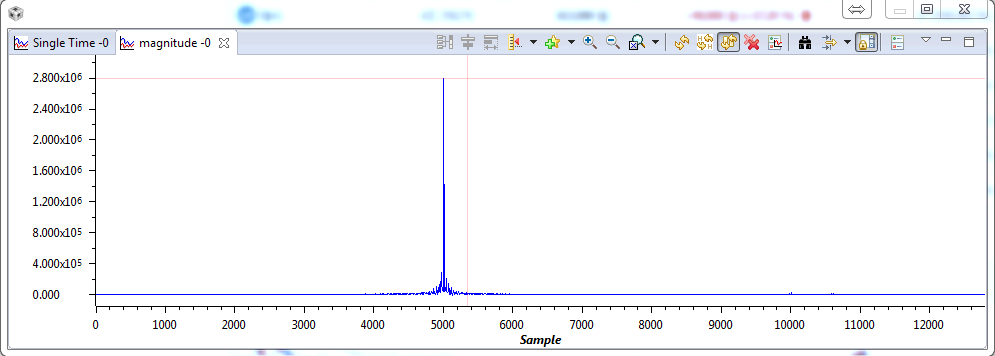
    Compared with the FFT Magnitude tool, it is very similar. But can you explain me why in peak amplitude of FFT Magnitude caculated by CCS tool it seems to be leached so much into adjacent frequency. The peak amplitude  caculated by CCS  is higher than FFT code one

    I use rectangular window, FFT state = 12

    here is the result be CCS tool

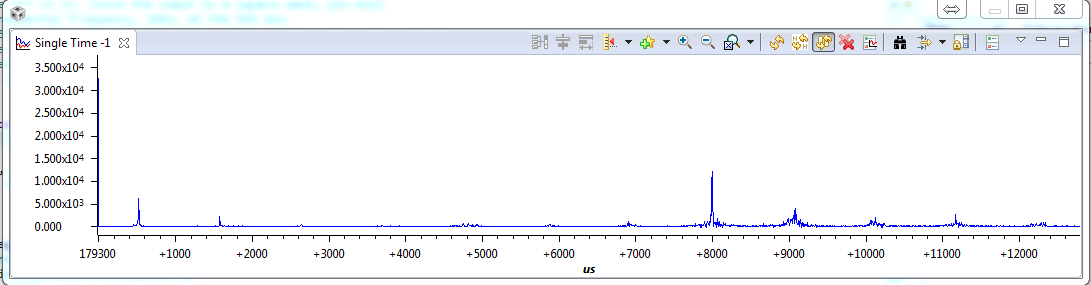
    and here is th result by my code

  • Hi Thanh,

    Im glad you got it to work.

    How did you setup the FFT magnitude graph. Can you post a screenshot
  • To Mr.Vishal,

    Thank you very much for your quick reply. 

    I use rectangular window, FFT state = 12