This thread has been locked.

If you have a related question, please click the "Ask a related question" button in the top right corner. The newly created question will be automatically linked to this question.

CCS/TMS320F28379D: EtherCat - Dual Core CPU2 - command linker file - error #10099-D

Part Number: TMS320F28379D
Other Parts Discussed in Thread: CONTROLSUITE

Tool/software: Code Composer Studio

Hi,

i´m having problem with combining the EtherCat Slave ET1100 with the dual core application.

I have an application in which the main programm runs successfully on CPU1 and the EtherCat programm, created from SSC, should run on CPU2. Both programm will be programmed in FLASH and use the *** interface.

I have already tested the blinky demo and it worked on both CPUs.

Now i tried to set the configuration like in the application demo for the etherCat Slave, but modified the command linker file to cpu2 and changed the predefined symbols:

- General:

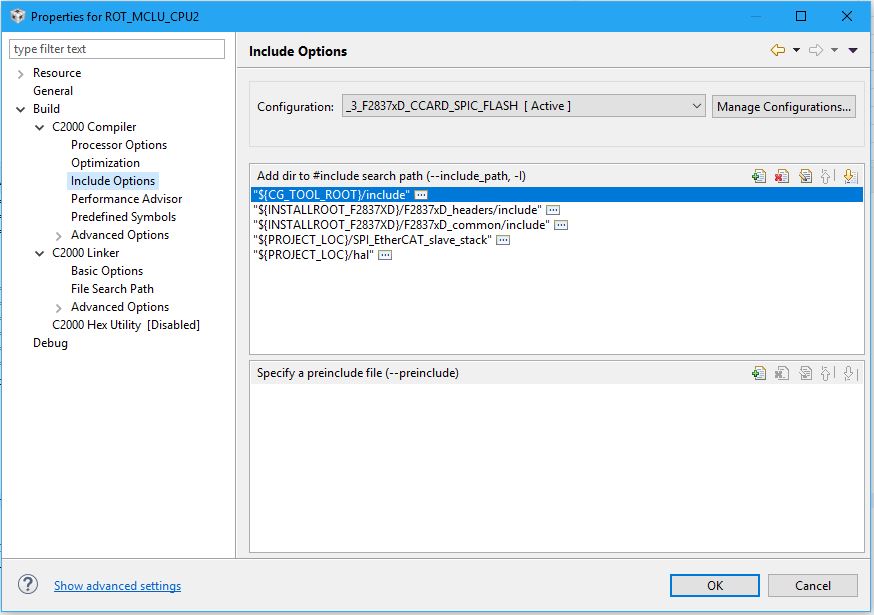
- Include Options:
- Predefined symbols :

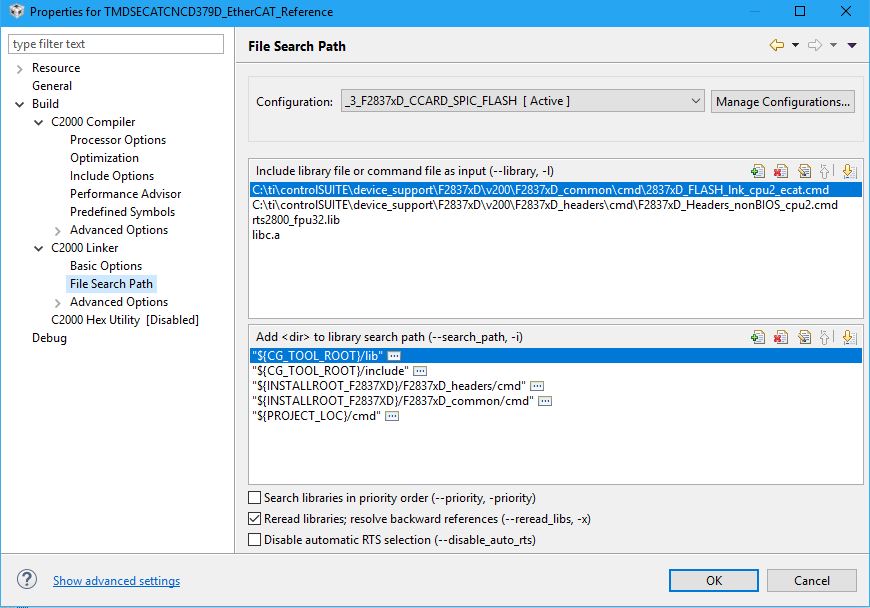
- File Search Path:

with this configuration i get the following errors:
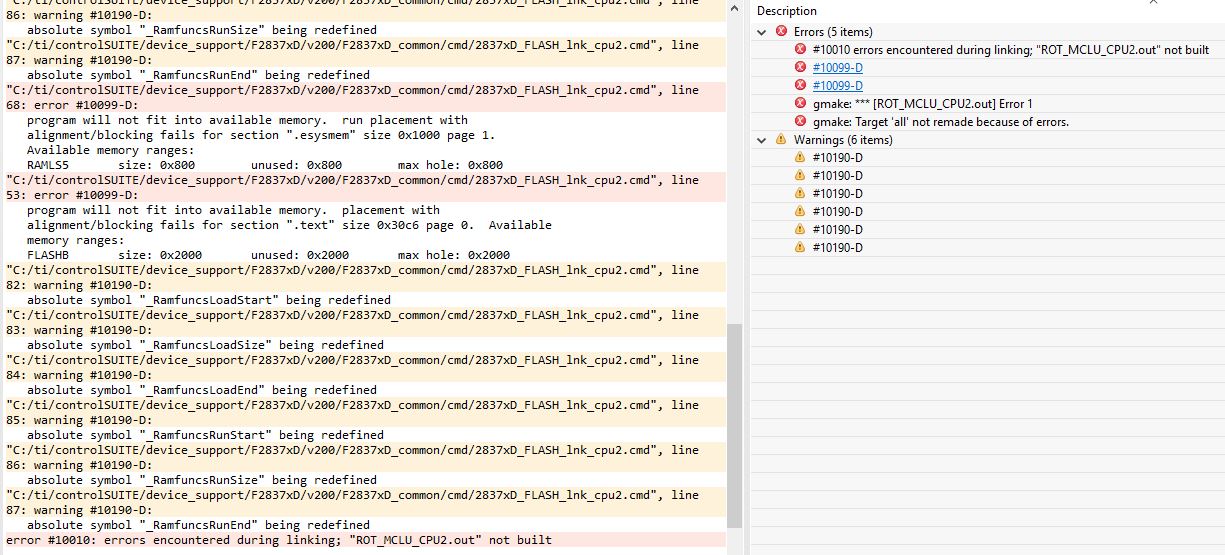
So for me it seems like the command linker file isn´t the right one if using the EtherCat programm on CPU2. With the command linker file for CPU1 its working fine. In this case the command linker file for cpu1 was in the demo application kit, maybe already modified for this case?

Do i have to modify the command linker file for cpu2 too?

With best regards

Willi Konrad

  • Willi,

    yes, you will have to adapt the linker command file for CPU2. Just look at any existing CPU2 example and try to map the sections from the EtherCAT example CPU1 linker command file to the CPU2 one. Just re-naming and/or re-using the CPU1 example linker command file for PCU2 might not always work.

    Best Regards
    Santosh Athuru
  • Hi Santosh,

    thank you for reply.

    I tried to map like you said. The errors are gone but i cant bring EtherCat Slave in Operation Mode in TwinCat.

    Both CPUs are running but my EtherCat stuck in a while loop, where he waits till he is in operation mode. So are my thougths

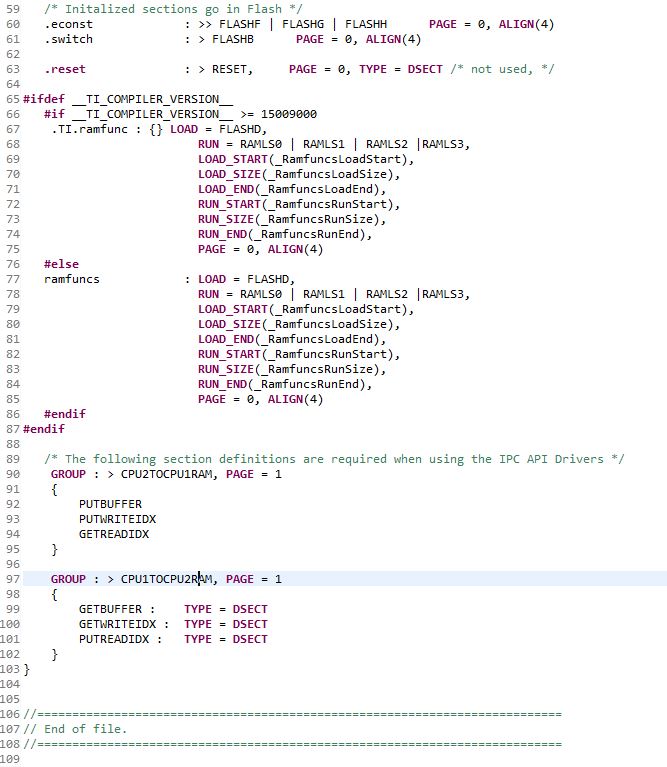
    This is modified command linker file:

    Can you please check if this is the right configuration of the command linker file to run the EtherCat Slave on CPU2?

    Thank you very much.

    With best regards

    Willi Konrad

  • Willi,

    I don't think anything is wrong with the linker command file anymore, it looks good to me. Also you mentioned that the program is running on CPU2.

    Can you confirm if you are using SPI or ASYNC16 PDI, and have allocated the ownership of the peripehral and the GPIOs to CPU2 correctly? Is the slave node is going to Pre-OP mode and not to OP Mode, it could be because the PDI ISR is not happening, put a break point in PDI ISR and see if you hit that if not check the IO configuration, SW and also the HW.

    Also can you confirm if you are using TMDSECATCNCD379D Kit or something else?

    Best Regards

    Santosh Athuru

  • Hi Santosh,

    The slave node stays in INIT mode.

    I´m using SPI PDI with the TMDSECATCNCD379D kit. I checked running the etherCat program just on CPU1. That worked. So i guess you´re right, i have to allocate the ownership of the peripheral and the GPIO´s to CPU2 correctly.

    On CPU1 i allocated the GPIOs

    - 113 (ESC_SYNC0_GPIO),

    - 114 (ESC_SYNC1_GPIO),

    - 119 (ESC_EEPROM_LOADED_GPIO),

    - 136 (ESC_SPI_INT_GPIO),

    - 137 (ESC_RESET_ET1100_GPIO)

    to CPU2. Also the four SPI-C GPIOs (122-125), because CPU2 don´t have access to set the GpioCtrlRegs. Are there more to allocate?

    Which peripheral do i have to allocate?

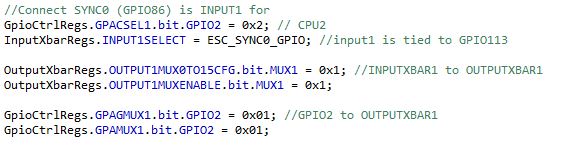
    The InputXbarRegs and OutputXbarRegs are also set in CPU1, because CPU2 don´t have access. Maybe thats the mistake?

    --> set in CPU1:

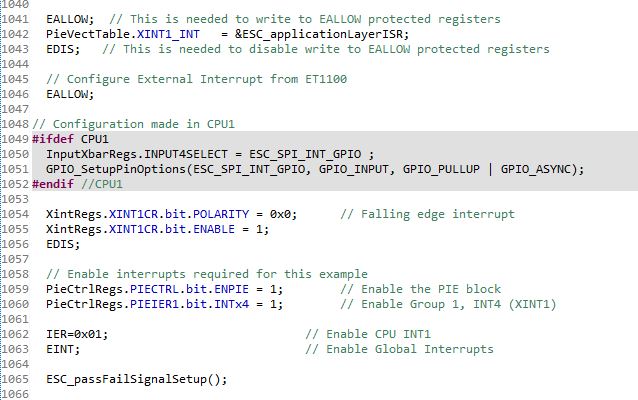
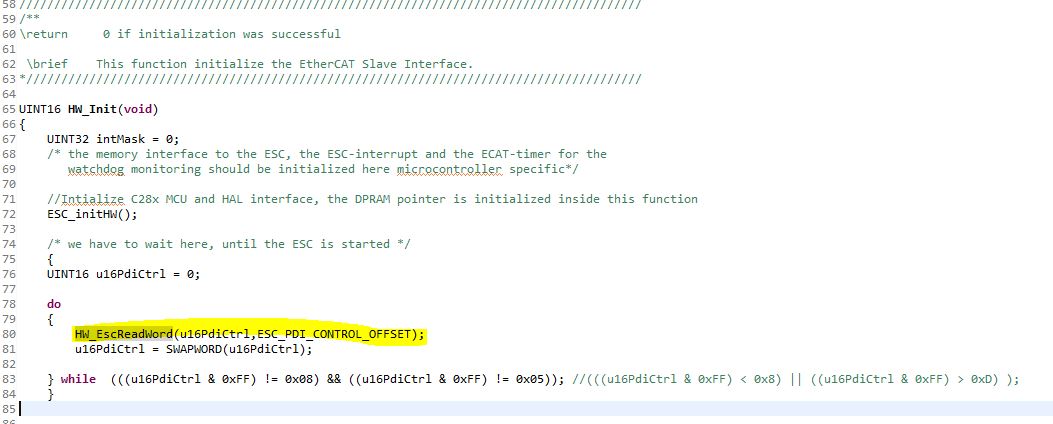
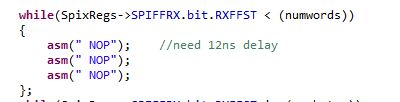
    I found out, that program is stuck here:

    because nothing coming from SPI-Interface:

    I don´t have any ideas anymore how to solve this. Maybe you know more?

    With best regards

    Willi Konrad
  • Willi,
    assign the *** port to CPU2 in addition to what you are doing. That should be enough.
    The GPIOXBAR connection configuration can be done on CPU1 itself, before you start the application on CPU2.

    I would suggest to run the PDI HAL API Test app on CPU2 first, that way you will have HAL ported to CPU2 and after that getting the stack example on CPU2 would be just an incremental change.

    There is another forum user who migrated the example to CPU2 successfully, so there shouldn't be any roadblocks.

    Best Regards
    Santosh Athuru
  • Hi Santosh,

    thanks for advices. But running the PDI HAL API Test app on CPU2 doesn´t work neither.

    I contacted the other user but he has not answered yet.

    Maybe you can have a look at my code if sth. is missing?

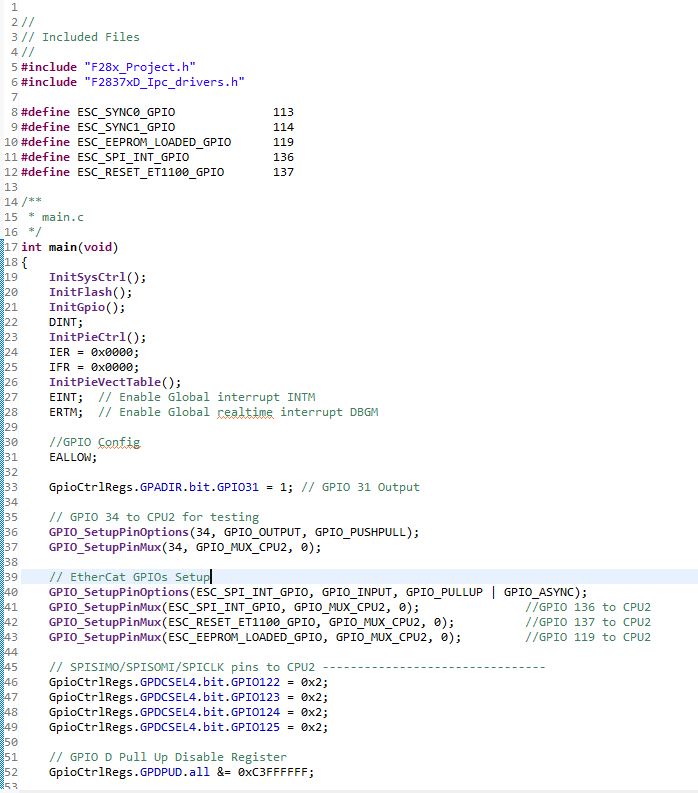
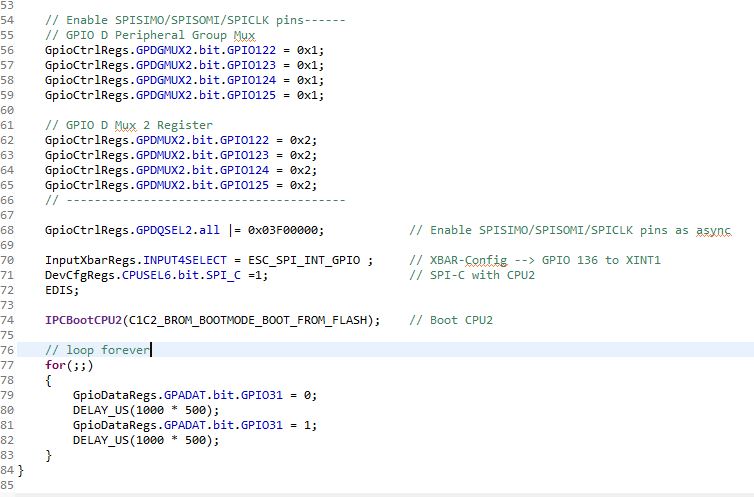
    This is my main file, from where i set the configurations for CPU2 and then send the boot command for CPU2.

    That should be all correct or is sth missing? Thats all for CPU1.

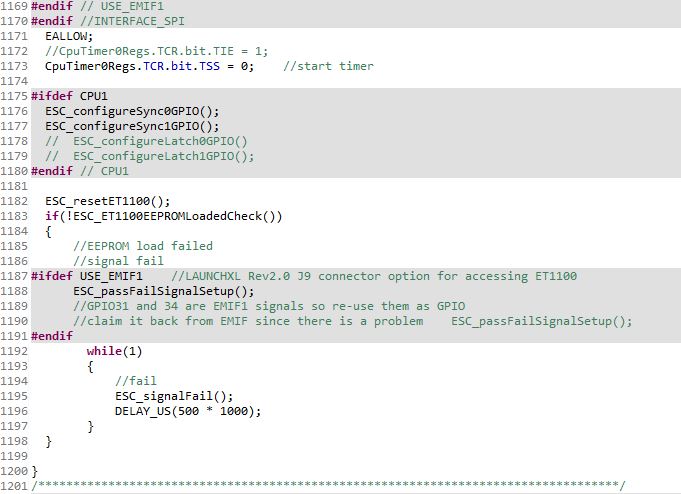
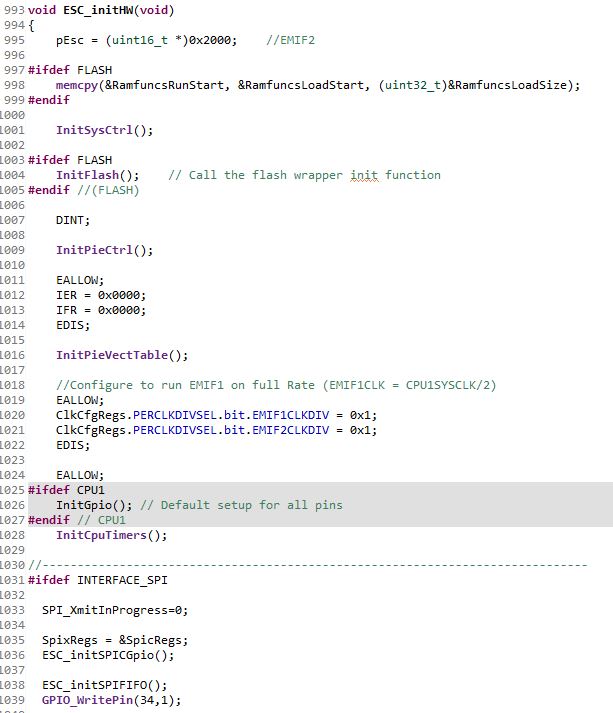
    So next is CPU2. There it jumps from the main()-function to the ESC_initHW() in etherCAT_slave_c28_hal.c - file.

    That should be all for CPU2.

    The program is stuck in trying to read from SPi-interface but SPi isn´t working i guess, so in Twincat it doesn´t go in OP-Mode.

    For CPU2 i also have the following configuration:

    The header cmd is nonBios for CPU2. The command cmd is the modified one from me for EtherCat in CPU2, like you already saw in the post above.

    I already stuck here for one week. I don´t know whats wrong here.

    With best regards

    Willi Konrad
  • I also having problems with SCI-A interface. I use the echoback demo and check data with PuTTY. On CPU1 its working but CPU2 is making trouble again. Configuring the GPIOs and set the peripheral to CPU2 in CPU1 and then booting CPU2 from flash. Now there are coming strange signs in PuTTY (maybe wrong baudrate?). Maybe theres a connection to my issue with SPI running on CPU2?

    With best regards
    Willi Konrad
  • Willi,

    It is a good idea to test the SCI with CPU2 and get familiar with the set up. You re-initialize SCIA on CPU2, so do you re-configure the baud rate on SCIA from CPU2 or do a AutoBaud lock?

    Please refer to the below TI reference code 

    The file SCI_Boot.c in C:\ti\controlSUITE\device_support\F2837xD\v210\F2837xD_examples_Dual\F2837xD_sci_flash_kernels\cpu01, has a function void Assign_SCIA_IO_CPU2(Uint32 BootMode).

    the above function runs on CPU1 and assigns SCIA to CPU2 (you can ignore the CLKSEM config (line 189), it is only needed to allow CPU2 to do clock configurations.

    Other the the abvoe reference, you can take a look at blinky example in C:\ti\controlSUITE\device_support\F2837xD\v210\F2837xD_examples_Dual\blinky_dc to understand the dual core run.

    Hope this helps.

    Best Regards
    Santosh Athuru

  • Hi Santosh,

    thank you for your answer. I´m already doing exactly the same. I think its not that difficult but sth is making me problems that i don´t know. Maybe you can have a look at my code i posted above.

    The baudrate will be configured first time on CPU2, like in the echoback demo.

    With best regards

    Willi Konrad
  • Hi Santosh,

    i solved the problem with my SCI-Interface. On CPU1 was running my EtherCat Slave program with SPi-PDI and on CPU2 my SCI-program.

    Now i found that in the init function of the SPi (ESC_initSPIFIFO()) the register was set ClkCfgRegs.LOSPCP.all = 0x1;

    So the controller had a different clock speed and the baudrate of the SCI wasn´t anymore 9600. So this is fixed.

    Now i thought maybe its the same problem i have with SPi. If i run the Ethercat with SPi on CPU2 maybe i have to modify the baudrate of SPi?

    On the main program we will have a fixed clock speed of 10MHz. So the baudrate will probably change of the SPi.

    But what is the right baudrate to communicate with the ethercat slave or twincat?

    With best regards

    Willi Konrad
  • Willi,

    thanks for the update. I would rather increase your SCI baud rate instead of touching the SPI settings. Getting SPI timings right for ET1100 is very tricky and you don't want to have timeouts with the ESC and be as fast as possible. So make sure you leave SPI at 20MHz and adjust SCI baud or increase the SCI Baud, by the way the SCI port supports Autobaud see if you can get that working by leaving the LOSPCP as configured for SPI?

    For further information on SPI timings, please refer to the ET1100 data sheet.

    Best Regards
    Santosh Athuru