This thread has been locked.

If you have a related question, please click the "Ask a related question" button in the top right corner. The newly created question will be automatically linked to this question.

CCS/LAUNCHXL-F28379D: FlashCoreSelection Error Upon Loading

Part Number: LAUNCHXL-F28379D
Other Parts Discussed in Thread: TMS320F28379D, BOOSTXL-BUCKCONV, POWERSUITE, CONTROLSUITE, C2000WARE,

Tool/software: Code Composer Studio

Hello,

I'm using the following hardware:

TMS320F28379D LaunchPad

BOOSTXL-BUCKCONV

I'm attempting to load the example project from PowerSuite entitled "Out of box demo (Buck_VMC_F2837xS)" to simply validate the operation of both boards. I'm aware that this example project is made for a single-core Delfino MCU and not necessarily the dual-core that I have. 

I seem to be able to get through the import and build process but the debug portion (that contains the loading of the program on the MCU) appears to be failing. The error I receive is as follows:

C28xx_CPU1: Error occurred during flash operation: Unknown property "FlashCoreSelection"

My guess is that it's expecting to see a single-core target and is instead seeing a dual-core. Is there any way to modify the project for this to work? Perhaps something to do with replacing the FlashProperties XML file? Thanks.

Fernando


  • Fernando,

    In CCS (Edit perspective) please check the target configuration. If the target configuration file (.ccxml) is in the project explorer window, open the file. If it is not in the project explorer window, then click View -> Target Configurations, and in the window that open click the plus sign (+) next to User Defined. Check which .ccmxl file is set as default and open it. Now make sure that it matches the target, which for your case should be "Texas Instruments XDS100v2 USB Debug Probe" with TMS320F28379D selected. Is this what you have? Additionally, you might need to change the linker command file (.cmd) to match the F28379D. Also, when loading the program make sure that you only launch the program on CPU1 (i.e. uncheck CPU2). For an additional reference, you might want to see the following post:

    e2e.ti.com/.../1731564

    Please let me know if this solves your problem. Also, please use the green "Verified Answer" button if it is now working. Thanks.

    - Ken
  • Ken,

    This seemed to somewhat help.

    Here's what I did:

    Project Explorer > F2837xS.ccxlm

    The connection was correct (Texas Instruments XDS100v2 USB Debug Probe). The "Board or Device" was not. I found and checked the TMS320F28379D, saved and exited. 

    Run > Debug Configurations > Main

    Checked "C28xx_CPU1" and "CPU1_CLA1". Unchecked "C28xx_CPU2" and "CPU2_CLA1". Applied and exited. Are both CPU1 boxes meant to be checked off?

    Did a clean, build and load. Did not receive the error from last time. I also don't receive a message stating that programming was successful but I assume it was (?).

    Once I run the code (F8), a .c file entitled 0x3fe493 opens with an error "No source available for "0x3fe493". The run code command is immediately halted and I am unable to resume. Is this configuration-related? 

    Lastly, in Project > Properties > Build > C2000 Compiler > Processor Options I see that the Configuration is set as "F2837xS_FLASH [Active]". Of course I have the F28379D so this would not seem to apply. The only other option however is "F2837xS_RAM". 

    Fernando


  • Fernando,

    It looks like you are making progress. When using the F28379D you need to have "C28xxCPU1" checked and also check "CPU1_CLA1" if using the CLA (flash programming is determined by memory sections assigned in the .cmd file). Please note that "No source available for "0x3fe493" is not an error, but simply CCS is letting you know that "C" source is not available. This code section is in the Boot ROM and the symbols need to be loaded to view the "C" source. If you look at the Disassembly window you should find the assembly code.

    If you want to view the Boot ROM source code, it is available in controlSuite and C2000Ware. In ControlSuite:

    C:\ti\controlSUITE\libs\utilities\boot_rom\F2837x_revb\revb_rom_sources

    In C2000Ware:

    C:\ti\c2000\C2000Ware_1_00_02_00\libraries\boot_rom\f2837xd\revB\rom_sources

    After loading the program, use the ADD symbols option and select the ROM COFF file from the path in the above directory. Then when you reset the device, it will point to the reset entry point with boot ROM with the source code. Please note the boot ROM source code is only provided for reference, and you cannot use it to modify the boot ROM.

    As for the project, you can select if you would like to run it out of flash or RAM by selecting the build configuration. However you will need to make the appropriate modifications for the device you are using (e.g. RAM linker .cmd file for the F28379D).

    I hope this helps. If this answers your questions, please click the green "Verified Answer" button. Thanks.

    - Ken
  • Ken,

    I am still unable to run the code. Here's what I did:

    Load > Add Symbols

    In the field "Program File" I browsed until I found what I believe to be the ROM COFF file (.out). I had to dive down some levels deeper than where you indicated:

    C:\ti\controlSUITE\libs\utilities\boot_rom\F2837x_revb\revb_rom_sources\ccs_files\cpu01\Release\F2837x_cpu01_bootROM_REVB_Golden_020314.out

    Was this the file you were referring to?

    My issue with "No source available for 0x3fe493" is that when I go to run the code, it seems to stop here. I realize it's not an error, but it's not making it possible for the example code to run.

    I'm able to step into the code and find that when I hit line 218 of F2837xS_SysCtrl.c, the error occurs. In the .c file, there is an assembly EALLOW. However, the disassembler shows ITRAP0 at this location. Am I using the wrong SysCtrl file?

    Fernando
  • Fernando,

    There are two separate items here. I only pointed out the symbols for the boot ROM as just a side note for why the message says "No source available...". This is not your issue, which is the program does not run when using the resume button in CCS. After loading the program, and before running, did you set the EMU boot mode with the CCS script?

    - Ken
  • Ken,

    Program appears to have loaded OK. I then did the following:

    Scripts > EMU Boot Mode Select > EMU_BOOT_FLASH

    The other option was "EMU_BOOT_SARAM". Clicking on the FLASH option doesn't seem to register any kind of change (like a check mark or something). After doing this and running I still come to the same result. The code does not run and crashes on the same line.

    Fernando
  • Fernando,

    Could you please provide me with the path from PowerSUITE for "Out of box demo (Buck_VMC_F2837xS)" demo you are having problems with? I check my PowerSUITE, but could not find it. Thanks.

    - Ken
  • Ken,

    From CCS (7.4.0):

    View > Resource Explorer Classic > powerSUITE > Development Kits > Digital Power BoosterPack > Example Projects > Out of box demo (Buck_VMC_F2837xS)

    This is per the instructions here (page 13):

    www.ti.com/.../tidu986.pdf

    I opted for the F2837xS instead of the F28069M as I believe it's more applicable.

    Fernando

  • Fernando,

    Thanks. I typically work with the files directly in C:\, so the location is slightly different and I was able to find your project.

    I may have found part of the issue. The project is currently using the files from the F2837xS common folder:

    C:\ti\controlSUITE\device_support\F2837xS\v160\F2837xS_common\source\FILE_NAME.c

    There are some differences between the files used for the F2837xD from its common folder (in addition to SysCtrl.c). When using the F2837xD you need to use the common files for this device:

    C:\ti\controlSUITE\device_support\F2837xD\v160\F2837xD_common\sourceFILE_NAME.c

    This would apply to the source files AND header files in the project that has "F2837xS_" naming, too.

    (Note that the latest version is v220, rather than v160 above).

    Next and important - when using the F2837xD you will need to set up a predefined symbol for CPU1. Under “C2000 Compiler” select “Predefined Symbols”. In the predefined name box that opens (“Pre-define NAME”) click the Add icon (first icon with green plus sign). Then in the “Enter Value” window type CPU1. This name is used in the project to conditionally include the peripheral register header files code specific to CPU1. Click OK to include the name. Finally, click OK to save and close the Properties window.

    Please make these changes and let me know if you are able to run the program.

    - Ken
  • Ken,

    Successfully set up and saved the predefined symbol. No problem there, thanks for the detailed instruction.

    I'm new to CCS and have never altered the common files of a project before. Here's what I did:

    Project > Properties > CCS Build > C2000 Compiler > Include Options

    There are two paths here that seem relevant. They are as follows:

    "${F2837xS_DEVICE_SUPPORT_ROOT}\F2837xS_common\include"
    "${F2837xS_DEVICE_SUPPORT_ROOT}\F2837xS_headers\include"

    If I'm understanding you, it seems as though these want to be F2837xD specific. Correct?

    It appears I can edit these paths. I followed the path that you outlined in your reply. This 'source' folder contains 26 .c files. Which ones do I specifically have to point to?

    Fernando
  • Fernando,

    Yes, you will need to modify the two paths for "F2837xD_". This will take care of the header files. As for the .c source files, they are part of the project and can be seen in the CCS project explorer window. You will need to delete (or exclude from build) each F2837xS_FILE-NAME and add the equivalent F2837xD_FILE-NAME. The source files can be found in:

    C:\ti\controlSUITE\device-support\F2837xD\<version>\F2837xD_common\source
    C:\ti\controlSUITE\device-support\F2837xD\<version>\F2837xD_headers\source (contains F2837xD_GlobalVariableDefs.c)
    C:\ti\controlSUITE\device-support\F2837xD\<version>\F2837xD_headers\source (contains F2837xD_Headers_nonBIOS_cpu1.cmd)

    It looks like the project has 12 F2837xD specific source files that need to be replaced.

    Also, you might be interested in looking at my workshop and manual for help with working with CCS and the F2837xD files:

    processors.wiki.ti.com/.../C2000_Multi-Day_Workshop

    I hope this helps.

    - Ken
  • Ken,

    From the 3 paths that you presented in your previous reply, I was able to find 11 files that needed replacing:

    \F2837xD_common\source - 7 .c files, 2 .asm files 

    \F2837xD_headers\source - 1 .c file

    \F2837xD_common\cmd - 1 .cmd file 

    You mentioned 12. Am I missing one? Below is a view of my current Project Explorer:

    n

    I highlighted two .cmd which are still F2837xS specific. Do these want to be changed as well? 

    It seems as though I've taken care of the source files (except for possibly one which I can't find). As for the header files, how are these changed exactly? Is it in Properties > CSS Build > C2000 Compiler > Include Options?:

    I figured these were the two paths that I essentially altered manually by excluding the xS file from build and adding the equivalent xD files. 

    Fernando


  • Fernando,

    Yes, there are 12 files - I am counting one of the _DP_BoosterPack.cmd files (you will only need one; flash or RAM). This linker .cmd file is unique to this project and you will need to modify it to match the memory map for the F28379D device. There is not a direct replacement from the header files since this is the project .cmd file. (Note that there are two linker .cmd files - one for the header files and one for the project). You can try to build first with this file and then see the errors for what needs to be modified. Also, as you pointed out, the two paths for the header files needs to be changed to ...\F2837xD_common\... and ...\F2837xD_headers\...

    - Ken
  • Ken,

    When you have a chance, please send me a copy of your project file. Still no luck on this end. Thanks.

    Fernando
  • Fernando,

    After making the changes, what errors are you getting? Does the project build? If not, which files are generating the errors?

    - Ken
  • Ken,

    The build finishes with errors.

    As you mentioned, I only need to swap out one of the ...DP_BoosterPack.cmd files, correct? I assume I should swap out the FLASH variant because that it what the program is booting out of? I don't know where to find the F2837xD variant of this file.

    I've attached a .zip file of my project. If you could review, that'd be great. Thanks.

    Fernando

    Buck_VMC_F2837xS.zip

  • Fernando,

    Please try making the following changes to your project:

    1. In the project Properties, under C2000 Compiler select Include Options and update the following (“${F2837xD_Device_...):
    a. "${F2837xD_DEVICE_SUPPORT_ROOT}\F2837xD_common\include"
    b. "${F2837xD_DEVICE_SUPPORT_ROOT}\F2837xD_headers\include"
    2. In the project Properties, under Resource select Linked Resources. Select Path Variables tab and highlight F2837xS_DEVICE_SUPPORT_ROOT and click Edit. Change the following:
    a. Name: F2837xD_DEVICE_SUPPORT_ROOT
    b. Location: ${ORIGINAL_PROJECT_ROOT}\..\..\..\..\device_support\F2837xD\v210
    i. NOTE: changed to header files version to v210 (fixes issues with CAN ISR naming)
    3. Then select OK and OK to save the updates
    4. Need to exclude F2837xS_RAM_DP_BoosterPack.CMD (right-click on file and select Exclude from Build)
    5. For this code which is uses the external crystal on the F28379D LaunchPad you will need to configure anther predefined symbols. Under “C2000 Compiler” select “Advanced Options” and then “Predefined Symbols”. In the predefined name box (“Pre-define NAME”) click the Add icon (first icon with green plus sign). Then in the “Enter Value” window type one at a time): _LAUNCHXL_F28379D (note leading underscore). This is in addition to CPU1, which you have done earlier. Click OK to include the name. These names are used in the project to conditionally include the peripheral register header files code specific to CPU1 and the LaunchPad. Finally, click OK to save and close the Properties window.
    6. Open Buck_VMC-Main.c and go to line 321. FMULT_1 needs to be changed to FMULT_0 (note this changed/fixed from v160 to v210 in F2837xD_Examples.h – see line 162 in file).
    7. NOTE, I am not the expert on this code, but the following fixed some errors (fixes “a value type “int” and “int16” cannot be assigned to a union error). Open PWM_1ch_UPCntDB_ActivHIC_Cnf.c and change lines 73 and 74 to:
    (*ePWM[n]).DBRED.bit.DBRED = 15;
    (*ePWM[n]).DBFED.bit.DBFED = 15;
    (*ePWM[n]).DBRED.bit.DBRED=dbRED;
    (*ePWM[n]).DBFED.bit.DBFED=dbFED;
    8. This project was built with an earlier version of the compiler which generates a linking error. In the project Properties select General and then change the Compiler Version to a newer version (e.g. TI v16.9.6.LTS). This will require the following change in F2837xS_FLASH_DP_BoosterPack.CMD – on line 119 (ramfunc needs to be .TI.ramfunc):
    .TI.ramfunc : LOAD = FLASHD,

    - Ken
  • Fernando,

    Did the steps in my previous post help?

    - Ken
  • Ken,

    Firstly, thanks so much for the detailed instruction. That was great.

    I was able to follow everything you recommended and implemented all of the changes. I performed a clean and rebuild of the project. I didn't receive any errors although I do have the following warning:

    This project contains 11 unresolved buildable linked resource(s). The project may not build as expected. 

    I assume this is related to the F2837xD specific .c files that you had me include in the project. Do you also see this warning upon building?

    I unfortunately don't have the Launchpad with me today so I can't test loading the project onto the MCU. 

    Fernando

  • Fernando,

    I am glad that the project is now building without any errors. The warnings have to do with the changes that were made to the linked resources in the Path Variables from F2837xS to F2837xD and it is relate to the files that are excluded from the project. This can be solved by adding back a path under Path Variables for F2837xS (copy the one for F2837xD and rename the D with S). In my directions for step 2, I should have said "Add" rather than "Edit". The project should now build without any warnings. Please let me know if this works for you.

    - Ken
  • Ken,

    That worked. The project now builds with no errors or warnings. 

    I'm trying to load the project onto the MCU now and receiving this very basic error:

    Error connecting to the target:
    (Error -1135 @ 0x0)
    The debug probe reported an error. Confirm debug probe configuration and connections, reset the debug probe, and retry the operation.
    (Emulation package 7.0.100.0)

    First thing I did was check the .ccxml file. The "Connection" is correct (TI XDS100v2 USB Debug Probe) as is the 'Board or Device" (TMS320F28379D). When I click the "Test Connection" button, I receive a notice indicating that JTAG has succeeded.

    The only thing I can think of is that the "Target" in "Debug Configurations" does not match what we have discussed in the past. My only options are:

    C28xx

    CLA_0

    I recall having CPU1 and CPU2 in the past and you indicated that only CPU1 should be selected. 

    Fernando 

  • Fernando,

    I notice that the Project window has the F28377S.ccmxl file [Active], but the configuration is set for F28379D - this should not be a problem thought it is confusing. Can you try deleting this from the project and then create a "global" taget configuration. Following the directions in the workshop manual that I sent you earlier on page 2-20 (page 44) steps 3 to 5:

    processors.wiki.ti.com/.../C2000_Multi-Day_Workshop

    Please let me know what happens.

    - Ken
  • Ken,

    That seemed to do the trick.

    If you recall from my initial post, I'm trying to use the LAUNCHXL-F28379D in conjunction with a BOOSTXL-BUCKCONV. I'm currently on page 15 of TIDU986. After cleaning and building the project I click debug and receive the following message:


    In 'Debug Configurations' I have only the following checked off:

    C28xx_CPU1

    CPU1_CLA1

    I can apparently run the code but of course the expressions do not update. I can send you screenshots of the 'Disassembly' lines with regards to each error. Thanks.

    Fernando

  • Fernando,

    If you are running the code in real-time emulation mode, then you need to enable the window for continuous refresh. In my workshop see "Using Real-time Emulation" in lab 6 starting on page 6-32 (page 146). This needs to be done for the Expressions window for the values to update.

    Please let me know if this solves your problem. Also, please use the green "Verified Answer" button if it is now working.

    - Ken
  • Ken,

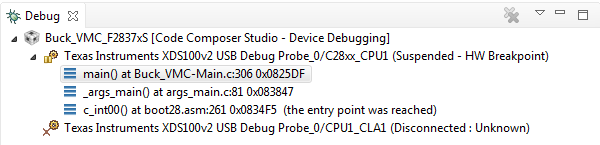
    In the Debug window that opens, C28xx_CPU1 is running. However, CPU1_CLA1 is not (Disconnected: Unknown). Does this also need to be running? 

    Once I run the code and turn on the supply voltage to the board, I do not see any of the expression values change. For example, I should immediately see the value of Gui_Vin change to 9 (9VDC is in the input voltage). I tried testing another expression just to see if I could see any life on the board. I set the Continuous_ON expression to 1 but gate of the FET, Q1, remained LOW. 

    On a separate note, the target just disconnected. My machine notified me of the following:

    A USB device has malfunctioned and exceeded the power limits of its hub port. You should disconnect the device.

    I had never seen this before. I assume there's something significantly incorrect regarding the board's configuration for this to occur. Please advise. Thanks.

    Fernando

  • Fernando,

    The CPU1_CLA1 will connect if it is used in the project - this is probably not the case for your project since you do not have any CLA files included. You can review module/lab 9 in my workshop for more details about the CLA.

    To see values change in the windows you need to run in real-time mode and also have the windows enabled for continuous refresh.

    It looks like you may have a problem with your PC USB connection - try again with only the LaunchPad connected.

    - Ken
  • Fernando,

    One more question - are you looking for the expression values changing in the Expression window or in the GUI? If using both, are they changing in the Expression window?

    - Ken
  • Ken,

    I unplugged the LaunchPad from the BOOSTXL-BUCKCONV board. 

    Did another clean, build and [debug] load of the project. Per TIDU986 I have enabled real-time emulation mode. I'm also continuously refreshing the Expressions window once per second. I then click run. As before, the Debug window shows that the CPU1 is running and that the CLA1 is disconnected. 

    Although the Expressions window is continuously refreshing, none of the values are changing. In fact all of the value are 0 except for the following:

    Gui_ItripSet = 6.0

    pid2p2z_Gui = 1

    Pgain1_Gui = 100

    Igain1_Gui = 5

    I'm seeing very limited life on the header pins of the LaunchPad (J1-8). Besides the voltage rails, I'm only seeing 3.3V on pins 16, 37 and 56. Per SPRUI77A these are the following:

    16, 56 - RST

    37 - GPIO3 or EPWM2B depending on MUX setting

    Not too sure what else to do. The code appears to be running on the MCU per CCS. 

    Fernando

  • Fernando,

    I think the problem is a compatibility issue with the F28379D LaunchPad and the BOOSTXL-BUCKCONV BoosterPack. Please see the BoosterPack Checker at:

    dev.ti.com/.../

    To see the compatibility differences, first filter to C2000 then select the F28377S or F28069M LaunchPad. (I realize that you are using the F28379D LaunchPad, but this is the way for us to find the compatibility difference or else the BOOSTXL-BUCKCONV BoosterPack will not be listed). Next at the top on the BoosterPack tab select the BOOSTXL-BUCKCONV BoosterPack. You can now switch between the LaunchPads. Notice that the F28377S and F28069 LaunchPads are compatible with the BOOSTXL-BUCKCONV BoosterPack. Now select the F28379D LaunchPad and notice that the BOOSTXL-BUCKCONV BoosterPack is not compatible. You will also notice that the difference is with pin 29.

    As an option, perhaps try using jumper wires to route the needed signals between the F28379D LaunchPad and the BOOSTXL-BUCKCONV BoosterPack. I realize that this is not as simple as plugging the LaunchPad in to the BoosterPack board, but if the needed signals are available it might work. Let me know what happens.

    - Ken
  • Ken,

    I followed your instruction and can confirm that Pin 29 on the BOOSTXL-BUCKCONV (from here on abbreviated as BP) wants to tie to an ADC input while Pin 69 on the LAUNCHXL-F28379D (from here on abbreviated as LP) is a DAC output. I've wired all of the compatible pins with jumpers. I tied the incompatible Pin 29 (analog output of instance ILFB) of the BP to Pin 65 of the LP (analog input of instance adcinb5). Previously, this was plugging into Pin 69 (analog output of instance adcina4). 

    A few questions:

    1. What file must be modified in CCS to reassign this pin? I wanted to replace all instances of "adcina4" with "adcinb5" but the former was not found. 

    2. Per page 6, Figure 4 of TIDU986, H3.10 of the BP has an output called "DAC4". However this is not captured in the BoosterPack Checker tool. Here, Pin 31 (i.e. H3.10) appears unused.

    3. Per page 6, Figure 2 of TIDU986 there appears to be an input called "Actv_Drv1" that drives the gate of the low-side pass transistor, Q1, enabling the active load. Where is this being driven from? There appears to be a discontinuity in the schematic. 

    4. Even though the Pin 29 compatibility is true, shouldn't I be seeing signs of life elsewhere? Like I mentioned in my previous post, I'm only seeing voltage rails and a few other signals. 

    Example of no life:

    9VDC provided to BP

    Voltage at H2.8 of BP (VinFB) measures 2.175V

    Pin H2.8 of BP is jumped to Pin 68 on the LP (J7.8 per the schematic in SPRUI77A); 2.175V is of course measured here as well 

    Code is running on CCS in emulation mode with expressions constantly refreshing; Gui_Vin still reads 0.0

    Fernando

  • Hi Fernando,

    Several of the pins change from the 77S launchpad to the 77D launchpad.  

    EPWM2 changes to EPWM4 (control PWM)

    ADC-A2 changes to ADC-C5 (ILFB)

    ADC-A3 changes to ADC-C4 (Vfb)

    ADC-B3 changes to ADC-B4 (Vin)

    The PWM can be changed with the BUCK_PWM_NO in the BUCK_VMC-Settings.h file (chage from 2 to 4)

    The ADC changes are a little more involed, each number needs to be updated in the same file above (number should match the ADC num ie C5 would be 5).  We then need to change the trigger select from pwm2 to pwm4 this is done by changing ADC_TRIG_SOURCE from 7 to 11 (details in TRM).  Then for the ADCs that changed from letters (ie B -> C) we need to change the initiation of the ADCs, this is all done in the BUCK_VMC-Main.c file:

    The code uses ChSelx[] to select what ADC will be set up. We need to create a ChSel3 and assign the ILFB and Vfb to location 0 and 1 in the array.  We also need to create a third TrigSel array and assign ADC_TRIG_SOURCE to location 0 and 1 as well.  We then need to make a third call (the code currently conatins 2 calls) to the ADC_SOC_CNF function passing it 3 for the ADCno (this is adc c) and the new trigsel and channel sel arrays we made, the rest of the arguments should be the same as what the code calls for the other ADCs. 

    Finally we need to remap the ADC results for the Vout and IL.  This is done by changing the:

    #define Vout1R AdcaResultRegs.ADCRESULT0 and #define IL1R AdcaResultRegs.ADCRESULT1

    from AdcaResultRegs to AdccResultRegs this points Vout1R and ILR to the results of the C and vs the A adc.

    Regards,

    Jake

  • Jake,

    Thanks. Changes to the main.c and settings.h files seemed to have helped.

    One step that I always had in my procedure when loading the MCU was a "Rebuild Project". Even after altering those two files, I noticed that after clicking "Rebuild Project", the code would revert to the original values. Thus, I was loading the same old, non-working code. Instead, I did a "Build Project" which kept the changes that you proposed.

    With regards to the operation, I'm now getting life in the Expressions window and the on-chip ADCs appear to be measuring some values (although not terribly accurately).

    Am I correct in stating that the only true pin incompatibility is with Pin 29 of the BP/Pin 69 of the LP? The mapping that you described in your post is purely MCU internal, correct? Should I just jump Pin 29 of the BP to where adcinc5 is sourced on the LP (i.e. Pin 64)? This is unfortunately already being used for the ILFB-AVG instance of the BP.

    Could I just jump it to Pin 65 of the LP (analog pin of instance adcinb5)? This is currently not being used. I would just need to change the ADC letter from C to B, correct?

    Fernando

  • Hi Fernando,

    I'm not sure I follow.  The 79D and 77S parts have slightly different pin outs so the changes I made were to correct for this difference.  This mainly involved changing what ADC the variables used by the code point to along with changing what PWM module is used to generate the main control.  With these changes made I think the main control pins should all be mapped to work correctly with the 79D Launchpad. 

    A quick look at the pinouts between the two different lauchpads doesn't really show any incompatibilities. Analog ins/outs and what pins on the launchpads are PWMs seem to be the same the only difference is they are connected to different ADC/DAC/PWM submodules.  for example the pins where PWM2 is located on the 77S Launchpad is where PWM4 is located on the 79D Launchpad so changing the PWM used would make the two launchpads compatible.

    Does this help?

    -Jake

  • Hi Jake,

    I'm referring to the compatibility of the BOOSTXL-BUCKCONV with the LAUNCHXL-F28379D. Per the "BoosterPack Checker", there is a single pin incompatibility; Pin 29 of the BP mates with Pin 69 of the LP. Pin 69 is apparently a DAC output and needs to be an analog input.

    I currently have both boards side-by-side and have simply connected them using jumpers. I would prefer to just have the boards sitting on top of each other but I was under the impression that this incompatibility would be an issue; the MCU would not be able to get a reading of IFLB. That being said, I simply connected Pin 29 of the BP to Pin 65 of the LP; a pin that is not being used by anything else and is an analog input of instance adcinb5. That being said, doesn't there need to be a change in the code to reflect this? Thanks.

    Fernando
  • Hi Fernando,

    I see the confusion. I believe there may be a mistake in the compatibility checker. That pin maps to ADCINA4 on both lauchpads and is the overcurrent protection feature. I did not update this in my code as it is the same module for the 77S and 79D. I'll have to double check that nothing needs to change in code to enable the overcurrent feature but you should be ok to connect the boards as intended.

    Regards,
    Jake
  • Fernando / Jake,

    Yes, I have been looking into this today. There is an error with the BoosterPack compatibility checker. The F28379D LaunchPad documentation (sprui77a.pdf) is correct. Please keep me posted on the progress.

    - Ken
  • Hi Jake,

    OK, so you're saying that this BP and LP are 100% compatible; great.

    I've replaced the main.c and settings.h files with the ones you provided but for whatever reason, even when I do just "Build Project", the files seem to revert to their original condition. It's able to load and run but I then obviously don't see any life on the board again. Any idea why my saves aren't being registered?

    Fernando
  • Hi Fernando,

    The project is pulling from the RTOS settings in the .cfg file.  In order to avoid this copy the files in then do a build all project -> build all.  This should keep the changes in settings.h file. 

    Regards,

    Jake

  • Hi Jake,

    Unfortunately I didn't have any luck with doing Project > Build All. I still witnessed the settings.h file being reverted to its original status. I tried seemingly every other build permutation but to no avail.

    I got around it by just altering the main.cfg file. There were 6 lines of code where I just changed the value to the news ones that you indicated in the settings.h file. Now, after a clean and build, the new values are maintained. 

    I was able to plug the LP board right on top of the BP and it seems to be running just fine. I'm going to start running through TIDU986 now. Thanks for all the help!

    Fernando  

  • Fernando / Jake,

    I am glad it is now working. I will close this thread.

    - Ken