This thread has been locked.

If you have a related question, please click the "Ask a related question" button in the top right corner. The newly created question will be automatically linked to this question.

TMS320F28075: Testing out F2807x_sci_flash_kernels.c

Part Number: TMS320F28075
Other Parts Discussed in Thread: C2000WARE

I'm having issue getting this sample project from C2000ware to work. Below are the procedures I had taken:

1) compiled a program using CCS7. I've used the LEDs as an indicator for the working program.

1) Configured the SW1 switch on the controlCARD to SCI Boot Mode (GPIO72 '0'; GPIO84 '1').

2) Connected the serial cable to GPIO28 and GPIO29 (Since I'm using these 2 pins for UART communication, and as indicated in sample program for the parameter 'SCI_BOOT_ALTERNATE')

3) Converted the program.out file using hex2000.exe. The command I used was "hex2000 -boot -sci8 -a program.out" which created a "program.a00" file that I dumped through Realterm.

4) Connected using Realterm at baud rate 9600 and sent an "A", received the echo correctly.

5) Sent the file over. Noticed that the LEDs were not operating as the program was designed.

Is there any possible steps I've overlooked when trying out this sample code? Or have I made some mistakes in one of the above steps? Any feedback or suggestion are much appreciated.

  • Hi Stephen,

    I will look into it.

    And you say

    Stephen Yeo said:

    1) compiled a program using CCS7. I've used the LEDs as an indicator for the working program.

    do you mean you insert some code yourself? Could you put them here.

    you can also put the program.out file her and I can test it to find the problem.

    Best Regards

    Emma

  • 1) compiled a program using CCS7. I've used the LEDs as an indicator for the working program.

    Maybe I should clarify on that vague description. basically for the sci_flash_kernels sample code I complied the exact demo project from C2000Ware. And based on my understanding I assume it's able to load an application (program.out) that's being sent through SCI (perhaps something like blinky) when sci_flash_kernel is running.

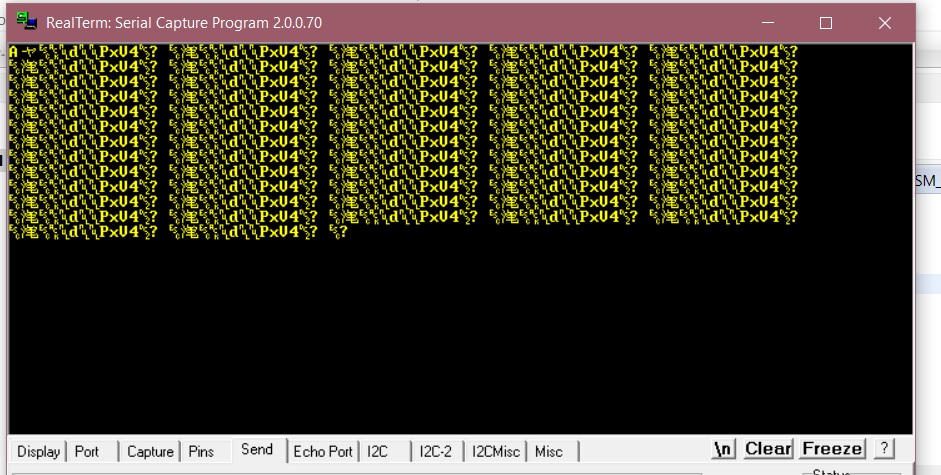
    Also to adding to my step 4 and 5, I did some extra testing earlier and here's the screenshot of it:

    As you can see, the "A" for auto baud rate detection was echoed properly. But I'm not sure if the dump file is supposed to be like this. What's the supposed output format from using hex2000?

  • Hi Stephen,

    you can read through this document:

    the realterm doesn't support the correct format the C2000 need.

    you can follow the instruction the document describes.

    Emma

  • Hi Emma,

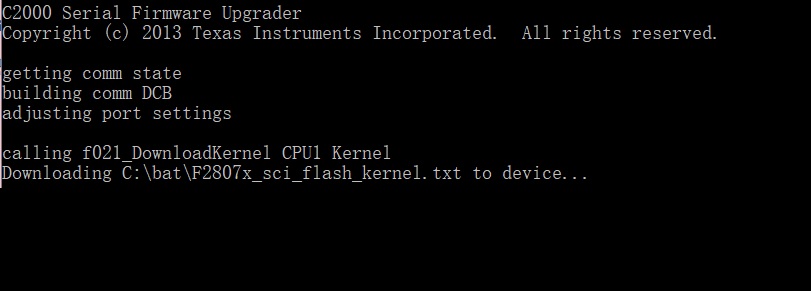
    Thank you for the suggestion. I've tried procedures listed in the document but the files didn't seem to be downloaded into the RAM properly. Here's a screenshot of it where it didn't seem to progress beyond "Downloading ........."

    As additional information, I'm currently using F2807x controlCARD with SW1 configured to "Boot from SCI" mode and A:SW1 configured to use pin76 for UART communication from the docking station.

  • Hi again,

    In addition to my previous screenshot, I've retried Serial Flash Programmer with "-v"/verbose output for further debugging and it seemed like the process is stuck at trying autobaud lock. I've also conducted some more troubleshooting eg. using C2Prog to flash the kernel (since it's often suggested as alternative in the community) and Realterm/hyperterminals to trigger the single character "A" autobaud echo. However, all these trials seemed to suggest that the autobauding was not successful.

    Some probings were conducted on the controlCARD based on the schematics (TMDSCNCD2807, schematics available in ~\boards\controlCARDs\ folder of C2000Ware materials) and the switches are operating correctly based on the intended logic (so as resisters R8 for A:SW1; R15 and R16 for SW1).

    Another point of interest that came across was an issue reported in pg26 of [http://www.ti.com/lit/er/sprz423f/sprz423f.pdf]. The F28075 chipset I'm using is of Silicon Revision B (TMX32028075PTPT YFB-58AXYQW). The report listed a possible hang of boot ROM and mentioned about e INTOSC as the primary clock source. Is this scenario relevant to the problem I'm facing and if so, is there any further documentation or guides on overcoming it?

    Lastly, is there other successful alternatives or methods that has been used to perform bootloading operation through SCI? Thank you for the assistance in debugging this issue.
  • Hello,

    Stephen Yeo said:
    In addition to my previous screenshot, I've retried Serial Flash Programmer with "-v"/verbose output for further debugging and it seemed like the process is stuck at trying autobaud lock.

    Is the program stuck trying to conduct the autobaud while loading the kernel, or has the kernel been loading and the application is stuck trying to conduct the autobaud before loading the application?

    Thanks,

    Emma

  • Emma Wang said:

    Is the program stuck trying to conduct the autobaud while loading the kernel, or has the kernel been loading and the application is stuck trying to conduct the autobaud before loading the application?

    Hi Emma,

    The program is stuck trying to conduct the autobaud while loading the flash kernel (not the final application loading), as shown in my screenshot on 10th March.

    My current suspicion is that the SCI boot ROM isn't operating correctly in the first place, based on all previous tests. Is there any tests to verify if the device is in SCI boot mode properly before attempting to conduct bootloading?

    Thanks.

    Stephen

  • Stephen,

    I will encounter same situation when I write 015A at the address 0xD00.

    But I will succeed when I write 815A at the address 0xD00.

    I think the SCIboot1 should be used since we are use alternate I/O

    hope it will work on your laptop.

    Best Regards

    Emma

  • Hi Emma,

    Emma Wang said:

    I will encounter same situation when I write 015A at the address 0xD00.

    But I will succeed when I write 815A at the address 0xD00.

    May I ask how do I achieve this? I'm a novice user for CCS and C2000 MCUs so some simple instructions/references on how to configure it will be much appreciated.

    And I assume you're still using Serial Flash Programmer utility and sci_flash_kernel application as provided without any edits to them?

    Thank you.

    Regards,

    Stephen

  • Hi again,

    I've tried by editing the GEL file to insert an option for SCI boot as follows:

    hotmenu EMU_BOOT_SCI()
    {
    *0xD00 = 0x815A;
    }

    I've also edited the definition in F2807x_sci_flash_kernel.c into the following:

    #define C1C2_BROM_BOOTMODE_BOOT_FROM_SCI 0x00000081

    When in debugging mode, I've used the "EMU Boot Mode Select" tool to enter "EMU_BOOT_SCI" and reset the CPU from debugger menu. Together with Serial Flash Programmer, I've managed to get pass the initial autobaudLock() and download the SCI_flash_kernel into the MCU.

    However, the program hung again when reaching the autobaudLock() after completed loading the kernel, as shown in picture below:

    Further debugging into source codes of Serial Flash Programmer showed the program was trapped inside this loop within autobaudLock():

    while (dwRead == 0){
                ReadFile(file, &rcvData, 1, &dwRead, NULL);       //program does not execute beyond "ReadFile()"
    }

    This seems to suggest that the program is unable to read any output from MCU/kernel, which raises the doubt if the kernel is booted correctly before autobaudLock can be performed. I've also tried commenting out autobaudLock() functions after the kernel is loaded, but the program also hang at ReadFile() of other functions (eg during loadProgram(); ).

    It will be extremely helpful if you could explain the changes you've made to the source files in sci_flash_kernel or the serial flash programmer, and any extra procedures you've taken which is not documented in sprabv4b.pdf

    Thank you for the patience and continuous guidance in troubleshooting my issue.

    Regards,

    Stephen

  • Stephen,

    I have ever encounter this situation.

    and I didn't change:

    Stephen Yeo said:

    I've also edited the definition in F2807x_sci_flash_kernel.c into the following:

    #define C1C2_BROM_BOOTMODE_BOOT_FROM_SCI 0x00000081

    I just changed this part

    //

    // parameter SCI_BOOT for GPIO84,85; parameter SCI_BOOT_ALTERNATE

    // for GPIO28,29

    //

    EntryAddr = SCI_GetFunction(SCI_BOOT);

    return(EntryAddr);

    }

    in F2837xD_sci_flash_kernels_cpu01.c

    EntryAddr = SCI_GetFunction(SCI_BOOT_ALTERNATE);

    because we are the Emulation mode is connected by GPIO28,29.

    and you should also write 0x815A to the address 0xD00.

    Hope will be useful for you.

  • Hi Emma,

    Emma Wang said:

    EntryAddr = SCI_GetFunction(SCI_BOOT_ALTERNATE);

    I've made sure that this part is correct, and "SCI_BOOT_ALTERNATE" is also the default setting in the C2000Ware sample file.

    Emma Wang said:

    and you should also write 0x815A to the address 0xD00.

    For this part, I just want to verify how this is done. Is it by editing the GEL file as I suggested in my previous post, or is there any code I need to write and flash to the MCU specifically for it? (Sorry for asking this, I'm not familiar with using CCS.)

    Emma Wang said:

    I have ever encounter this situation.

    So far I've followed the exact instructions in sprabv4b.pdf, along with the required hex2000 conversion stated in it. However, the Serial Flash Programmer is unable to execute autobaudLock(), or rather the ReadFile() function in it.

    Here's the steps I had taken:

    1) convert sci_flash_kernel and program out files into txt using command line "hex2000.exe -boot -a -sci8 <file_name>.out -o <file_name>"

    2) use CCS to enter debugging mode (currently running on a blinky program)

    3) in debugging mode, use GEL file to enable option for EMU_BOOT_SCI 

    hotmenu EMU_BOOT_SCI()
    {
    *0xD00 = 0x815A;
    }

    4) reset the CPU through debugger tools and run the debugging session

    5) executed Serial Flash Programmer using argument "-d f2807x –k <flash_kernel location>.txt –a <program to be flashed>.txt –p COM3 –b 9600 -v"

    6) Serial Flash Programmer executes and gets past the 1st autobaudLock check (which I wasn't able to get pass in my post on March 10, currently considered solved)

    7) flash_kernel.txt being loaded into MCU, the echoback confirms the data bits are correct.

    8) (this is where my last screenshot illustrates) flash_kernel.txt finished being loaded. the kernel is supposed to boot up and autobaudLock() is performed before printing (and waiting) for user command input for kernel operations (DFU, erase etc).

    Step 8 is where currently the autobaudLock cannot be completed, and thus the Serial Flash Programmer hangs. If every steps I've listed above are correct, then my suspicion is that the flash kernel was not booted up properly after the initial bootloading was completed, thus unable to perform subsequent autobaudLock(). But as of now the issue remains unsolved which I hope to get some further insights.

    Thank you for your assistance.

    Regards,

    Stephen

  • Stephen,

    I am sorry I didn't realize you are not familiar with CCS.

    1.when you first connect your device, do not click debug, instead:

    click view-> Target Configuration

    2.open the Projects->examples->targetconfigs and you will see a .ccxml file,

    right click it and click launch selected configuration. and then right click the C28xx_CPU1 and choose connect target on the debug window

    like that:

    3.open the view->Memory Brower, input the 0xD00 and then change the value to 0x815A as I have told you in the previous replies.

    Hope you can solve your problem as soon as possible.

    Best Regards,

    Emma

  • Hi Emma,

    Thank you for your guidance, I've manage to get the flash_kernel loaded now.

    Regards,
    Stephen