This thread has been locked.

If you have a related question, please click the "Ask a related question" button in the top right corner. The newly created question will be automatically linked to this question.

DRV8301-69M-KIT: Fault LED6 On

Part Number: DRV8301-69M-KIT
Other Parts Discussed in Thread: DRV8301, MOTORWARE

Hi all, 

I have recently obtained a DRV8301-HC-EVM Rev D InstaSpin Evaluation board second hand from a friend. I have successfully connected to the InstaSpin Universal GUI and am using Proj_Lab13e to read out motor parameters, however I cannot run the motor as the red Fault LED6 on the board is always lit after the InstaSpin Universal GUI begins running. I would like to find out the cause, whether my DRV8301 chip is dead or whether there is another cause. 

Some more info: PVDD is supplied with 12V. My ControlCard is an F2806M. I have disconnected the motor and the fault LED is still lit. I have also tried a different motor with no luck. 

I have read through the following thread: https://e2e.ti.com/support/applications/motor_drivers/f/38/p/639691/2360751 which suggests the following debug procedure...

"Please try a simple debug procedure:
1) Disconnect the motor
2) Place 12V on the DRV8301 PVDD
3) Set EN_GATE to a logic high
4) Measure the AVDD, DVDD, and GVDD voltages

If the voltages are not ~6.5V, 3.3V, and 10.5V, there is a problem with the DRV8301."

Which C file in the code can I find EN_GATE in? Also where are AVDD DVDD and GVDD voltages found? Should they be measured physically on the board or can I find their value in a register in Code Composer Studio?

Thank you kindly, 
Matt


  • Hey,
    I'm not shure about EN_GATE but I can help you with point 4.
    To measure AVDD DVDD GVDD look in the datasheet for the pinout and I would measure it at the caps(not directly at the drv).
    I would also check the mosfets for short circuits.
  • You may download and install motorware, use the lab01b in the folder as below to check the hardware kit. without connecting the motor, only connect the DC power supply.
    C:\ti\motorware\motorware_1_01_00_18\sw\solutions\instaspin_foc\boards\drv8301kit_revD\f28x\f2806xF\projects\ccs\proj_lab01b

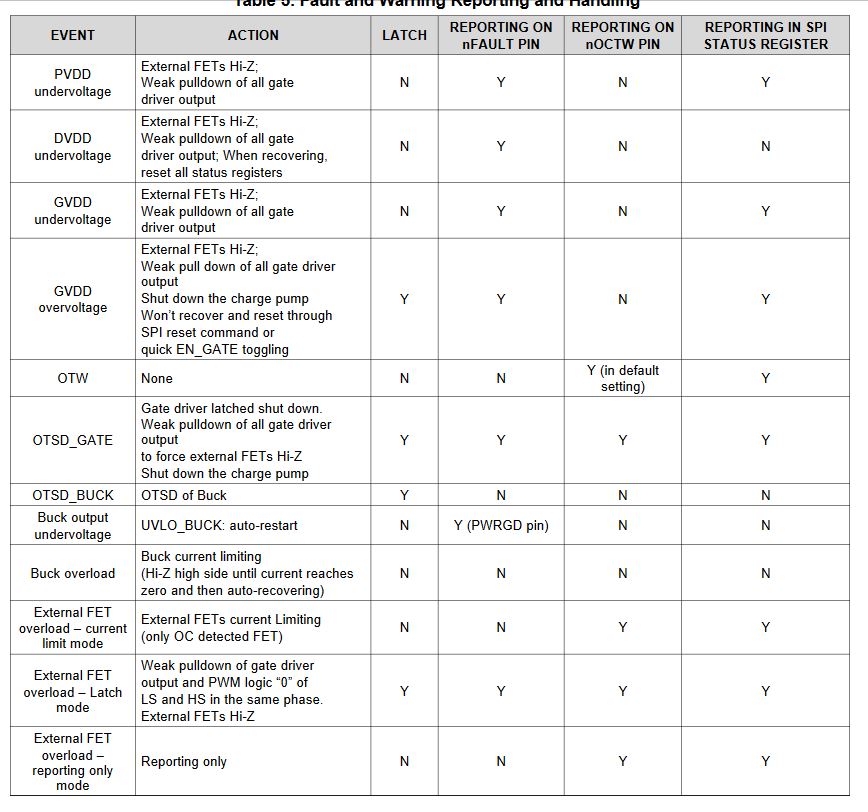
    You can check the DRV8301 status registers to know what fault appeared if the LED6 is on.
    set gMotorVars.Flag_enableSys = 1 and gDrvSpi8301Vars.RcvCmd to 1, and then check gDrvSpi8301Vars.Stat_Reg_1 and gDrvSpi8301Vars.Stat_Reg_2.
  • Thank you all, I will try these suggestions and get back to you on whether this has solved my issue.
  • Sorry for the walk through required...

    I have found and opened that Lab01b project in CC. I'm aware of how to run the project in Code Composer and go to debug view and type in those variables to view their value, so that's all good. Where and how am I setting "gMotorVars.Flag_enableSys = 1 and gDrvSpi8301Vars.RcvCmd to 1" though? Am I placing this somewhere in the C code or is there a debug window where I can set variables to a value?

    While I'm waiting for your reply I have rebuilt and run Lab 13e as before and run in debug mode in CC. The fault LED6 lights up as per normal. Checking those two status registers you suggested I am receiving Fault=1 and all other bits also = 1 for Stat_Reg_1, then for Stat_Reg_2 I am getting GVDD_OV = 1 and DeviceID = 15. I checked the DRV8301 datasheet and this looks like every device fault is active! Does this mean my DRV8301 chip is dead?


    Thanks.

  • I have also been paying around with the Universal GUI and Lab13e and found the DRV8301 SPI section in the GUI. It tells me the SPI is working but Rx is not working. Status Register 1 shows faults for every type and Status Register 2 also shows a fault for GVDD_OV.
  • Please refer to instaSPIN lab guide to know more detailed description on how to debug the project with CCS, you may add gMotorVars.Flag_enableSys and gDrvSpi8301Vars.RcvCmd in expression window which can be added by click "View->Exppression", and change the value of these two variables.
    You may need to check the DRV8301 device whether was damaged, if yes, have to replace it with a new one. And please provide 24V on PVDD pin to see if the fault as repeated.
  • Thanks. I have tested with 24V PVDD but no change. I tried changing the values of gMotorVars.Flag_enableSys and gDrvSpi8301Vars.RcvCmd to =1 (they were zero). Only gMotorVars.Flag_enableSys would change to 1, while gDrvSpi8301Vars.RcvCmd would not change and remained at 0. Fault registers remained as before.

    I think the chip is dead, I will try replacing it today. Thank you for the help!
  • That's right, gDrvSpi8301Vars.RcvCmd will be changed from 1 to 0 which means the read data is completed. I guess the DRV8301 maybe damaged.
  • Hi guys,

    Unfortunately I have replaced the DRV8301 chip and this has NOT solved the problem! The Fault LED6 is still on when the Universal GUI is run and the motor does not spin. The IC was replaced fairly professionally using a reworking station, so I'm fairly confident nothing else has been damaged in the process and that the driver is correctly soldered. 

    I would note that the DRV8301 is being recognised as SPI is working. However I am still getting the same range of errors as before. 


    Any other ideas as to what the issue might be?

  • hey Matt,

    Do you check the mosfets? Does the buck work correctly? Look at the datasheet what could cause a fault and check them all.


  • Hi Matt,

    We would like to see what's update on your question, we will close this thread if there is no further question. Thanks.