This thread has been locked.

If you have a related question, please click the "Ask a related question" button in the top right corner. The newly created question will be automatically linked to this question.

LAUNCHXL-F28069M: Motor not moving with sensored feedback in Instaspin Lab 12

Part Number: LAUNCHXL-F28069M

Hi all,

I have some serious struggles in getting my PMSM moving in Instaspin Lab 12 a & b. The motor runs ok without the encoder in e.g. lab 5d. I'm using a small sized PMSM motor (http://www.namiki.net/product/dccorelessmotor/pdf/SOBL23-1207.pdf

The encoder seems to work as the values do update in "st_obj.vel.conv.Pos_mrev" in the watch window. The scale is from 0 to 1 during one mechanical rotation. Also, the direction should be correct and the phase should be plugged correctly. Noise shouldn't be a problem as this works also PWM's on. The PWM's go on once changing "enable system" and "run identify" to 1 but the motor aligns itself into a locked position, gives some small noise but does not move by increasing speed reference (or running inertia identification in 12a). Rs recalibration has been enabled.

Have also tried to tune the motor variables in user.h and they should be okay(ish). One of the challenges is that the stator d and q inductances of the motor seem to be really low and the automatic identification tracks it as something around 5*10^(-10)H. Measuring those with an oscilloscope have given results around 0.0002H. Rated flux is measured rather close to the plate values given. These are however been ok in previous unsensored labs. Tried also to change PWM frequencies up to 60Hz.

Below you'll find the user.h parameters.

//! \brief ADC current offsets for A, B, and C phases
#define I_A_offset (0.8304952979)
#define I_B_offset (0.831510365)
#define I_C_offset (0.8265882134)
//! \brief ADC voltage offsets for A, B, and C phases
#define V_A_offset (0.2917994261)
#define V_B_offset (0.2907087803)
#define V_C_offset (0.2908745408)

#define MY_MOTOR 113
#define USER_MOTOR MY_MOTOR

#elif (USER_MOTOR == MY_MOTOR)
#define USER_MOTOR_TYPE MOTOR_Type_Pm
#define USER_MOTOR_NUM_POLE_PAIRS (4)
#define USER_MOTOR_Rr (NULL)
#define USER_MOTOR_Rs (3.56)
#define USER_MOTOR_Ls_d (0.00007) //lowest value that the system takes without errors
#define USER_MOTOR_Ls_q (0.00007)
#define USER_MOTOR_RATED_FLUX (0.0022) // plate value
#define USER_MOTOR_MAGNETIZING_CURRENT (NULL)
#define USER_MOTOR_RES_EST_CURRENT (0.1)
#define USER_MOTOR_IND_EST_CURRENT (-0.1)
#define USER_MOTOR_MAX_CURRENT (0.45)
#define USER_MOTOR_FLUX_EST_FREQ_Hz (100) //have tried several values through out the range
#define USER_MOTOR_ENCODER_LINES (880)
#define USER_MOTOR_MAX_SPEED_KRPM (2.0)
#define USER_SYSTEM_INERTIA (0.0044) // values defined in sensorless inertia identification
#define USER_MOTOR_FRICTION (0.01)
#define USER_SYSTEM_BANDWIDTH_SCALE (1.0)

#define USER_PWM_FREQ_kHz (60.0)

#define USER_NUM_PWM_TICKS_PER_ISR_TICK (2)

Not quite sure what to test next. I'm extremely grateful if someone has any good debug tips on this.

  • For low inductance motors, we recommend using lab2c to identify the motor parameters. Were you able to successfully run this project without any issue?

    Sean
  • Thanks for the reply! Have done 2c a few times but as mentioned it gives a really low inductance and not sure if it can be true since it will give an error if using an inductance of that size. Have been trying to run the 12b with these and the plate values without success.

    Cheers,

    Ville

  • For lab12a and lab12b, it is important to ensure that the connections are done correctly. If the motor or encoder wires are connected in the wrong order, the motor is unable to move properly. In the same time, the encoder need to be also wired correctly per the board.

    Set correct USER_MOTOR_ENCODER_LINES It is important for the setup and configuration of the ENC module that the number of lines on the encoder be provided.
  • Thanks for the reply!

    The encoder gives proper values in debug mode and one mechanical round gives 1.0 to the above mentioned field. Checked also that the rotation is to the right direction and that the phases are plugged correctly. Unfortunately these did not help.

  • Made some parameter identification today with different initial values in lab 2c. Got some new user.h values that now work pretty smoothly with the sensorless labs. There's some torque ripple with low RPM's (<200RPM) but at higher speeds it works well. It gets better when increasing the PWM frequency but cannot really go up from 60kHz anymore.

    New values are here:
    #define USER_MOTOR_Rs (3.56160378)
    #define USER_MOTOR_Ls_d (0.000735975744)
    #define USER_MOTOR_Ls_q (0.000735975744)
    #define USER_MOTOR_RATED_FLUX (0.00843063649)
    #define USER_MOTOR_MAGNETIZING_CURRENT (NULL)
    #define USER_MOTOR_RES_EST_CURRENT (0.1)
    #define USER_MOTOR_IND_EST_CURRENT (-0.1)
    #define USER_MOTOR_MAX_CURRENT (0.5)
    #define USER_MOTOR_FLUX_EST_FREQ_Hz (100)

    #define USER_PWM_FREQ_kHz (60.0)
    #define USER_NUM_PWM_TICKS_PER_ISR_TICK (2)

    However, this does not help the original issue. The motor does not move at all in Lab 12 a or b. Any ideas how to proceed?
  • If the motor can run well using sensorless labs, you have to check the encoder connection and setting again follow the lab12a guide, ensure the ENC_setup() is called with correct parameters. And try to tune gMotorVars.SpinTAC.VelIdGoalSpeed_krpm and gMotorVars.SpinTAC.VelIdTorqueRampTime_sec to identify the motor inertia.

    What's the gMotorVars.SpinTAC.VelIdErrorID if the motor running failed in lab12a.
  • Thanks for your answer!

    The error code is 2004. The motor does not move at all. Tried to tune both parameters but unfortunately it does not make a difference and the error code remains the same.

    Have been trying to ensure that all encoder related setups are correct. I've rotated the motor in 12b without enabling the system. Here I added "st_obj.vel.conv.Pos_mrev" in the watch window, which gives me values on a scale from 0 to 1 during one mechanical rotation.The value is growing towards the same direction as the motor spins in the sensorless labs. I've understood that this should indicate that all is working with the encoder itself?

    There's two things I'm a bit confused:

    1. The variable below in 12b's watch window is giving me the following error. Is this something I need to worry about?

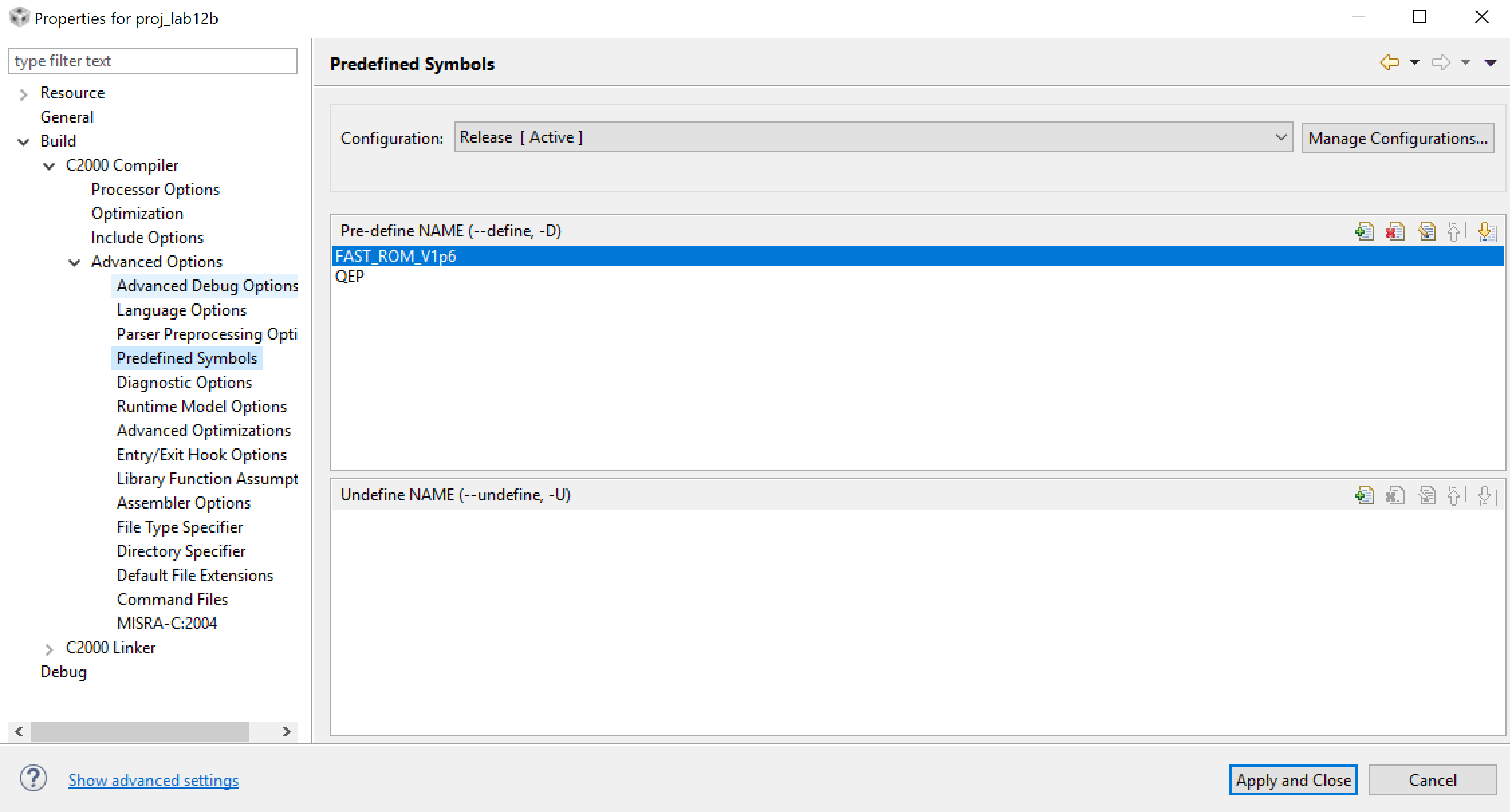
    2. The predefined symbol QEP is not highlighted in the properties menu even though I'm selecting and saving it. Does this indicate errors in the enc setup? Haven't been editing any other code in the project files besides user.h where I have added the encoder lines definition.

    Other parameters for ENC_setup are:

    #ifndef QEP
    #define USER_IQ_FULL_SCALE_FREQ_Hz (800.0) 
    #else
    #define USER_IQ_FULL_SCALE_FREQ_Hz (USER_MOTOR_NUM_POLE_PAIRS/0.008)
    #endif

    and

    #define USER_ISR_FREQ_Hz ((float_t)USER_PWM_FREQ_kHz * 1000.0 / (float_t)USER_NUM_PWM_TICKS_PER_ISR_TICK)

    #define USER_PWM_FREQ_kHz (60.0)

    #define USER_NUM_PWM_TICKS_PER_ISR_TICK (2)

  • Been working on this once in while but the problem remains. Really stuck with it at the moment. Any good suggestions on how to solve this?

  • Since you could identify and run the motor using sensorless InstaSPIN-FOC, you may use lab05c and lab05d to identify the inertia and run the motor by sensorless instaSPIN-Motion. If both are good at running the motor, but failed on lab12a, I have to say again that you need to check the encoder connection and configuration once more.

    You don't worry about the above two question you mentioned that are correct setting in the project.

  • Hey there,

    Changed the motor and encoder and got it working now. Both are similar type so no dramatic change in those. It had the similar problem in the beginning: it aligned to a certain position but did not move. After decreasing PWM frequency from 60kHz to 30kHz and changing decimations to 1 in user_j1.h, it started working. Looked this in more detail with a current probe. At 30kHz there is quite alot of PWM induced current ripple (current drops after each pulse due to low inductance) but for some reason increasing the switching frequency does not smoothen it but rather makes it even worse. Motor runs now pretty ok but would like to run it with a higher PWM freq but seems that it causes trouble on something else.

    Any idea why is it behaving like this?

    Motor specs: https://www.faulhaber.com/fileadmin/Import/Media/EN_1028_B_FMM.pdf

    Encoder specs: https://ams.com/documents/20143/36005/AS5040_DS000374_3-00.pdf/3fb0c913-036c-71c5-7ebb-4111aa093ace

    user_j1.h parameters

    #ifdef __cplusplus
    extern "C" {
    #endif

    // **************************************************************************
    // the defines

    //! \brief CURRENTS AND VOLTAGES
    // **************************************************************************
    //! \brief Defines the full scale frequency for IQ variable, Hz
    //! \brief All frequencies are converted into (pu) based on the ratio to this value
    //! \brief this value MUST be larger than the maximum speed that you are expecting from the motor
    #ifndef QEP
    #define USER_IQ_FULL_SCALE_FREQ_Hz (495.0) // 800 Example with buffer for 8-pole 6 KRPM motor to be run to 10 KRPM with field weakening; Hz =(RPM * Poles) / 120
    #else
    #define USER_IQ_FULL_SCALE_FREQ_Hz (USER_MOTOR_NUM_POLE_PAIRS/0.008) // (4/0.008) = 500 Example with buffer for 8-pole 6 KRPM motor to be run to 6 KRPM; Hz = (RPM * Poles) / 120
    #endif

    //! \brief Defines full scale value for the IQ30 variable of Voltage inside the system
    //! \brief All voltages are converted into (pu) based on the ratio to this value
    //! \brief WARNING: this value MUST meet the following condition: USER_IQ_FULL_SCALE_VOLTAGE_V > 0.5 * USER_MOTOR_MAX_CURRENT * USER_MOTOR_Ls_d * USER_VOLTAGE_FILTER_POLE_rps,
    //! \brief WARNING: otherwise the value can saturate and roll-over, causing an inaccurate value
    //! \brief WARNING: this value is OFTEN greater than the maximum measured ADC value, especially with high Bemf motors operating at higher than rated speeds
    //! \brief WARNING: if you know the value of your Bemf constant, and you know you are operating at a multiple speed due to field weakening, be sure to set this value higher than the expected Bemf voltage
    //! \brief It is recommended to start with a value ~3x greater than the USER_ADC_FULL_SCALE_VOLTAGE_V and increase to 4-5x if scenarios where a Bemf calculation may exceed these limits
    //! \brief This value is also used to calculate the minimum flux value: USER_IQ_FULL_SCALE_VOLTAGE_V/USER_EST_FREQ_Hz/0.7
    #define USER_IQ_FULL_SCALE_VOLTAGE_V (18.0) // 24.0 Example for boostxldrv8301_revB typical usage and the Anaheim motor

    //! \brief Defines the maximum voltage at the input to the AD converter
    //! \brief The value that will be represented by the maximum ADC input (3.3V) and conversion (0FFFh)
    //! \brief Hardware dependent, this should be based on the voltage sensing and scaling to the ADC input
    #define USER_ADC_FULL_SCALE_VOLTAGE_V (26.314) // 26.314 boostxldrv8301_revB voltage scaling

    //! \brief Defines the full scale current for the IQ variables, A
    //! \brief All currents are converted into (pu) based on the ratio to this value
    //! \brief WARNING: this value MUST be larger than the maximum current readings that you are expecting from the motor or the reading will roll over to 0, creating a control issue
    #define USER_IQ_FULL_SCALE_CURRENT_A (18.0) // 20.0 Example for boostxldrv8301_revB typical usage

    //! \brief Defines the maximum current at the AD converter
    //! \brief The value that will be represented by the maximum ADC input (3.3V) and conversion (0FFFh)
    //! \brief Hardware dependent, this should be based on the current sensing and scaling to the ADC input
    #define USER_ADC_FULL_SCALE_CURRENT_A (33.0) // 33.0 boostxldrv8301_revB current scaling

    //! \brief Defines the number of current sensors used
    //! \brief Defined by the hardware capability present
    //! \brief May be (2) or (3)
    #define USER_NUM_CURRENT_SENSORS (3) // 3 Preferred setting for best performance across full speed range, allows for 100% duty cycle

    //! \brief Defines the number of voltage (phase) sensors
    //! \brief Must be (3)
    #define USER_NUM_VOLTAGE_SENSORS (3) // 3 Required

    //! \brief ADC current offsets for A, B, and C phases
    //! \brief One-time hardware dependent, though the calibration can be done at run-time as well
    //! \brief After initial board calibration these values should be updated for your specific hardware so they are available after compile in the binary to be loaded to the controller
    #define I_A_offset (0.8331743479)
    #define I_B_offset (0.8355930448)
    #define I_C_offset (0.8392037153)

    //! \brief ADC voltage offsets for A, B, and C phases
    //! \brief One-time hardware dependent, though the calibration can be done at run-time as well
    //! \brief After initial board calibration these values should be updated for your specific hardware so they are available after compile in the binary to be loaded to the controller
    #define V_A_offset (0.5271264911)
    #define V_B_offset (0.5257175565)
    #define V_C_offset (0.5249399543)


    //! \brief CLOCKS & TIMERS
    // **************************************************************************
    //! \brief Defines the Pulse Width Modulation (PWM) frequency, kHz
    //! \brief PWM frequency can be set directly here up to 30 KHz safely (60 KHz MAX in some cases)
    //! \brief For higher PWM frequencies (60 KHz+ typical for low inductance, high current ripple motors) it is recommended to use the ePWM hardware
    //! \brief and adjustable ADC SOC to decimate the ADC conversion done interrupt to the control system, or to use the software Que example.
    //! \brief Otherwise you risk missing interrupts and disrupting the timing of the control state machine
    #define USER_PWM_FREQ_kHz (30.0) //30.0 Example, 8.0 - 30.0 KHz typical; 45-80 KHz may be required for very low inductance, high speed motors

    //! \brief Defines the maximum Voltage vector (Vs) magnitude allowed. This value sets the maximum magnitude for the output of the
    //! \brief Id and Iq PI current controllers. The Id and Iq current controller outputs are Vd and Vq.
    //! \brief The relationship between Vs, Vd, and Vq is: Vs = sqrt(Vd^2 + Vq^2). In this FOC controller, the
    //! \brief Vd value is set equal to USER_MAX_VS_MAG*USER_VD_MAG_FACTOR. Vq = sqrt(USER_MAX_VS_MAG^2 - Vd^2).
    //! \brief Set USER_MAX_VS_MAG = 0.5 for a pure sinewave with a peak at SQRT(3)/2 = 86.6% duty cycle. No current reconstruction is needed for this scenario.
    //! \brief Set USER_MAX_VS_MAG = 1/SQRT(3) = 0.5774 for a pure sinewave with a peak at 100% duty cycle. Current reconstruction will be needed for this scenario (Lab10a-x).
    //! \brief Set USER_MAX_VS_MAG = 2/3 = 0.6666 to create a trapezoidal voltage waveform. Current reconstruction will be needed for this scenario (Lab10a-x).
    //! \brief For space vector over-modulation, see lab 10 for details on system requirements that will allow the SVM generator to go all the way to trapezoidal.
    #define USER_MAX_VS_MAG_PU (0.5) // Set to 0.5 if a current reconstruction technique is not used. Look at the module svgen_current in lab10a-x for more info.


    //! \brief DECIMATION
    // **************************************************************************
    //! \brief Defines the number of pwm clock ticks per isr clock tick
    //! Note: Valid values are 1, 2 or 3 only
    #define USER_NUM_PWM_TICKS_PER_ISR_TICK (1)

    //! \brief Defines the number of isr ticks (hardware) per controller clock tick (software)
    //! \brief Controller clock tick (CTRL) is the main clock used for all timing in the software
    //! \brief Typically the PWM Frequency triggers (can be decimated by the ePWM hardware for less overhead) an ADC SOC
    //! \brief ADC SOC triggers an ADC Conversion Done
    //! \brief ADC Conversion Done triggers ISR
    //! \brief This relates the hardware ISR rate to the software controller rate
    //! \brief Typcially want to consider some form of decimation (ePWM hardware, CURRENT or EST) over 16KHz ISR to insure interrupt completes and leaves time for background tasks
    #define USER_NUM_ISR_TICKS_PER_CTRL_TICK (2) // 2 Example, controller clock rate (CTRL) runs at PWM / 2; ex 30 KHz PWM, 15 KHz control

    //! \brief Defines the number of controller clock ticks per current controller clock tick
    //! \brief Relationship of controller clock rate to current controller (FOC) rate
    #define USER_NUM_CTRL_TICKS_PER_CURRENT_TICK (1) // 1 Typical, Forward FOC current controller (Iq/Id/IPARK/SVPWM) runs at same rate as CTRL.

    //! \brief Defines the number of controller clock ticks per estimator clock tick
    //! \brief Relationship of controller clock rate to estimator (FAST) rate
    //! \brief Depends on needed dynamic performance, FAST provides very good results as low as 1 KHz while more dynamic or high speed applications may require up to 15 KHz
    #define USER_NUM_CTRL_TICKS_PER_EST_TICK (1) // 1 Typical, FAST estimator runs at same rate as CTRL;

    //! \brief Defines the number of controller clock ticks per speed controller clock tick
    //! \brief Relationship of controller clock rate to speed loop rate
    #define USER_NUM_CTRL_TICKS_PER_SPEED_TICK (15) // 15 Typical to match PWM, ex: 15KHz PWM, controller, and current loop, 1KHz speed loop

    //! \brief Defines the number of controller clock ticks per trajectory clock tick
    //! \brief Relationship of controller clock rate to trajectory loop rate
    //! \brief Typically the same as the speed rate
    #define USER_NUM_CTRL_TICKS_PER_TRAJ_TICK (15) // 15 Typical to match PWM, ex: 10KHz controller & current loop, 1KHz speed loop, 1 KHz Trajectory


    //! \brief LIMITS
    // **************************************************************************
    //! \brief Defines the maximum negative current to be applied in Id reference
    //! \brief Used in field weakening only, this is a safety setting (e.g. to protect against demagnetization)
    //! \brief User must also be aware that overall current magnitude [sqrt(Id^2 + Iq^2)] should be kept below any machine design specifications
    #define USER_MAX_NEGATIVE_ID_REF_CURRENT_A (-0.5 * USER_MOTOR_MAX_CURRENT) // -0.5 * USER_MOTOR_MAX_CURRENT Example, adjust to meet safety needs of your motor

    //! \brief Defines the R/L estimation frequency, Hz
    //! \brief User higher values for low inductance motors and lower values for higher inductance
    //! \brief motors. The values can range from 100 to 300 Hz.
    #define USER_R_OVER_L_EST_FREQ_Hz (100) // 300 Default

    //! \brief Defines the low speed limit for the flux integrator, pu
    //! \brief This is the speed range (CW/CCW) at which the ForceAngle object is active, but only if Enabled
    //! \brief Outside of this speed - or if Disabled - the ForcAngle will NEVER be active and the angle is provided by FAST only
    #define USER_ZEROSPEEDLIMIT (0.5 / USER_IQ_FULL_SCALE_FREQ_Hz) // 0.002 pu, 1-5 Hz typical; Hz = USER_ZEROSPEEDLIMIT * USER_IQ_FULL_SCALE_FREQ_Hz

    //! \brief Defines the force angle frequency, Hz
    //! \brief Frequency of stator vector rotation used by the ForceAngle object
    //! \brief Can be positive or negative
    #define USER_FORCE_ANGLE_FREQ_Hz (2.0 * USER_ZEROSPEEDLIMIT * USER_IQ_FULL_SCALE_FREQ_Hz) // 1.0 Typical force angle start-up speed


    //! \brief POLES
    // **************************************************************************
    //! \brief Defines the analog voltage filter pole location, Hz
    //! \brief Must match the hardware filter for Vph
    #define USER_VOLTAGE_FILTER_POLE_Hz (364.682) // 364.682, value for boostxldrv8301_revB hardware


    //! \brief USER MOTOR & ID SETTINGS
    // **************************************************************************

    //! \brief Defines the default bandwidth for SpinTAC Control
    //! \brief This value should be determined by putting SpinTAC Control through a tuning process
    //! \brief If a Bandwidth Scale value has been previously identified
    //! \brief multiply it by 20 to convert into Bandwidth
    #define USER_SYSTEM_BANDWIDTH (20.0)

    Thanks is advance!

  • Good progress. You have to set USER_NUM_PWM_TICKS_PER_ISR_TICK to 2 or 3 if you want to apply a higher PWM frequency than 30kHz, it's better to keep USER_PWM_FREQ_kHz /USER_NUM_PWM_TICKS_PER_ISR_TICK < 25kHz for instaSPIN-FOC lab project, if not, the ISR will be time overflow.