Tool/software: Code Composer Studio
Hello all,
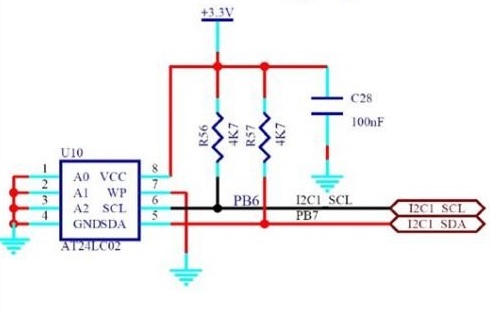
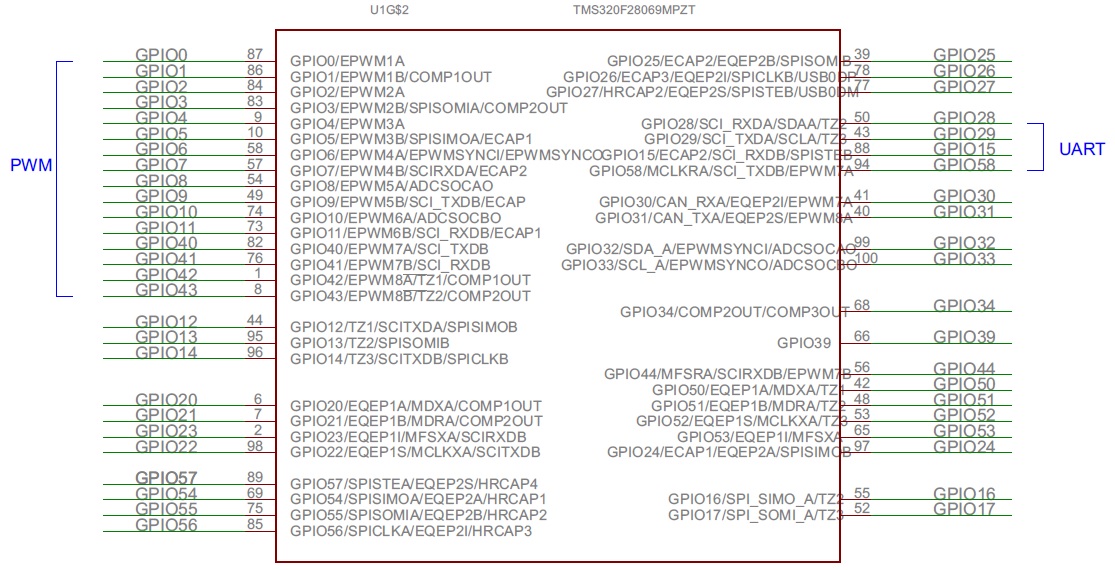
I use Launchxl-F28069m kit.
I read and write values from/to my pc with sci communication. There is a "WRITE EEPROM" button on my pc interface and when I press that, I deactivate sci, activate i2c parts to write to eeprom.
After writing to eeprom, vice versa. I deactivate i2c and reactivate sci.
But, this is not working. As I understand, SciaRegs.SCIFFRX.bit.RXFFST and I2caRegs.I2CFFRX.all are the problem.
For sci, I used a little different version of sci_echoback, for i2c, more or less i2c_eeprom example.
If I configure switching sci - i2c event with a gpio, for example GpioDataRegs.GPADAT.bit.GPIO18, the plan works perfect. But I dont want to use a hardware switch. (Talking about If GpioDataRegs.GPADAT.bit.GPIO18 == 0 go for i2c, if GpioDataRegs.GPADAT.bit.GPIO18 == 1 go for sci stuff.)
Normally SciaRegs.SCIFFRX.bit.RXFFST is 0. If it is 0, everything works smoothly. When I switch with WRITE EEPROM software signal from sci, SciaRegs.SCIFFRX.bit.RXFFST becomes 3. (Receive FIFO has 3 words.) Or 4.
My i2c and sci configurations are shown below :
I2C
void I2CA_Init(void)
{
        I2caRegs.I2CMDR.all     = 0x0000;
       // Initialize I2C
       I2caRegs.I2CSAR = 0x0050;        // Slave address - EEPROM control code

       // I2CCLK = SYSCLK/(I2CPSC+1)

         I2caRegs.I2CPSC.all = 8;  //6     // Prescaler - need 7-12 Mhz on module clk


       I2caRegs.I2CCLKL = 10;           // NOTE: must be non zero
       I2caRegs.I2CCLKH = 5;            // NOTE: must be non zero
//     I2caRegs.I2CIER.all = 0x24;      // Enable SCD & ARDY interrupts

       I2caRegs.I2CMDR.all = 0x0020;    // Take I2C out of reset
                                        // Stop I2C when suspended

       I2caRegs.I2CFFTX.all = 0x6000;   // Enable FIFO mode and TXFIFO
       I2caRegs.I2CFFRX.all = 0x2040;   // Enable RXFIFO, clear RXFFINT,

   return;
}

Uint16 ReadEeprom(Uint16 e2promaddress)
{
    Uint16 addresslow;
    Uint16 addresshigh;

    I2caRegs.I2CMDR.bit.IRS = 1;                // reset I2C
    while (I2caRegs.I2CSTR.bit.BB == 1);        // busy loop
    I2caRegs.I2CSTR.bit.SCD = 1;                // Clear the SCD bit (stop condition bit)
    while(I2caRegs.I2CMDR.bit.STP == 1);        // stop bit loop

    addresshigh         = e2promaddress>>8;
    addresslow          = e2promaddress;

    I2caRegs.I2CSAR     = 0x0050;

    while (I2caRegs.I2CSTR.bit.BB == 1);
    I2caRegs.I2CMDR.all = 0x2620;               // start, no stop bit, master, tx, reset I2C
    I2caRegs.I2CCNT     = 0x0002;
    I2caRegs.I2CDXR     = addresshigh;
    I2caRegs.I2CDXR     = addresslow;

    while(!I2caRegs.I2CSTR.bit.ARDY);           // all ready?

    I2caRegs.I2CMDR.all = 0x2C20;               // start, stop bit when CNT =0, master, rx, reset I2C
    I2caRegs.I2CCNT     = 1;

    if(I2caRegs.I2CSTR.bit.NACK == 1)
    {
         I2caRegs.I2CSTR.all = I2C_CLR_NACK_BIT;    // 0x0002
    }
         I2caRegs.I2CMDR.bit.STP = 1;                    // stop bit when CNT=0

    while(!I2caRegs.I2CSTR.bit.SCD);                // stop bit detected?

    dataReadSample[e2promaddress] = I2caRegs.I2CDRR; // read data

    DELAY_US(100);

    return(dataReadSample[e2promaddress]);
}


void WriteEeprom(Uint16 e2promaddress, Uint16 data)
{
        Uint16 addresslow;
        Uint16 addresshigh;

        I2caRegs.I2CMDR.bit.IRS = 1;            // reset I2C

        addresshigh         = (e2promaddress>>8)&0x00FF;
        addresslow          = e2promaddress&0x00FF;
        I2caRegs.I2CSAR     = 0x0050;           // EEPROM control bits + address (A0-A2). for 24LC256, 0 1 0 1 0 A0 A1 A2

        while (I2caRegs.I2CSTR.bit.BB == 1);

        I2caRegs.I2CCNT     = 3 ;
        I2caRegs.I2CMDR.all = 0x6E20;               //start, stop, no rm, reset i2c
        I2caRegs.I2CDXR     = addresshigh;
        I2caRegs.I2CDXR     = addresslow;
      //I2caRegs.I2CDXR     = (data >> 8) & 0x00FF; // high byte data
        I2caRegs.I2CDXR     = data;                 // low byte data
        dataWriteSample[e2promaddress] = I2caRegs.I2CDXR;

        I2caRegs.I2CMDR.bit.STP = 1;                // stop bit when CNT=0

        while(!I2caRegs.I2CSTR.bit.SCD);            // stop bit detected?

        DELAY_US(5000);                             // 5ms = write cycle time of 24LC256 - based on datasheet 24LC256

    return;
}
SCI
while(SciaRegs.SCIFFRX.bit.RXFFST !=1 && GpioDataRegs.GPADAT.bit.GPIO18 == 0 && sendParameterToPc != 1)
                            {
                                //
                                // wait for XRDY =1 for empty state
                                //
                            }
void
scia_fifo_init()
{
    SciaRegs.SCIFFTX.all=0xE040;
    SciaRegs.SCIFFRX.all=0x2044;
    SciaRegs.SCIFFCT.all=0x0;
}
//###########################################################################
//
// FILE:	F2806x_Sci.c
//
// TITLE:	F2806x SCI Initialization & Support Functions.
//
//###########################################################################
// $TI Release: F2806x C/C++ Header Files and Peripheral Examples V151 $
// $Release Date: February  2, 2016 $
// $Copyright: Copyright (C) 2011-2016 Texas Instruments Incorporated -
//             http://www.ti.com/ ALL RIGHTS RESERVED $
//###########################################################################

#include "F2806x_Device.h"     // F2806x Headerfile Include File
#include "F2806x_Examples.h"   // F2806x Examples Include File

//---------------------------------------------------------------------------
// InitSci:
//---------------------------------------------------------------------------
// This function initializes the SCI(s) to a known state.
//
void InitSci(void)
{
	// Initialize SCI-A/B:

	//tbd...

}

//---------------------------------------------------------------------------
// Example: InitSciGpio:
//---------------------------------------------------------------------------
// This function initializes GPIO pins to function as SCI pins
//
// Each GPIO pin can be configured as a GPIO pin or up to 3 different
// peripheral functional pins. By default all pins come up as GPIO
// inputs after reset.
//
// Caution:
// Only one GPIO pin should be enabled for SCITXDA/B operation.
// Only one GPIO pin shoudl be enabled for SCIRXDA/B operation.
// Comment out other unwanted lines.

void InitSciGpio()
{
   #if DSP28_SCIA
       InitSciaGpio();
   #endif // endif DSP28_SCIA
   #if DSP28_SCIB
       InitScibGpio();
   #endif // endif DSP28_SCIB
}

#if DSP28_SCIA
void InitSciaGpio()
{
   EALLOW;

/* Enable internal pull-up for the selected pins */
// Pull-ups can be enabled or disabled disabled by the user.
// This will enable the pullups for the specified pins.

	GpioCtrlRegs.GPAPUD.bit.GPIO28 = 0;    // Enable pull-up for GPIO28 (SCIRXDA)
//	GpioCtrlRegs.GPAPUD.bit.GPIO7 = 0;     // Enable pull-up for GPIO7  (SCIRXDA)

	GpioCtrlRegs.GPAPUD.bit.GPIO29 = 0;	   // Enable pull-up for GPIO29 (SCITXDA)
//	GpioCtrlRegs.GPAPUD.bit.GPIO12 = 0;	   // Enable pull-up for GPIO12 (SCITXDA)

/* Set qualification for selected pins to asynch only */
// Inputs are synchronized to SYSCLKOUT by default.
// This will select asynch (no qualification) for the selected pins.

	GpioCtrlRegs.GPAQSEL2.bit.GPIO28 = 3;  // Asynch input GPIO28 (SCIRXDA)
//	GpioCtrlRegs.GPAQSEL1.bit.GPIO7 = 3;   // Asynch input GPIO7 (SCIRXDA)

/* Configure SCI-A pins using GPIO regs*/
// This specifies which of the possible GPIO pins will be SCI functional pins.

	GpioCtrlRegs.GPAMUX2.bit.GPIO28 = 1;   // Configure GPIO28 for SCIRXDA operation
//	GpioCtrlRegs.GPAMUX1.bit.GPIO7 = 2;    // Configure GPIO7  for SCIRXDA operation

	GpioCtrlRegs.GPAMUX2.bit.GPIO29 = 1;   // Configure GPIO29 for SCITXDA operation
//	GpioCtrlRegs.GPAMUX1.bit.GPIO12 = 2;   // Configure GPIO12 for SCITXDA operation

    EDIS;
}
#endif // endif DSP28_SCIA

#if DSP28_SCIB
void InitScibGpio()
{
   EALLOW;

/* Enable internal pull-up for the selected pins */
// Pull-ups can be enabled or disabled disabled by the user.
// This will enable the pullups for the specified pins.

	GpioCtrlRegs.GPAPUD.bit.GPIO11 = 0;    // Enable pull-up for GPIO11 (SCIRXDB)
//	GpioCtrlRegs.GPAPUD.bit.GPIO15 = 0;    // Enable pull-up for GPIO15 (SCIRXDB)
//	GpioCtrlRegs.GPAPUD.bit.GPIO19 = 0;    // Enable pull-up for GPIO19 (SCIRXDB)
//	GpioCtrlRegs.GPAPUD.bit.GPIO23 = 0;    // Enable pull-up for GPIO23 (SCIRXDB)
//	GpioCtrlRegs.GPBPUD.bit.GPIO41 = 0;    // Enable pull-up for GPIO41 (SCIRXDB)
//	GpioCtrlRegs.GPBPUD.bit.GPIO44 = 0;    // Enable pull-up for GPIO44 (SCIRXDB)

	GpioCtrlRegs.GPAPUD.bit.GPIO9 = 0;	   // Enable pull-up for GPIO9 (SCITXDB)
//	GpioCtrlRegs.GPAPUD.bit.GPIO14 = 0;	   // Enable pull-up for GPIO14 (SCITXDB)
//	GpioCtrlRegs.GPAPUD.bit.GPIO18 = 0;	   // Enable pull-up for GPIO18 (SCITXDB)
//	GpioCtrlRegs.GPAPUD.bit.GPIO22 = 0;	   // Enable pull-up for GPIO22 (SCITXDB)
//	GpioCtrlRegs.GPBPUD.bit.GPIO40 = 0;	   // Enable pull-up for GPIO40 (SCITXDB)
//	GpioCtrlRegs.GPBPUD.bit.GPIO58 = 0;	   // Enable pull-up for GPIO58 (SCITXDB)

/* Set qualification for selected pins to asynch only */
// Inputs are synchronized to SYSCLKOUT by default.
// This will select asynch (no qualification) for the selected pins.

	GpioCtrlRegs.GPAQSEL1.bit.GPIO11 = 3;  // Asynch input GPIO11 (SCIRXDB)
//	GpioCtrlRegs.GPAQSEL1.bit.GPIO15 = 3;  // Asynch input GPIO15 (SCIRXDB)
//	GpioCtrlRegs.GPAQSEL2.bit.GPIO19 = 3;  // Asynch input GPIO19 (SCIRXDB)
//	GpioCtrlRegs.GPAQSEL2.bit.GPIO23 = 3;  // Asynch input GPIO23 (SCIRXDB)
//	GpioCtrlRegs.GPBQSEL1.bit.GPIO41 = 3;  // Asynch input GPIO41 (SCIRXDB)
//	GpioCtrlRegs.GPBQSEL1.bit.GPIO44 = 3;  // Asynch input GPIO44 (SCIRXDB)


/* Configure SCI-B pins using GPIO regs*/
// This specifies which of the possible GPIO pins will be SCI functional pins.

	GpioCtrlRegs.GPAMUX1.bit.GPIO11 = 2;   // Configure GPIO11 for SCIRXDB operation
//  GpioCtrlRegs.GPAMUX1.bit.GPIO15 = 2;   // Configure GPIO15 for SCIRXDB operation
//	GpioCtrlRegs.GPAMUX2.bit.GPIO19 = 2;   // Configure GPIO19 for SCIRXDB operation
//	GpioCtrlRegs.GPAMUX2.bit.GPIO23 = 3;   // Configure GPIO23 for SCIRXDB operation
//	GpioCtrlRegs.GPBMUX1.bit.GPIO41 = 2;   // Configure GPIO41 for SCIRXDB operation
//	GpioCtrlRegs.GPBMUX1.bit.GPIO44 = 2;   // Configure GPIO44 for SCIRXDB operation


	GpioCtrlRegs.GPAMUX1.bit.GPIO9 = 2;   // Configure GPIO9 for SCITXDB operation
//	GpioCtrlRegs.GPAMUX1.bit.GPIO14 = 2;   // Configure GPIO14 for SCITXDB operation
//	GpioCtrlRegs.GPAMUX2.bit.GPIO18 = 2;   // Configure GPIO18 for SCITXDB operation
//	GpioCtrlRegs.GPAMUX2.bit.GPIO22 = 3;   // Configure GPIO22 for SCITXDB operation
//	GpioCtrlRegs.GPBMUX1.bit.GPIO40 = 2;   // Configure GPIO40 for SCITXDB operation
//	GpioCtrlRegs.GPBMUX2.bit.GPIO58 = 2;   // Configure GPIO58 for SCITXDB operation


    EDIS;
}
#endif // endif DSP28_SCIB

//===========================================================================
// End of file.
//===========================================================================
I2caRegs.I2CMDR.all is also suspicious.
This can be a bit detailed question so feel free to ask me any details to clarify. There should be a simple detail because with GPIO it works. (NPN. I touch GPIO with a cable connected to gnd.)
I should change my communication method with soft signals. FIFO should let me.
P.S: I tried adding delay, it does not solve the problem.
P.S 2: Using WriteEprom causes the problem. Not ReadEeprom.
void WriteEeprom(Uint16 e2promaddress, Uint16 data)
{
        Uint16 addresslow;
        Uint16 addresshigh;

        I2caRegs.I2CMDR.bit.IRS = 1;            // reset I2C

        addresshigh         = (e2promaddress>>8)&0x00FF;
        addresslow          = e2promaddress&0x00FF;
        I2caRegs.I2CSAR     = 0x0050;           // EEPROM control bits + address (A0-A2). for 24LC256, 0 1 0 1 0 A0 A1 A2

        while (I2caRegs.I2CSTR.bit.BB == 1);

        I2caRegs.I2CCNT     = 3 ;
        I2caRegs.I2CMDR.all = 0x6E20;               //start, stop, no rm, reset i2c
        I2caRegs.I2CDXR     = addresshigh;
        I2caRegs.I2CDXR     = addresslow;
      //I2caRegs.I2CDXR     = (data >> 8) & 0x00FF; // high byte data
        I2caRegs.I2CDXR     = data;                 // low byte data
        dataWriteSample[e2promaddress] = I2caRegs.I2CDXR;

        I2caRegs.I2CMDR.bit.STP = 1;                // stop bit when CNT=0

        while(!I2caRegs.I2CSTR.bit.SCD);            // stop bit detected?

        DELAY_US(5000);                             // 5ms = write cycle time of 24LC256 - based on datasheet 24LC256

    return;
}
Thank you.