This thread has been locked.

If you have a related question, please click the "Ask a related question" button in the top right corner. The newly created question will be automatically linked to this question.

CCS/TMS320F28377S: DCSM, OTP ECC, stuck in ROM WaitBoot()

Expert 2530 points

Part Number: TMS320F28377S
Other Parts Discussed in Thread: UNIFLASH, CONTROLSUITE

Tool/software: Code Composer Studio

Hi

I have some FW with DCSM Z1 settings provided in linker output file. This is fine for first time flashing. It is also fine for 2nd programming attempt without unsecuring, it just fails but unit keeps working with old FW. But I had to unsecure, debug and flash new version.

I've pulled one of boot pins to choose wait mode, I edited GEL file to make Z1 unsecured using known Z1 passwords when I click CPU reset button in IDE. I did some debugging in RAM (without changing any bit in OTP), then I flashed new code to my failure *with the same old OTP zone config in linker output file*, it failed. Then I flashed code without built in OUT file zone config settings. It succeded, but code doesn’t start (of course with both boot pins pulled high)! It starts if change zone link pointer to the next zone with blank password. Why? Did OTP ECC get damaged? How and where to see evidence of this in registers? I loaded symbols from ROM out file, every time I click CPU reset and Resume it stops in WaitBoot routine at ESTOP instruction. I tried debugging ROM for why it ends there, but it is too difficult to understand with tons of various OTP settings. If after clicking CPU Reset I edit PC pointer to entry point of my FW, it works as expected. What I'm sure about is that boot ROM doesn't do any attempt to call anything in flash.

Could anyone help with this? Why doesn’t it run anymore? If it’s due to OTP ECC, then how to verify this? I see no single change in Flash ECC regs between the moment after clicking CPU reset and when it stops on ESTOP in WaitBoot() in ROM.


Also I wonder why security is made OTP so that single failure may easily lead to broken device or even expensive produced unit? Why not flash, which could be erased even not having known unlock password? Perhaps it was not easy for TI, OK, but why EVERYTHING is reversed!?!? Uniflash lists passwords from 3rd down to 0th. CCS flash settings list them from 0th to 3rd. By address order of settings in zone config is EXEONLYRAM-EXEONLYSECT-GRABRAM-GRABSECT. Why then CCS shuffled them in flash settings? OK, it is as is, but how is it supposed to be handled easily? CCS – no. Uniflash – no. Providing DCSM settings in ELF file is easy for the first time. What if some servicing is required, unlock, then lock again? How to do it without the grief?

Update: I checked Boot ROM Status register at 0x2C. Comparing CPU Reset - Resume sequence, unsecured  vs secured is 0x0000F000 vs 0x0000D000. In secured bit 9 Flash boot has started is not set. Error bits 17.. 30 are clear in both cases.

Update2: Tried engaging Z2. First of all CCS (v8) refused to program  PSWDLOCK=0 for Z2. Seems like CCS bug.

With Z2 it is the same, enabled security - no operation, disabled security - operates OK.

Regarding Boot ROM Status. It turns that my understanding about EMUKEY etc was wrong. Since I was secured board up with boot pins set to Wait, no wonder that it landed in WaitBoot() function. But setting EMUKEY for example to 0x0B5A (boot from flash), clicking CPU Reset and Resume, connection with CPU always gets lost, connection not possible without board power cycle.


Thanks

Edward

  • Hi Edward,

    Let's try to solve this issue Ist and then we can talk about your other queries on security settings in OTP instead of main flash bank.

    Glad to see you have tried debugging the issue and fixed some of the issue as EMUBOOT setting. Running device securely is different than un-secure environment. When you are running device as secure, if CCS halts in secure code, JTAG connection get disconnected due to ECSL. Do you have any breakpoint in secure code? Also have you checked the XRSn pin on the board to see if device is getting reset when device is secure? 

    Regards,

    Vivek Singh

  • Hi Vivek,

    thank You for response.

    XRSn pin should be fine, I'll check it tomorrow.

    It turns out that ROM indeed jumps to and runs code in flash. Some added feature broke secured execution in flash. I wonder which one if all RAM and FLASH code executes only from secure RAM/Flash, all RAM/flash in GRABSECT/GRABRAM are set to secure. Even bootloader is working. I've no idea what could break it and how to debug it. Printf- and pins- debug using so slow flash programming as in F28377S is going to take long :-(.

    Since clicking Unlock in CCS is confirmed, I thought that it should be possible to run from ROM up to the breakpoint in flash. This seems being not possible. Even if I have only bootloader, which operates correctly in secured mode, I can't run from ROM until the entry point in flash. JTAG connection breaks, bootloader runs. No means to debug such problems?

    Thanks,
    Edward
  • Edward,

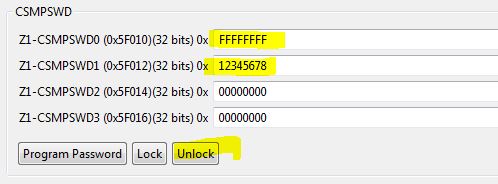
    You should be able to disable ECSL before resuming the RUN after reset and then should be able to step through the code. ECSL password is lower 64bit. In CCS flash plug-in just enter correct ECSL password and click on unlock and then you should not see CCS getting disconnected.

    Regards,

    Vivek Singh

  • Hi Vivek,

    I’d love to be able to do what you say, but I’m not. Provide I just 2 passwords or all 4, it’s not possible to step from ROM to flash.

    First of all unlocking with just 2 keys gives this:

    C28xx_CPU1: Unlocking device...
    C28xx_CPU1: Lock status: 1
    C28xx_CPU1: Error unlocking device. Device still locked. Please recheck the entered password.

    Unlocking with all 4 keys gives success and lock status 0.

    Once unlocked it’s no problem to debug code loaded to RAM or FLASH. Debugger must be setting PC to entry point already in flash/RAM, since then everything works. What I’m trying to say is that it’s not possible to step from ROM to FLASH with 0xB5A in EMUKEY. (BTW It's not very friendly that EMUKEY is 0x25A by default. I understand it's because of boot pins are set to Wait, but how else could we connect to locked device and unlock it? No way. ) I mean clicking CPU Reset in debugger, then Resume - no way to reach entry point in flash.

    I load ROM symbols from

    C:\ti\controlSUITE\libs\utilities\boot_rom\F2837x_revb\revb_rom_sources\ccs_files\cpu01\Release\F2837x_cpu01_bootROM_REVB_Golden_020314.out

    Looks like these do match ROM in my device, disassembly agrees with labels and everything else. So from CPU Reset I can step up to the ExitBoot routine in c1brom_Init_Boot.asm. PUSH ACC line in _ExitBoot pushes 0x80000 to the stack, which is correct entry point in flash. Last time debugger session is alive is in ExitBoot at LRETR instruction… I see now why, something relocks device again.

    Stepping again and checking flash visibility. CPU Reset – Unlock - _c1brom_system_init() and device is locked again, flash is not visible from debugger. Let’s check what’s wrong there. After InitDCSM() flash visible, and after next few lines make flash gets not visible again

    //not to trip ECSL if the passwords are ALL_1,
    //which would be the case with fresh erased parts.
    EALLOW;
    DcsmRegsZ1.Z1_CSMKEY0 = 0xFFFFFFFF;
    DcsmRegsZ1.Z1_CSMKEY1 = 0xFFFFFFFF;
    DcsmRegsZ1.Z1_CSMKEY2 = 0xFFFFFFFF;
    DcsmRegsZ1.Z1_CSMKEY3 = 0xFFFFFFFF;
    DcsmRegsZ2.Z2_CSMKEY0 = 0xFFFFFFFF;
    DcsmRegsZ2.Z2_CSMKEY1 = 0xFFFFFFFF;
    DcsmRegsZ2.Z2_CSMKEY2 = 0xFFFFFFFF;
    DcsmRegsZ2.Z2_CSMKEY3 = 0xFFFFFFFF;
    EDIS;

    Clicking Unlock in CCS below this and no problems stepping out from ROM to Flash…. Is this really how the things should work on this device? Very "friendly".

    I’ve checked your suggestion regarding XRS, it doesn’t look wrong.
    I’ll try debugging with breakpoint at LRETR in ExitBoot and reunlocking, I hope to catch the problem.

    Edit: I've forgot to mention that on different device it is the same, on that 2nd device I'm sure OTP wasn't programmed twice, so the problem has nothing to do with OTP ECC. Something just breaks execution while secured.


    Regards,
    Edward

  • Update: Nothing. Resume in short: I have SW in flash that runs unsecured fine. It doesn't work while secured. My idea was to try to unlock MCU with security keys, then debug starting from ROM. As I wrote previously, ROM relocks MCU again and it's impossible to step out from ROM to MCU. So I do 1) CPU Reset, 2) unlock, 3) set breakpoint at LRETR (at 0x3ff224), 4) run until breakpoint, 5) unlock again and click run, my SW, surprise, works. So there's no way debug my code in secure mode using debugger means. SW reupload takes minutes.. Looks like I'll get silver before fixing it...

    Update2: I narrowed the issue. Booting to bootloader is OK, booting further to main application is also OK. I application I'm using LED to debug, I've set pin direction to output, then moving for(;;) YELLOWLEDTOGGLE=1; deeper from main(), where toggle-define is corresponding GPIO TOGGLE bit. LED stopped blinking in my InitADC() routine, as shown

    static void InitADC(void)

    {

    EALLOW;

    AdcaRegs.ADCCTL2.bit.PRESCALE = 6; //set ADCCLK divider to /4

    AdcbRegs.ADCCTL2.bit.PRESCALE = 6; //set ADCCLK divider to /4

    AdcSetMode(ADC_ADCB, ADC_RESOLUTION_16BIT, ADC_SIGNALMODE_DIFFERENTIAL);

    for(;;)

    YELLOWLEDTOGGLE = 1;

    AdcSetMode(ADC_ADCA, ADC_RESOLUTION_12BIT, ADC_SIGNALMODE_SINGLE);

    //Set pulse positions to late

    AdcaRegs.ADCCTL1.bit.INTPULSEPOS = 1;

    AdcbRegs.ADCCTL1.bit.INTPULSEPOS = 1;

    ....

    I wonder why it worked in secure mode in older app. version.


    Edward

  • Hi

    I finally narrowed the issue. If I remove from controlSUITE's AdcSetMode function call to CalAdcINL(), also call from my code to controlSUITE's InitTempSensor(), then everything starts working even in secure mode... Both these calls access calibration constants in OTP, calibration functions in ROM or OTP. Has anyone an idea what I could do to make these functions stop working? The most weird thing is older SW version with similar initialization worked, even with CalAdcINL() and InitTempSensor()... Arghhh and ouch.


    Edward
  • Edward,

    Does that mean, BOOT code is actually jumping to your application? Were you able to unlock the ECSL and step through the code? You could set a breakpoint just before these function call and then see what happens when these functions are called. OTP is not secure on this device so that should not cause any issue.

    Also which RAM you are using for stack?

    Vivek Singh

  • Sorry, I missed your earlier update. You can ignore the unlock error because that's for CSM which is not unlocking because you are only entering two passwords. You could also open the KEY register location in CCS register view and enter the ECSL password and then step through the code.

    Vivek Singh
  • Hi Vivek,

    • Does that mean, BOOT code is actually jumping to your application?

    Yes.

    • Were you able to unlock the ECSL and step through the code? You could set a breakpoint just before these function call and then see what happens when these functions are called. OTP is not secure on this device so that should not cause any issue.

    I think I already mentioned it. I was unlocking with only 2 (ECSL?) and all 4 valid keys. In both cases by default EmuKey == 0x25A. So I first need to set it to 0xB5A to make rom not entering its WaitBoot routine but exiting from ROM to Flash entry point. Providing two keys Flash is not readable, providing all 4 flash is readable. Then in both cases at exit from ExitBoot() ROM function I had to unlock again, else JTAG disconnects and debug session is over. Doing these two mentioned unlocks before any stepping and in ExitBoot(), exit to flash succeeds and everything works, even calls to CalibrateINL etc.

    To make my SW running out of reset in secure mode, I need to suppress calls to CalibrateINL() and InitTempSensor(). Both routines are reading some settings from OTP, I don't know how and why these functions hang, I'll try figuring it out.

    • Also which RAM you are using for stack?

    Stack is in D1 RAM.

    • You could also open the KEY register location in CCS register view and enter the ECSL password and then step through the code.

    This would be worse time waste. Copy pasting two and more keys takes additional time. In debug settings I checked Continue debug launch if targed connection or program load fails. This helps not closing debug perspective and keep Flash settings open. I just do Connect Target/Disconnect Target and, since these commands scroll flash settings up, I need to scroll them back and just click Unlock.

    Looking deeper into why calibration functions stop in secure mode.

    Edit: BTW default GEL has to be changed. Once unlocked it's not possible to load code to RAM unless GEL_Reset() is suppressed here

    OnPreFileLoaded()
    {
     //GEL_Reset();
    }

    Edward

  • Hi,

    Finally solved. Thanks Vivek for the question about the stack. Because of lack of stack due to the need to add enormously stack hungry FP printf, I moved stack to D-RAM, which is secured. And that's the problem for ADC INL and other calibration routines in OTP. Some do save restore regs to stack, and all have LRETR at the end. Using stack for storage is impossible while executing from unsecured memory and having secure stack. I thought LRETR should be fine, but no, it pulls RPC from the stack, which again is inhibited while executing from secure memory while stack is secure...

    Shouldn't be calibration routines in OTP and secure stack be handled by controlSUITE? Perhaps the need to have not secure stack is specified in datasheet and I'm missing it? It would be better I think if instead of calling routines in OTP we could read calibration data from OTP. Isn't it?

    Edward

    P.S. How to mark someone's message helpful? I see only resolved button.

  • With regard to printf, also note the following thread: https://e2e.ti.com/support/microcontrollers/c2000/f/171/t/620616

  • Hi and and thanks Brett,

    In my case speed was not the issue, printf has to service downloadable configuration data, with standard printf specifiers and standard printf response. I already switched to previously done my own implementation for different architecture, less stack, more speed, but stack was left there in secure RAM and bit after few months doing different project... But at least I've got more familiar with DCSM, OTP, etc on F28377S, good.

    Regards,
    Edward