This thread has been locked.

If you have a related question, please click the "Ask a related question" button in the top right corner. The newly created question will be automatically linked to this question.

SDSPI driver and SWISSBIT sd card issue

Part Number: F28M35H52C

Tool/software: TI-RTOS

Hello,

We have used for a while the TI SDSPI driver with FatFS on our Concerto (M3 side) with commercial SD cards and it has worked fine.

Now we want to use an industrial grade SD card, more specifically the SWISSBIT S-450u 8Go (part no. SFSD8192N1BM1MT-I). Now there are a lot of IO errors with the card and files are not written and read properly. Small files(~40KB) can usually be written without issue (9 out of 10 times) but with bigger files, at some point in the transfer, it is not working anymore. Sometimes we have the error "SDSPI:(%p) send_cmd: SD card wait time expired". Other times, no error message but FatFS f_write function returns 0 for the number of Bytes written.

We've heard that SWISSBIT cards might use a non-standard protocol with different timings. We've tried to increase all the delays we found in the SDSPI driver but no success.

Has anybody come across such issues with these sd cards? Any idea how to adapt the driver?

Thanks for the help,

Ril

  • Ril,

    I don't think anyone here in the C2000 group has had any experience with this specific Part number. I had to request an account on Swissbit to get access to the DS to see if there are any timing incompatibilities between our devices. I am waiting on the account to be enabled so that I can download the Data sheet... it may take up to 24 hours. 

    Generally, this type of failure feels to me like it is related to the HW timing. What SPI clock frequency is expected by the SD card? Does lowering the clock rate help? What are the clock polarity and phase requirements of the Swissbit SD card? How about the delays between commands. Different SPI slaves may require different timings between commands, such as the Chip select must be toggled high for 'x us' after the 'y' command in order to latch or retrieve data. Alternately, some may require that the chip select is held active for the entire duration of a command. 

    It appears just from the fact sheet that the SD card should be compatible with existing SD card standards, so I don't necessarily believe that there is any differences in the command structure. Just something to look into.

    Once the Swissbit account is activated, I will reply with my analysis of the DS. This won't occur until Monday at the earliest.

    In the meantime, can you potentially try varying the clock rates, confirming clock polarity and phase requirements, and trying basic commands of the SD card while observing the behavior on an oscilloscope to ensure they are behaving as expected?

    Thanks,

    Mark

  • Hello Mark,

    Thank you for your answer.

    I'm also waiting for my Swissbit account to me validated so I can download the DS. It's taking quite some time!

    I don't know what kind of SPI frame the SD card is expecting but I can show you a few scope captures. On all the captures, we have:

    - D0 : CS

    - D1 : CLK (400kHz clock, does not go up to the part it reconfigures the clock to 12.5MHz

    - D2 : MOSI

    - D3 : MISO

    Sending CMD0 (0x40: GO_IDLE_STATE):

    - code: send_cmd(hwAttrs, CMD0, 0)

    This goes on for a few ms until we get:

    SDSPI:(4000b000) send_cmd: SD card wait time expired

    SDSPI:(4000b000) disk initialization failed

    SDSPI:(4000b000) send_cmd: SD card wait time expired

    So it seems like the acual CMD0 is never sent since it didn't pass the 'wait_ready' step in the SDSPI driver.

    If I bypass the wait_ready step by commenting the return statement we got:

    I'm not sure where the small glitch pulses between the 2 cursors comes from. My scope has only a 50Mhz bandwidth and these pulses width is ~4ns.But if I repeat the step, I get the exact same trace...

    Sending CMD8 (0x48: SEND_IF_COND):

    - code: send_cmd(hwAttrs, CMD8, 0x1AA) followed by 4* rxSPI(hwAttrs)


    Sending CMD55 (0x77: APP_CMD):

    - code: send_cmd(hwAttrs, CMD55, 0)

    Sending CMD41 (0x69: SEND_OP_COND (ACMD)):

    - code: send_cmd(hwAttrs, CMD41, 0x40000000)

    When I wrote the first post, sometimes the file transfer would work, but today, it doesn't work at all even though I tried with the same code and card. I don't understand what changed.

    Hope you can give me some pointers while I wait for Swissbit support.

    Thanks.

    Ril

    EDIT:

    Well, I just realized that now I can transfer some small files again. I really get unpredictable behavior:

    Sometimes, the wait_ready() function blocks and other times, it goes fine. It seems quite random.

    When it goes fine, I can transfer some data. I use the fatfs api to transfer files as blocks of 4096 bytes, with 1 ms delay between block transfer( or call to f_write/f_read). It goes fine for the first few blocks(sometimes first 100 blocks, sometimes first 50 blocks...) and then f_write returns 0 as the transfered amount of bytes. At this point, I don't see any SPI traffic anymore.

    If I change the delay between calls to f_write/f_read to 10 ms, everything works perfectly.

    Here is two captures showing write and read frames. The data is 0,1,2,3,4,5..... Everything looks good on the SPI frame in terms of polarity and phase. BTW, when there is no wait_ready error, the clock is reconfigured to 12.5 MHz.

    I also tried to keep the clock at 400 kHz instead of reconfiguring it to 12.5 MHz, but I observe the same behavior.

    Thanks for your support.

  • Ril,

    To me it seems like your software is good. What are the minimum delays between bulk transfers that the SD card requires? If giving extra delays between successive commands is working, then perhaps it is a timing issue.

    Those 4ns pulses are concerning, If you have that coming on your data lines, it is possible that it could corrupt the data that needs to be passed. I recommend getting your hands on a higher BW scope to see the transaction more clearly.

    Are you toggling Chip select between commands? If you do not toggle the Chip select at all during your operation, there is a chance that noise could provide an extra clock edge to the SPI slave, and the entire channel becomes out of sync until the next toggle. It is possible that the SD card gets out of sync, and then you have not provided a way to recover from this situation.

    Is anything else in your system running while the SD card is being written to? If so, have you removed the other operations in order to isolate any issues that might be causing the failures?

    It would be worth trying to get a capture of the transaction at the exact time of the failure. Does anything look out of place? (perhaps trigger on the last edge seen on one of the SPI channels, as you said that the SPI stops operating after failure)

    -Mark
  • Hi Mark, thanks for answering.

    Mark Labbato said:
    Ril,

    To me it seems like your software is good. What are the minimum delays between bulk transfers that the SD card requires? If giving extra delays between successive commands is working, then perhaps it is a timing issue.

    I didn't find any information in the DS about this, but I'll ask Swissbit.

    Mark Labbato said:

    Those 4ns pulses are concerning, If you have that coming on your data lines, it is possible that it could corrupt the data that needs to be passed. I recommend getting your hands on a higher BW scope to see the transaction more clearly.

    I did use a better BW scope and actually, it wasn't glitches. It was the CRC of the command and it was correct.

    Mark Labbato said:

    Are you toggling Chip select between commands? If you do not toggle the Chip select at all during your operation, there is a chance that noise could provide an extra clock edge to the SPI slave, and the entire channel becomes out of sync until the next toggle. It is possible that the SD card gets out of sync, and then you have not provided a way to recover from this situation.

    I did try to toggle the CS pin between block(sector) writes. Same result. And it is working fine with commercial SD card (sandisk) so I don't the issue comes from that.

    Mark Labbato said:

    Is anything else in your system running while the SD card is being written to? If so, have you removed the other operations in order to isolate any issues that might be causing the failures?

    Only a small Modbus server that I use to communicate with the board and start some operations. Again, works perfect with regular SD card.

    Mark Labbato said:

    It would be worth trying to get a capture of the transaction at the exact time of the failure. Does anything look out of place? (perhaps trigger on the last edge seen on one of the SPI channels, as you said that the SPI stops operating after failure)

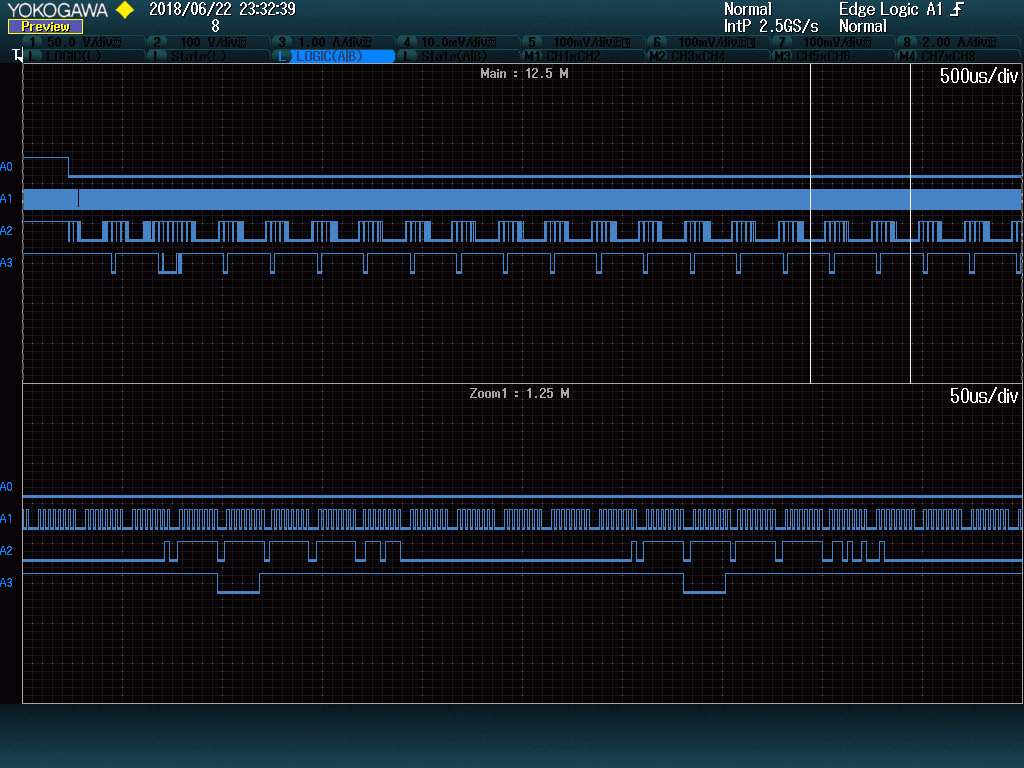
    I tried to capture the end of the SPI transaction. I think the following capture shows what happens when it starts to fail:

    The host keep sending the two same commands again and again until it times out I suppose.

    We added 10k pull-ups on MOSI and MISO. Since then, we don't have initialization issue anymore.

    The remaining issue is that the transfer stops after a few blocks. Adding delay between block write/read helps.

    I'm also in contact with an engineer from Swissbit and I'm hoping to get more information.

    Thanks for your help.

    Ril

  • Since this is working with another SD card and adding delays helps, It sounds like it definitely has something to do with this SD card specifically. I would be curious to hear the results of your debug with Swissbit. Please post back here when you have resolved the issues with them.

    -Mark