This thread has been locked.

If you have a related question, please click the "Ask a related question" button in the top right corner. The newly created question will be automatically linked to this question.

TMS320F28335: How to load a hex file using Code studio composer and run the F28335 controller board without using the debug environment

Part Number: TMS320F28335
Other Parts Discussed in Thread: UNIFLASH

Dear Everyone,

I have a question regarding how to load the hex file in F28335 controller board without relying on the Debug environment, which means the code is permanent upload to the MCU.

Because I wanted to put my F28335 out of my PC desktop. So that, every time I just need to apply DC jack voltage for running the controller board and it becomes moveable. 

I hope someone who can provide me with some details guidelines on how to solve this problem.

Thanks for  reading this message.

Regards,

  • Hi John,

    You can use Codeskin's C2Prog for loading .hex file.

    Alternately, you can use CCS Uniflash to load .out files directly.


    Regards,
    Gautam

  • Hello Gautam,

    Thanks for the given solutions.


    I have tried to use the uniflash to load " hex" file, however it appears this kind of error message. I loaded the “OUT” file is successfully loaded, but the main problem is that, it doesn't generate any PWM signal from my boards. After that I try to verify it again ensure the code is functional from the Debug environment.

    How can I solve this problem in this case. I have attached the screenshot figures

    I tried "UNIflash" and C2prog. I replied to the next section regarding issues in c2prog.

    Thanks,Gautam.


    Regards,
    John

  • Hi Gautam

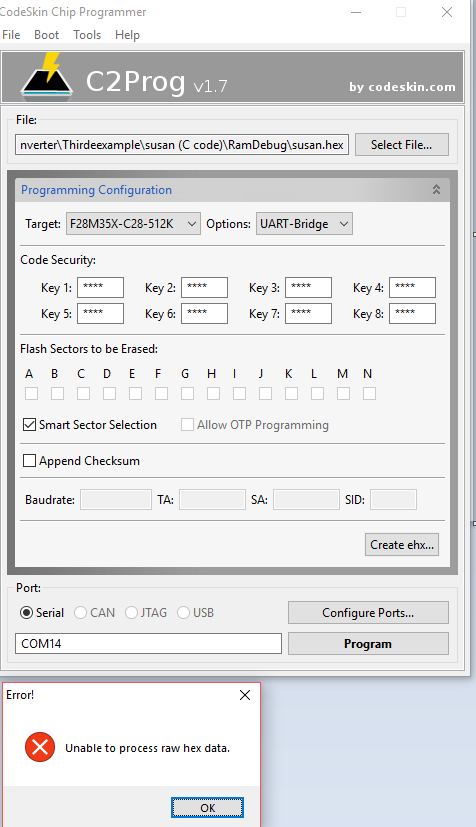
    I also tried to use c2prog to load the hex files and I have settings all the serial port first.

    but the program always pop-out the error message in  " unable to process raw hex data."

    Regards,

    John

  • For C2Prog check this link out:
    e2e.ti.com/.../609877
  • Hi Gautam,

    C2prog
    -------------------------------------
    I did the same procedure steps to generate the hex file, however when I press " edit flags" and typed in the command as follow " hex2000 -romwidth 16 -memwidth 16 -i -o .\Debug\test.hex .\Debug\test.out"

    After I tried to rebuild the project coding based on this way to generate the hex file, it appears an error message in CCS console panel.


    UNIFLASH
    -------------------------------------
    However, I did try some example code in control suite based on the active flash options to compile the code. After that, I try to load the "OUT" compiled by F28335 active flash, actually it works. Does the Uniflash only working for the active flash "OUT" file? 

    In this case, how can I load the active RAM "OUT" by using the UNIflash.


    Regards,
    John

  • John,

    UniFlash supports a fully embedded application. It can load only to Flash. If you have any code that needs to execute from RAM, please assign it to ramfuncs section and copy it to RAM at run time.

    Coming to hex utility, you just need to add "--memwidth=16 --romwidth=16 --intel" in the edit flags window.
    What error did you get ?

    Thanks and regards,
    Vamsi
  • John,

    Did you try the hex utility with the flags mentioned?

    Thanks and regards,
    Vamsi
  • John,

    Can I close this thread?
    Or do you have further questions on hex utility?

    Thanks and regards,
    Vamsi