This thread has been locked.

If you have a related question, please click the "Ask a related question" button in the top right corner. The newly created question will be automatically linked to this question.

TMS320F28069: i2c sample program not working not able to see the write or read of the EEPRom data

Part Number: TMS320F28069
Other Parts Discussed in Thread: TMDSDOCK28069, CONTROLSUITE, C2000WARE, LAUNCHXL-F28069M

The i2c sample program given in the control suit is not working. what could be the issue?  i am using 28069 control stick with usb dociing station of rev 2.0  wherein jp9 has to be connected between processor line and the FTD chip .Even after this it is not working 

Do I have to connect the jumper ?

I am not able to do single stepping if i try to do ? is there any standard  working program available. ? pl do send it at the earliest.

And also pl clarify how to see the result? using memview only ????

Thanking you,

Regards

Sundari

  • Hi Sundari,

    Are you using the TMDX28069USB or the TMDSDOCK28069 (F28069 ControlCard with DIMM 100 Dock)?

    You are trying to run the i2c_eeprom example correct? This example requires an external EEPROM to work. Do you have an EEPROM connected with the appropriate setup (pull-up resistors on SDA/SCL lines). For viewing the results you should use the expressions window when debugging and look at the I2cMsgOut1 and I2cMsgIn1 message structures.

    You say you aren't able to single step through the code. Have you tried a different example program within ControlSuite, or C2000ware since it's more updated? I think you should make sure a simpler example works if you're having issues simply running the code.

    Best,
    Kevin
  •  TMS320F28069: i2c sample program not working not able to see the write or read of the EEPRom data.

    Hi kevin

      I am using  TMDSDOCK28069 (F28069 ControlCard with DIMM 100 Dock)

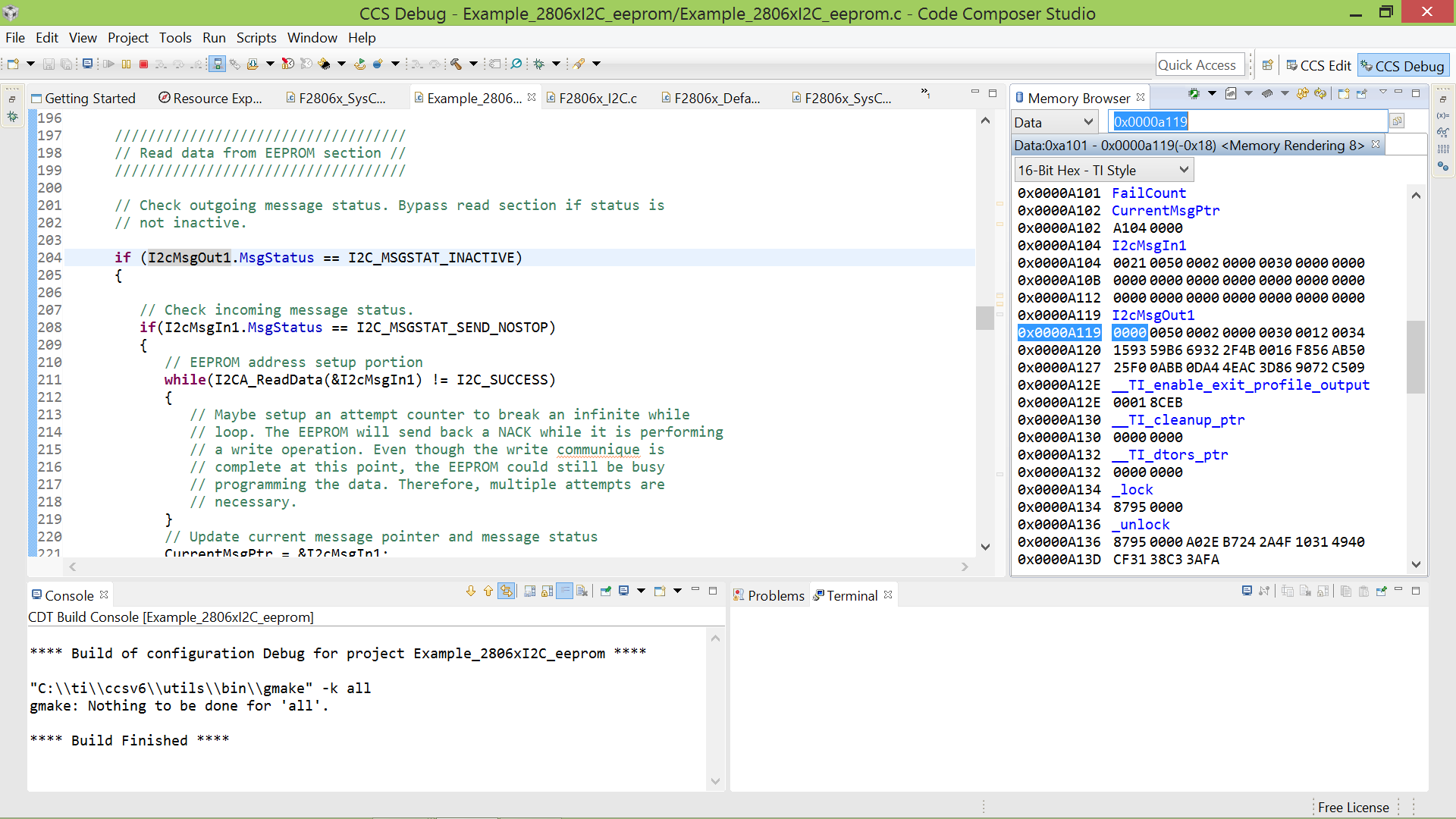
    I am able to single step the code if it is within the unending loop. Since it is interrupt program I was not able to see the program.otherwise debugging the program is not an issue. I could see the message structure also through memview. But not able to see the EPROM location.

    If I am using the docking station what  are the hardware points that I should check ? like jumpers jp9 is mandatory ? Can anybody sense it  and tell?

    I am struggling with this since two days .  Succeeded people can throw some light.


    Warm Regards,
    Sundari

  • Hi Sundari,

    OK. You're correct, with interrupts you probably can't step into the interrupt function. You can however put breakpoints within the interrupts or right click and select run to line. Then you should be able to check the I2cMsgOut1 & I2cMsgIn1 structures.

    I'm confused as to what you're trying to check regarding the hardware, I don't see a JP9 on either of the schematics. Are you trying to probe the SCL/SDA lines? This will be GPIO 28 (SDA) and GPIO 29 (SCL) by default for the i2c_eeprom example.

    best,
    Kevin
  • Dear Kevin,

    Still my problem is not solved. The sample program given in Piccola is not working. IS there any updated version available? pl send it if possible.

    When i check the SCL AND SDA lines both are high before starting the program.  After wards it beomes low. But the actual clock is not coming in the SCL line. Even SDA line also, I could not find  the data toggling waveform.  Hence , othertthan  the message I2c msg out1 filled in buffer I dont knwo whether it is being written to EEPROM or not is not known.

    !. I have all doubts namely the CPU  is not able to put the data in the I2c  bus. because no toggling of the waveforms.

    2. Similarly , the  next step is to see the data being written to the EERPROM .  This is as for as writing is concerned.

    3. Similarly , for reading, the I2cmsg structure is not updated with the data .  It shows the initialised values only.

    4.  Hence sureshot it is not present in the I2c eprom.  I wasted lot of days in this. I dont know  where is the error. kindly send me the working code for me to concentrate on the acutla problem of my developement

    Regards,

    S.M.Sundari

  • Hi Sundari,

    It's a little more readable if you check the I2CMsgIn and I2CMsgOut structs in the expression window. Regardless your MsgIn struct is in the I2C_MSGSTAT_SEND_NOSTOP_BUSY state and your MsgOut is in the I2C_MSGSTAT_INACTIVE state. Your program should be attempting to read from the specified EEPROM address.

    What is the issue you are experiencing when you run the application normally? You said it isn't working, but have given no additional details beyond that. I need more to work on to help you. Does it hit the following pass function?

    void 
    pass()
    {
        __asm("   ESTOP0");
        for(;;);
    }
    

    Best,

    Kevin

  • Hi Sundari,

    The screenshot of the structures in the expressions window show that the MsgIn struct is in the I2C_MSGSTAT_SEND_NOSTOP_BUSY state and your MsgOut is in the I2C_MSGSTAT_INACTIVE state. These are not the initial states set and it should mean the initial I2CA_WriteData function was successful and the I2C module is now trying to read the requested data from the eeprom, but may not be succeeding.

    I can try this example program with the F28069 on my side to ensure it works. You shouldn't have issues capturing the waveforms as the writeData function sounds like it's succeeding. Are you sure you're setting up the capture correctly on the oscilloscope,or whichever instrument you're using?

    I'd also suggest checking your hardware setup of the eeprom.

    Best,
    Kevin
  • Hi Sundari,

    I just tested the example with the LAUNCHXL-F28069M and it worked as intended, though I did have to change the default SDA/SCL GPIOs from 28/29 to 32/33.

    Are you using a LaunchPad or ControlCard, or is it a custom board?

    Best,
    Kevin