This thread has been locked.

If you have a related question, please click the "Ask a related question" button in the top right corner. The newly created question will be automatically linked to this question.

CCS/TMS320F28027: HVPSFB-PCMC - there is no any pwm is issued by CPU after EVM is powered

Part Number: TMS320F28027
Other Parts Discussed in Thread: UNIFLASH, CONTROLSUITE

Tool/software: Code Composer Studio

1. Could you advice please,  what can we do to start getting PWM from CPU?

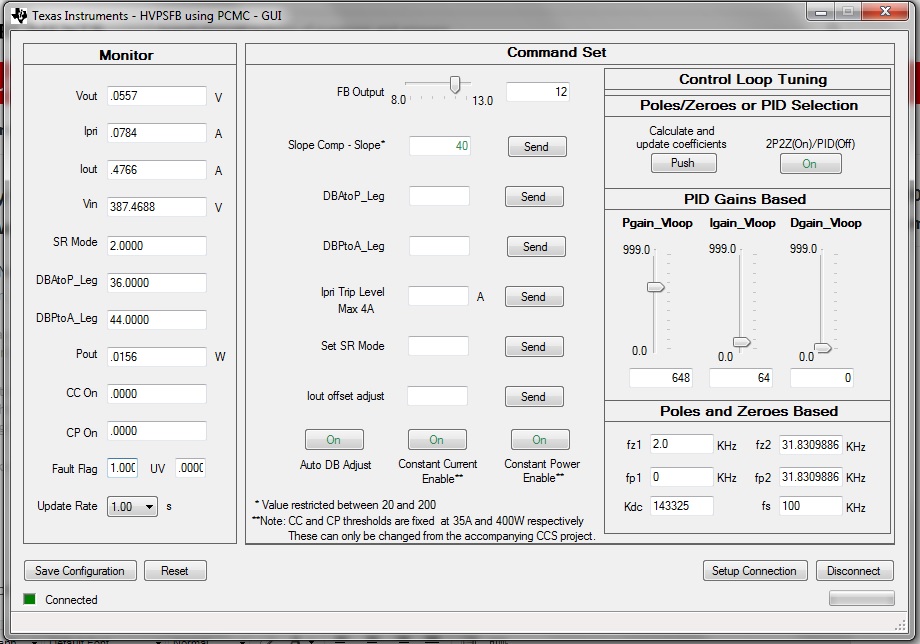
Regarding the question: we flashed CPU successfully and managed connect CPU to GUI (we observe monitoring voltages at its menu and the output voltage is 0). When sampling PWM outputs by oscilloscope no any  output signal is observed (P00 to P07 at HVPSFB controller board). CPU was flashed by HVPSFB_PCMC.out through uniflash.  J1 and R6 are removed as directed in manual.

2. When trying to compile and build all through code composer, there is no .out file generated.

We will appreciate your assistance to get Code Composer properly installed or fixed maybe.

Then we getting the following log:

"../F28027_FLASH_HVPSFB.CMD", line 26: error: BOOT_RSVD memory range overlaps
existing memory range BEGIN
"../F28027_FLASH_HVPSFB.CMD", line 28: error: progRAM memory range overlaps
existing memory range PRAML0
"../F28027_FLASH_HVPSFB.CMD", line 35: error: BEGIN memory range has already
been specified
"../F28027_FLASH_HVPSFB.CMD", line 38: error: IQTABLES memory range has already
been specified
"../F28027_FLASH_HVPSFB.CMD", line 38: error: IQTABLES memory range overlaps
existing memory range IQTABLES
"../F28027_FLASH_HVPSFB.CMD", line 39: error: IQTABLES2 memory range has
already been specified
"../F28027_FLASH_HVPSFB.CMD", line 39: error: IQTABLES2 memory range overlaps
existing memory range IQTABLES2
"../F28027_FLASH_HVPSFB.CMD", line 40: error: IQTABLES3 memory range has
already been specified
"../F28027_FLASH_HVPSFB.CMD", line 40: error: IQTABLES3 memory range overlaps
existing memory range IQTABLES3
"../F28027_FLASH_HVPSFB.CMD", line 42: error: BOOTROM memory range has already
been specified
"../F28027_FLASH_HVPSFB.CMD", line 42: error: BOOTROM memory range overlaps
existing memory range BOOTROM
"../F28027_FLASH_HVPSFB.CMD", line 43: error: RESET memory range has already
been specified
"../F28027_FLASH_HVPSFB.CMD", line 43: error: RESET memory range overlaps
existing memory range RESET
"../F28027_FLASH_HVPSFB.CMD", line 51: error: RAMM1 memory range has already
been specified
"../F28027_FLASH_HVPSFB.CMD", line 51: error: RAMM1 memory range overlaps
existing memory range RAMM1
"../F28027_FLASH_HVPSFB.CMD", line 53: error: dataRAM memory range overlaps
existing memory range DRAML0
warning: creating output section "EmuKeyVar" without a SECTIONS specification
warning: creating output section "PartIdRegsFile" without a SECTIONS
specification
warning: creating output section "EmuBModeVar" without a SECTIONS
specification
warning: creating output section "FlashScalingVar" without a SECTIONS
specification
warning: creating output section "FlashCallbackVar" without a SECTIONS
specification
warning: creating output section "SysPwrCtrlRegsFile" without a SECTIONS
specification
warning: creating output section "DevEmuRegsFile" without a SECTIONS
specification
warning: creating output section "FlashRegsFile" without a SECTIONS
specification
warning: creating output section "CpuTimer0RegsFile" without a SECTIONS
specification
warning: creating output section "CpuTimer1RegsFile" without a SECTIONS
specification
warning: creating output section "CpuTimer2RegsFile" without a SECTIONS
specification
warning: creating output section "CsmPwlFile" without a SECTIONS specification
warning: creating output section "GpioIntRegsFile" without a SECTIONS
specification
warning: creating output section "SpiaRegsFile" without a SECTIONS
specification
warning: creating output section "SciaRegsFile" without a SECTIONS
specification
warning: creating output section "NmiIntruptRegsFile" without a SECTIONS
specification
warning: creating output section "CsmRegsFile" without a SECTIONS
specification
warning: creating output section "XIntruptRegsFile" without a SECTIONS
specification
warning: creating output section "Comp2RegsFile" without a SECTIONS
specification
warning: creating output section "Comp1RegsFile" without a SECTIONS
specification
warning: creating output section "PieCtrlRegsFile" without a SECTIONS
specification
warning: creating output section "SysCtrlRegsFile" without a SECTIONS
specification
warning: creating output section "GpioDataRegsFile" without a SECTIONS
specification
warning: creating output section "ECap1RegsFile" without a SECTIONS
specification
warning: creating output section "AdcResultFile" without a SECTIONS
specification
warning: creating output section "I2caRegsFile" without a SECTIONS
specification
warning: creating output section "EPwm3RegsFile" without a SECTIONS
specification
warning: creating output section "EPwm2RegsFile" without a SECTIONS
specification
warning: creating output section "EPwm4RegsFile" without a SECTIONS
specification
warning: creating output section "EPwm1RegsFile" without a SECTIONS
specification
warning: creating output section "GpioCtrlRegsFile" without a SECTIONS
specification
warning: creating output section "AdcRegsFile" without a SECTIONS
specification
warning: creating output section "PieVectTableFile" without a SECTIONS
specification
"../28027_RAM_lnk.cmd", line 122: error: program will not fit into available
memory. placement with alignment/blocking fails for section ".text" size
0x13ed page 0. Available memory ranges:
PRAML0 size: 0x900 unused: 0x900 max hole: 0x900
error: errors encountered during linking; "HVPSFB_PCMC.out" not built

>> Compilation failure
makefile:151: recipe for target 'HVPSFB_PCMC.out' failed
gmake: *** [HVPSFB_PCMC.out] Error 1
gmake: Target 'all' not remade because of errors.

**** Build Finished ****

  • Hi Victor,

    For #1, are you following the quick start guide (QSG-HVPSB-Rev1.1.pdf) located here: ...\controlSUITE\development_kits\HVPSFB_v1.1\~Docs ? Do the entries in the 'Monitor' section make sense? Is the 'Fault Flag' entry 0?

    For #2, it is possible that CCS is including .cmd file in addition to the ones already included with the project. When you import/open this project inside CCS, right-click on the project name and select 'Properties'. In the project properties window select '<none>' for the 'Linker command file:' entry. After selecting these options and going back to the CCS editor/project window, click on 'Clean Project'. You can now rebuild this project.

    Let me know this goes.

    Hrishi

  • Hi,

    Thanks for your reply,

    For #1,

    yes, we are following the quick start guide (QSG-HVPSB-Rev1.1.pdf).

    monitoring section more or less ok, discounting the CPU a/d measurement discrepancy. You can see that it reads the input voltage about to 390v,

    the fault flag entry is  1.00 (you can see in the attached file with the GUI's screenshot)

    Regarding #2: we made your suggested procedure and it made clean compilation and loading without errors (only a bunch of warnings) ; we found out that the problem, seems to be, in the source files of TI project imported from ~\ti\controlSUITE\development_kits\HVPSFB_v1.1\HVPSFB_PCMC..

    when the .out file is loaded from the untouched source directory (no any build) the gui is able to reconnect with the CPU,

    when the source files are built with the CCS and new .out is regenerated, the connection with the gui is dead.

    Therefore we conclude that may be:

    2 problems are presented at the material got from the TI for the EVK -

    the 1st problem: that the old (untouched .out file) have some errors in running the CPU and thus EVK is stalled, but the gui subroutine successfully launched,

    the 2nd problem: that source files for compilation and debugging  have a bug error of running gui at least (EVK is also stalled at that instance),

    then we need further assistance in launching EVK, may be there is a "clean" - verified source files for that EVK that you can send us, please.

    Regards.

  • Hi Victor,

    This could be related to a small bug we found in the original code. My co-worker will post the s/w fix shortly.

    In the mean time to fix the problem of not being able to connect to the GUI when working from CCS, please unplug and re-plug the USB to your PC (while the control board is powered down - never do this during a session with power connected to the board!). Now, make sure you use the correct com port in the GUI by clicking on 'Setup Connection' in the GUI. Once you select the correct serial port, you should be able to connect to the GUI.

    I hope this helps.

    Hrishi

  • Victor,

    The FaultFlg set at power-up could be related to a bug that we found in the original code.  Unfortunately, this was identified after controlSUITE was frozen so there is no official way to update the source code distributed through controlSUITE.

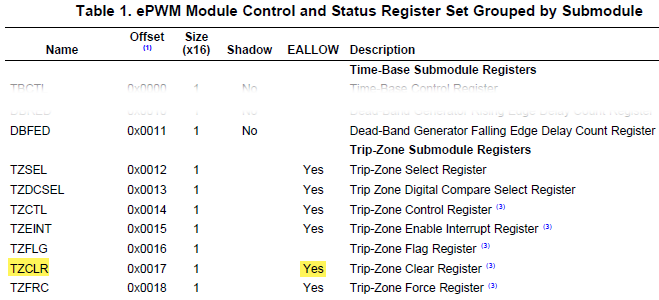
    The problem lies in the fact that the TZCLR is an EALLOW protected register, but the source code is writing to TZCLR without EALLOW privilege:

    To correct this in your software, add EALLOW privilege to the TZCLR writes in HVPSFB-Main.c.  For example, change the code starting at line 543 of the PCMC HVPSFB-Main.c from:

    	FaultFlg = 0;	
    	EPwm1Regs.TZCLR.bit.OST = 1;			// Clear any spurious OC trip
       	EPwm2Regs.TZCLR.bit.OST = 1;			// Clear any spurious OC trip 
    
    	EALLOW;
    	GpioCtrlRegs.GPAMUX1.bit.GPIO0 = 1;		// 0=GPIO,  1=EPWM1A,  2=Resv,  3=Resv
    	GpioCtrlRegs.GPAMUX1.bit.GPIO1 = 1;		// 0=GPIO,  1=EPWM1B,  2=SPISIMO-D,  3=Resv

    to:

    	FaultFlg = 0;	
    
    	EALLOW;
    	EPwm1Regs.TZCLR.bit.OST = 1;			// Clear any spurious OC trip
       	EPwm2Regs.TZCLR.bit.OST = 1;			// Clear any spurious OC trip 
    
    	GpioCtrlRegs.GPAMUX1.bit.GPIO0 = 1;		// 0=GPIO,  1=EPWM1A,  2=Resv,  3=Resv
    	GpioCtrlRegs.GPAMUX1.bit.GPIO1 = 1;		// 0=GPIO,  1=EPWM1B,  2=SPISIMO-D,  3=Resv

    The corrected factory .out image for the kit is attached.

    https://e2e.ti.com/cfs-file/__key/communityserver-discussions-components-files/171/HVPSFB_5F00_PCMC_5F00_v2_5F00_EALLOW.out

    -Tommy

  • Ok. HVPSFB_PCMC_v2_EALLOW.out - you posted, works fine. But, anyway, when correcting main.c file, exactly by your instructions, we still have the same dead .out file , there is no any connection with the GUI. Well, can you give us the exact sources where from you generated your .out file, please.
  • Victor,

    When you say "dead" .out file, do you mean that the project fails to build and generate an .out file?

    The binary that I posted was generated from the controlSUITE project with the noted main.c modification so that is the recommended way to reproduce the binary.

    Are you able to build other example projects from controlSUITE? Is there a chance that your copy of the HVPSFB project may have been corrupted? From your build warnings, it looks like the project may have been modified.

    You should be able to import and build the fresh controlSUITE project. I confirmed that I can import and build \ti\controlSUITE\development_kits\HVPSFB_v1.1\HVPSFB_PCMC using CCSv5 through CCSv8.

    -Tommy
  • Hi Victor,

    Are you still facing this issue? 

    Hrishi 

  • Hi Victor,

    I am going to mark this post as 'resolved' for now. Feel free to reject the resolution if you want to reopen it.

    Hrishi