This thread has been locked.

If you have a related question, please click the "Ask a related question" button in the top right corner. The newly created question will be automatically linked to this question.

TMS320F280049: CAN Port Setup using C2000ware

Part Number: TMS320F280049
Other Parts Discussed in Thread: C2000WARE

All:

Reference: e2e.ti.com/.../696523

We are using the F28004x ControlCard and docking station. We have an external CAN transceiver that works with the F2837x ControlCard, I am having a difficult time getting the CAN working on the F28004x ControlCard - probably a clock setup issue. As noted in the reference, the external 20 MHz clock can be brought directly to the CAN clock input - however, I am unsure of what if any functions to call in order to set this up. Am I missing something? (I know, left myself wide open on that one...)

  • OK, looks like I was able to set up CAN to use the external 20 MHz clock on the ControlCard.
    Based on the discussion from the referenced e2e post, here are the key function calls:

    // Initialize the CAN A module.
    CAN_initModule(CANA_BASE);

    // Select the External 20 MHz clock as the clock source.
    CAN_selectClockSource(CANA_BASE, CAN_CLOCK_SOURCE_XTAL);

    // Set the bit rate based on the External clock rate (20 MHz), CAN rate 500k and 20 as the third parameter.
    CAN_setBitRate(CANA_BASE, 20000000, 500000, 20);
  • Todd,

                If you scope the CANTX pin, do you see any activity? Even assuming there is a clock config problem, you should see some activity in the CANTX pin.

  • Hareesh
    Thanks for your reply. I will scope TX. So far, I am getting good response when I connect Pcan to the CAN bus. I have also been able to connect to customer’s app.
  • The CAN Driverlib examples for 280049 were written for the ControlCARD and should run "as is". 


  • Hareesh:
    For some reason on F280049 ControlCard, using the external oscillator and resulting SYSCLK as source for CAN did not work, BUT if I sourced external oscillator directly to the CAN, it did work - came up and ran without any problems.

    This was highly unusual, because I also have an F2837x ControlCard, and CAN will work with both external oscillator as direct connection and using SYSCLK, with SYSCLK being sourced from external oscillator.

    Do you know of any reasons why the F280049 ControlCard needed CAN to be sourced directly from the external oscillator?
  • Todd,

                I presume you ran the C2000ware example “as is” to start with.


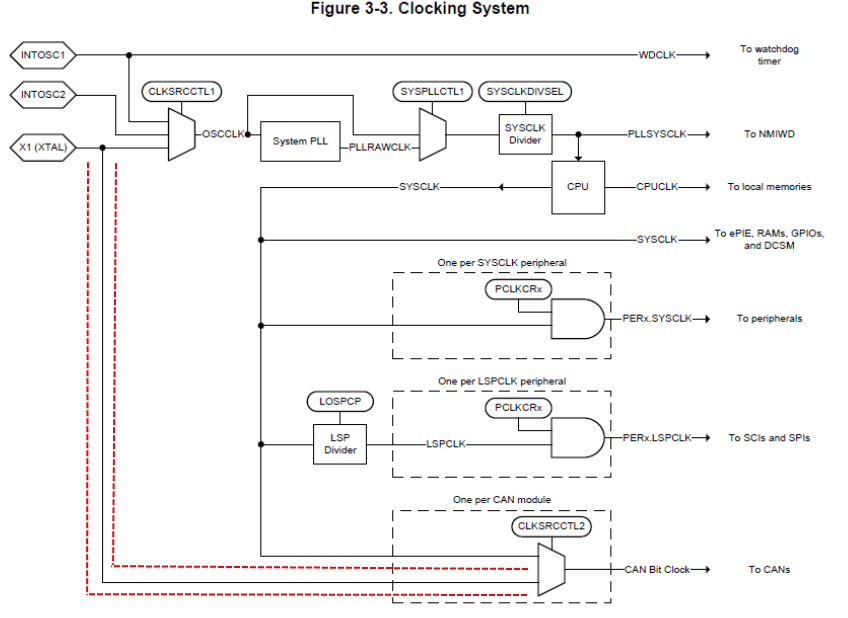
    Can you confirm you are using the clock path highlighted by the dotted red line in the attachment? I presume you are writing to the CLKSRCCTL2 register to switch the CAN clock source and changing that frequency to 20 MHz.


    What bit-rate are you using? Does it make a difference if you use a very low bit rate like 50 kbps?


    By any chance, are you using the 10 MHz internal oscillator (INTOSC)?

  • Todd,
    Any update on this?
  • Hareesh:
    Yes, I am using the path highlighted to supply clock to CAN (20 MHz on ControlCard). And as far as I know, I am using the same 20 MHz clock as an external clock source. However, trying to route the SYSCLK to CAN did not work on my particular ControlCard. I will try another ControlCard that is present here, to see if it exhibits the same problem. The code is based on C2000WARE, but is custom code that was ported from an F2837x ControlCard.
  • Hareesh:
    Here is snippet of the code used. I have commented out the working external clock, and attempted to add 2 lines using internal clock source.

    /** - initialize port pins for CAN-A */
    GPIO_setPinConfig( GPIO_30_CANRXA );
    GPIO_setPinConfig( GPIO_32_CANTXA );

    /** - initialize the CAN controller, select SYSCLK source and set 500 kbps */
    CAN_initModule( CANA_BASE );

    /* This is an attempt to use internal clock source - does not work. */
    CAN_selectClockSource( CANA_BASE, CAN_CLOCK_SOURCE_SYS );
    CAN_setBitRate(CANA_BASE, 100000000, 1000000, 16);

    /* Below two lines are code that does work -
    CAN_EXT_CLK is 20,000,000, CAN_BIT_RATE is 500,000, CAN_BIT_TIME is set to 20

    CAN_selectClockSource( CANA_BASE, CAN_CLOCK_SOURCE_XTAL );
    CAN_setBitRate( CANA_BASE, CAN_EXT_CLK, CAN_BIT_RATE, CAN_BIT_TIME );
    */
    CAN_setAutoBusOnTime( CANA_BASE, ABO_DELAY_SEC * HZ_PER_MHZ * SYSCLK_MHZ );
    CAN_enableAutoBusOn( CANA_BASE );

    /** - wait for broadcast from downloader */
    vConfigRxMailboxes( BROADCAST_ID, MODE_NORMAL );

    /** - start CAN module A operation */
    CAN_startModule( CANA_BASE );
  • Todd,

                Bit-time of 16 does not yield a bit rate of 50 kbps (it yields 52.08 kbps). You could use a BT of 20 or 25, which yield 50 kbps. All you need to do is to change the BT parameter in the function to 20 or 25.


       CAN_setBitRate(CANA_BASE, DEVICE_SYSCLK_FREQ, 500000, 25);


    You could simply change the BT value in the function call above and recompile the project and it should work.