This thread has been locked.

If you have a related question, please click the "Ask a related question" button in the top right corner. The newly created question will be automatically linked to this question.

LAUNCHXL-F28069M: Configuration to run a programm standalone (Programming done with Simulink).

Part Number: LAUNCHXL-F28069M

Hello,

i have a ti launchpad f28069m board and i'm programming it using the simulink code generation tool. I wanted to know if there is a way to configure the board to run the programm in standalone ,as soon as i power it up. The project consist of a balancing robot that will be given to students. They have to design the controllers and later on do validation tests. Untill now i achieved to download the programm to the mcu with the 'boot from flash' configuration mode. If i move the boot configuration switch to the down position (only TRSTn pin), the model runs standalone, but if i remove the power and power it again, the mcu goes into a pause state. So i have to first move the switch to the up position, then power it up and when powered, move it to the down position, in order to run the program completely. I want to avoid this process as the switch won't last long, because it will be used repeatedly by the students. Is there a way or a configuration that runs the code directly from power up? And if posible is there a way to configure the switch to be able to both download the code when connected to simulink and run in standalone when powered down and up again? Thanks in advance!

Regards, 

Emmanuel

  • Emmanuel,
    For the "standalone" option there should be an option in Simulink to compile to run from flash vs RAM. This will program the flash with your code; and with the correct boot mode settings(boot from flash) will power up and run as you want. For a project in code composer there are build options for this; I assume there is something similar in Simulink but if someone who is more familiar with the tool properties could chime in I would appreciate it.

    Assuming this is a static or saved setting, this should solve your second problem as well; i.e. on every new build it will load it to flash and then that will be the default to run from power up.

    Best,
    Matthew
  • In simulink configuration, you have an option "Boot from Flash". Simply tick that option.

    You can check this video:

    Regards,

    Gautam

  • Hello Gautam,

    thanks for the help. I've been using the simulink configuration with 'Boot from flash' option turned on as seen on the attached image, but it doesn't behave as i expect it to. While having the boot selection  switches in the up position, if i reboot the board it doesn't run the code just until i plug the USB cable. I want the code to run directly from startup. Is my configuration wrong or something?

    Regards,

    Emmanuel

  • Hello Matthew,

    thanks for the quick response. It is good to know that it's possible, could you please tell me how this configuration is done? Maybe i can add custom code to the simulink generated code and this could solve my problem as well. If you look at my reply to Gautam, i am actually using this 'boot from flash' configuration, but after reboot i have to plug in the USB cable for the program to start running and i want to avoid that as well.

    Regards,
    Emmanuel
  • Emmanuel Santiago Iglesias said:
    if i reboot the board it doesn't run the code just until i plug the USB cable.

    You mean to run the code in standalone mode you need to plug-out and plug-in the USB cable?

  • After uploading the code i unplug the usb cable, turn off and then on the board. The board just holds the code until i plug the USB cable again and that is when the code starts running. I want the code to run as soon as i power up the board.
  • Hi Emmanuel,

    The boot from flash check box is the way to get the code to run stand alone (on board power up).

    https://www.mathworks.com/help/supportpkg/texasinstrumentsc2000/ref/sect-hw-imp-pane-c28x-build-options.html

    Normally if you power down the board, unplug USB, and power on the board, the code will run after board boots. I don't know what happens if you reconnect USB after boot.

    Cheers,

    -Brian

  • Hello Brian,

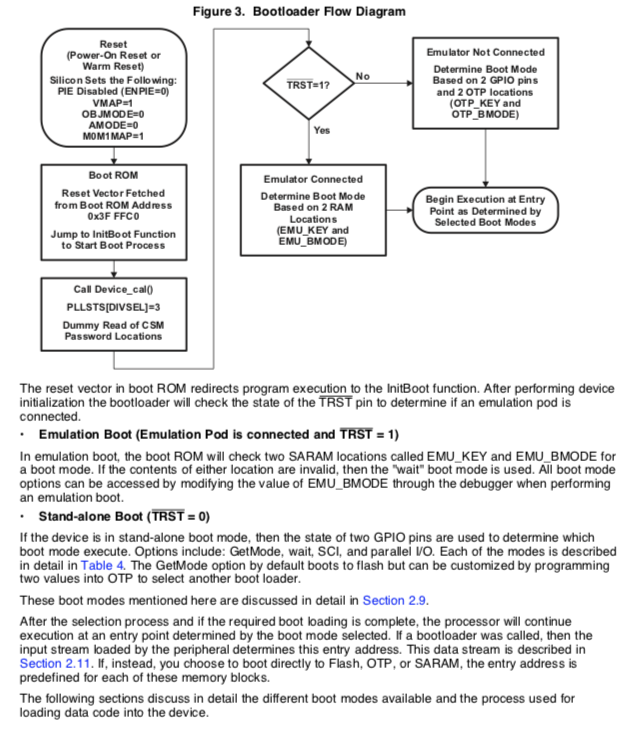
    i think the issue is something with the boot mode configuration. From the technical reference manual (SPRUFN6A) i noticed that the device does a check on some memory locations to determine boot mode (EMU_KEY and EMU_BMODE) before beginning the execution of the program. It also says that if some of the locations are invalid, then the 'wait boot mode' is used (see attached image), where the CPU keeps looping within the boot ROM until the emulator is connected. I assume the code is hanging there in this wait mode until i connect the USB. That's the check i want to overcome as i am using external power for the board. I've already tested with 5 different boards and all of them have the same behavior, so there has to be something wrong with my configuration. Any ideas on what i can do? Maybe my linker file is corrupted or something? Can i manually change the values of EMU_KEY andEMU_BMODE?

    Regards, 

    Emmanuel

  • Hi Emmanuel,

    I've never had a problem with running stand alone, but I may not have tried the same setup you have.

    Please contact MathWorks Technical Support and start a ticket, they can help answer this question or escalate to the development team for additional review.

    Cheers,

    -Brian

  • Hello Brian,

    Alright i’ll try to contact the technical support. Thanks for the help!

    Regards,
    Emmanuel