This thread has been locked.

If you have a related question, please click the "Ask a related question" button in the top right corner. The newly created question will be automatically linked to this question.

CCS/TMS320F28379D: storing data of a incoming signal into a file

Part Number: TMS320F28379D
Other Parts Discussed in Thread: C2000WARE, CONTROLSUITE

Tool/software: Code Composer Studio

Hello

I want to store a limited number of sampled data of the incoming SDFM signal in DSP and then export them into a file (for example excel file). What is the simplest way?  The method should be fast enough to store the data in a rate of fs=50kHz. 

Regards

  • Messi,

    Can you please elaborate what you are trying to do? Are you trying to store the raw SD-modulator bit stream? (or) are you trying to store filtered data into an array?

    Regards,
    Manoj
  • Hi Manoj
    Thanks for prompt reply

    I want to store the filtered data (real current data) and use them in PC.
    Other than SDFM, I am trying to find the simplest way to store any internal DSP data such as motor speed (generated by QEP) or motor estimated torque or flux etc.
    I don't need much data to be stored. only a limited number is enough (100 data with rate of 50K or 100 K samples in second)
    regards
  • Messi,

    Please check the below examples in below C2000Ware path:-

    <C2000Ware>\device_support\f2837xd\examples\cpu1

    sdfm_pwm_sync_cpu
    sdfm_filters_sync_dma
    sdfm_filters_sync_cla

    Regards,
    Manoj
  • Manoj,

    I have the same problem. which way should I use? which way is the simplest way? Is there any document to help me on this issue? Or I should read TRM DMA and CLA chapters?

    Could you please point me out which feature of the DSP should I use to transfer data to my PC so I could urgently jump into that way and use it?

    in the following post, I have read that for storing data we can use the "watch windows". How it is possible and is this possible using watch windows to store the data in a fast enough rate? (for example ALL data of 10ms which are being generated in a 50K sample per second rate )

    https://e2e.ti.com/support/microcontrollers/c2000/f/171/t/308446?how-to-store-data-into-computer-


    Best regards

  • Sana,

    I'm not fully aware of your system requirement / bandwidth. All the 3 suggested examples stores the filter results in a buffer using CPU (or) CLA (or) DMA. Most of our customers tend to use CLA (or) DMA option. They generally prefer to use CPU for other stuffs. So, you can use either CLA / DMA SDFM example. Running this examples should help you to get started.

    If you want to export the filtered data stored in an array, you can just save the raw data into a .dat file and then export it to excel sheet if you desire to do so.

    Regards,
    Manoj
  • There is a set of data logging routines in the C2000 Digital Control Library (DCL), which you can download freely in C2000Ware. One simple method is to use these functions to log the variables of interest into one or more data buffers, then manually export them into Excel or something. The DCL includes cycle efficient buffer write functions which you would typically place in an ISR. The technique is used extensively in the library examples (see the DF22 example) and there is source code to illustrate how it is done. Once you have a full buffer you can open it in a CCS memory window, then right-click in the memory window and select Save Memory...". You save the data in a .dat file which you can open in Excel or Matlab, for example. You can also just select the data you want in the CCS memory browser and then Copy-Paste directly into Excel. There are other ways, but I offer this up as a simple method which seems to do what's being asked for here.

    Regards,

    Richard
  • Hello Richard 

    Thank you for reply.

    I am gonna use DCL as you advised me. I think you meant I should use "FDLOG" and "MLOG". 

    1- Are these two functions (Macro codes) make use of DMA ? or DMA is different way of storing and accessing the data? 

    2- How could I get the ".cmd" file (for example F28069_DCL.cmd) and ".asm" files for 28377d to modify them for logging the data? 

    3- Which ".asm" files are necessary for using "FDLOG" in my project that should I copy them into my project?

    Best regards

  • Hi Manoj
    Thank you for your advises.
    I'm gonna work a little more on this issue.
    regards
  • I recommend focussing on the FDLOG component in DCL.  These functions are implemented in inline C or assembly (not macros) and none of them make use of the DMA.  You could set up a DMA channel to move the data into an allocated block of RAM.  That is another way.

    I have not written any  FDLOG examples for the F2837x series but it would be simple to modify the linker command file to do so.  Referring to the DF22 code example I mentioned earlier, you would allocate as many blocks of RAM as you need using a similar method to lines 56-59 of the F28069 linker file.

    Regards,

    Richard

  • Thank you Richard for your advice

    I am focusing on FDLOG. But as I already have not worked with C2000ware, and also ".cmd" files, I am a little confused.
    My project is created using the files of controlsuite. Besides there is no any ".cmd" file in my project right now.

    -For using "FDLOG" which files - in addition to the "DCL_fdlog.h" should I include to my project?

    -Is it possible to include and use "F28069_DCL.cmd" in my project without modification for 28377d? Or can I use ",cmd" file of these path without modification ? "C:\ti\controlSUITE\device_support\F2837xD\v210\F2837xD_common\cmd". If YES, which of files?

    -What about the ".asm" files? should I include them too?

    Regards

  • You are welcome.

    You can use controlSUITE or C2000Ware. The main thing to remember is that controlSUITE is no longer being updated, so you will aalways find the newest materials in C2000Ware. In the case of the DCL, the latest version is v3.1 (you are using v1.0).

    You will need a linker command file in your project, and you will need to understand the basics of how to work with them. In controlSUITE you will find the file "2837xD_RAM_lnk_cpu1.cmd" which you could start with, then make the changes above.

    To work with FDLOG you only need the header file "DCL_fdlog.h". You don't need to add any assembly files.

    Regards,

    Richard
  • Thank you again for reply

    Sorry for my amateur questions !
    But these two file are far different from each other : "2837xD_RAM_lnk_cpu1.cmd" and "F28069_DCL.cmd".
    What modifications should I make in "2837xD_RAM_lnk_cpu1.cmd" for storing a few number of data using "FDLOG ". Is there any ducument to help me on this issue (memory).
    Do I need to just add the following part of "F28069_DCL.cmd" to " "2837xD_RAM_lnk_cpu1.cmd" ?

    /* data buffers */
    PDataLogSection : > RAML5, PAGE = 1 align(2)
    QDataLogSection : > RAML6, PAGE = 1 align(2)
    RDataLogSection : > RAML7, PAGE = 1 align(2)
    SDataLogSection : > RAML8, PAGE = 1 align(2)


    Or another modifications are also needed? such as the following section:

    /* Digital Controller Library functions */
    dclfuncs : > RAML4L, PAGE = 0
    dcl32funcs : > RAML4L, PAGE = 0

    ramfuncs : > RAML4L, PAGE = 0
    LOAD_START(_RamfuncsLoadStart),
    LOAD_END(_RamfuncsLoadEnd),
    RUN_START(_RamfuncsRunStart),
    RUN_SIZE(_RamfuncsRUNSize)


    Best regards
  • I don't think copying those lines is necessary or a good way to proceed.  It's possible you may need to read through the basics of linker command files in chapter 8 of the Assembly Language Tools Guide:

    However, the attached is an extract from the draft DCL v4.0 user's guide which steps you through how to add data logging capability to your code.  I recommend you simply follow these steps.  Feel free to post back if there's anything which isn't clear.

    Regards,

    Richard

    DCL v4.0 User's Guide (129-130).pdf

  • Thank you so much Richard

    I have already started with ch8 of "spru513" to learn about ".cmd" files.
    And thanks again for the "DCL User's guide" I'm gonna read it carefully too.

    Could you please let me know how I could know the memory addresses of  "2837xD_RAM_lnk_cpu1.cmd" which I can use for to writing my data? I mean could I modify the mentioned file by adding the following expression without any consideration:

    mySectionName : > RAMGS0, PAGE = 1 align(2)

    Thanks. I'm very satisfied with TI support team.

    Best regards.

    Sana

  • Hello Richard

    I have read the  "DCL V4.9 User's Guide" and also important part of spru513 relating to the MEMORY and SECTIONS.

    I have followed the instruction of "DCL V4.9 User's Guide".

    I imported a simple project to CCS :

    C:\ti\c2000\C2000Ware_DigitalPower_SDK_1_01_00_00\c2000ware\device_support\f2837xd\examples\cpu1\blinky\cpu01

    then I have added "2837xD_RAM_lnk_cpu1.cmd" file from below path to my project:

    C:\ti\c2000\C2000Ware_DigitalPower_SDK_1_01_00_00\c2000ware\device_support\f2837xd\common\cmd

    I aimed to add following code to this file:

    "

    MEMORY
    {

    RAML5 : origin = 0x00C000, length = 0x002000

    }
    SECTIONS
    {

    mySectionName : > RAML5, PAGE = 1 align(2)

    }"

    But before that, while I built the project, some errors occurred during linking. (I have attached  a screenshot of the CCS which shows the errors)

    It is worth noting that I didn't change the  "2837xD_RAM_lnk_cpu1.cmd" file and just added it to blinky project! (this is one step before testing the FDLOG!)

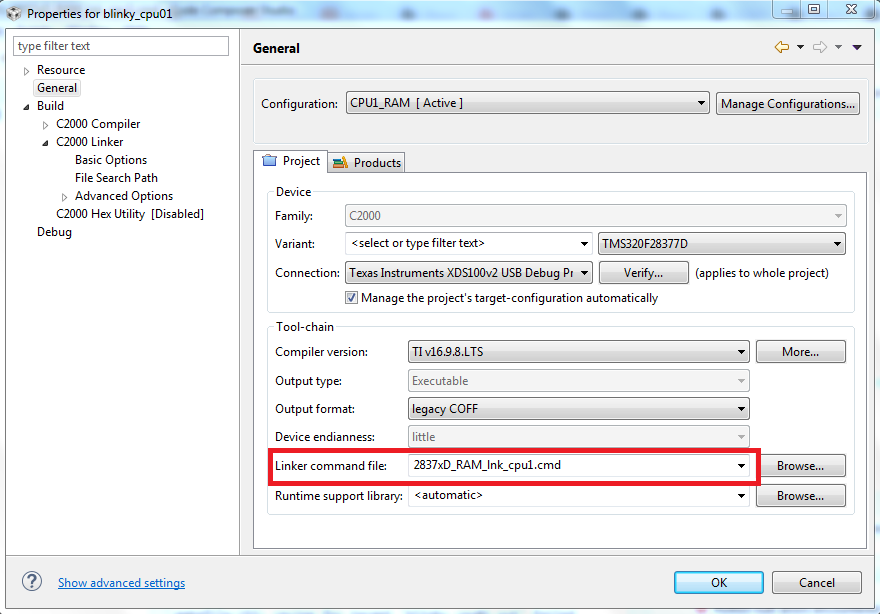
    Some screenshots of  properties of my project are attached too.

    I don't know why this errors occur!

    Could you please guide me?

    I have also attached modified blinky code i which I have added the instruction related to the FDLOG.

    regards

    //###########################################################################
    //
    // FILE:   blinky_cpu01.c
    //
    // TITLE:  LED Blink Example for F2837xD.
    //
    //! \addtogroup cpu01_example_list
    //! <h1> Blinky </h1>
    //!
    //! This example blinks LED X
    //!
    //! \note If using a Launchpad, use the Launchpad build configurations.
    //!
    //
    //###########################################################################
    // $TI Release: F2837xD Support Library v3.04.00.00 $
    // $Release Date: Sun Mar 25 13:26:04 CDT 2018 $
    // $Copyright:
    // Copyright (C) 2013-2018 Texas Instruments Incorporated - http://www.ti.com/
    //
    // Redistribution and use in source and binary forms, with or without 
    // modification, are permitted provided that the following conditions 
    // are met:
    // 
    //   Redistributions of source code must retain the above copyright 
    //   notice, this list of conditions and the following disclaimer.
    // 
    //   Redistributions in binary form must reproduce the above copyright
    //   notice, this list of conditions and the following disclaimer in the 
    //   documentation and/or other materials provided with the   
    //   distribution.
    // 
    //   Neither the name of Texas Instruments Incorporated nor the names of
    //   its contributors may be used to endorse or promote products derived
    //   from this software without specific prior written permission.
    // 
    // THIS SOFTWARE IS PROVIDED BY THE COPYRIGHT HOLDERS AND CONTRIBUTORS 
    // "AS IS" AND ANY EXPRESS OR IMPLIED WARRANTIES, INCLUDING, BUT NOT 
    // LIMITED TO, THE IMPLIED WARRANTIES OF MERCHANTABILITY AND FITNESS FOR
    // A PARTICULAR PURPOSE ARE DISCLAIMED. IN NO EVENT SHALL THE COPYRIGHT 
    // OWNER OR CONTRIBUTORS BE LIABLE FOR ANY DIRECT, INDIRECT, INCIDENTAL, 
    // SPECIAL, EXEMPLARY, OR CONSEQUENTIAL DAMAGES (INCLUDING, BUT NOT 
    // LIMITED TO, PROCUREMENT OF SUBSTITUTE GOODS OR SERVICES; LOSS OF USE,
    // DATA, OR PROFITS; OR BUSINESS INTERRUPTION) HOWEVER CAUSED AND ON ANY
    // THEORY OF LIABILITY, WHETHER IN CONTRACT, STRICT LIABILITY, OR TORT 
    // (INCLUDING NEGLIGENCE OR OTHERWISE) ARISING IN ANY WAY OUT OF THE USE 
    // OF THIS SOFTWARE, EVEN IF ADVISED OF THE POSSIBILITY OF SUCH DAMAGE.
    // $
    //###########################################################################
    
    //
    // Included Files
    //
    #include "F28x_Project.h"
    #include "DCL_fdlog.h"
    #pragma DATA_SECTION(myBuffer, "test")
    float32_t myBuffer[100];
    FDLOG pLog = FDLOG_DEFAULTS;
    //
    // Defines
    //
    #define BLINKY_LED_GPIO    31
    
    
    void main(void)
    {
    //
    // Step 1. Initialize System Control:
    // PLL, WatchDog, enable Peripheral Clocks
    // This example function is found in the F2837xD_SysCtrl.c file.
    //
        InitSysCtrl();
    
    //
    // Step 2. Initialize GPIO:
    // This example function is found in the F2837xD_Gpio.c file and
    // illustrates how to set the GPIO to it's default state.
    //
        InitGpio();
        GPIO_SetupPinMux(BLINKY_LED_GPIO, GPIO_MUX_CPU1, 0);
        GPIO_SetupPinOptions(BLINKY_LED_GPIO, GPIO_OUTPUT, GPIO_PUSHPULL);
    
    //
    // Step 3. Clear all interrupts and initialize PIE vector table:
    // Disable CPU interrupts
    //
        DINT;
    
    //
    // Initialize the PIE control registers to their default state.
    // The default state is all PIE interrupts disabled and flags
    // are cleared.
    // This function is found in the F2837xD_PieCtrl.c file.
    //
        InitPieCtrl();
    
    //
    // Disable CPU interrupts and clear all CPU interrupt flags:
    //
        IER = 0x0000;
        IFR = 0x0000;
    
    //
    // Initialize the PIE vector table with pointers to the shell Interrupt
    // Service Routines (ISR).
    // This will populate the entire table, even if the interrupt
    // is not used in this example.  This is useful for debug purposes.
    // The shell ISR routines are found in F2837xD_DefaultIsr.c.
    // This function is found in F2837xD_PieVect.c.
    //
        InitPieVectTable();
        DCL_initLog(&pLog, myBuffer, 100);
    //
    // Enable global Interrupts and higher priority real-time debug events:
    //
        EINT;  // Enable Global interrupt INTM
        ERTM;  // Enable Global realtime interrupt DBGM
    
    //
    // Step 6. IDLE loop. Just sit and loop forever (optional):
    //
        for(;;)
        {
            //
            // Turn on LED
            //
            DCL_writeLog(&pLog, 1);
            GPIO_WritePin(BLINKY_LED_GPIO, 0);
    
            //
            // Delay for a bit.
            //
            DELAY_US(1000*500);
    
            //
            // Turn off LED
            //
            GPIO_WritePin(BLINKY_LED_GPIO, 1);
    
            //
            // Delay for a bit.
            //
            DELAY_US(1000*500);
        }
    }
    
    //
    // End of file
    //
    

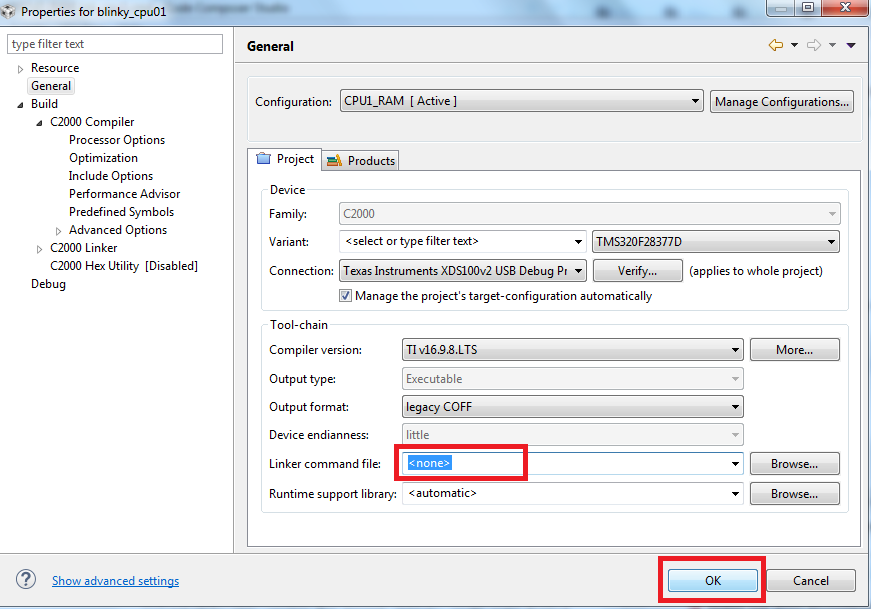
  • You have added two linker command files, so the memory blocks are defined twice. In the properties->general screen, select the <none> option for "Linker command file:". In the example it is already specified in the file search path screen so you don't need it there. Then re-build and the errors should go away.
    Regards,
    Richard
  • Richard

    I know that I should remove "Linker command file:" field.

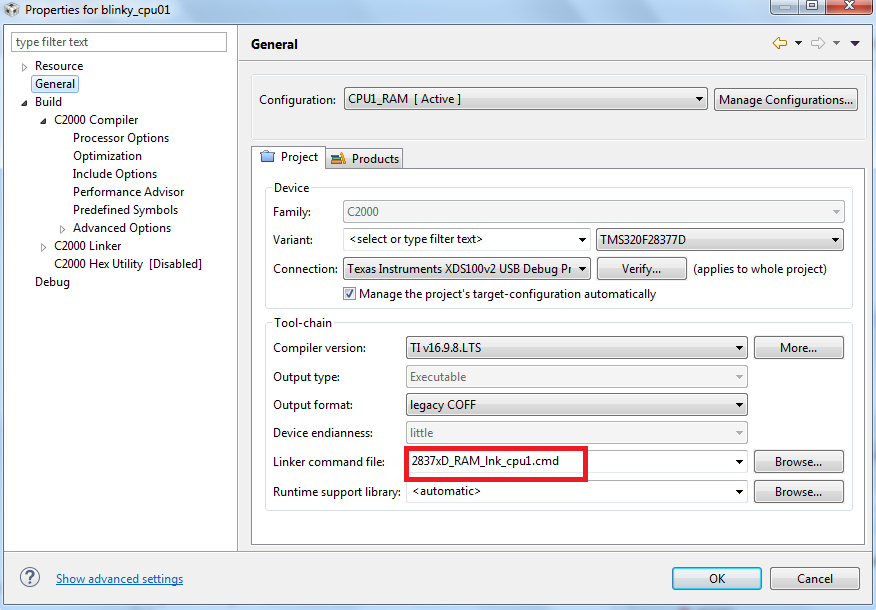
    But each time I remove it (select none), and click on "OK", in the next time I open the properties it appears again !!!

    you can see it in the attached pictures.

  • Sorry but I haven't seen this issue before and I can't reproduce it. Please bear with me while I try to find someone who can help. Thanks.

    Regards,

    Richard
  • Thank you Richard
    I have fixed that problem and know I'm working on FDLOG
    The problem was that I had added the "workspace" to my linker search path. in somewhere of workspace (which I don't know where!) there exist a "2837xD_RAM_lnk_cpu1.cmd" file. So as you said, two linker command files were executing.
    know could you please let me know in which addresses of memory I am allowed to write my data using FDLOG? does it differ?
    regards

  • As in step 4 of the instructions, you just select a memory range you are not using for anything else.  The buffer needs to go into data space (PAGE 1) RAM.  Look in the SECTIONS part of the file to see what is being allocated to each memory block and choose any available block big enough to take your buffer.  In the example .cmd file you mention, RAMGS6 does not seem to be used so you could start with that.  The assembly language tools guide I reference provides general examples of how to write .cmd files.

    Regards,

    Richard

  • Thank you Richard
    I appreciate your help
    Best regards
  • You're very welcome. Glad it helped.

    Regards,

    Richard
  • Hello Richard
    Your idea for storing data worked very well.
    Thank you
    Is it possible to write the data in a similar way on a external SD-RAM which has more memory compared to the internal RAM of DSP?
    If yes, should I use the same ".cmd" file? Is there any example for this purpose?
    Regards
  • I believe so. In principle the logger should work the same way with external memory, however I don't personally have any experience with SD-RAM. As this is a different question would you mind opening a new post for it please? That way we can assign it to someone knowledgeable in this area. Thanks.

    Regards,

    Richard
  • Hello again Richard
    One last question:

    could I use "2837xD_FLASH_lnk_cpu1.cmd" and modify it by moving the Flash memory blocks to the data page and use them for data storage using FDLOG? In a same manner which I used it for logging data on RAM blocks?

    regards
  • Sorry for my late reply.  No, unfortunately you cannot use these data log functions on flash.  Flash memory works in a different way from RAM.  You need to do your data logging into RAM. 

    Regards,

    Richard

  • Thank you Richard
    It's disappointing! I think finally I have to use oscilloscope and DAC to transfer my data to PC! because SD Card isn't fast enough and internal memory is too small.
    By the way , thank you for your help.
    best regards

  • You're very welcome. Sorry not to have better news.

    Regards,

    Richard