This thread has been locked.

If you have a related question, please click the "Ask a related question" button in the top right corner. The newly created question will be automatically linked to this question.

Launchpad F28377S / F28379D

Other Parts Discussed in Thread: C2000WARE

Hi,

I'm using Kit Launchpad f28377s, and I start a project with "FILE: empty_driverlib_main.c".

The question is that I want to use the code include in the example project "FILE: sci_ex2_loopback_interrupts.c".

What I need to include in project folder if I want to use this function: initSCIAFIFO() on my project

//
// initSCIAFIFO - Configure SCIA FIFO
//
void initSCIAFIFO()
{
//
// 8 char bits, 1 stop bit, no parity. Baud rate is 9600.
//
SCI_setConfig(SCIA_BASE, DEVICE_LSPCLK_FREQ, 9600, (SCI_CONFIG_WLEN_8 |
SCI_CONFIG_STOP_ONE |
SCI_CONFIG_PAR_NONE));
SCI_enableModule(SCIA_BASE);
SCI_enableLoopback(SCIA_BASE);
SCI_resetChannels(SCIA_BASE);
SCI_enableFIFO(SCIA_BASE);

//
// RX and TX FIFO Interrupts Enabled
//
SCI_enableInterrupt(SCIA_BASE, (SCI_INT_RXFF | SCI_INT_TXFF));
SCI_disableInterrupt(SCIA_BASE, SCI_INT_RXERR);

SCI_setFIFOInterruptLevel(SCIA_BASE, SCI_FIFO_TX2, SCI_FIFO_RX2);
SCI_performSoftwareReset(SCIA_BASE);

SCI_resetTxFIFO(SCIA_BASE);
SCI_resetRxFIFO(SCIA_BASE);

#ifdef AUTOBAUD
//
// Perform an autobaud lock.
// SCI expects an 'a' or 'A' to lock the baud rate.
//
SCI_lockAutobaud(SCIA_BASE);
#endif
}


Thanks all,

  • Hi Michael,

    When you import the empty_drivelib project, driverlib.lib is already included in your project. To include the above mentioned function, please have the code in the main.c file or include that as a separate file.
    To add a new file : Right click the project->New->Source FIle
    To add an existing file : Right click on the project->Add files

    Hope this helps!

    Regards,
    Veena
  • Hi Veena, thanks for your quickly answer!

    1. Some Optimization Advice occurs:

    Optimization Assistant complete and best results were obtained with speed vs size setting 5 (--opt_for_speed=5).

    Detecting compilation without optimization. Recommend setting --opt_level = 3. NOTE: debug ability will decrease.

    Its need to do something, or everything its ok?

    2. Other question, please

    I wold like to use this project: "FILE:   sci_ex2_loopback_interrupts.c", and just want to read data from PC (a simple test, for understood if everything works fine) .

    The data [0xA2, 0xA1, 0x3B, 0x01, 0xFF, 0x3B, 0x3B] wold be send by PC USB (RS485), whit this config: boudeRate: 9600; dataBits:8; lock:true; stopBits:1; parity: 'none'.

     2.1- It is possibly use the USB  of MCU (JTAG) to comunication?

    2.2 - And, for this, I just need to config GPOIO(RX)=85  GPIO(TX)=84, this is true? The Pin numbers are correct? 

      // GPIO85 is the SCI Rx pin.
        //
        GPIO_setMasterCore(85, GPIO_CORE_CPU1);
        GPIO_setPinConfig(GPIO_85_SCIRXDA);
        GPIO_setDirectionMode(85, GPIO_DIR_MODE_IN);
        GPIO_setPadConfig(85, GPIO_PIN_TYPE_STD);
        GPIO_setQualificationMode(85, GPIO_QUAL_ASYNC);


    Thanks,

  • Hi Michael,

    1. Optimization is good have since it reduces the cycles taken by your code. But you debugging the code might be hard compared to the one without optimization. You may see that the code gets executed out of order, some variables may bot be visible etc. I suggest you to turn off optimization during the initial development and once your code is stable, you can enable optimization see the behaviour.

    2. The device when connected to a PC opens up a COM port on the PC. You can refer to the sci_ex3_echoback example in C2000ware

    Regards,
    Veena
  • Hi, thanks for answer!

    "2. The device when connected to a PC opens up a COM port on the PC. You can refer to the sci_ex3_echoback example in C2000ware"

    I open  serial port with Putty and make this changes on code, but nothing hapend

        //
        // GPIO85 is the SCI Rx pin.
        //
        GPIO_setMasterCore(85, GPIO_CORE_CPU1);
        GPIO_setPinConfig(GPIO_85_SCIRXDA);
        GPIO_setDirectionMode(85, GPIO_DIR_MODE_IN);
        GPIO_setPadConfig(85, GPIO_PIN_TYPE_STD);
        GPIO_setQualificationMode(85, GPIO_QUAL_ASYNC);

        //
        // GPIO84 is the SCI Tx pin.
        //
        GPIO_setMasterCore(84, GPIO_CORE_CPU1);
        GPIO_setPinConfig(GPIO_84_SCITXDA);
        GPIO_setDirectionMode(84, GPIO_DIR_MODE_OUT);
        GPIO_setPadConfig(84, GPIO_PIN_TYPE_STD);
        GPIO_setQualificationMode(84, GPIO_QUAL_ASYNC);

  • Hi Michael,

    I hope you are using F2837x control card. The pin GPIO 28 is connected to the FTDI chip for USB-UART conversion
    You may need to use that pin for SCI

    Regards,
    Veena
  • Hi
    I'm not using the control card.
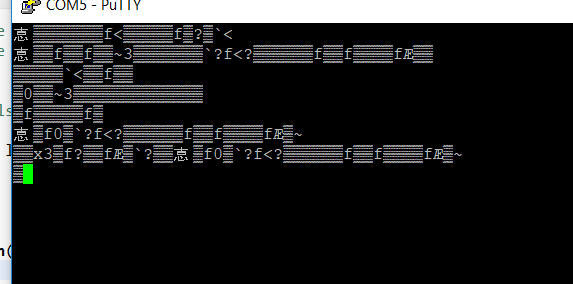
    The communication its ok, but the information does not match, the values do´nt make sense.
    I'm using the mormal configuration of the F28377s.

    1. There are diference between F28377s and Launchad_F28377s config SCI?
    In the LaunchPadDemo_example the baud is 115200 and not 9600

    Thanks
  • Please take a look of the read result. Do you know what this problem is? thanks

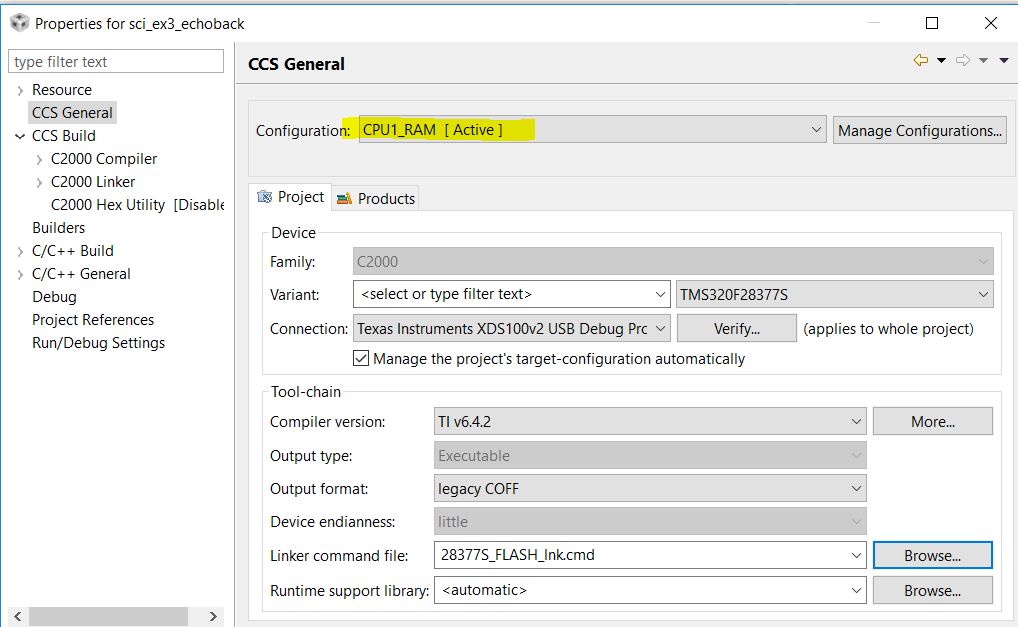
  • Is this setting okay or should it be "Debud [Active]?"

    Thank you

  • Hi Michael,

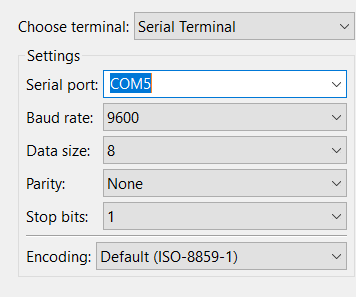
    The project settings look ok. If you are seeing some junk data on the putty, it could be possibly because of wrong baud rate or other settings. Can you confirm whether the following is configured the same as in your project?

    • Baud rate
    • Data Bits
    • Parity
    • Stop Bits

    Regards,

    Veena

  • COM configs are ok.

    1. I am not using any BoostPack or ControlCard, I just connected a normal USB cable from PC to Micro-USB LAUNCHXL-F28377S. This is ok?

    2. The only change that i made in the original code sci_ex3_echoback.c, was to change the PINS GPIO28->GPIO 85 nd GPIO29->GPIO84. But the result is a strange values.. It was supposed that everything works ok 

    Thanks for your help Veena

    //#############################################################################
    //
    // FILE: sci_ex3_echoback.c

    //
    // Included Files
    //
    #include "driverlib.h"
    #include "device.h"

    //
    // Defines
    //
    // Define AUTOBAUD to use the autobaud lock feature
    //#define AUTOBAUD

    //
    // Globals
    //
    uint16_t loopCounter = 0;

    //
    // Main
    //
    void main(void)
    {
    uint16_t receivedChar;
    unsigned char *msg;

    //
    // Configure PLL, disable WD, enable peripheral clocks.
    //
    Device_init();

    //
    // Disable pin locks and enable internal pullups.
    //
    Device_initGPIO();

    //
    // GPIO85 is the SCI Rx pin.
    //
    GPIO_setMasterCore(85, GPIO_CORE_CPU1);
    GPIO_setPinConfig(GPIO_85_SCIRXDA);
    GPIO_setDirectionMode(85, GPIO_DIR_MODE_IN);
    GPIO_setPadConfig(85, GPIO_PIN_TYPE_STD);
    GPIO_setQualificationMode(85, GPIO_QUAL_ASYNC);

    //
    // GPIO84 is the SCI Tx pin.
    //
    GPIO_setMasterCore(84, GPIO_CORE_CPU1);
    GPIO_setPinConfig(GPIO_84_SCITXDA);
    GPIO_setDirectionMode(84, GPIO_DIR_MODE_OUT);
    GPIO_setPadConfig(84, GPIO_PIN_TYPE_STD);
    GPIO_setQualificationMode(84, GPIO_QUAL_ASYNC);

    //
    // Initialize interrupt controller and vector table.
    //
    Interrupt_initModule();
    Interrupt_initVectorTable();

    //
    // Initialize SCIA and its FIFO.
    //
    SCI_performSoftwareReset(SCIA_BASE);

    //
    // Configure SCIA for echoback.
    //
    SCI_setConfig(SCIA_BASE, DEVICE_LSPCLK_FREQ, 9600, (SCI_CONFIG_WLEN_8 |
    SCI_CONFIG_STOP_ONE |
    SCI_CONFIG_PAR_NONE));
    SCI_resetChannels(SCIA_BASE);
    SCI_resetRxFIFO(SCIA_BASE);
    SCI_resetTxFIFO(SCIA_BASE);
    SCI_clearInterruptStatus(SCIA_BASE, SCI_INT_TXFF | SCI_INT_RXFF);
    SCI_enableFIFO(SCIA_BASE);
    SCI_enableModule(SCIA_BASE);
    SCI_performSoftwareReset(SCIA_BASE);

    #ifdef AUTOBAUD
    //
    // Perform an autobaud lock.
    // SCI expects an 'a' or 'A' to lock the baud rate.
    //
    SCI_lockAutobaud(SCIA_BASE);
    #endif

    //
    // Send starting message.
    //
    msg = "\r\n\n\nHello World!\0";
    SCI_writeCharArray(SCIA_BASE, (uint16_t*)msg, 17);
    msg = "\r\nYou will enter a character, and the DSP will echo it back!\n\0";
    SCI_writeCharArray(SCIA_BASE, (uint16_t*)msg, 62);

    for(;;)
    {
    msg = "\r\nEnter a character: \0";
    SCI_writeCharArray(SCIA_BASE, (uint16_t*)msg, 22);

    //
    // Read a character from the FIFO.
    //
    receivedChar = SCI_readCharBlockingFIFO(SCIA_BASE);

    //
    // Echo back the character.
    //
    msg = " You sent: \0";
    SCI_writeCharArray(SCIA_BASE, (uint16_t*)msg, 13);
    SCI_writeCharBlockingFIFO(SCIA_BASE, receivedChar);

    //
    // Increment the loop count variable.
    //
    loopCounter++;
    }
    }

    //
    // End of File
    //

  • Hi Michael,

    The oscillators present in control card and launchpads are different. You may need to add a symbol _LAUNCHXL_F28377S in your project so that it picks the correct oscillator frequency and hence your baud rate calculation would be correct.

    To add a predefined symbol, go to Project properties ->Build->C2000 compiler->Predefined Symbols and add "_LAUNCHXL_F28377S" in the tab Pre-define NAME.

    Regards,

    Veena

  • Hi Michael,

    The oscillators present in control card and launchpads are different. You may need to add a symbol _LAUNCHXL_F28377S in your project so that it picks the correct oscillator frequency and hence your baud rate calculation would be correct.

    To add a predefined symbol, go to Project properties ->Build->C2000 compiler->Predefined Symbols and add "_LAUNCHXL_F28377S" in the tab Pre-define NAME.

    Regards,

    Veena
  • Hi Michael,

    If the previous reply resolved your issue, please click the "This resolved my issue" button. Let us know if you still face any problems.

    Regards,
    Veena
  • Hi Michael,

    Since we haven't heard from you for the last few weeks, I assume you were able to resolve the issue. If this isn’t the case, please reject this resolution and reply to this thread.

    Regards,

    Veena