


Part Number: LAUNCHXL-F28379D
Tool/software: Code Composer Studio
Dear all,
My target configuration does not connect properly and gives following message,
[Start: Texas Instruments XDS100v2 USB Debug Probe_0]
Execute the command:
%ccs_base%/common/uscif/dbgjtag -f %boarddatafile% -rv -o -F inform,logfile=yes -S pathlength -S integrity
[Result]
-----[Print the board config pathname(s)]------------------------------------
C:\Users\Lahiru\AppData\Local\TEXASI~1\CCS\
TEXASI~1\0\0\BrdDat\testBoard.dat
-----[Print the reset-command software log-file]-----------------------------
This utility has selected a 100- or 510-class product.
This utility will load the adapter 'jioserdesusb.dll'.
An error occurred while soft opening the controller.
-----[An error has occurred and this utility has aborted]--------------------
This error is generated by TI's USCIF driver or utilities.
The value is '-151' (0xffffff69).
The title is 'SC_ERR_FTDI_OPEN'.
The explanation is:
One of the FTDI driver functions used during the connect
returned bad status or an error. The cause may be one or
more of: no XDS100 is plugged in, invalid XDS100 serial number,
blank XDS100 EEPROM, missing FTDI drivers, faulty USB cable.
Use the xds100serial command-line utility in the 'common/uscif'
folder to verify the XDS100 can be located.
[End: Texas Instruments XDS100v2 USB Debug Probe_0]
As mentioned in other forum questions i understood that this is due to driver problem. When I check my driver details it is not as recommended and as follows,

I tried to resolve the problem as specified in 
but when i'm doing that MPROG cannot identify the device and screen shot is as follows,
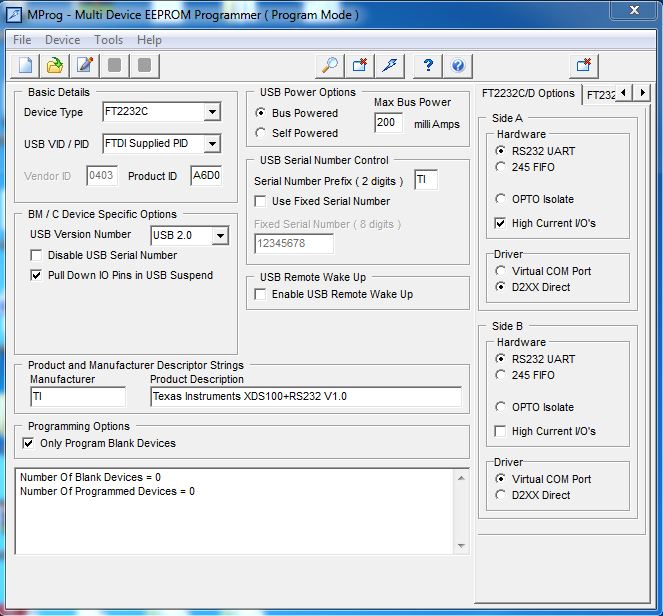
Please guide me to overcome this promlem
Thank you
Lahiru

