This thread has been locked.

If you have a related question, please click the "Ask a related question" button in the top right corner. The newly created question will be automatically linked to this question.

CCS/TMS320F28379D: TMS320F28379D

Part Number: TMS320F28379D
Other Parts Discussed in Thread: C2000WARE

Tool/software: Code Composer Studio

Hi,

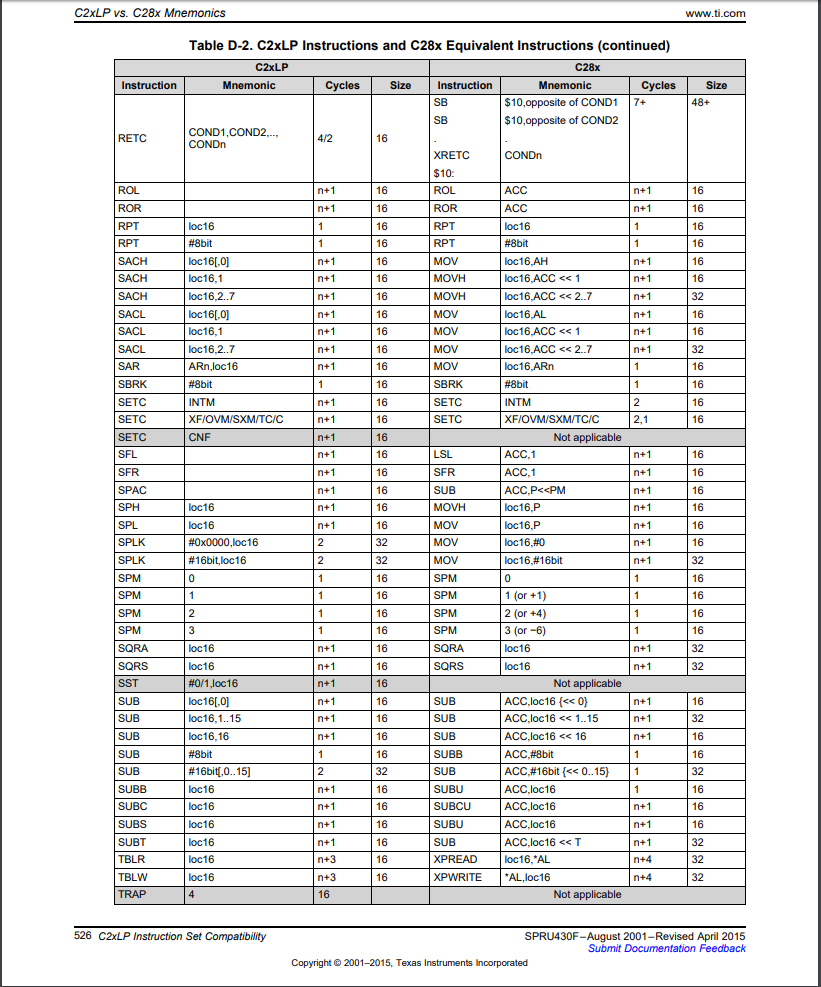
I want to control GPIO pins using the assembly language in Code COmposer Studio. Which command should I use to set values of registers (like GPyGMUXn, GPyMUXn etc) as SPLK command is not compatible with this processor?

Thanks

  • Mohd,

    SPLK is a C2xLP instruction and the equivalent C28x instruction is MOV. Please see the "TMS320C28x CPU and Instruction Set Reference Guide":

    www.ti.com/lit/SPRU430

    I hope this answers your question and if so, please click the green "Verified Answer" button. Thank you.

    - Ken

  • Thank you Ken,

    I've already tried using MOV command as:

    mov GPACTRL,#0x0001

    but it's showing following error
    "
    asm2000 -v28 impy.asm
    "impy.asm", ERROR! at line 28: [E0003] Syntax error - Operand 1
    mov GPACTRL,#0x0001

    1 Assembly Error, No Assembly Warnings

    Errors in Source - Assembler Aborted
    Makefile:8: recipe for target 'impy.obj' failed
    make: *** [impy.obj] Error 1

    "

    Then I tried to use the address of the register to put a value to that register as:
    "
    movw DP,#0x01F0

    mov @0,#0x0001
    "
    where (1F0x40 = 7C00) in hex, is the address of GPACTRL register.

    This get build successfully. However, while running the same code , the register is not changing.

    The same command is working for any data address (i.e. for address 8A00).
  • Mohd,

    The GPIO registers are EALLOW protected. Please see the "TMS320C28x CPU and Instruction Set Reference Guide" (link in my previous post).

    I hope this answers your question and if so, please click the green "Verified Answer" button. Thank you.

    - Ken
  • Ken,
    I know that EALLOW is needed,

    how to address GPACTRL using symbols unions and structures common for the C language headers
    rather than direct hex address bypasses proposed by Mohd.
  • Tom,

    I am not sure I follow your question. As you know, the header files for the F2837xD can be found at:

    C:\ti\c2000\C2000Ware_<version>\device_support\f2837xd\headers

    These header files make use of unions and structures (C language) for programming the peripherals.

    Also, you might find the following F2837xD workshops useful for learning about using the header files:

    processors.wiki.ti.com/.../C2000_Multi-Day_Workshop

    I hope this answers your question and if so, please click the green "Verified Answer" button. Thank you.

    - Ken
  • Ken,
    I will double check my project setup,
    I have GPACTRL as an unresolved symbol, I guess, and it causes a syntax error like in case showed by Mohd.
  • Tom,

    Download the workshop installer and see lab 5 exercise directions for setting up the header files. Then see the (lab/solutions) Gpio.c file. The structure is in the form of:

    GpioCtrlRegs.GPACTRL.all = 0x00000000;

    I hope this answers your question and if so, please click the green "Verified Answer" button. Thank you.

    - Ken
  • I don't think the name of the register can be used for these processors. Using the address is the way to access these registers using Assembly language.
    May be this can help:

    "
    _main:

    EALLOW

    movw DP,#0x01FC ;Setting Data Page to adress 0x7F00

    ;mov @00h, #0xABCD ;GPADAT (GPIO A Data register (GPIO0 to 31)

    mov @02h, #0xFFFF ;GPASET (GPIO A Set register, 1 set, 0 ignored)

    mov @04h, #0x101A ;GPACLEAR (GPIO A Data Clear register, 1 clear,0 ignored)

    ;mov @06h, #0x1010 ;GPATOGGLE (GPIO A Data Togge register, 1 toggle, 0 ignored)


    ;////////////////////////////////////////////////////////////////////////////////////////////;


    movw DP,#0x01F0 ;Setting Data page to address 0x7C00

    mov @20h, #0x0001 ;GPAGMUX1 (GPIO A Peripheral Group Mux register (GPIO00 to 15))

    mov @06h, #0x0000 ;GPAMUX1 (GPIO A Peripheral Mux 1 register (GPIO00 to 15))

    ;mov @0Ch, #0xFFFF ;GPAPUD (GPIO A Pull Up Disable register (GPIO0 to 31)

    mov @02h, #0x0000 ;GPAQSEL1 (GPIO A Qualifier select register (GPIO00 to 15), 00 Sync, 01 Qualification(3 samples), 10 Qualification(6 samples), 11 Async)

    ;mov @22h, #0x0000 ;GPAGMUX2 (GPIO A Peripheral Group Mux register (GPIO16 to 31))

    ;mov @08h, #0x0000 ;GPAMUX2 (GPIO A Peripheral Mux 2 register (GPIO16 to 31))

    ;mov @04h, #0x0000 ;GPAQSEL2 (GPIO A Qualifier select register (GPIO16 to 31), 00 Sync, 01 Qualification(3 samples), 10 Qualification(6 samples), 11 Async)

    mov @00h, #0x0000 ;GPACTRL (GPIO A Qualification Sampling Period Control (GPIO0 to 31) // 0 to 7 bits define for GPIO0 to 7 and so on// 00 PLLSYSCLK, 01 PLLSYSCLK/(2*1), ...., FF PLLSYSCLK/(2*255) )

    mov @0Ah, #0xFFFF ;GPADIR (GPIO A Direction Register (GPIO0 to 31), 0 input, 1 output // b4 changing to output, load output latch by using GPASET, GPYCLEAR, GPATOGGLE or GPADAT registers)

    ;mov @10h, #0x0000 ;GPAINV (GPIO A Input Polarity Invert Registers (GPIO0 to 31), 0 non-inverted, 1 inverter)

    ;mov @12h, #0x0000 ;GPAODR (GPIO A Open Drain Output Register (GPIO0 to 31), 0 Normal Output, 1 Open Drain Output)

    EDIS
    "

    Thanks
  • Mohd / Tom,

    These register names are defined and used with the peripheral register header files. I am not sure why you want to use assembly when the peripheral register header files are easier to use and are very efficient. Please see module 3 in the F2837xD workshop that I referenced earlier in this thread.

    - Ken