This thread has been locked.

If you have a related question, please click the "Ask a related question" button in the top right corner. The newly created question will be automatically linked to this question.

RTOS/TMS320F280049: how the F280049 recognize the two Boot Modes by which Pin?

Part Number: TMS320F280049
Other Parts Discussed in Thread: C2000WARE

Tool/software: TI-RTOS
Hi guys,

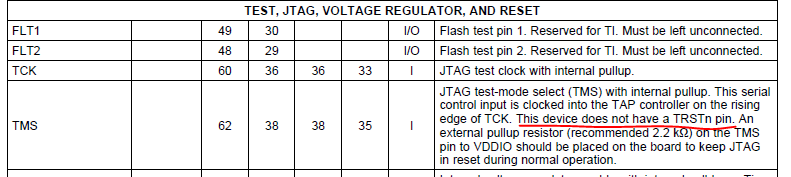
F28033 chip distinguish the Emulation Mode and the Stand-alone Mode by get the TRST Pin, but the F280049 how to do it? From the F280049 data sheet, above the picture, it doesn't have the TRST pin.
would you please tell me how the F280049 recognize the two Boot Modes? any the document prove it?

Thanks.

  • Hi,

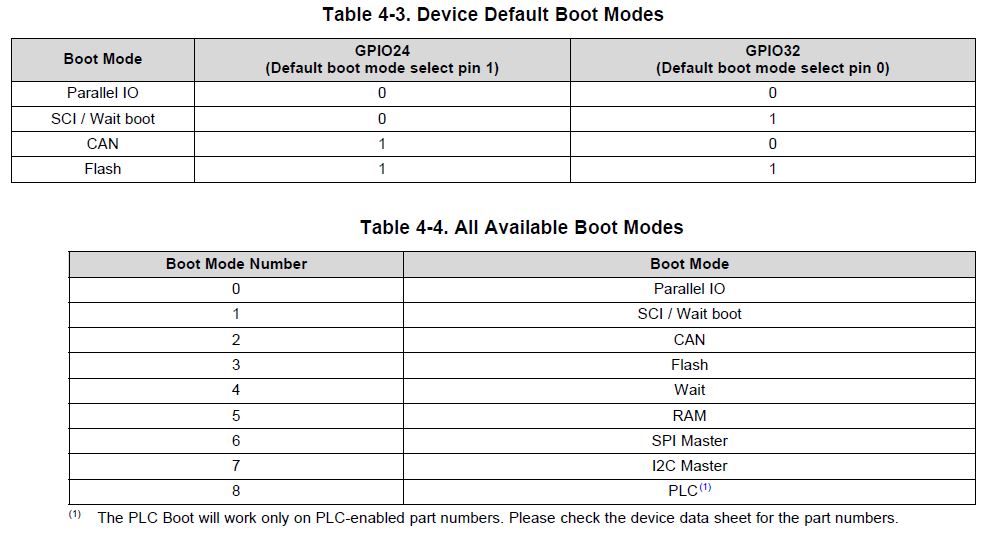
    Please refer "ROM Code and Peripheral Booting" section in device TRM  for full detail. Following is the snapshot from this section.

    Regards,

    Vivek Singh

  • Hi, Vivek
    Thanks for you reply, but I don't think it is the right answer. This snapshot you show is not explain how the F280049 recognize the Emulation Mode and the Stand-alone Mode ? is it through by which GPIO Pin? or other which approach to distinguish there? Please read my question again.
    Thanks.
  • Hello

    Boot determines this by reading the DCON field in the CPUSYS.RESC register.
    Can see the boot source code in C2000Ware.

    Best regards
    Chris
  • Hi,

      Thank you for your reply. I had tried to get understand, but I don't find about the register you said in file detail. see the below picture. it exist in the literature number SPRUI33B.  My question is how did the F280049 get into the standalone boot or emulation boot by what? 

    thanks again.

  • This decision is based on the DCON bit field in the RESC register. Can see further details in the technical reference manual.

    Additionally in the boot source code, see file "SelectMode_Boot.c" and specifically function "SelectBootMode()".
    Located at ~\libraries\boot_rom\f28004x\revB\rom_sources\F28004x_ROM\bootROM\source

    Best regards
    Chris
  • Christopher

    thanks for your reply. I have find the code you said. Now I sort out the two boot mode. when you reset the F280049, the factory boot ROM will work until judge if the debugger is connected. and by judge the  DCON bit field in the RESC register to go standalone or emulation boot. In respective boot flow, check the xxx_BOOTPIN_CONFIG_KEY value to get into the boot mode which the factory default boot mode with GPIO Pins or the user  boot mode option. that is my view, am I right?

    there are my questions below:

    1. the code judging if the debugger is connected or not, is concluded by the factory Boot ROM will do it, or the user should add this code?

    2. In the emulation boot mode, EMU_BOOTPIN_CONFIG_KEY is what default value? the emulation standalone boot is equal to the standalone boot? or is mean to get into the standalone boot?

    3. In the standalone boot mode, OTP_BOOTPIN_CONFIG_KEY is what default value? it is located in OTP place, so we only just can write the value one time?

    thanks again.

    Picture 1. choose the emulation or standalone boot mode 

    Picture 2. standalone and emulation boot flow

  • Hello

    That's right

    1. This is part of the factory boot ROM code

    2. The boot configuration emulation values are stored in RAM. So by default, it will be 0. Emulation boot without any configuration of its boot values will go to wait boot.

    3. The default value is all 1s. By default, it will read the boot pins, decode the boot mode and run that. Yes, it is one time programmable. Use emulation boot to make sure you are configuring everything correctly before using the OTP boot configuration locations.

    Best regards

    Chris

  • Hi,Christopher
    I understand it totally. thanks sincerely for your help.