This thread has been locked.

If you have a related question, please click the "Ask a related question" button in the top right corner. The newly created question will be automatically linked to this question.

TMS320F28377S: Firmware upgrade using SCI

Part Number: TMS320F28377S
Other Parts Discussed in Thread: C2000WARE

Hi,

I'm using example code provided in the control suite "C2000Ware_1_00_06_00" for serial flash programming. I have configured GPIO84,GPIO85 for SCI boot mode. I ran serial_flash_programmer.exe with example "blinky_cpu01" and "F2837xS_usb_flash_kernels_cpu01"  using the command

:> .\serial_flash_programmer.exe –d f2806x –k <~\f28069_flash_kernel.txt> -a <file> -p COM<num>

At the of programming I'm getting status code: VERIFY_ERROR (screenshot attached). What does this mean?  

  • It may mean that something was not erased or programmed correctly in the flash. There may have been an error in verification at address 0x82000.

    Can you run the Verify command again to confirm? Or also, you can verify with CCS and the emulator.

    It may be possible that this is not a legitimate error. You should confirm.

    Please see this: www.ti.com/.../sprabv4c.pdf

    sal
  • Hi Sal,

    It is still giving error status but is working now, after DFU I have checked giving run command and address to branch to. I was giving wrong address. That's why it was not working before.

    Now, I have few doubts:

    1. When I reset the controller, LED is not blinking maybe because it is staying in boot mode only I guess. Right now, I have configured GPIO72, GPIO84 for SCI boot mode externally through hardware. Is that how it is to be done? If so, how does it go to normal mode?

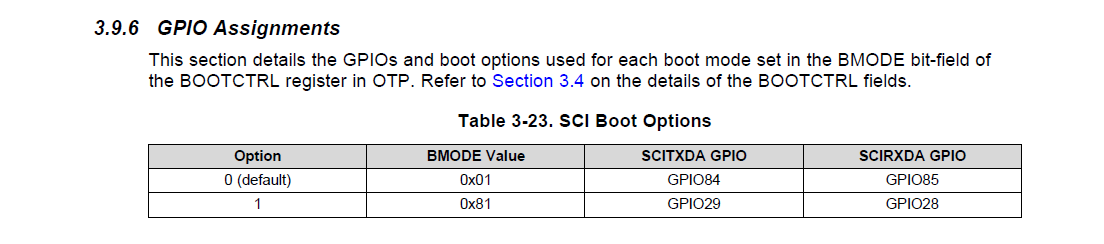
    2. As per datasheet, firmware upgrade through SCI can be done only through following pins. I have done using GPIO84,GPIO85 as the default BMODE is option0. How can I change BMODE value so that I can use other set of GPIOs. 

    3. In our circuit, we have assigned above GPIOs for some other purpose. Can I use other GPIO for serial DFU? If so, how can I do that?

  • I ran verify command and it is showing

    SUCCESS of Command
    ERROR Status: VERIFY_ERROR
    ERROR Address: 0x82010

    When I gave RUN command, I thought it was working as LED is blinking but I just realised that Blinky code is already programmed to FLASH and that code was running when I gave RUN command.
    So, DFU is failed I guess.
  • Please erase the flash before testing and performing the DFU and let me know what you are observing.

    sal