This thread has been locked.

If you have a related question, please click the "Ask a related question" button in the top right corner. The newly created question will be automatically linked to this question.

CCS/TMS320F280049: How to creat a hex file through CCS v9?

Part Number: TMS320F280049
Other Parts Discussed in Thread: TMS320F28033,

Tool/software: Code Composer Studio

hello!

i now use TMS320F280049 to debug ourself BOOT loader, since before, we use TMS320F28033 and CCS 3.3, so CCS V9 is huge different with CCS 3.3; in CCS 3.3 we use a command :

hex2000 xxxx.hcf in project's bulid option gerenal page to creat the hex file we want , and in xxxx.hcf file we define the corresponding command;

so now , how can i generate the hex file through CCS v9?tks a lot!

  • Hi,

    Please add below command at CCS Build -> Steps -> Post -build steps

    "${CG_TOOL_HEX}" "${BuildArtifactFileName}" -o "${BuildArtifactFileBaseName}.hcf"

    (or )

    hex2000.exe XXXX.out -o XXXX.hcf

    Thanks,
    Katta
  • thank you very much, i have found the Post-build steps.and add the command:

    "${CG_TOOL_HEX}" "${.\Debug\HF415U111}" -o "${HF415U111}.hcf"

    OR

    "${CG_TOOL_HEX}" "${HF415U111}" -o "${HF415U111}.hcf"

    THE HF415U111.hcf file is in the project first directory, and the HF415U111.OUT is in the second directory named "Debug" folder;

    but both that two command , i receive the error below:

    -i"E:/product/CCS_WORKSPACE/HF415U111/INCLUDE/driverlib_inc" --reread_libs --diag_wrap=off --display_error_number --xml_link_info="HF415U111_linkInfo.xml" --rom_model -o "HF415U111.out" "./INCLUDE/HF415U111_IsrVariableDefs.obj" "./SOURCE/GBB_BOOT.obj" "./SOURCE/GBB_CanDriver.obj" "./SOURCE/GBB_EntryVect.obj" "./SOURCE/GBB_epromdata.obj" "./SOURCE/HF415U111_cal.obj" "./SOURCE/HF415U111_cancom.obj" "./SOURCE/HF415U111_initial.obj" "./SOURCE/HF415U111_main.obj" "./SOURCE/HF415U111_start.obj" "./SOURCE/HF415U111_vAdcTreatment.obj" "./SOURCE/HF415U111_vEventLog.obj" "./SOURCE/HF415U111_warnctrl.obj" "./SOURCE/f28004x_EPwm.obj" "./SOURCE/f28004x_InitPeripherals.obj" "./SOURCE/f28004x_MemCopy.obj" "./SOURCE/f28004x_adc.obj" "./SOURCE/f28004x_can.obj" "./SOURCE/f28004x_codestartbranch.obj" "./SOURCE/f28004x_cputimers.obj" "./SOURCE/f28004x_dcsm_z1otp.obj" "./SOURCE/f28004x_dcsm_z2otp.obj" "./SOURCE/f28004x_defaultisr.obj" "./SOURCE/f28004x_dma.obj" "./SOURCE/f28004x_globalvariabledefs.obj" "./SOURCE/f28004x_gpio.obj" "./SOURCE/f28004x_i2c.obj" "./SOURCE/f28004x_piectrl.obj" "./SOURCE/f28004x_pievect.obj" "./SOURCE/f28004x_spi.obj" "./SOURCE/f28004x_sysctrl.obj" "./SOURCE/f28004x_usdelay.obj" "../CMD/28004x_cla_flash_lnk.cmd" "../CMD/f28004x_headers_nonbios.cmd" "../LIB/IQmath_fpu32.lib"  -llibc.a 
    <Linking>
    Finished building target: "HF415U111.out"
     
    "C:/ti/ccs901/ccs/tools/compiler/ti-cgt-c2000_18.12.1.LTS/bin/hex2000" "" -o ".hcf"
    makefile:205: recipe for target 'post-build' failed
    fatal error: cannot open input file ".out": No such file or directory
    gmake[2]: [post-build] Error 1 (ignored)
     
    
    **** Build Finished ****

    what's the problem? can you help me ?


  • Hi,

    The command "${CG_TOOL_HEX}" "${BuildArtifactFileName}" -o "${BuildArtifactFileBaseName}.hcf"

    will take care of the project name and location. You can use the same command.

    In both of your commands, you didn't mention HF415U111.out so the script couldn't find your file.

    Please use the suggested command or give a full name with .out.

    Thanks,

    Katta

    Note: If this post answers your question, please click the Verify Answer button below. Thank you!

  • Sorry, when i directly use the command :"${CG_TOOL_HEX}" "${BuildArtifactFileName}" -o "${BuildArtifactFileBaseName}.hcf"

    the ccs v9 compiler output is below:

    "./SOURCE/f28004x_i2c.obj" "./SOURCE/f28004x_piectrl.obj" "./SOURCE/f28004x_pievect.obj" "./SOURCE/f28004x_spi.obj" "./SOURCE/f28004x_sysctrl.obj" "./SOURCE/f28004x_usdelay.obj" "../CMD/28004x_cla_flash_lnk.cmd" "../CMD/f28004x_headers_nonbios.cmd" "../LIB/IQmath_fpu32.lib"  -llibc.a 
    <Linking>
    Finished building target: "HF415U111.out"
     
    "C:/ti/ccs901/ccs/tools/compiler/ti-cgt-c2000_18.12.1.LTS/bin/hex2000" "HF415U111.out" -o "HF415U111.hcf"
    Translating to Extended Tektronix format...
       "HF415U111.out" codestart ==> codestart
       "HF415U111.out" .appvec ==> .appvec
       "HF415U111.out" .text ==> .text
       "HF415U111.out" IQmathTables ==> IQmathTables
       "HF415U111.out" IQmath ==> IQmath
       "HF415U111.out" .switch ==> .switch
       "HF415U111.out" .cinit ==> .cinit
       "HF415U111.out" .econst ==> .econst
       "HF415U111.out" appcrc ==> appcrc
       "HF415U111.out" .bootvec ==> .bootvec
       "HF415U111.out" bootramfuncs ==> bootramfuncs
       "HF415U111.out" FlashBoot ==> FlashBoot
     
    warning: Data is being written to auto-generated file HF415U111.x01
    
    **** Build Finished ****

    the compiler seem do not use my special config file"HF415U111.hcf" but creat a new file named "HF415U111.hcf" in Debug directory and also
    output a file named "HF415U111.x01" not a hex file.
    the "HF415U111.x01" context is below:

    %1261F8000800000051
    %2266680008000228049676477651010100
    %4E6F7800080014B2AAA2FE76048FE802D576C2B62BD0D2281918FFA81ED4A08D01406D068FC282
    %4E6BA80008003487FF56009252618DC392809427A20F63061EAB0F65061E066FD1A20F63D1061E
    %4E6C5800080054D1AB0F65D1061ED106078D011EDC9252631BFF6492506F92506F92505A925469
    %4E6C0800080074926192968D0192D89098DFDE560898925268925267760418FE6F76041A015261
    %4E6BA8000800947604925261880EF61FC2960600518FCEA88F901E5600560056A9A806765E7604
    %4E6998000800B41E6F0E1E0600516F7604BE022B1EC2925261526192A3C452618F105600A80F63
    %4E6B08000800D46F8F085600A80F642B2B6F280156016F280256026F28035603FE82868B00B2AA
    %4E6DA8000800F4A2FE02BE7604431EC2FF01446D7604927604FFCE46FF0276049252FF02760418
    %4E6A7800080114FD476C92FF52615261760492901A0296906F181F1A606F181F1A407604CC0093
    %4E6B080008013476041A019776049018FF986F7604CC00760418FF9876049261526776043B06FF
    %4E6D88000801541A806F76043B06FF96760406D4D5FF969B9A764276049A5DFF01760492760418
    %4E6A1800080174FF52FF007604CD00406D76041B076776049252687604466D760492FF52617604
    %4E68B800080194436DD16FD17604486C7604406C9250597604426C925059536076049252677604
    %4E6BE8000801B42B76049252FF0176049252617604063B8DC37604588DC2FF560296AA8D010D8A
    %4E6BF8000801D47604021E7956001E8FCEA806765E2976041E5601078AD07604AAC28876040D8A
    %4E6EB8000801F476048D01CC0F7E887604560CCA9676045601078AD03BD506FFD4969B9A281976
    %4E6B58000802144276045C589A7604DC5D936F8FC27604A88D01290D7604838792760490965601
    %4E6C78000802347604880783D07604A8AB0D76048A8D01CC0F76047E88D5560CD4CA9676045600
    %4E6C48000802545600561E9A9B76425C76049A9BDC5D5C76416F526152FF007604927604889076
    %4E6FB80008027404D4D51A5A937E59979A9B76429A5D5C9BDC5C76428F229A7641FF0076049256
    %4E61280008029402D4D59B9A76425C8F5A9A9BDC5C76429A8F227641BE8F202B2B2BDC00FF7604
    %1261F8000800000051
    %2266680008000228049676477651010100
    %4E6F7800080014B2AAA2FE76048FE802D576C2B62BD0D2281918FFA81ED4A08D01406D068FC282
    %4E6BA80008003487FF56009252618DC392809427A20F63061EAB0F65061E066FD1A20F63D1061E
    %4E6C5800080054D1AB0F65D1061ED106078D011EDC9252631BFF6492506F92506F92505A925469
    %4E6C0800080074926192968D0192D89098DFDE560898925268925267760418FE6F76041A015261
    %4E6BA8000800947604925261880EF61FC2960600518FCEA88F901E5600560056A9A806765E7604
    %4E6998000800B41E6F0E1E0600516F7604BE022B1EC2925261526192A3C452618F105600A80F63
    %4E6B08000800D46F8F085600A80F642B2B6F280156016F280256026F28035603FE82868B00B2AA
    %4E6DA8000800F4A2FE02BE7604431EC2FF01446D7604927604FFCE46FF0276049252FF02760418
    %4E6A7800080114FD476C92FF52615261760492901A0296906F181F1A606F181F1A407604CC0093
    %4E6B080008013476041A019776049018FF986F7604CC00760418FF9876049261526776043B06FF
    %4E6D88000801541A806F76043B06FF96760406D4D5FF969B9A764276049A5DFF01760492760418
    %4E6A1800080174FF52FF007604CD00406D76041B076776049252687604466D760492FF52617604
    %4E68B800080194436DD16FD17604486C7604406C9250597604426C925059536076049252677604
    %4E6BE8000801B42B76049252FF0176049252617604063B8DC37604588DC2FF560296AA8D010D8A
    %4E6BF8000801D47604021E7956001E8FCEA806765E2976041E5601078AD07604AAC28876040D8A
    %4E6EB8000801F476048D01CC0F7E887604560CCA9676045601078AD03BD506FFD4969B9A281976
    %4E6B58000802144276045C589A7604DC5D936F8FC27604A88D01290D7604838792760490965601
    %4E6C78000802347604880783D07604A8AB0D76048A8D01CC0F76047E88D5560CD4CA9676045600
    %4E6C48000802545600561E9A9B76425C76049A9BDC5D5C76416F526152FF007604927604889076
    %4E6FB80008027404D4D51A5A937E59979A9B76429A5D5C9BDC5C76428F229A7641FF0076049256
    %4E61280008029402D4D59B9A76425C8F5A9A9BDC5C76429A8F227641BE8F202B2B2BDC00FF7604

  • the compiler seem do not use my OWN special config file"HF415U111.hcf" but creat a new file named "HF415U111.hcf" in Debug directory and also output a file named "HF415U111.x01" not a hex file

    I read the TMS320C28x Assembly Language Tools v18.12.0.LTS, this sheet suggest use this command:

    1)hex2000 -t firmware -o firm.lsb -o firm.msb

    OR

    2)hex2000 hexutil.cmd

    but i also have the questions below:

    1)why the old CCS v3.3 use "xxx.hcf" but the new complier use "xxx.cmd"

    2)just use"hex2000 hexutil.cmd" the complier can find the hex2000 oneself?

    3) i creat a file"HF415U111.cmd", the contest is below, but the complier output error

    HF415U111.out
    -i
    -byte
    
    ROMS
    {
    	ROMBoot:	o=0x080002 l=0x00E000 romwidth=16 files={HF415U111.hex}
    }
    
    SECTIONS
    {
    	.cinit, .text, IsrRamfuncs,Cla1Prog,.appvec, .econst, .switch, .const, IQmath
    }


    Building target: "HF415U111.out"
    Invoking: C2000 Linker
    "C:/ti/ccs901/ccs/tools/compiler/ti-cgt-c2000_18.12.1.LTS/bin/cl2000" -v28 -ml -mt --cla_support=cla2 --float_support=fpu32 --tmu_support=tmu0 --vcu_support=vcu0 -O2 --opt_for_speed=2 --advice:performance=all --define=_INLINE --define=_FLASH -g --diag_warning=225 --diag_wrap=off --display_error_number --abi=coffabi -z -m"HF415U111.map" --stack_size=0x200 --warn_sections -i"E:/product/CCS_WORKSPACE/HF415U111/LIB" -i"C:/ti/ccs901/ccs/tools/compiler/ti-cgt-c2000_18.12.1.LTS/lib" -i"C:/ti/ccs901/ccs/tools/compiler/ti-cgt-c2000_18.12.1.LTS/include" -i"E:/product/CCS_WORKSPACE/HF415U111/INCLUDE/driverlib_inc" --reread_libs --diag_wrap=off --display_error_number --xml_link_info="HF415U111_linkInfo.xml" --rom_model -o "HF415U111.out" "./INCLUDE/HF415U111_IsrVariableDefs.obj" "./SOURCE/GBB_BOOT.obj" "./SOURCE/GBB_CanDriver.obj" "./SOURCE/GBB_EntryVect.obj" "./SOURCE/GBB_epromdata.obj" "./SOURCE/HF415U111_cal.obj" "./SOURCE/HF415U111_cancom.obj" "./SOURCE/HF415U111_initial.obj" "./SOURCE/HF415U111_main.obj" "./SOURCE/HF415U111_start.obj" "./SOURCE/HF415U111_vAdcTreatment.obj" "./SOURCE/HF415U111_vEventLog.obj" "./SOURCE/HF415U111_warnctrl.obj" "./SOURCE/f28004x_EPwm.obj" "./SOURCE/f28004x_InitPeripherals.obj" "./SOURCE/f28004x_MemCopy.obj" "./SOURCE/f28004x_adc.obj" "./SOURCE/f28004x_can.obj" "./SOURCE/f28004x_codestartbranch.obj" "./SOURCE/f28004x_cputimers.obj" "./SOURCE/f28004x_dcsm_z1otp.obj" "./SOURCE/f28004x_dcsm_z2otp.obj" "./SOURCE/f28004x_defaultisr.obj" "./SOURCE/f28004x_dma.obj" "./SOURCE/f28004x_globalvariabledefs.obj" "./SOURCE/f28004x_gpio.obj" "./SOURCE/f28004x_i2c.obj" "./SOURCE/f28004x_piectrl.obj" "./SOURCE/f28004x_pievect.obj" "./SOURCE/f28004x_spi.obj" "./SOURCE/f28004x_sysctrl.obj" "./SOURCE/f28004x_usdelay.obj" "../HF415U111.cmd" "../CMD/28004x_cla_flash_lnk.cmd" "../CMD/f28004x_headers_nonbios.cmd" "../LIB/IQmath_fpu32.lib"  -llibc.a 
    <Linking>
    "../HF415U111.cmd", line 1: error #10008-D: cannot find file "HF415U111.out"
    "../HF415U111.cmd", line 2: error #10046-D: option parameter missing or invalid
    error #24010-D: option -i is missing its parameter 'dir'
     
    >> Compilation failure
    makefile:183: recipe for target 'HF415U111.out' failed
    makefile:179: recipe for target 'all' failed
    gmake[1]: *** [HF415U111.out] Error 1
    gmake: *** [all] Error 2
    
    **** Build Finished ****
    

  • Hi Foriner,

    1) why the old CCS v3.3 use "xxx.hcf" but the new complier use "xxx.cmd"

    Please check in "Code Composer Studio™ forum"

    2) just use"hex2000 hexutil.cmd" the complier can find the hex2000 oneself? 

    You need to give a complete path for hex2000.exe. Or else you can add hex2000.exe path in "path" environment variable. Please check for "How to update path environment variable"

    3) I create a file"HF415U111.cmd", the contest is below, but the compiler output error

    As per TMS320C28x Assembly Language Tools v18.12.0.LTS User's Guide

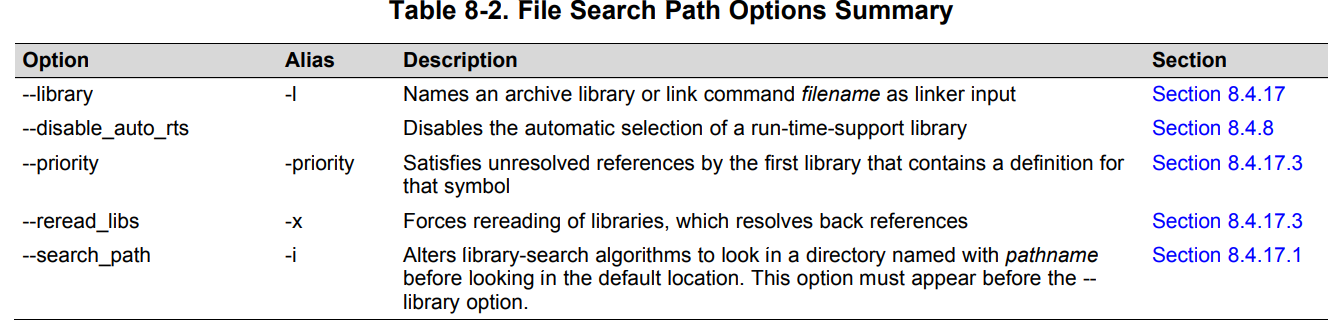
    you need to supply the search path after "-i". Due to which the hex2000 utility couldn't find the HF415U111.out.

    Thanks,

    Katta

  • 1) why the old CCS v3.3 use "xxx.hcf" but the new complier use "xxx.cmd"

    Please check in "Code Composer Studio™ forum"  --------can you give me the link address? thank you!

    2) just use"hex2000 hexutil.cmd" the complier can find the hex2000 oneself? 

    You need to give a complete path for hex2000.exe. Or else you can add hex2000.exe path in "path" environment variable. Please check for "How to update path environment variable"------------you are right, when i give a complete path ,the hex2000 is work ,this help a lot!! but where is "path environment variable"?

    3) I create a file"HF415U111.cmd", the contest is below, but the compiler output error

    As per TMS320C28x Assembly Language Tools v18.12.0.LTS User's Guide

    you need to supply the search path after "-i". Due to which the hex2000 utility couldn't find the HF415U111.out.----------------i don't understand , as i use a xxx.cmd to config the hex2000 how to work ,now i use a xxxx.hcf, it also can work. but the xxxx.hcf must in Debug path.otherwise the complier can not find the hcf file,  why?

  • 1. Code Composer Studio™ forum https://e2e.ti.com/support/tools/ccs/f/81

    2. As I mentioned, search for "How to update path environment variable" in Windows forums. It is nothing to do with hex2000 utility. You can add the path to path environment variable.

    3. When you run any command in the command prompt, the path should be relative to the current directory. It is better to give a complete path or relative to your current directory.

    Thanks, Katta